The second one does the load balance trough the source address, but I don’t want use the source address (I explain later).
With the first one the load balance can be done trough the source address, source port (is the one I’m interested in), destination address and destination port, but it doesn’t work. I think that it doesn’t work because all traffic comes from one host. This host is a proxy server and I want to balance this load with the mikrotik. When I look the connections in the firewall I see that all of them are from the ip of the server, not from the client connected to the server (this is normal, because it is a proxy).
What I want to do is to balance the server’s traffic trough the source port (the port of NAT proxy) without using source address.
If someone knows how to do the load balance of one host using another method that not use the source port, I also accept it.
The mikrotik is a RB450G and the firmware version is the 4th.
Use the PCC example from the wiki you posted and use ‘src-port’ as the classifier. That should work. If it doesn’t post your configuration here, including all the mangle rules, the routes you installed, the IP addresses of all involved machines and a network topology picture.
It is possible your proxy is always using the same source port, though. Given that you want to balance outbound traffic I would think ‘dst-address-and-port’ or ‘both-addresses-and-ports’ would be the best classifier to choose to spread load as evenly as possible.
Well, I think that with src-port should work too, but it don’t work.
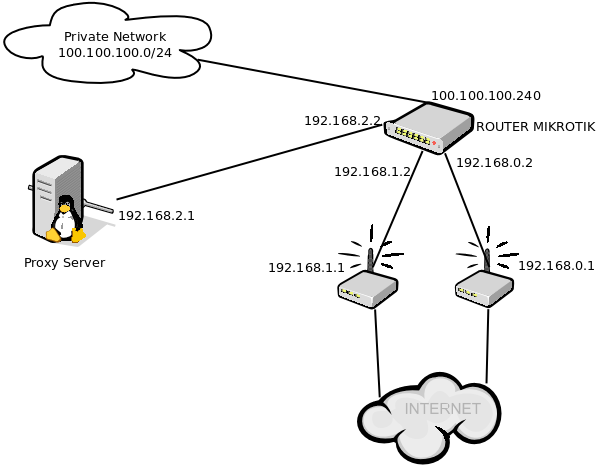
I paste the network topology
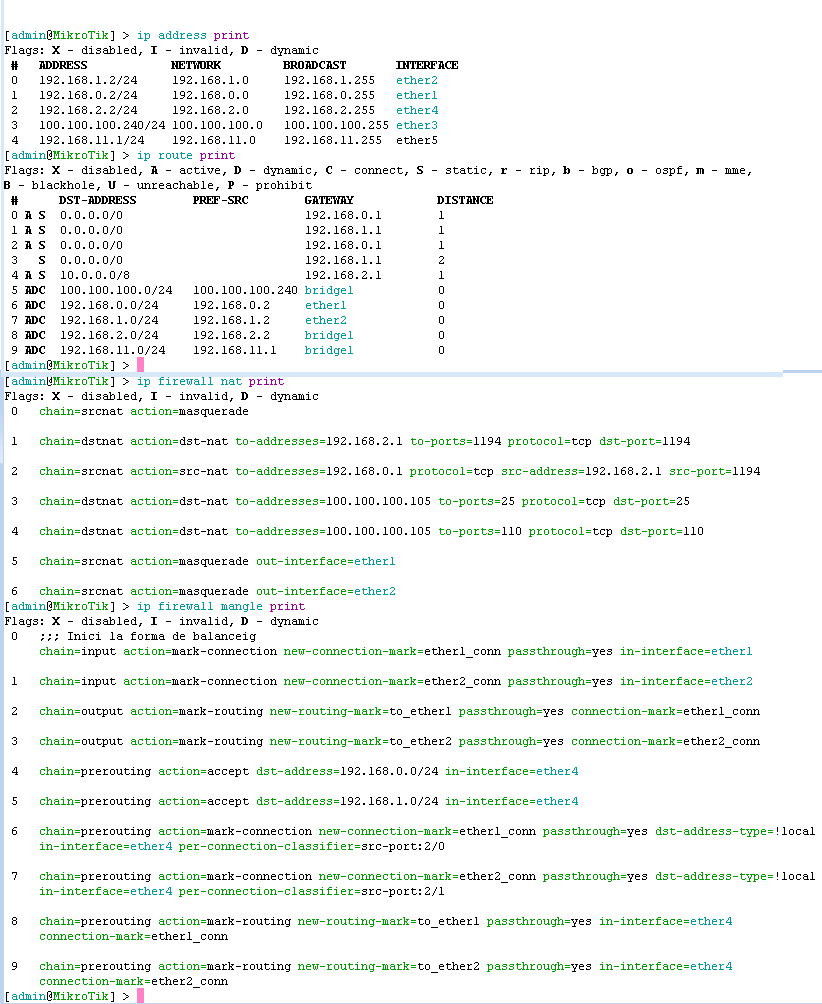
The configuration is the follow. Another question is why the default route to 192.168.1.1 with distance 2 is not active? I have try to change distance to 1, but isn’t active yet, and this is that says the example.
At the configuration you will see another things as a private net 100.100.100.0 and routes to 10.0.0.0 that they are the clients of the proxy.
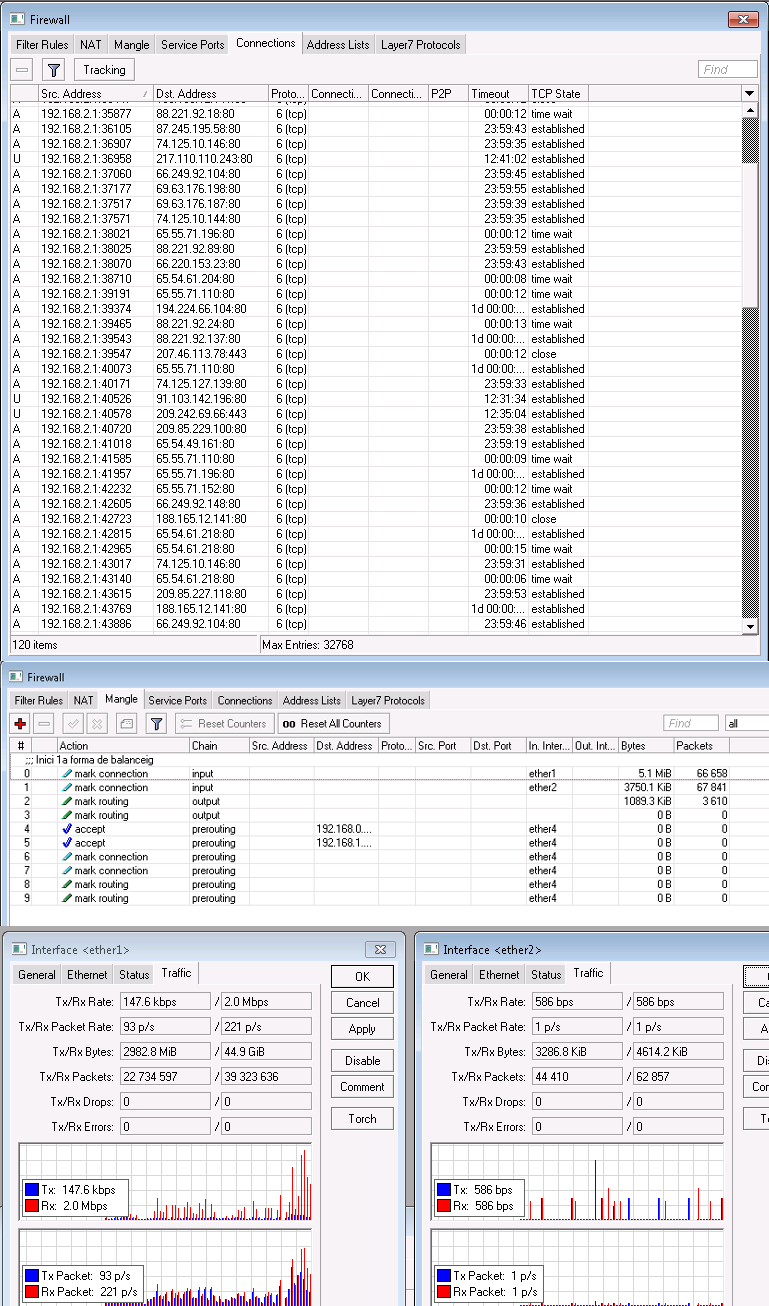
Finally, a paste the firewall connections (1st). I see that the source port is different for each connection.
If a look the mangle rules (2nd) I see that only Input and Output registers traffic.
And if I look the traffic interfaces (3d) I see that the “ether2” doesn’t catch traffic.
Well, is this correct?
Remove rule 0 in your NAT table (chain=srcnat action=masquerade, and no further qualifiers).
What is the purpose of bridge1? Ether4 appears to be part of the bridge according to the routing table, that is screwing things up. I don’t see the other network (192.168.11.0/24) that is on the bridge in your network diagram. Can you remove ether4 from the bridge temporarily? That should make it work. If so, you will have to change the interface referred to in the mangle rules in prerouting, or ditch the bridge for good.
The source port does appear to be random, and will work better than both-ports-and-addresses for HTTPS, so src-port does seem like a good choice for the classifier.
Lastly, just as a sidenote, 100.100.100.0/24 is NOT private IP space and shouldn’t be used as such. Just because it’s reserved doesn’t mean it’s yours to use - reserved explicitly means “do not use, anywhere”.
I have removed the rule 0 and the bridge, and it works.
The bridge was because the network 100.100.100.0/24 could access to the server. I don’t know what happened but this network couldn’t access to the server and for this reason I configured the mangle. In order the network could access to the server I configured a masquerade rule at the interface ether4. I think that it is correct, isn’t it? I won’t be able to check if it works in 2 weeks.
Referred to the use of the network 100.100.100.0/24 is a thing that when I arrived to the infrastructure it was already done
If there is no problem and it works correctly, it is solved. Thank you very much!