I have iperf container on my MikroTik, i want to make it as iperf server, How do I configure it so I can test the iperf server for example iperf -c 192.168.88.1
The easy way is to use a container set up that way from the start, such as mine, which is built for all of the platforms RouterOS supports the “container” package on, with the RouterOS container engine’s limitations specifically in mind.
If you don’t like that option, then you may at least learn something from the Dockerfile it was built from. The last few lines are the direct answer to your question.
got error 404 when pull docker image

You’re either running into an error that was fixed in RouterOS way back in March — implying that you didn’t try upgrading RouterOS before complaining — or you haven’t set up the container package as documented, including setting the remote registry URL.
I’ve followed the tutorial you suggested, but I tried to ping the container but it doesn’t work
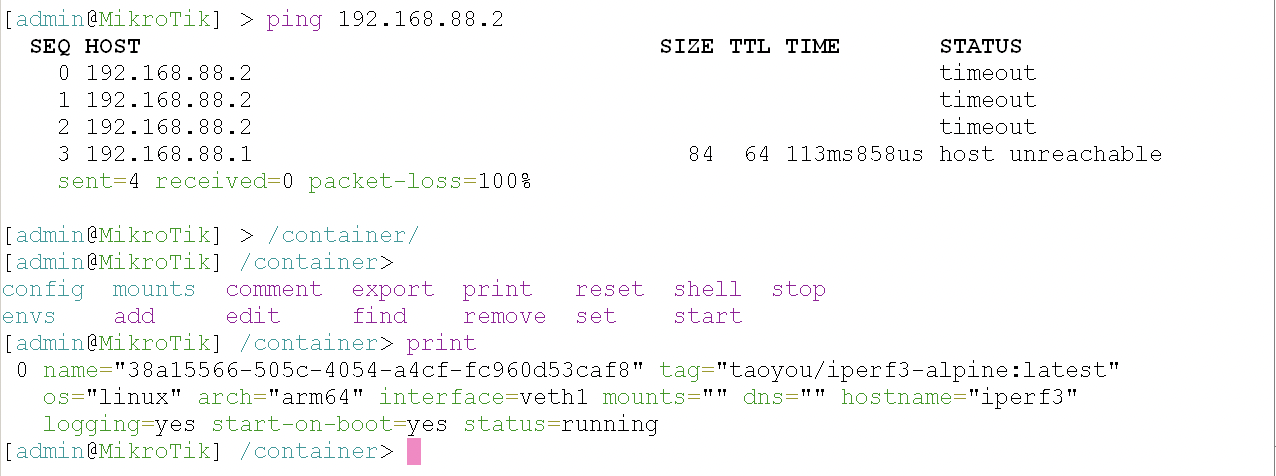
Apparently not, since your screenshot shows you’re back to using the risky and flabby taoyou container, not the superior one I linked you to above.
(Yes, I’m biased in that judgement, but I’m also correct.  )
)
I tried to ping the container but it doesn’t work
Success will depend on how you have your container’s virtual Ethernet networking set up, plus details like associated firewall rules. Since you haven’t shown any of that, and I’m tired of the “20 questions” game, there’s nothing more to do here until you paste your configuration into a “code” block for us to examine. (Point B specifically.)
I can assure you, my container does ping on the veth IP when bridged to the LAN as shown at the top of my container’s documentation.