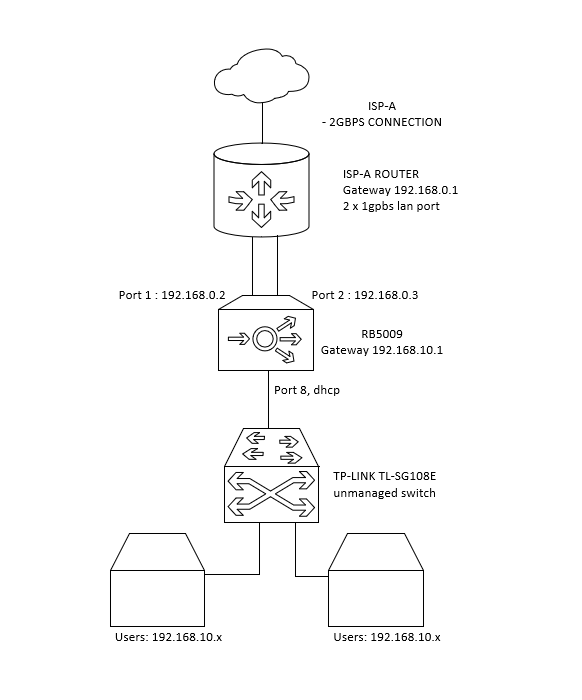
Hi all, i’ve been searching this forum and the internet and still cannot find solution regarding my problem.
I have subscribe a 2gbps internet from my ISP. Even though it is advertised as a 2gbps connection, the router supplied by the ISP only has gigabit only for my usage.
I have a RB5009, how can i do PCC Load Balancing as following diagram?
i have unsuccessfully try to config according to the diagram. ill share the export as follow : mkttest1.txt (2.34 KB)
Does my plan realistically can be done in RouterOS or just cant?
i hope that my problem can be solved, thanks in advance.
Does the ISP modem support this setup?
Can the RB5009 replace the current modem?
Isn’t the TP-Link switch a bottleneck as well? The connection between the TP-Link and the RB is Gigabit, or are there any other devices connected to the RB?
In my experience (nearly) everything can be done with MikroTik. But there is more hardware involved.
To be accurate the RB5009 has one 2.5 gig port, so
a. it could be used to get receive the 2GB throughput, if the ISP actually provided a useful modem/router, but the rest of the ports on the 5009 are 1gig so any user would only be able to achieve 1gig of speed for any session.
b. Even if you could get 1 gig coming in on WAN1 from the ISP router and 1 gig coming into WAN2 from the ISP router, one is still stuck even on an outgoing 2.5 gig port to a switch, for example, that a single session would still be limited to that one gig connection through one of the ISP connections.
edit removed: forget about 1 sfp+ port, thanks lurker.
You do know that the rb5009 does indeed have an sfp+ port, right? In fact I think that this is probably the best device to receive a “multi-gig” internet connection. It’s usually delivered on a copper 2.5GbE, and you can fan out either using the 1G ports on the device, or go on with a switch using the sfp+.
… and you can already stop there.
TP-Link SG108E only has 1G ports.
Guess what speed that 2.5Gb port will negotiate when connected to that switch?
PS there is also an SFP+ port on RB5009. Can go up to 10Gb if you want.
But again … if there is only switch behind using 1Gb ports, what’s the point ? That will be the bottleneck.
Yep, but we can go step by step. there is always time to replace the current TP-Link with a faster switch.
At the moment the questions are more or less (as I see the matter):
Can I connect two (LAN) 1Gb ports on the ISP router to two (1Gb) ports of the RB5009 and get more speed than a single connection?
And if I can, will I have 2 Gb on the RB5009 (that I can later distribute via several 1 Gb ports, or to a fast switch via the 2.5 Gb port or via the SFP port)?
If OP replaces the current TP-Link switch with a 2.5G one, he can:
Plug the switch to ether1
Plug ether2 and ether3 to the modem, configure them as two separate WAN interfaces with ECMP routes.
Change IPv4 Multipath Hash Policy under IP → Settings to L4.
Assuming that his PCs also have 2.5G network adapters or faster, he should be able to take advantage of the 2Gbps WAN whenever he does something that makes multiple concurrent connections. That includes running speedtest.net tests, or download anything with download managers, or download two things at the same time.
He won’t even have problems with services like online banking websites that usually don’t like multi-wan setups, because to those services he still has only one public IPv4 address.
Thanks lurker, I missed that as I only looked at the top of the info and didnt scroll further down. I really need to get a 32 inch iphone…
In that case the onus is on the ISP to provide an ISP device fully capable of dispensing 2.5 gig on one pipe (one wanIP)
Yes, it makes ECMP behave somewhat like the PCC mode “both-addresses-and-ports”. The default setting L3 is equivalent to the PCC “both-addresses” mode.
In our example with the two WANs and two resulting ECMP routes, the hash value (that decides whether a connection will be routed through the 1st or the 2nd ECMP route) will be calculated from the source port, source address, destination port and destination address of the outgoing connection. Which means if you use one computer (that = only 1 source IP address) and make 3 connections to the same download server (one destination IP), port 443 (one destination port) then you still get the chance of having different calculated hash values, because the connections have different source ports (ports on your PC). Those hashes might distribute the connections over the multiple WANs.
If you keep the default setting L3, then only the source address and destination address are used to calculate the hashes. Which means if you only use one PC connecting to only one server, then even with download manager making multiple connections, those connections will all have the same calculated hash value, and only one WAN route will be used.
hi @CGGXANNX, thank you for the reply.
Let say that i replace TP link switch with UBNT Pro Max 24 switch. and the connection between RB and UBNT is using 10g sfp. i several pc that have a 2.5g network card and connected to the UBNT 2.5g ports.
Do i just follow as your suggestion or is there any additional setting need to be done?
If you replace ether1 from my previous post with sfp-sfplus1 then it’s even better. The configuration on the RB5009 (dual WAN with ECMP + L4 hash mode) is still as I described. It only depends on the modem, whether it can provide two connected clients with full 1Gbps/port. If you have two PCs, maybe you can plug them both to the modem and run speed tests simultaneously. If both PCs achieve 9xx Mbps at the same time, then the setup that I described would work.