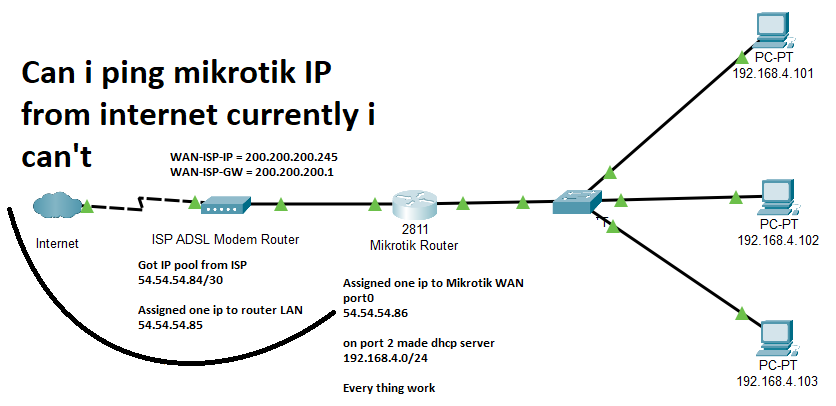
Hello
I have the following setup
I am total newbie therefore avoid CLI command, and if necessary then you have to explain it, i use WINBOX
I can ping ISP Router IP 54.54.54.85 fine from public and local network, but i am unable to ping Mikrotik Router WAN IP 54.54.54.86 from public network
Is it possible to ping Miktotik router from public? If yes! How to configure my routers?
is it possible to ping Miktotik router from public? If yes! How to configure my routers?
yes. it is possible - but it is easier for you to get help from your isp directly. because forum members don’t have any idea/privilege on your isp router.
ISP will provide 0 help, I have asked them how to configure IP POOL they said your headache,
Ok i will come to the point, can i create IPIP Tunnel using Mikrotik router with above configuration or there is a need to involve ISP for that. if i had to involve ISP then i had to forget that I ever wanted to create an IPIP Tunnel.
Concur, if you have an ISP router in front of yours, YOU ARE SOL to get anything past the router in terms of tradiitional stuff, ping, wireguard etc. if they are unwilling to forward anything.
Depending on your router though, zerotier can be used to access your LANs and bypass their stupidity.
The other option is to have a friend with an MT router, or rent a VPS server in the cloud (run your own virtual MT) and then connect from your router outbound which the ISP will not be able to stop, and then you will have two way comms!.
The question to ask your ISP is if they can put their modem into bridge mode. Some will and some will not. If the ISP will put their device into bridge mode, that means your router will be truly public IP facing, so it gets (or you assign) the public IP addresses.
For what it’s worth, I have two internet services at home. One is Spectrum cable, and the other is Frontier fiber. In both cases, when the service was installed, I asked for their modem (ONT for the fiber) to be put into bridge mode. Both were happy to do so. In my case it’s easy - no PPPOE or anything else fancy on either service - just enable a DHCP client on my router for each service. In the case of the cable modem, it will respond on the LAN port to an IP, so I can see status. I’ve never attempted to access the fiber ONT.
You don’t tell us how you configured the routing on the Mikrotik. What did you set as default gateway? That should be 54.54.54.85. I assume that your ADSL router is configured with an
54.54.54.85/30 address on its “internal” interface. I had a similar configuration from an ISP in the past (on non Mikrotik HW). You need to check routing on both routers. I used multiple addresses from my pool internally so I had to route the whole (/29 in my case) from the ADSL router to the address of the internal router. In your case that should not be necessary