How to prevent all traffic from going through PPTP VPN?

Hi Everyone,

I’ve set-up a PPTP VPN on my RB450G, and use it to connect to it from my laptop.

How can I prevent all of the Internet traffic to go through the VPN connection, and only use it for a single subnet to access my Shared Folder?

It’s making my Internet way too slow if I send all of the traffic through VPN… :frowning:

Please advise.

Thanks in advance!

That depends on what client you are using for the VPN tunnel. What you are looking for is called split tunneling, look it up on google and it should tell you have to do it depending on your client. You are also going to have to put in static routes into your PC (I’m assuming that is your PPTP client) so it knows how to reach the private subnets on the router. You should be able to do this as part of the PPTP tunnel negotiation.

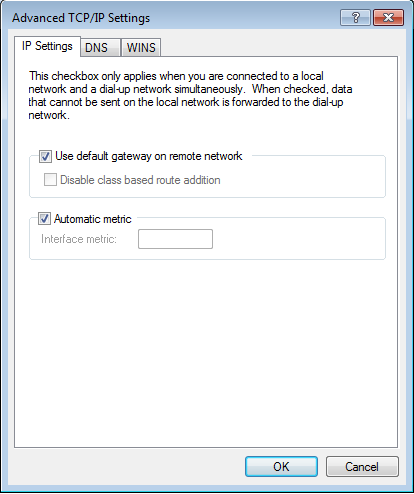
If you are using Windows VPN client, untick use default gateway on remote network.
default_gateway_on_remote_network.png

Hello. Thanks for help!

I’m using Windows 7 as VPN clients for PPTP on my RB450G server.

I’ve tried un-checking the “use default gateway on remote network”, and now my Internet traffic doesn’t go through VPN - which is good.

However, now there’s no route to the remote network on my Win 7 pc. I can ping the “VPN network”, but not the remote office network.

Adding route on each Win7 pc is not an option. Is it possible to achieve through Mikrotik?

Thank You

Your Windows machine itself needs to know how to get to your remote subnet. Without that route, it will not work. That is because without a specific route for that subnet, Windows will just use the default route it has. There is nothing the MikroTik can do about that.

As part of the PPTP tunnel being established you should be able to pass a route to the Windows machine so it knows how to get there.
http://wiki.mikrotik.com/wiki/Manual:PPP_AAA#User_Database

How about option 121 (Classless Static Route) in the DHCP Server? Take a look at this example in the user manual.

http://wiki.mikrotik.com/wiki/Manual:IP/DHCP_Server#Configuration_Examples