is there a way to recover password from device ?
thanks dear ,
is there any alternate?
because device is on top of tower which is 65 mtr from ground.
its remote location i can access that RB 433 but not open unless password,
or somewhat else feature like flashfig which configure remote device?
hi normis,
is there any possibility o resolve this ?
Maybe this will help you:
http://mikrotikpasswordrecovery.com/
HTH,
dear,
this will only work when you have admin password
otherwise its showing “blank”
i recently joint the team and who know all the admin password had left
It worked for me perfectly, passwords were recovered from backup file.
Maybe you did something wrong or maybe passwords are blank?
Regards,
dear try to creat new user with write access, open winbox and used new user login
then try to create backup & download backupfile
let me know what it shows ?
As mentioned in manual (http://wiki.mikrotik.com/wiki/Manual:Router_AAA#Sensitive_information),
to create and download backup files you need user with ‘sensitive’ policy turned on.
HTH,
now let me what is the alternate to get password for user called = admin ( full aceess )
or way to recover password
thanks in advance
Run Winbox (log-in as user with ‘sensitive’ policy), go to ‘Files’, create and download to local computer newly created backup file.
Next upload backup file to http://mikrotikpasswordrecovery.com/ and click ‘Show Passwords’ button.
HTH,
thanks dear for your support,
how can i change sensitive policy with write access group user login ?
it just give me error " not permitted (9)"
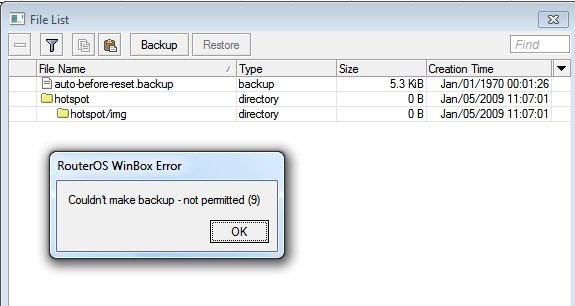
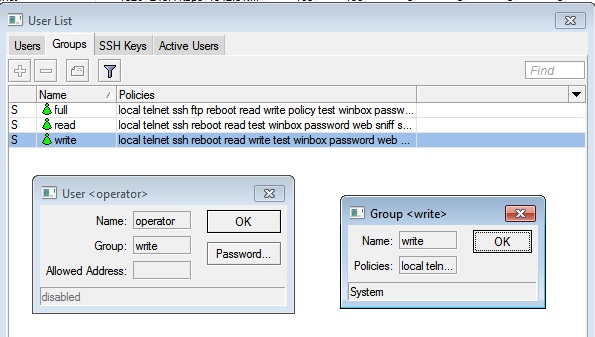
you neeed POLICY permission to change group/user settings.
dear, please go through full post,
- i dont have full access
- i cant change any policy setting
- person who have full access left
noe please help to recover password of setup a new password,
also note that the device is in working condition i can open it in winbox through IP
is it possible to install RSC file remotly by netinstall or flashfig or any other tool ?
if you don’t have full access, you can’t do it. that is the purpose of the password, otherwise it would be a security hole. you can stop looking, there are no security holes. you must reinstall.
is it possible to reinstall remotly ( not in same network ) by netinstall
MY PC–Switch–Router ---- Router–Switch–RB
please guide
MY PC–Switch–Router ---- > Router> --Switch–RB
Two questions:
Is this router marked on your diagram as bold also MikroTik device and you have full access to it?
Is anybody on remote network able to reset RB to factory default using reset button?
Or maybe you are able to reset RB to default config from Winbox?
I don’t know which user policy is needed to do ‘Reset configuration’, Normis probably knows this.
If both answers are ‘yes’, reset RB to factory default, next login to Router and from it, login to RB using MAC-Telnet (user: admin, no pass).
Your config will be lost but you gain access to RB and you will be able to reconfigure it.
HTH,
Hello, how can you reset the admin password when RouterOS is a CHR vmdk image and not a phisical device with reset button? Obviously I have full access even to console.
Thanks in advance.
it has been forever since I logged into my box and I can not seem to get the right password
is their a way IF I find my backup config to find the password from that file ?
my other choice is to restore an old OS backup from this PC before we changed hardware / reinstalled as its user profile must have stored the password on that Ubuntu install