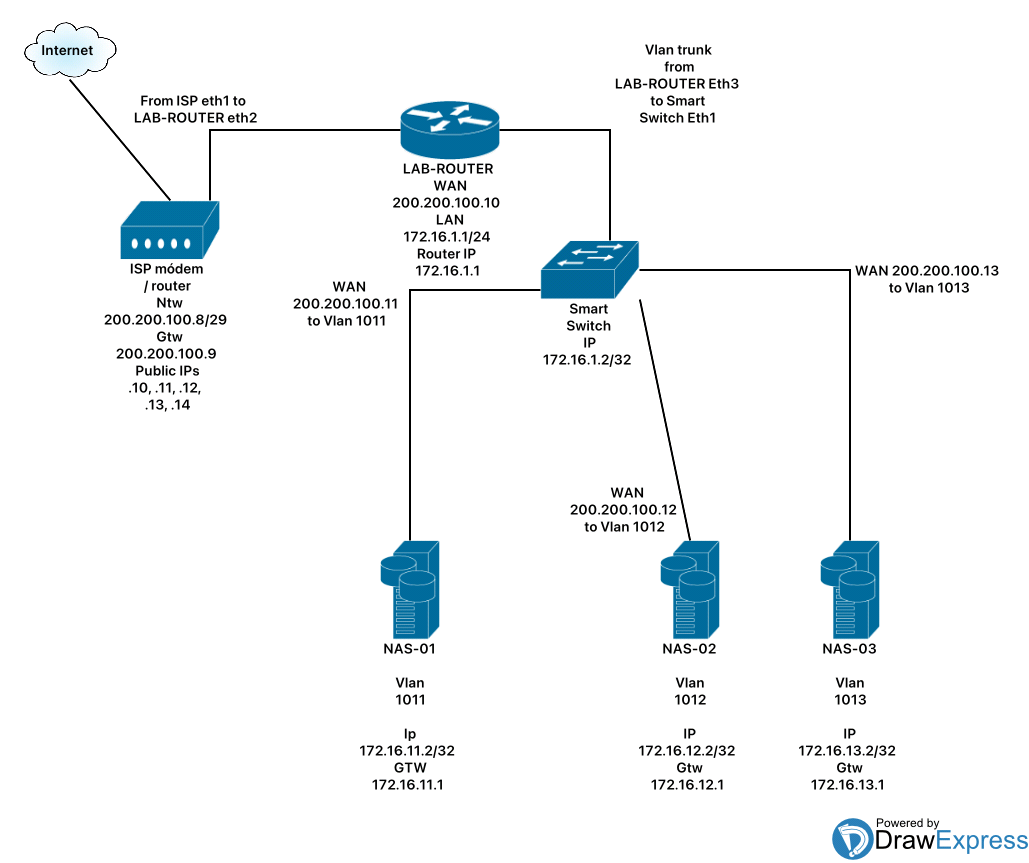
I got a RB5009 and have 3 olds Synology NASes and got a /29 public IPs segment. So I would like to setup a small lab whit the RB5009 to assign to each Synology a public IP maintaining each NAS totally independent / separated from each other, accesible from internet by its own public IP (ports 80/443) and also locally by router for management. This router also will have its own WAN ip.
I would like to receive feedback of my plan so I have done this drawing of what I think should be the network setup. I have little knowledge and also searching help whit router configuration. Any comments and help appreciated.
I plan to use router Eth2 as WAN to receive the cable from the ISP modem because I would like to keep router SPF+ for the switch and the router 2.5G Eth1 port for anything on the future. The ISP bandwidth is only 50 Mb and I plan not got more (is too $$$ and it is only for a lab)
On each Synology NiC I can set the Vlan # to tag it.
I have to ask "Why are you doing this?". You are quite clear on what you are doing and it is probably workable. What sticks out to me is that you have the NAS's on separate vLANs but all accessible from the public internet, which rather defeats the separation of the vLANs.
You've done your homework. I assume you will want to nat between the public and the private addresses. Nothing wrong with that.
Another way would be to assign the public addresses directly to the NASes and route them directly. Which you prefer should be based on your undisclosed (but surely diabolical) future plans.
@ductview The vLANs separation is to avoid NASes access from locals except if there are rules to allow this. For example if I have guest vLAN I don't want to access this or that NAS or all of them
@lurker888 The goal is to configure router firewall with rules to restrict as much as possible external access to NASes port 80/443 and deny anything else.
Well as second thought "maybe" (I'm noob on this matters) I only need NAT 1:1 src-nat / dst-nat for each NAS plus strict firewall using one of the NAS Nic for external access and use the second NAS Nic (each Synology does have 2 Nics) for local access.
As the NAS units have 2 ethernet sockets, it makes sense to use one for external access with a public IP address and the other for internal access with an IP address on your network.
As for the Guest network, if this is the only reason to separate your NAS's, my own inclination would be to look at the problem the other way around and create the guest network on a single vLAN and then Firewall it to only have access to the internet
And, unless you can articulate a reason to segregate the NAS's from each other, there is no benefit and an admin burden to putting them on separate vLANs. A single vLAN would be adequate for them all.
Hi, tks for your comments. Because I would like to have each NAS whit it's own 80/443 access and I have /29 from ISP if I put all of them on a single vLAN sharing ip local segment and public IP I will not (as far as I understand) able to use ports 80/443 independently on each NAS. That's why I look for total NAS segregation from the internet. I'm still trying to understand networks... and at same time to make things simple as possible.
There is a terminology issue right there. You are giving the NAS's public IP addresses, so you are not totally segregating them from the internet ???
I have never needed to put servers on the public internet across a NAT barrier, so you are ahead of me there, but AFAICS there is no constraint that requires separate vLANs for separate public addresses.
Perhaps you should clarify how these NAS's are to be accessed from outside? Are you intending to create a http[s] site with a single URL, spread across the 3 NAS's? Or is this for 3 separate sites? Whatever the answer, my thought on this is that the 3 NAS's will naturally take 3 public addresses without vLANs and if you want to integrate a website under a single URL, you would be looking at doing that with you http[s] server set up. But I could be wrong about that last.
My mistake to explain... I mean totally segregate each NAS from another from the internet. So for example NAS1 accesible through internet port 80/443 cannot see nothing else on the router. And if I'm understanding you correctly seems that to do this vLAN are not necessary; instead each NAS whit is own subnet + public IP and src-nat / dst-nat + pertinent firewall rules. Hope I have clarify this.
If you put all of the NAS's on the same subnet, what threat do they pose to each other? Perhaps if we understood that, it would be clearer what you should do. For myself, I would put them all on 1 vLAN with 1 IP subnet, so they could be managed as a group and firewalled together and I would only use separate vLANs if I could articulate a threat from putting them together.
If all NASes are in 1 vLAN q/1 IP subnet how can I forward to each NAS port 80/443? Ex. NAS-1 same IP subnet and forwarding port 80/443 for internet service; NAS-2 same IP subnet and forwarding port 80/443; NAS-3 same IP subnet and forwarding port 80/443.
The main benefit of separating the NAS devices into different Layer 2 networks (VLANs) is protection against Layer 2 attacks, such as ARP spoofing.
When it comes to restricting access to services like the DSM management ports, you have two options: either use separate VLANs and manage the firewall rules centrally on the router, or keep all NAS devices in the same VLAN and configure the host firewall on each NAS individually.
Also your current network diagram does not make sense to me and in my opinion will won't work.
Let's assume you place all NAS devices in a single VLAN (Layer 2 network). You could also use separate vlans with all options.
There are two options (1 and 2) for making ports 80 and 443 on your NAS devices directly accessible from the internet. Option 3 is, in my opinion, the more modern and flexible approach to handling HTTP traffic.
Option 1: NAT
Assign the public IP addresses intended for the NAS devices to the WAN interface of your router.
Configure port forwarding (DNAT) or 1:1 NAT to map each public IP address to the corresponding internal NAS IP address.
Configure the appropriate firewall rules to allow the required inbound traffic.
Option 2: Assign public IP addresses directly to the NAS devices
Assign each NAS its own public IP address directly on one of its network interfaces.
Configure 200.200.100.10 as the default gateway on each NAS.
Assign 200.200.100.10/29 to the corresponding VLAN interface on your router.
Configure the WAN interface with a /32 address, using 200.200.100.10/32, assuming the ISP gateway 200.200.100.9 is reachable via that interface.
Add a static default route (0.0.0.0/0) pointing to 200.200.100.9.
Enable Proxy ARP on the WAN interface (arp=proxy-arp) or create static ARP entries with published=yes for the three public NAS IP addresses.
Exclude the public subnet 200.200.100.8/29 from source NAT (masquerading).
Configure the firewall to allow only the required inbound traffic, such as TCP ports 80 and 443
Option 3: Use a http revere proxy / WAF
If you only need HTTP and HTTPS, then in my opinion, this is the best and most secure solution.
Set up an HTTP reverse proxy on your RB5009 using a container (/container or /app).
Most revere proxy will generate you automatecly a certifate if you setup your public dns corretly.
Also. I'm not sure what exactly you're trying to access on your Synology NAS devices over ports 80 and 443, but both ports are already used by DSM's built-in Nginx web server. If you want to host web applications on those ports, you'll need to use a reverse proxy anyway, either the one built into DSM or a separate one.
Hi, tks for the hints. After read the comments received at this moment to me the best options are 1 or 2 described by you; I'll have to think which one would be better..
Regarding ports 80/443 for each NAS I plan to setup a NPM on each NAS using mcvlan to avoid Synology DSM conflict because Synology DSM use internally ports 80/443. The NPM reverse proxy on each NAS will manage containers installed on each NAS.
I simply find it cleaner to give the public addresses directly to the devices. The downside is that this needs /32 support on the devices (and also on the router end, but RouterOS supports this perfectly.)
But as long as you're doing stateful firewalling already, connection tracking will be enabled, so NAT doesn't add any sort of new load...
Option 4 would be : have WIREGUARD running on the router and only have these older NAS'ses accessible behind a VPN.
Especially with old NAS'ses, not getting any security updates anymore..."just" making them accessible globally is not smart, unless you want to perform remote management from a certain (set of) public IP's for which you can make a filter on the RB5009
Tnks @lurker888@jvanhambelgium@Buckeye for hints. At this moment I plan leave ports 80/443 open but restricted to my country and for everything else Wireguard VPN. I tried before WG and like it; is fast and already included on router. Still want to try how will behave NPM as container on the RB5009 using a Samsung T3 SSD USB; regarding use containers on MK, I read bad comments from users but maybe now whit RouterOS 7.25 things are working better...