Hello, maybe someone can help me..
I try to find my failure since the last 3 days :-/
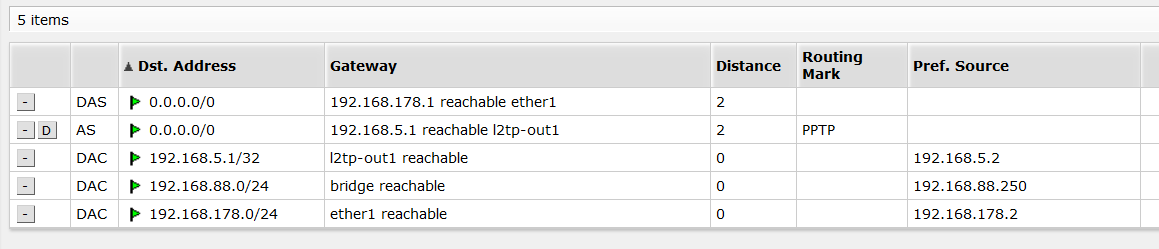
My client-network is 192.168.88.0/24, router-ip 192.168.88.250.
The l2tp-client is already working (client-ip 192.168.5.2).
i added srcnat, out-interface l2tp-out1 with “to-address” 192.168.5.2
and a routing-mark for one client (192.168.88.123).
FInally i added this route: Dst: 0.0.0.0/0, Gateway 192.168.5.1 (reachable via l2tp-out1) for this routing-mark.
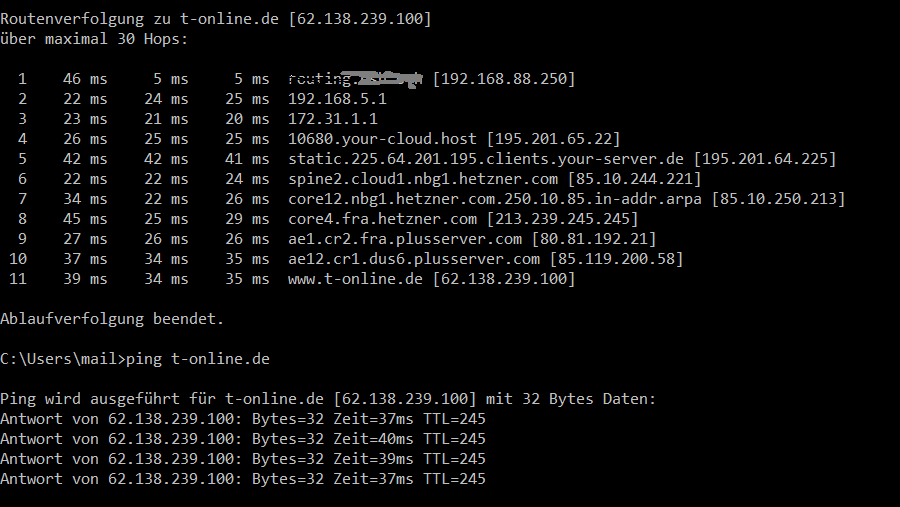
If i do a tracert from 192.168.88.123 i.e. to 8.8.8.8 or google.de it is working and the gateway 192.168.5.1 is used - but it’s not possible to open a website in browser..
If i do a tracert from 192.168.88.123 i.e. to 8.8.8.8 or google.de it is working and the gateway 192.168.5.1 is used - but it’s not possible to open a website in browser..
did you add routing for 192.168.5.0/24 to go out from l2tp-out1 ?
if your trace route is working then the routing should be fine. Sounds like an DNS issue.
you can enable log on the mangle rule and maybe using firewall filter to watch traffic going out l2tp-out1 interface, especially to port 53
I’d suggest try to set 8.8.8.8 or 1.1.1.1 as DHCP server for your 192.168.88.0/24 clients, instead of 192.168.88.1. see if makes any difference.
you do this in IP - DHCP server - Network, I think.