Hi,
I have 2 Huawei ME909s-120 and I tried both with a RB411U and a RB912UAG but the modem is not recognized in /ports or /usb. It works with the Huawei ME909u-521 works without any problem.
ROS version is 6.28 or greater.
Any solution?
Thanks
Diego
I have the same problem on RB912 ROS version 6.35.1
The lte interface is recognized, but don’t see any USB port.
If I activate the log “async” I see that I have no reponse on command AT+CPIN?
15:28:16 lte,async lte1: sent AT+CFUN=1
15:28:16 lte,async lte1: rcvd OK
15:28:16 lte,async lte1: sent AT+CPIN?
15:28:26 lte,async lte1: no response
15:28:26 lte,async lte1: sent AT+CFUN=0
15:28:26 lte,async lte1: rcvd OK
15:28:30 lte,async lte1: sent AT+CFUN=1
15:28:30 lte,async lte1: rcvd OK
15:28:30 lte,async lte1: sent AT+CPIN?
15:28:40 lte,async lte1: no response
15:28:40 lte,async lte1: sent AT+CFUN=0
15:28:41 lte,async lte1: rcvd OK
And /interface lte info
         pin-status:
      functionality:
       manufacturer: Huawei Technologies Co., Ltd.
              model: ME909s-120
           revision: 11.617.01.00.00
               imei: xxxxxxxxxxxxxxxxxxxxxx
               imsi: xxxxxxxxxxxxxxxxxxxxxx
  subscriber-number: +CNUM: "My Number","xxxxxxxxxx",129
The board work perfectly with me909u.
Any ideas?
I just configured a 912UAG-2HPnD (Basebox 2) running RouterOS 6.35.1 with a me909s-120 (Firmware Revision 11.613.03.00.00) and its working.
At first I didn’t get an entry in Interface->LTE, but after switching the USB Mode as described here I could configure an APN (Interface->LTE->APN), added a dhcp-client for the lte interface and was online. After installing ROS 6.35.1 I also upgraded the Routerboard firmware (System->Routerboard->Upgrade) - don’t know if that helped.
Hi,
i have the same Problem.
Did you fixed ist ?
BR
Finally got it working (without lte interface reset looping)
and without making usb power-reset on each boot
For me the working config is:
ME909s-120
fw:11.617.01.00.00
usb mode miniPCI
ROS 6.36rc13 - here just works)
ROS 6.35.1(lte not working at all,ignoring direct-ip can make ppp work)
ROS 6.35.2(thought here it is working ONCE power resetting modem for 5 secs right after boot. if lte interface goes down or signal level falls critically it hags in configuration stage and you have to reboot then power reset for at least 5 secs)
After a few weeks of operation, I had one of the Huawei 909s-120 go down and not reliably come up again. First updated the Huawei LTE-Card firmware - no satisfactory result. The upgraded RouterOS to 6.38rc28. Now the LTE-Interface comes up reliably, but stops working after a few megabytes traffic (~50MB), just as reported in this thread here
RB912UAG with LTE Card Huawei ME909s-120 stop working after 50MB Traffic
I have also Huawei ME909s-120 and NetMetal 5
So it didnt work, also with latests software.
I test it on 6.36r and 6.37rc5
I see only lte1 interface witch not connected.
Afrer restart lte1 interface became invisible, need repower board.
@buzzdee and @ergeyklenov
Please try final 6.36 add dhcp-client to lte1 interface
in terminal add
/sy log add topics=lte
and send supout.rif
Locally we have 2 diffrent ME909s cards and we cannot replicate issue,
Hi, sorry i didn’t manage to make supout.rif, attaching screenshot with list of resources,
me909s-120 (11.617.01.00.00) perfectly works under win10, 912UAG-2PhD does not recognize it as lte interface but seems can see it as usb device 
router os is 6.36, firmware is 3.24
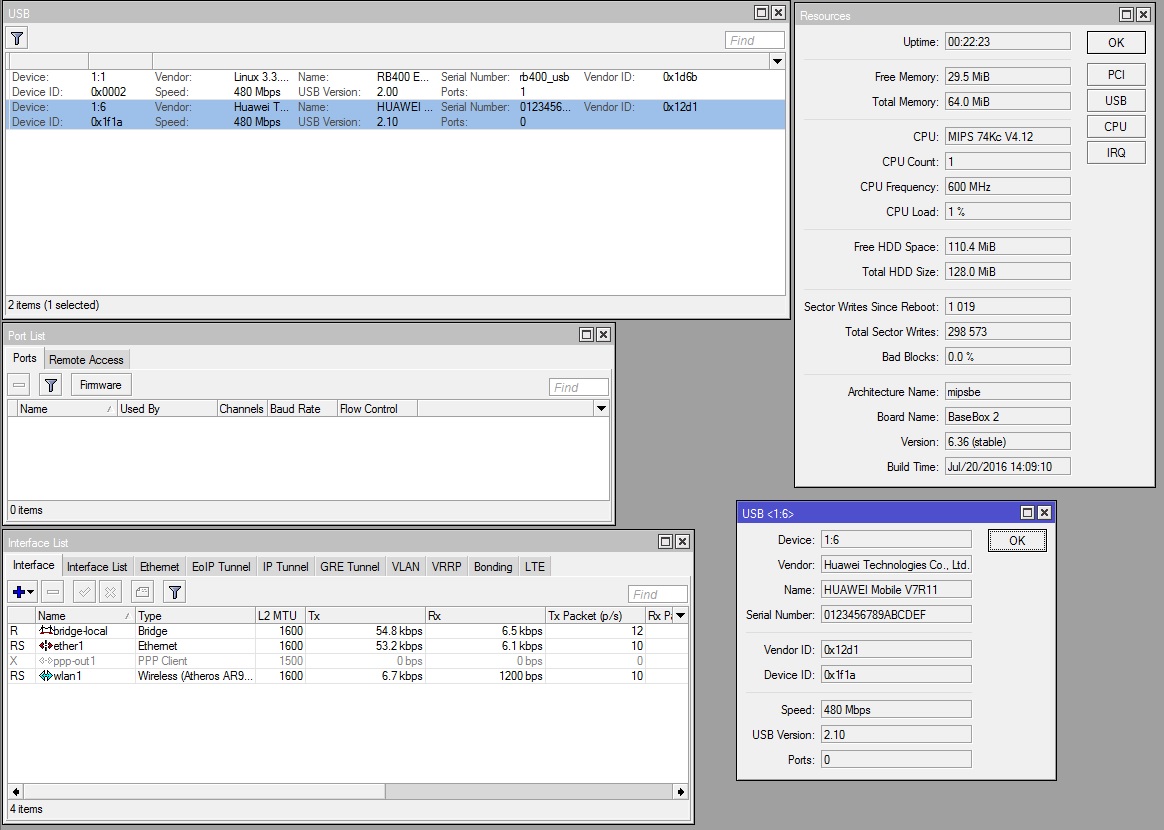
still not working on 6.37rc32 see it in usb resource but nothing in ports, can provide remote access if required for the solution, thanks!
lte module firmware is 11.617.01.00.00, mb your two test modules are running one of previous versions ?
I have a similar problem with the ME909s-120 on my RB912Gs - it hangs after a short period of high throughput. The lte1 interface stays up, but I don’t get any more input packets. A usb power-reset fixes the problem. The issue is more pronounced when I’m using WLAN, leading me to believe that there’s some sort of power consumption issue. I can usually transfer huge amounts of data through the ethernet port, but WLAN locks the LTE interface up relatively quickly and reliably.
What version firmware your module’s ME909s-120?
on my the ME909s-120 FW 11.617.01.00.00 interface lte1 does not even appear.
Same issue with HUAWEI ME909s-120 11.617.01.00.00 and RB922UAGS-5HPacD, RB953GW-5Hnt-RP boards, LTE modem not recognized (direct-ip).
I think it is time to get a fix for that, since a long time this is an open case.
Same. ME909s-120 on 11.617.01.00.00. Routerboard RB912UAG-2HPnD, ROS 6.32.3, Firmware 3.24
Routerboard RB953GS-5HnT-RP + LTE HUAWEI ME909s-120 on 11.617.01.00.00 My topic http://forum.mikrotik.com/t/rb953gs-5hnt-rp-lte-huawei-me909s-120-not-recognized/101429/1
If I use PCIE MINI Converted to USB the card LTE HUAWEI ME909s-120 then everything works
I have a firmware 11.611.99.12.00. I can downgrade one of my boards, If someone will give the current version to be able to refuse.
I’m sorry for my english is not my native language
A friend sent me a firmware 11.617.01.00.00.
And I as promised to downgrade the firmware to version 11.611.99.12.00
She, too, does not work.
And it does not work even across use PCIE MINI Converted to USB the card
Update firmware back to version 11.617.01.00.00
At whom works this board? send exact version of the firmware.
If you are experiencing issues with ME909s card in RouterOS or in RouterBoard please send us email support@mikroptik.com
Also you can try to set this setting.
/system routerboard settings set init-delay=5
i see 6.37rc42 is available, me909s-120 finally gets recognized and works pretty good on 912UAG (but with disabled wireless module, it seems me909s-120 need more power)
Has anyone succeeded in running stable Huawei ME909s-120 with RB411U or RB912UAG?
yes it works really stable and fast in my 912UAG BUT only with disabled wireless (wifi) module, if i enable it me909s-120 will down every XX Mb of lte traffic