I have a job at a large group of candy shops scattered around my city. We use Mikrotik hap ac2’s for the Internet at many small candy shops around the city. Sometimes the wire Internet dies, and we lose access to some candy shops. The director said I should help him find the BEST USB modems for backup internet connection via LTE. We know Huawei E3372 is very good for Mikrotik hap ac2, but the director said I should investigate and find a modem that is BETTER than E3372 NOW in year 2025. Can you help me find that modem or prove there is no better modem? We need maximum stability as priority 1 and max speed as priority 2.
I did my own Google research and found modem 3G/4G Vodafone K5160 is better because of attachable antennas, but maybe someone can suggest a better variant?
Using MiniPCIe WWAN cards (as long as they support USB connection) with an adapter is also an option. I currently use R11eL-EC200A-EU with a Chinese enclosure/adapter for my travel hAP ac2. I had to replace the pigtails though because the enclosure came with RP-SMA ones. Though I’m not sure if it’s the best or most stable, and I’m also looking for something smaller but good quality, with both built-in antennas and external antenna sockets, LTE support and speeds at least the same as the EC200A-EU, and (important!) no built-in NAT.
Of course firmware may be different, but I don’t think that it can make anything “different” (let alone “better”), they are seemingly both 150 Mb/cat4.
Since I don’t think you have issues with space and you are going anyway to use external antennas, using a MiniPciE card with adapter seems to me a very good idea.
BUT the Ac2 has now become an oldish device, it has only 16 Mb storage (which means that in the best case you will have issues with upgrading), and the R11eL-EC200A-EU is around 65 bucks (150 Mbps), the R11eL-FG621-EA (300 Mbps) is 85 and the USB adapter, maybe another 20 or so, so all in all not very cheap.
If I were you (or your director) I would consider investing (double that sum) in a new device, like the Chateau LTE 6 Ax: https://mikrotik.com/product/chateau_lte6_ax
and have everything in a single box (128 Mb storage should be enough to avoid upgrade issues for a long time).
The Ax Lite LTE could be a cheap alternative, but it has only 2.4 GHz wifi.
If there was a device with the features or a Chateau, but the size and the “universal tower case” form factor of a hAP ac2/ax2/ac lite TC, I would be interested (if it’s too small for internal LTE antennas, I could accept external only). For OP though, if they can accept upgrading the whole device, and they don’t mind the inconvenient socket placement, then a Chateau could be a good solution.
Devices like LtAP or wAP ac LTE/LTE6 kit don’t have enough Ethernet ports for me, not sure about OP.
I don’t know, your use case (travel router) imposes small size/portability.
The OP one should not have those needs, so I would all the time go for anything that avoids the (IMHO) complication of the USB connection and drivers, i.e. either:
is all in one box (the chateau or similar)
is in more boxes but connected via “standard” ethernet
The LTE 6 KIt you suggested (+ any switch to have more ports) is not cheap at 269$ and has only 2.4 Ghz Wi-Fi (and only 16 Mb), if there is no need for the rugged/outdoor I would stand by my Ax lite LTE6 suggestion, much cheaper at 99$ and with 128 Mb.
The Chateau LTE 6 Ax is $199 and has 5 GHz too and the external antennas connectors.
For the same money one could get an Ax2 $99 as router/switch and an ax lite LTE 6, another $99, this latter used only as LTE modem (but without external antennas, though adding two pigtails is easy, if voiding warranty is OK), for the moment get only the Ax Lite LTEs, and little by little replace the Ac2’s wit the Ax2’s.
The wAP ac devices have 5 GHz radios, but indeed they aren’t cheap especially if a switch also has to be bought (for me, money is not that big of an issue as long as I get what I need, but for OP a low price might make it easier to convince their boss). Also the 16 MB is yet another reason why I’d rather not use them.
As for the hAP ax2 + hAP ax lite LTE6, might be a decent solution for OP (they could also get the ax lite first, and replace the hAP ac2 with ax2 later), but for me it would mean still two devices, one of them bigger than what I already have (with an inconvenient flared bottom), and an additional power supply.
I have considered replacing just my ac2 with ax2 (the 16 MB is starting to become an issue), but the ax2 doesn’t have a USB socket, so I wouldn’t be able to connect the LTE modem. Apparently it has the footprint on the PCB but it still doesn’t work if installed. If only something like a hAP ax2 LTE6 kit existed.
I got a T99W175 (specifically T99W175.04) to test with my hAP ac2 as it has potential of solving a different problem of mine.
I prepared it for USB 2.0 operation as described here - I attached a 4.7k 0603 (metric) resistor between the left two pads on the back (a bit too big but I didn’t have 0402 ones on hand), removed the second pin from the left on the front, and set AT^CUSTOMER to 0 (originally it was 6, but it showed a “modem failed” error with that setting).
However, it works fine only when not under a higher load. If I try to do a speed test, the modem turns off shortly after starting the speed test.
Does it not have enough power? Should I use a lower value resistor or a short (I’m not sure if it provides power to anything or just pulls something high/low)?
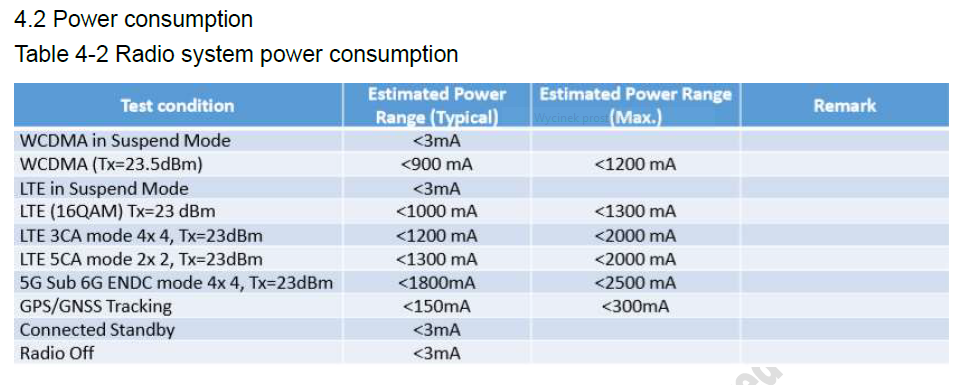
According to T99W175 documentation, it can pull max. 2.5 A (1.8 A typical), while hAP ac2 can only provide max. 1 A on the USB port. Because of that, I also tried to set the maximum transmit power to 0 dBm on all bands using the following script, after doing that it sometimes manages to finish the speed test, but sometimes shuts down anyway (big improvement to download speed - 170 Mbit/s vs 50 on LTE, but upload speed still about the same as on LTE - 28 Mbit/s. I’m not sure if it’s because of the low TX power or something else, but in my case the upgrade would only make sense if both reached 100 Mbit/s).
I would first try with a suitable powered USB hub between the devices.
If the issue is power, it should work.
1.8A or 2.5A is however a lot, cannot say if USB hubs capable of putting out that amount of current are easily found.
Maybe using a USB Y cable (the kind was sometimes used in the (good?) ol’ times to connect USB hard disks (connected to a separate USB power supply)?
Loosely like: https://www.delock.com/produkt/65306/merkmale.html
BUT, since its original use is to have BOTH the male USB plugged into the SAME computer, having one in the Mikrotik and one in the external power supply (i.e. with separate grounds) may create issues.
The hap ac2 standard power supply is 24V 0.8A, i.e. 19.2W, no way it can power both the the router (which has a theoretical max 16W without attachments, but that in real life will be more like 12 W) and the additional 10 W or so the modem needs.
With a 24V 1.2A power supply, 28.8W you could use a buck converter and draw the 5V 2.5A from it, so the ground will be surely common, but you would need also a sort of Y cable for the dc jack.
If you need it as a main router with LTE backup… now the hAPaxLite-LTE6 might be a little unpowered depending on primary internet and/or CAT6 LTE is pretty slow relative to newer modem.
Also there are newer models coming up, at some point, see:
And, if you’re in North America (or want a travel router to work there)… you’re pretty much screwed unless you do use external modem via USB or miniPCIe. MikroTik has NO models with “global” LTE/5G modems that work worldwide.
I posted this more as an information that the T99W175 might not be a good option for the hAP ac2, but also to find out if anything can be done to make them work together. I might test it later with the powered hub once I get one. Though in my case, I’m looking into the T99W175 as a potential replacement for the FG621-EA modem in an SXT LTE6 kit, because currently there aren’t any 5G devices from Mikrotik that would fill the same niche. The closest would be the upcoming ATL 5G, but it might not fit where I have the SXT installed currently:
I’m not sure yet if its existing antennas would be usable at the 3.5 GHz band or not, and if just the two with terminating resistors on remaining sockets would be enough, or would I have to install additional ones. So far I did the tests with 4 proper 5G antennas though.
As for the hAP ax lite LTE6 as a replacement for my current travel setup, I already wrote previously in this thread why it won’t be a good solution for me - no 5 GHz radio and inconvenient vertical-only enclosure with flared bottom. The 4 Ethernet ports aren’t that big of a deal but also make it more inconvenient - I’d prefer to have a large variety of WAN options while having two Ethernet ports available for a regular LAN and two for EoIP-bridged LAN.
I live in Poland and currently have no plans to travel to the US for the foreseeable future.
As for the current, I got it from the table below on page 36 of the documentation. Also now I noticed that the modem runs at 3.3 V and not directly at 5 V, so the current at 5 V could be lower as long as the adapter uses a DC-DC converter and not a linear regulator.
It’s a very interesting solution for me too, please if you can make it work can you post details in the forum?
I have doubts about how to connect the antenna connectors of the T99W175.
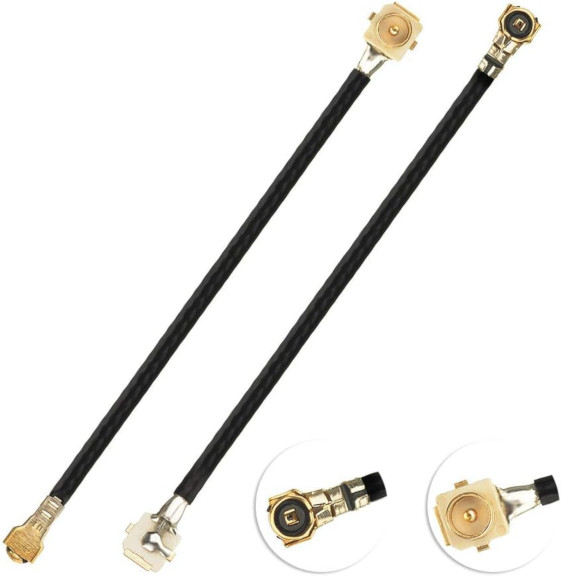
If the existing antennas turn out to be viable, I plan to use MHF4 to u.FL adapters like on the picture below, along with either termination resistors or two additional antennas glued somewhere inside the SXT. I’m also considering using Wilkinson splitters so that I can use the 2 antennas for all 4 sockets.
Update: The T99W175 power issue was apparently caused by the USB adapter. I had the card in a M.2 to MiniPCIe adapter, that was then insterted into a MiniPCIe to Micro USB adapter that was connected to the router with a USB A to Micro USB cable. I got a direct M.2 to USB 3.0 adapter without a cable, and now the modem works fine (so far) with the hAP ac2 and passes speed tests. I’m getting 270 Mb/s download, the upload is only about 15 Mb/s but maybe it’s because of the location or the antennas I used to test.
I no longer need it to upgrade the SXT as I got the ATL 5G R16 some time ago, and I’m getting 690 Mb/s down and 130 up with it, but it will be useful for traveling with the hAP ac2. The new adapter doesn’t come with an enclosure though. I’m considering getting the new hAP be3 Media to use as the travel router, maybe the adapter will fit in its flash drive compartment.
Edit: It was indeed the antenna arrangement/location that caused the slow upload, I’m now getting 130 Mb/s upload on the T99W175 as well.
 :
: