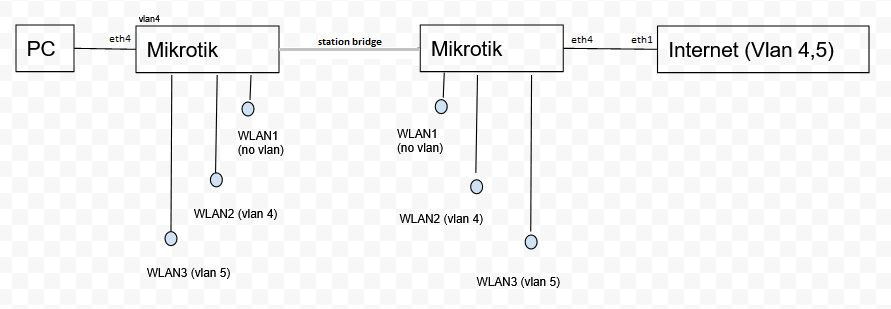
I am attempting to set eth4 as an access port for vlan 4. I am trying to do this at the switch chip. I know there’s other ways to do it but surely it makes sense to do it in hardware instead of software. Note the below config is not my final config, just something I setup to demonstrate the issue as simply as possible. If the config is working I should get an IP when connected to eth4 but I don’t. The below config works fine on an RB951 but doesn’t work on an RB751. Is there something that needs to be done different for the 751?
/interface bridge
add name=BRIDGE_MAIN protocol-mode=none

/interface bridge port
add bridge=BRIDGE_MAIN interface=ether4

#make eth4 an access port on vlan 4
/interface ethernet switch port
set 2 default-vlan-id=4 vlan-header=always-strip vlan-mode=secure

/interface ethernet switch vlan
add ports=ether4,switch1-cpu switch=switch1 vlan-id=4

#Add a DHCP server on VLAN4
/interface vlan
add interface=BRIDGE_MAIN name=VLAN4 vlan-id=4

/ip pool
add name=POOL4 ranges=192.168.4.160-192.168.4.170

/ip dhcp-server
add address-pool=POOL4 disabled=no interface=VLAN4 name=DHCPSERVER_4

/ip address
add address=192.168.4.1/24 interface=VLAN4 network=192.168.4.0

/ip dhcp-server network
add address=192.168.4.0/24 dns-server=192.168.4.1 gateway=192.168.4.1
Dont waste my time with a few lines of a config.
Post the complete config minus any public IP info of course.
A network diagram to show what is connected to the etherports and what subnets/vlans are supposed to go over them is an excellent communication tool.
That’s the basic setup. Every last part of it is working, vlan 4 works right across all 3 mikrotiks, except not out to the PC. If the PC used wifi on WLAN2 (vlan4) then it works. So that shows everything is working except eth4 isn’t adding the tag, or the switch to cpu interface isn’t passing it on. I’ve gone to all the trouble of isolating the issue and creating the simplest possible config I can think of that demonstrates the issue on a single device, so I’m not sure what the purpose would be of looking at the full config. I’m playing around with a lot of different stuff so don’t really have the full config at the moment.
What’s missing from the diagram:
vlan4 uses IP range 192.168.4.x
vlan5 uses IP range 192.168.5.x
DHCP for those 2 are on the far right mikrotik
no vlan uses 192.168.3.x, DHCP in the middle mikrotik
other devices have static IPs or none. The device on the far left is only really doing layer 2 so I’ve configured it with and without IPs
The ISP has no vlans, I’ve just set vlan 4 that goes straight out to the internet and vlan 5 goes via nord vpn. I want a vlan that my ISP can’t monitor my traffic.
The target hasn’t shifted one little bit, just the method of trying to solve it. I started with WDS, that had bugs, so I moved to station bridge, that had bugs, so I moved to EoIP over station, that worked better but that meant the 2 APs on the left had to use the same frequency. So then I tried 2 radios (well 2 devices) but the only device I had left was a 751 and now that doesn’t do vlans in the switch chip for some reason. You should really have a look at the simplified config, it demonstrates the problem very well. If you want to know about the rest of it out of curiosity I’m more than happy to talk about it, it’s going to be a pretty cool setup if I can get it working. Some of it’s already installed and running off solar for 18 months on a remote site, I’m just wanting to extend it.
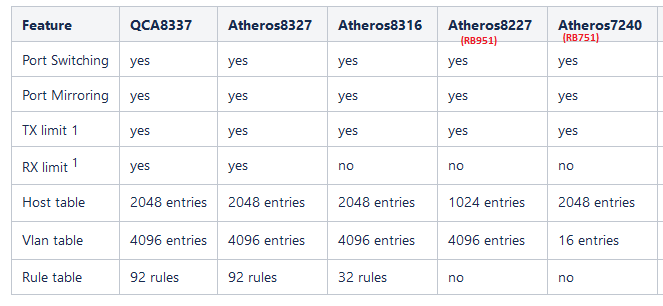
I’ve found the 751 struggles a bit so everything I can put in hardware the better. I found this page that says the 751 and 951 have basically the same features in the switch chip, the 951 just has “more”. So it should work. I sniffed some traffic on the bridge and I can see DHCP requests coming through with no vlan tag. I also added a DHCP server to the bridge with no vlan and it picks that up straight away. So looks like the switch chip simply isn’t adding that vlan tag.
I do dump switches (no VLAN filtering, or VLAN untagging in the bridge). WLAN wireless (WLAN2 and WLAN3) setup can pick a VLAN to use, from this non-filtered trunk communication. WLAN2 and WLAN3 do the tagging and untagging.
Classic MT drivers will transfer all VLAN (with tags) and the untagged traffic over an “AP-bridge”-“station bridge” wifi connection, if VLAN mode is untagged, and PVID=1 (the default) set in the wireless.
This is a trunk, just as a trunk ethernet connection.
Why using VLAN filtering? All VLANs travel over the same ethernet and wifi-bridge interconnect anyway. It is not presented to clients.
WLAN is always via CPU (bridge), not connected to the switch.
PC needs access port (pvid=4) for ethernet as untagged traffic So maybe filtering is needed to be secure. Traffic for PC is coming from CPU (WLAN). Switch wirespeed is out of scope here. So using bridge VLAN for PC should be relative OK. Enabling bridge VLAN-filtering will indeed disable HW off-loading. But there is only one ethernet interface in use.
So I assume ‘AP-station bridge’ here is via WLAN1-WLAN1. WLAN2 and WLAN3 are AP’s for clients only, as access (untagged)
There is no WLAN2-WLAN2 or WLAN3-WLAN3 interconnect.
That’s why I made the simple config. The full config isn’t that much different though, the access port and DHCP server are just on different devices with a wireless bridge in the middle. The vlan tags are removed before going out to the internet. I’m totally baffled by this one though. If I get the config for the switch wrong then no traffic gets through, so it is doing something, just not sending through vlan 4. I think I’ll quit for the night and hope someone whose encountered this specific issue will read the thread.
All your assumptions there are correct. The only thing is there could be 2 PCs on the far left switch that would want to talk as quickly as possible. Besides that I agree with what you’re saying, the wlans are already going through the CPU.
I found this in the manual. Should I be using add-if-missing instead of leave-as-is on the CPU port? I tried it and it maybe worked but the device is playing up a bit, will investigate more tomorrow.
“add-if-missing - adds a VLAN tag on egress traffic and uses default-vlan-id from the ingress port. Should be used for trunk ports.”
No experience, just reading loads of “Notes” in the wiki.
Sometimes a lot to guess there.
So there is a major difference between Atheros8327 and Atheros7240 !?
Atheros8227 only default-vlan-id=0.
An what with Atheros7240?? Also zero, or even more restrictive ?
From: https://wiki.mikrotik.com/wiki/Manual:Switch_Chip_Features
Help is not better.
I take that as “if you can’t upgrade the hardware to something with more capability, then this is the best you can do with the limited hardware”?
Doesn’t this have a single 400Mhz core? May have been great in 2011, not so great now. I doubt it will have great performance, but perhaps it is a slow link.
.
.
Nice one, I have been doing a lot of searching on 751ui etc but didn’t think to search on the switch chip. When I do I am seeing conflicting information, although your information does appear to be accurate.
/interface ethernet switch port
set ether2 vlan-mode=secure vlan-header=[b]add-if-missing[/b]
set ether3 vlan-mode=secure vlan-header=always-strip default-vlan-id=200
set ether4 vlan-mode=secure vlan-header=always-strip default-vlan-id=300
set ether5 vlan-mode=secure vlan-header=always-strip default-vlan-id=400
It’s the RB751G-2HnD. It is 400MHz single core with 32MB. It can be really slow but I don’t think it’s the CPU so much because it seems to sit fairly low most of the time. I am looking at getting something newer but it’s kind of that thing where you start on something and want to get it working. It’s been a good learning experience dealing with some of the hardware differences.