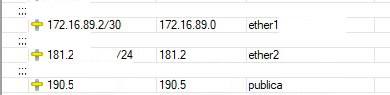
Well to have the two WANs respond to pings you will need to have some mangle rules involved.
You will note I only do this mangle for WAN2 as WAN1 is primary and any pinging will always work as the router chooses this path for return traffic from the router.
Now we have added a special table for the routing involved and added to the other routes looks like:
I prefer to use non-related DNS, for canary addresses as its more independent.............
You are absolutely right!
I freaking forgot to identify which WAN we were mangling LOL. Sorry to have wasted your time.
Please find the fix below.
/ip firewall mangle
add action=mark-connection chain=input in-interface="ether2 - INTER" connection-mark=no-mark new-connection-mark=incomingWAN2 passthrough=yes
add action=mark-routing chain=output connection-mark=incomingWAN2 new-routing-mark=useISP2 passthrough=no
I dont understand however why your Primary WAN is not working it looks fine to me??
First check if the modification above fixes everything. I think that should!!
Otherwise for the primary wan1 - gigabit, well I dont understand why you keep putting in pref-src=190.5X, is that an additional piece needed to get ISP connectivity from that ISP???
hi wtfrank, can you explain what you mean for ISP1. I am not familiar with loopback to private IP to the public IP. For some reason the ping of hte public IP is not reaching you........... hmmmmmmmmmmmmmmm
A little help from a friend,
Can you confirm which situation describes your setup:
The ISP is providing you with a private interconnection subnet but routes traffic for that public IP to you via that subnet, using the private IP attached to your WAN1 ; or
The ISP may be dst-nating traffic for the public IP to the private one attached to WAN1.
In simple term, i set a permanent public ip as private ip in my mikrotik without interface asociation (Like 127.0.0.1 but with public ip usually set on a brigde without port) and the ISP identify my router with that.