Hi every one
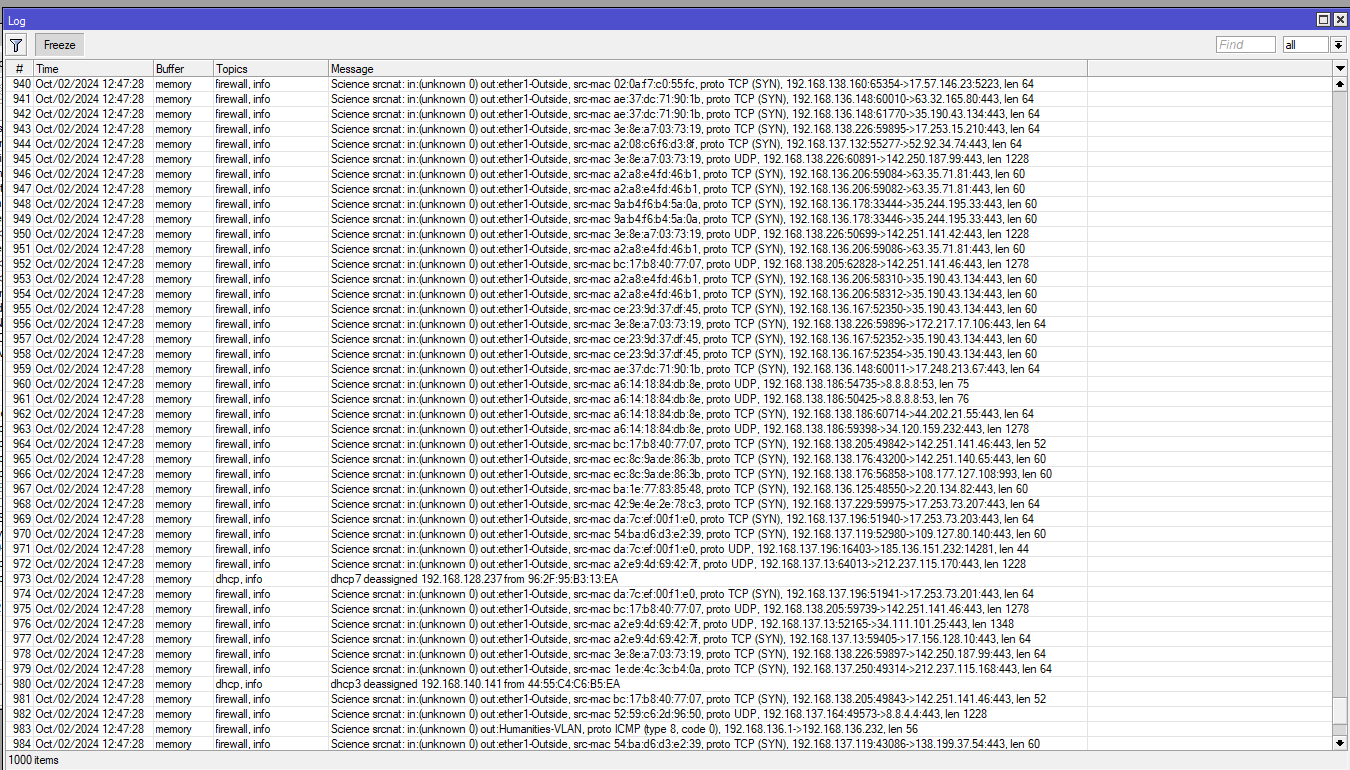
i have problem in mikrotik and i can not solve it
can any one help me ?
you need to give us more information m8
is this a new setup?
did it just start after a few days
is it a new firwall testing process
we are driving here blind
looks as a firewall issue but what im not sure no info
Hi
No this is not new setup and the mikrotik work properly before that for along time.
i well provide you any needed info
firewall rule
/ip firewall filter
add action=accept chain=input dst-port=11337 protocol=tcp
add action=accept chain=input dst-port=5678 protocol=tcp
add action=accept chain=input dst-port=8291 protocol=tcp
add action=accept chain=input dst-port=11994 protocol=tcp
add action=accept chain=input dst-port=8291 protocol=tcp
add action=accept chain=input dst-port=1574 protocol=tcp
add action=reject chain=output dst-address=139.99.5.202 protocol=tcp
add action=reject chain=output dst-address=95.154.216.166 protocol=tcp
add action=passthrough chain=unused-hs-chain comment=
“place hotspot rules here” disabled=yes
/ip firewall mangle
add action=mark-routing chain=prerouting log=yes log-prefix=207
new-routing-mark=SX80 passthrough=yes src-address=192.168.128.5
/ip firewall nat
add action=dst-nat chain=dstnat comment=“Acces radius from outside”
dst-address=172.31.255.254 dst-port=20443 protocol=tcp to-addresses=
192.168.81.14 to-ports=443
add action=dst-nat chain=dstnat comment=“SSH from outside” dst-address=
172.31.255.254 dst-port=22 protocol=tcp to-addresses=192.168.81.14
to-ports=22
add action=dst-nat chain=dstnat comment=“remote dektop for server”
dst-address=172.31.255.254 dst-port=3389 protocol=tcp to-addresses=
192.168.130.130 to-ports=3389
add action=dst-nat chain=dstnat comment=“remote dektop for dr.yaseen server”
dst-address=172.31.255.254 dst-port=3388 protocol=tcp to-addresses=
192.168.130.48 to-ports=3388
add action=dst-nat chain=dstnat comment=“remote dektop for dr.yaseen server2”
dst-address=172.31.255.254 dst-port=3377 protocol=tcp to-addresses=
192.168.129.193 to-ports=3377
add action=dst-nat chain=dstnat comment=“remote dektopF server” dst-address=
172.31.255.254 dst-port=3333 protocol=tcp to-addresses=192.168.131.131
to-ports=3333
add action=dst-nat chain=dstnat comment=“remote dektop DGPS” dst-address=
172.31.255.254 dst-port=3399 protocol=tcp to-addresses=192.168.136.200
to-ports=3399
add action=dst-nat chain=dstnat comment=“remote dektop for network server”
dst-address=172.31.255.254 dst-port=7777 protocol=tcp to-addresses=
192.168.130.45 to-ports=7777
add action=dst-nat chain=dstnat comment=“remote dektop for network server”
dst-address=172.31.255.254 dst-port=8888 protocol=tcp to-addresses=
192.168.128.167 to-ports=8888
add action=dst-nat chain=dstnat comment=
“remote dektop for Dr.yaseen Gaming Pc-server room” dst-address=
172.31.255.254 dst-port=3344 protocol=tcp to-addresses=192.168.129.130
to-ports=3344
add action=passthrough chain=unused-hs-chain comment=
“place hotspot rules here” disabled=yes
add action=src-nat chain=srcnat comment=PPPOE out-interface=ether1-Outside
src-address=10.10.2.0/23 to-addresses=172.31.255.254
add action=src-nat chain=srcnat comment=“Gmail Admin Area” src-address=
192.168.81.14 to-addresses=172.31.255.254
add action=masquerade chain=srcnat src-address=192.168.128.0/19
add action=masquerade chain=srcnat comment=“masquerade hotspot network”
src-address=192.168.128.0/22
add action=masquerade chain=srcnat comment=“Tower masquerade hotspot network”
src-address=192.168.160.0/22
add action=masquerade chain=srcnat comment=“masquerade hotspot network”
src-address=192.168.148.0/22
add action=masquerade chain=srcnat comment=“masquerade hotspot network” log=
yes log-prefix=Science src-address=192.168.136.0/22
add action=masquerade chain=srcnat comment=“masquerade hotspot network”
src-address=192.168.140.0/22
add action=masquerade chain=srcnat comment=“masquerade hotspot network”
src-address=192.168.144.0/22
add action=masquerade chain=srcnat comment=“masquerade hotspot network”
src-address=192.168.132.0/22
add action=masquerade chain=srcnat src-address=10.101.0.0/22
add action=masquerade chain=srcnat src-address=10.5.50.0/24
add action=masquerade chain=srcnat disabled=yes src-address=10.101.12.0/22
add action=masquerade chain=srcnat comment=“masquerade hotspot network”
src-address=10.101.12.0/22
add action=masquerade chain=srcnat comment=“masquerade hotspot network”
src-address=10.5.50.0/24
add action=masquerade chain=srcnat comment=“masquerade hotspot network”
src-address=10.101.0.0/22
add action=masquerade chain=srcnat src-address=172.17.17.0/24
add action=masquerade chain=srcnat comment=“masquerade hotspot network”
src-address=10.101.4.0/22
add action=masquerade chain=srcnat comment=“masquerade hotspot network”
src-address=192.168.152.0/22
add action=dst-nat chain=dstnat dst-address=172.31.255.254 dst-port=80
protocol=tcp to-addresses=192.168.130.203 to-ports=80
add action=masquerade chain=srcnat comment=“masquerade hotspot network”
src-address=192.168.156.0/22
add action=masquerade chain=srcnat comment=“masquerade hotspot network”
src-address=192.168.200.0/24
add action=masquerade chain=srcnat src-address=10.0.0.0/8
Also i have this problem 

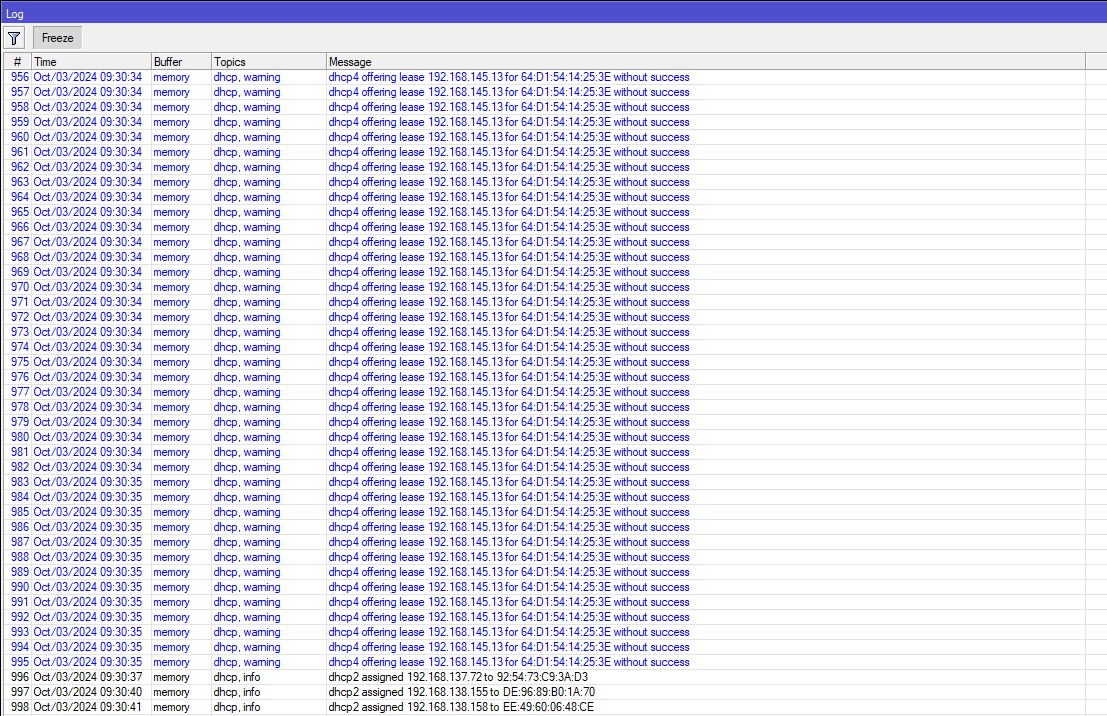
The amount of services you make avaiable publically is a bit worrying. Both through port forward but also on the router itself.
Chances are that devices becomes (or already is) compromised…big red flag.
I.e.:
add action=accept chain=input dst-port=11337 protocol=tcp
add action=accept chain=input dst-port=5678 protocol=tcp
add action=accept chain=input dst-port=8291 protocol=tcp
add action=accept chain=input dst-port=11994 protocol=tcp
add action=accept chain=input dst-port=8291 protocol=tcp
add action=accept chain=input dst-port=1574 protocol=tcp
In my opinion you have a bigger problem. Can you provide a full network diagram and a complete export of the configuration?
/export file=anynameyoulike
Remove serial and any other private info an post in between code tags by using the </> button.
this is the complete backup
backup.rsc (17.5 KB)
Concur with erlinden, pull the router netinstall new clean firmware and redo your setup.
Start with the default settings and for gods sake dont open up the winbox port to the internet!!