I want to be able to adjust my settings to block external access the admin panel.

Hi I am new to mikrotik products. I have a basic 4+1 port router, mainly for security. I want to do good security practices, but I am a bit confused.
I changed that administration password, … but I ddon’t know exactly how to block external access to the admin panel.
Here is what I did in telnet,

[admin@security_gateway] > do
command: /user set 0 allowed-address=192.168.88.1/24
[admin@security_gateway]>

Then I just exited telnet , without any save command or anything else. Did I block external access to the router (admin panel) correct?

Thanks.

Hello,

please read this thoroughly.

https://wiki.mikrotik.com/wiki/Manual:Securing_Your_Router

I read that already , but some things are not obvious like

Do I enter the command “do” , before enter ting the actual command ? The afterwards do I enter a save command into the shell ? Or can I exit
Telnet?


[admin@security_gateway] > do

command: /user set 0 allowed-address=192.168.88.1/24

[admin@security_gateway]>

hello,

you do not type “do” or “command”.

At the prompt, you simply type the command as shown in the document.

For example:

[admin@security_gateway] /user set 0 allowed-address=192.168.88.1/24

The command is acted upon straight away, you do not have to save it. While we are on that topic, please search for “safe mode” at wiki.mikrotik.com

Hope this helps.

[admin@security_gateway] > /user set 0 allowed-address=192.168.88.1/24
expected end of command (line 1 column 13)
[admin@security_gateway] >

What does expected end of command (line 1 column 13) , mean ? Does this mean an error?

PS : Is 192.168.88.0/24 appropriate cidr notation ? IE can a device or a notation have a .0 ip adress

Thanks.

To show what I mean by expected end of command… here is a picture of my telnet commands .

[attachment=0]Screenshot from 2018-07-15 22-43-25.png
Screenshot from 2018-07-15 22-43-25.png

am I allowed 13 days of professional support for my product?
I cannot understand ,instead of using router os cli, I used telnet to re input the commands after wiping the router memory. still I get the exact same error, when doing any command with the words “allowed-address” . I get an expected end of command error.

/ip service set winbox address=192.168.88.0/24 
/user set 0 address=192.168.88.0/24

Also CLI has autocompleation. Start typing user like /us press [TAB] you should see /user then /user [TAB] "aaa group add disable enable find removeactive ssh-keys comment edit export print set " all available commands and so on step by step

Yes, I just figured this out today! Someone with the proper authority has to update and adjust the mikrotik.com wiki page especially the part on limiting which address(es) can access the router. As written by the above poster , the CORRECT way is to write is :

/user set 0 address=192.168.88.0/24
/ip service set winbox address=192.168.88.0/24
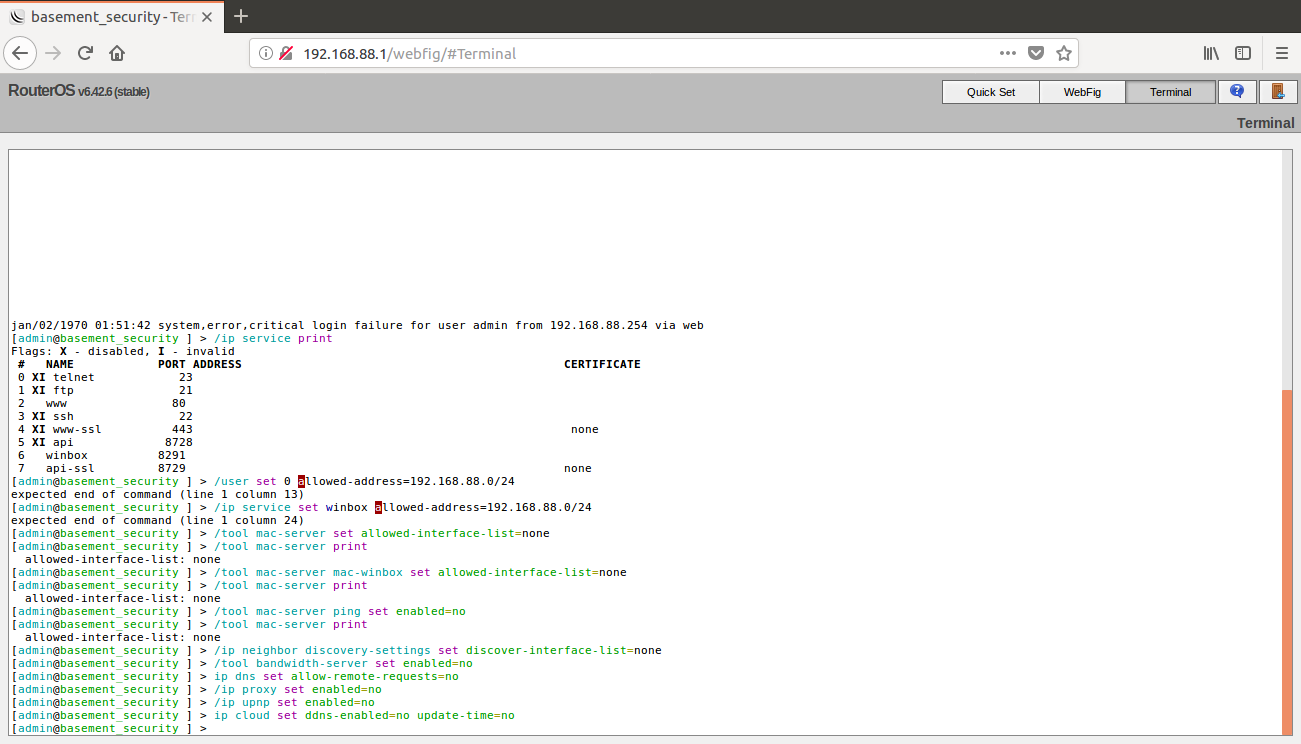
I have taken screenshots of the mistkaes.

https://wiki.mikrotik.com/wiki/Manual:Securing_Your_Router
Screenshot from 2018-07-20 17-06-00.png
Screenshot from 2018-07-20 17-03-30.png
