hi friends
some customer compained me that they want to block the facebook and orkut like social site
from our end.
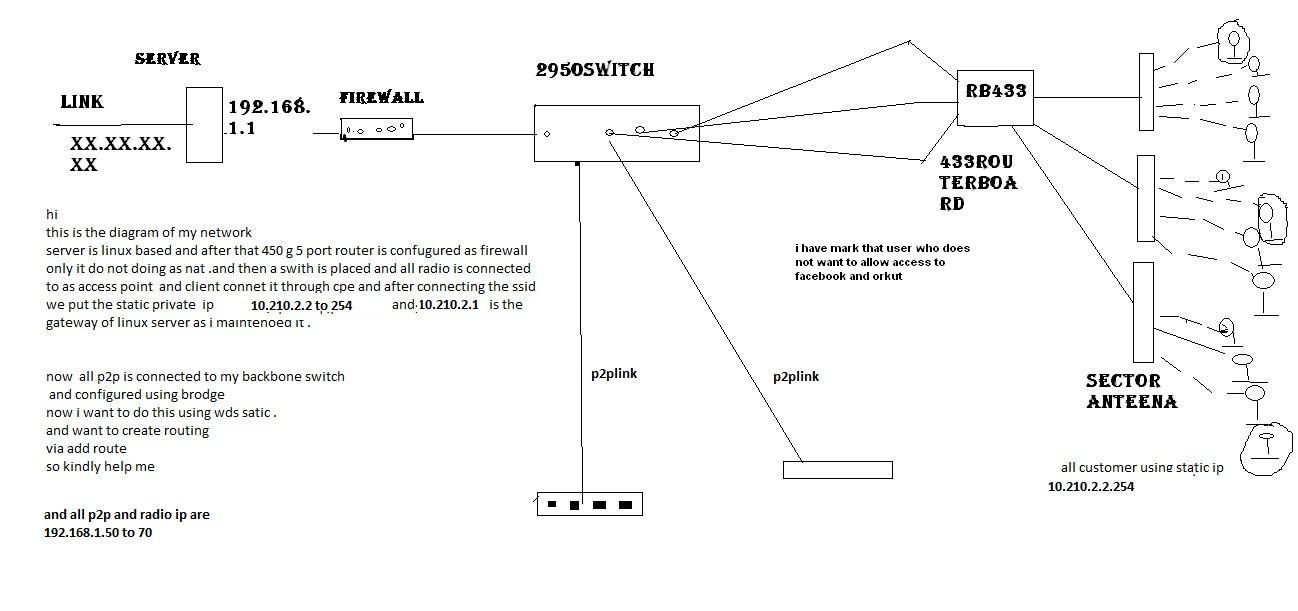
these customer are connected to the access point (2.4)and all are using static internal ip
that are provided by us .
now i am not able to do that bcos if configure the firewall on radio(access point 2.4)then all client that are connected to that ap are not able to use facebook and other social sites .
kindy tell me what should to by giving me an example???
i am also submittng the diagram of my network
with regard
from suraj
If customers are assigned static IPs then it is so easy for you to add dropping rules through MT firewall, first of all your schema is a bit unclear but what I understood is that you need to block facebook for some clients knowing that these clients are assigned Static IPs, therefore collect the IPs you want to block and them to MT Firewall under Address List + add a filter Rule dropping facebook for instance to these specific clients, hope I was clear and if any further help needed please post back.
Check the order of your rules. Put the rule I gave you at the top and see if that works. You could have another rule accepting the traffic before it is suppose to get dropped.
Due to the nature of SSL, using Content=facebook isn’t always going to capture facebook traffic and has a fairly high false-positive rate (in theory you could be dropping packets for any webpage that uses facebook connect, or the “like this on facebook” button).
The only reliable method for blocking facebook with a mikrotik is to block at the DNS level.
Enable DNS server on the mikrotik, add invalid entries for facebook.com, the capture blacklisted users’ DNS requests. This only works if aren’t already providing a DNS server behind the mikrotik, and the mikrotik isn’t providing DNS caching already.
/ip dns
set servers=<public DNS server1>,<public DNS server2> allow-remote-requests=yes

/ip dns static
add address=127.0.0.1 disabled=no name=facebook.com ttl=5m
add address=127.0.0.1 disabled=no name=www.facebook.com ttl=5m
add address=127.0.0.1 disabled=no name=glib1.facebook.com ttl=5m
add address=127.0.0.1 disabled=no name=glib2facebook.com ttl=5m
add address=127.0.0.1 disabled=no name=mail.facebook.com ttl=5m
add address=127.0.0.1 disabled=no name=dns.facebook.com ttl=5m
add address=127.0.0.1 disabled=no name=ns0.facebook.com ttl=5m
add address=127.0.0.1 disabled=no name=ns1.facebook.com ttl=5m
add address=127.0.0.1 disabled=no name=ns2.facebook.com ttl=5m
add address=127.0.0.1 disabled=no name=ns3.facebook.com ttl=5m
add address=127.0.0.1 disabled=no name=ns4.facebook.com ttl=5m
add address=127.0.0.1 disabled=no name=ns5.facebook.com ttl=5m

/ip firewall nat
add action=redirect chain=dstnat comment="Capture DNS" disabled=no dst-port=53 protocol=udp src-address-list=DNSBlacklist to-ports=53
add action=redirect chain=dstnat comment="Capture DNS" disabled=no dst-port=53 protocol=tcp src-address-list=DNSBlacklist to-ports=53

/ip firewall address-list
add address=<Client Static IP to be blocked> list=DNSBlacklist comment="Added to DNS block list on request of <Customer name>"
how fool i am
thanks man it’s wirking
now the 10.210.2.14 can not access the facebook.early moring customer told me that they were not able to acces the facebook any more.
thanks
now i am finding more solutions.
hope you will help me
Hi all,
After i blocked traffic for facebook, a need to know how to redirect the request for facebook to another webpage, like myhomepage.com?
Can anybody help me in this issue?
 and if any further help needed please post back.
