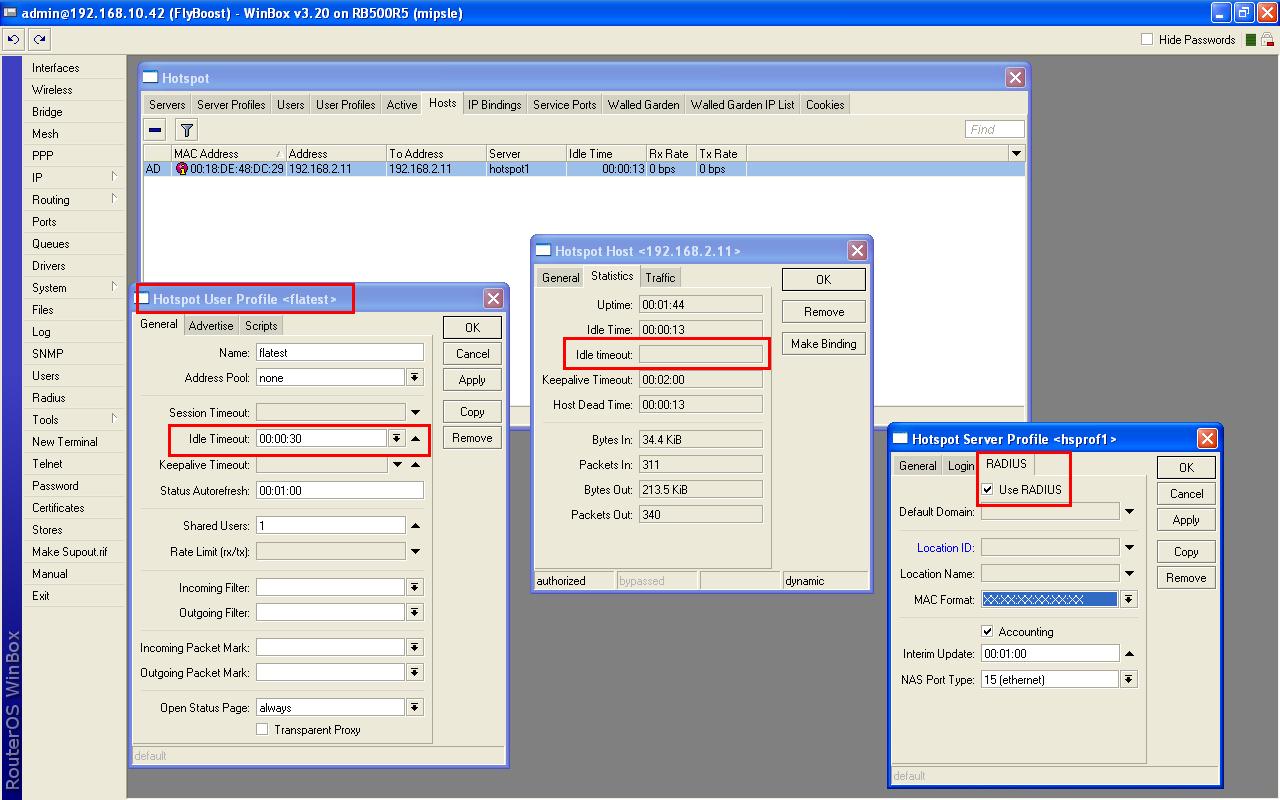
Hi all,
i’ve a problem to automatically disconnect authenticated users with external radius when they stop to generate traffic through the mikrotik device. We are using mikrotik ver 3.20 and HOTSPOT configuration.
We have tried to set “idle-timeout” in “hotspot server” section, but the problem persist.
Is it possible to set a script or something similar ?
I also tried to set 10 seconds of idle-timeout, turn off every application of the client and monitor it.
I have the problem only when i use external radius and i set the idle-timeout on the “server hotspot” section. If i use “local users” and i set the idle-timeout in “local user profile” it work.
It a strange problem.
Hi,
I show you how i configured the mikrotik hot spot. See the jpg attachment, where the host 192.168.2.11 has no idle timeout. Just to clarify i use a Free RADIUS External Server with Radiusmanager. I create a hot spot user profile with the name “flatest” and on radiusmanager i created with the same name a service.
The strange is that if i use LOCAL USERS, all work fine. I try also with different version of Mikrotik, but the problem is the same.
Thank’s a lot.
Try putting an idle time value in the Server configuration (first tab - Servers) This is SUPPOSE to be only for un-authorized users but it also appears in the statistics screen for a host.
Na-uh. As far as I remember, one value doesn’t over ride another. One of these two takes preference over the other. If you configure a timeout of 30 seconds in the server profile, and dont have a timeout on the user profile it may very well be that MT prefers to use the user profile, and not apply a timeout at all.
If you managing this via Radius, disable all idle-timeout options on MT, and ONLY supply the timeouts via radius.
This is very conflicting, and has been happening for years already now with versions going back as far as 2.8
Hi all,
i’ve asked to mikrotik support, they suggest me to set idle-timeout in MT router in “user default profile”. Now it’s OK, great.
It seems that if i use a “custom user profile” it doesn’t work.
We have similar problem in 3.22 routeros. We use the built-in radius server of MT ( 127.0.0.1 ).
When setting the timout values ( idle, session, keep-alive ) at “default” user profile it does NOT have any influence on the user created by User Manager.
I mean e.g. when a user ( AAA by MT radius ) logs off and closes the browser his timer is counting over the idle-timeout value (5min) too.
Are these changes require reboot of MT? Or these changes are immediately come into force?
Thank you!
I had this probelm and noticed that it is because a user is not going idle actually and that because of 2 things:
1- the router: which sends packets to the hot spot user like status auto refresh.
If you are using hotspot, check your hot spot timers like idle time keep alive time out and status auto refresh interval timing. They are in hotspot server and profile settings of the router.
for example hotspot status auto refresh timer sends packets to the client and by doing so it iterrupts the idle timing..
2- the applications of the user’s device that use notifications and check internet connection which cause idle time to restart automaticaly again and again.
to solve this try to use keep alive timing or reducing the idle timing as low as possible.