Good morning,
I am using IGMP Proxy to pass all IPTv traffic from the GPON SFP module (VLAN3) to the TV set-top box. If the set-top box is inside a VLAN IGMP-Proxy does not work, but if it is directly connected to the router interface without vlan, it works correctly.
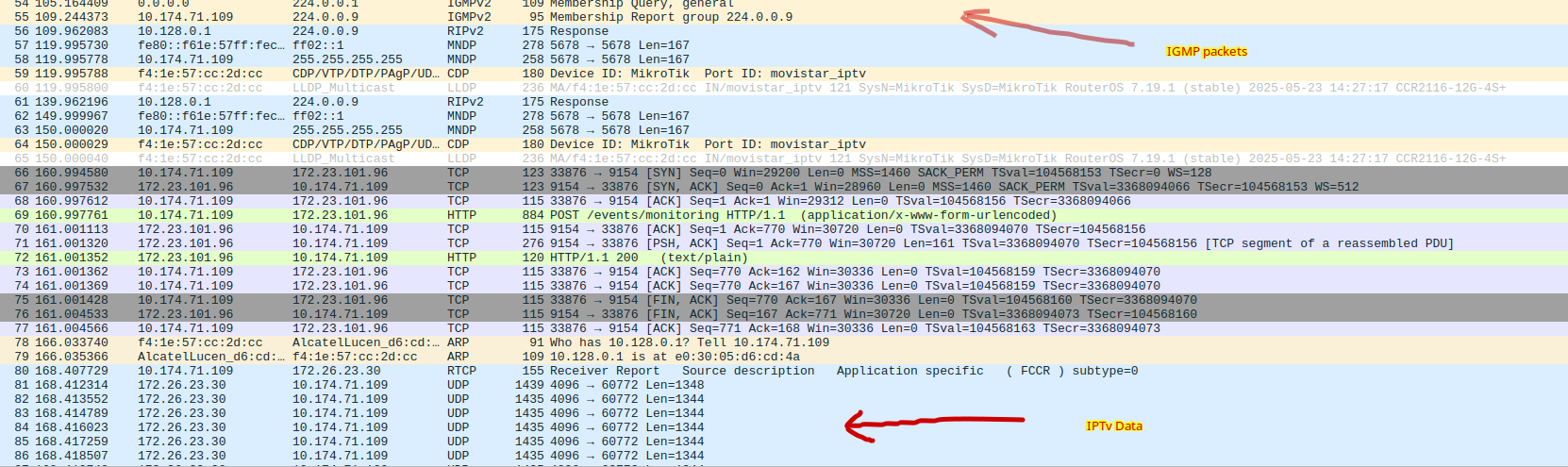
I see that IGMP-Proxy is not able to create the routes in the MFC tab.
Attach send you config working and not working.
Regardsconfig_not_working.rsc (7.67 KB)config_working.rsc (6.96 KB)
What is plugged into your “lan” (ether12) port? A managed switch? did you configure VLAN on that switch correctly?
Hi,
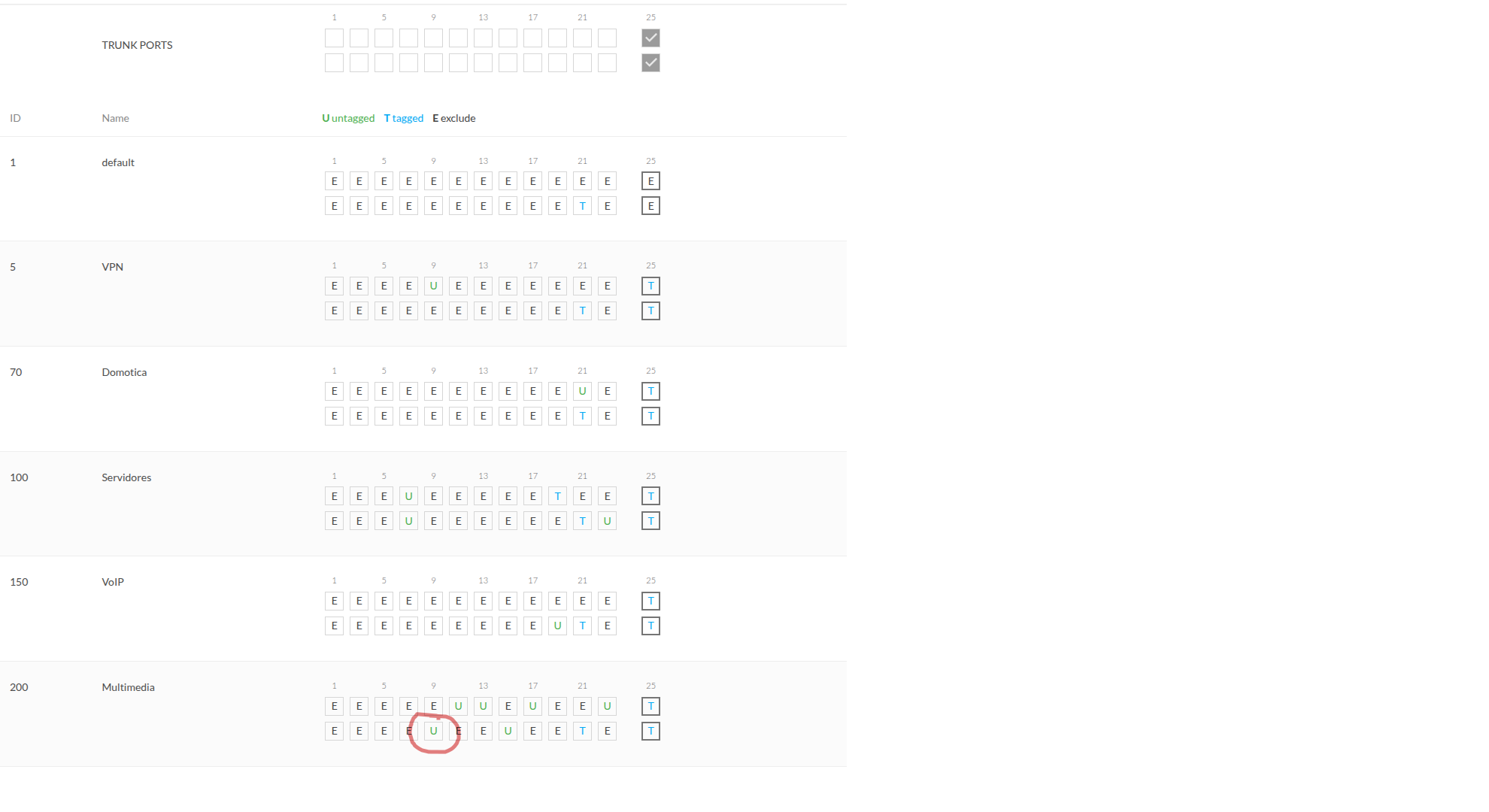
yes it is port 10 with VLAN 200 and IGMP Snooping activated.
With other brand router, it is working perfectly.
When you configure the vlan200 interface on the “lan” interface (which is ether12), ether12 will carry the frames of vlan200 as tagged . If you plug ether12 directly into port 10 of the switch, then you’ll also need to change the mode of that port 10 to tagged . On your screenshot port 10 still has U, which means untagged . Try to toggle that U → T on that port of the switch?
Unrelated to that but your router has a powerful switch chip. You’ll get more from your CCR2116 if you configure a single bridge (spanning all ports except for the management port ether13) and configure bridge VLAN filtering on it. Even your sfp-movistar port and the movistar_xxx VLANs can be configured on that bridge.
When you configure the vlan200 interface on the “lan” interface (which is ether12), ether12 will carry the frames of vlan200 as tagged . If you plug ether12 directly into port 10 of the switch, then you’ll also need to change the mode of that port 10 to tagged . On your screenshot port 10 still has U, which means untagged . Try to toggle that U → T on that port of the switch?
Unrelated to that but your router has a powerful switch chip. You’ll get more from your CCR2116 if you configure a single bridge (spanning all ports except for the management port ether13) and configure bridge VLAN filtering on it. Even your sfp-movistar port and the movistar_xxx VLANs can be configured on that bridge.
There is one thing I don’t understand. If all the VLANs can actually see each other and can communicate with the computers that are on each of them, why do I need to create a bridge interface for all the router interfaces? I understand that when the router routes the packets through each of the virtual interfaces, the router already put the VLAN for that virtual interface. I also understand that the IGMP-Proxy when configured as Upstream in SFP Port and as downstream in the VLAN interface, all the packets that go out there will be routed with the VLAN 200. Is that right?
Good morning again,
I have changed the configuration. I added the ether11 and ether12 interface to a bridge, configured the VLAN tagging and added the VLAN configuration to one of the physical ports to test.
# 2025-05-30 12:49:58 by RouterOS 7.19.1
# software id = XXXXXXXXXX
#
# model = CCR2116-12G-4S+
# serial number = XXXXXXXXX
/interface bridge
add frame-types=admit-only-untagged-and-priority-tagged igmp-snooping=yes \
    name=bridge1 vlan-filtering=yes
add igmp-snooping=yes name=local-lan vlan-filtering=yes
/interface ethernet
set [ find default-name=ether4 ] disabled=yes
set [ find default-name=ether5 ] disabled=yes
set [ find default-name=ether6 ] disabled=yes
set [ find default-name=ether7 ] disabled=yes
set [ find default-name=ether8 ] disabled=yes
set [ find default-name=ether9 ] disabled=yes
set [ find default-name=ether10 ] disabled=yes
set [ find default-name=ether11 ] comment="Switch 24" name=lan1
set [ find default-name=ether12 ] comment="Switch 16 PoE" name=lan2
set [ find default-name=ether1 ] comment="4G Internet" name=mobile_inet
set [ find default-name=ether3 ] comment=Wireshark name=mon_wireshark
set [ find default-name=sfp-sfpplus1 ] auto-negotiation=no comment=\
    "Modulo SFP Movistar" name=sfp-movistar speed=2.5G-baseX
set [ find default-name=sfp-sfpplus2 ] disabled=yes
set [ find default-name=sfp-sfpplus3 ] disabled=yes
set [ find default-name=sfp-sfpplus4 ] disabled=yes
set [ find default-name=ether2 ] comment="Switch APC" name=switch_apc
/interface vlan
add comment="LAN - Administracion" interface=lan2 name=lan_admin vlan-id=999
add comment="LAN - Cluster RPi" interface=lan2 name=lan_clusterpi vlan-id=\
    2000
add comment="LAN - DMZ" interface=lan2 name=lan_dmz vlan-id=900
add comment="LAN - Domotica" interface=lan2 name=lan_domotica vlan-id=70
add comment="LAN - Invitados" interface=lan2 name=lan_guest vlan-id=240
add comment="LAN - Multimedia" interface=lan2 name=lan_media vlan-id=200
add comment="LAN - Servidores" interface=lan2 name=lan_servers vlan-id=100
add comment="LAN - Voz IP" interface=lan2 name=lan_voip vlan-id=150
add comment="Movistar - Inet" interface=sfp-movistar name=movistar_inet \
    vlan-id=6
add comment="Movistar - IPTv" interface=sfp-movistar name=movistar_iptv \
    vlan-id=2
add comment="Movistar - VoIP" interface=sfp-movistar name=movistar_voip \
    vlan-id=3
/interface pppoe-client
add add-default-route=yes allow=pap,chap comment="Movistar Inet" disabled=no \
    interface=movistar_inet max-mtu=1492 name=pppoe-movistar user=\
    adslppp@telefonicanetpa
/interface list
add comment="Movistar SFP VLANS" name=movistar_vlans
/ip dhcp-server option
add code=6 comment="Movistar IPTv - DNS Server" name=movistar_iptv_dns value=\
    "'172.26.23.3'"
add code=240 comment="Movistar IPTv - OPCH Servers" name=movistar_iptv_opch \
    value="':::::239.0.2.10:22222:v6.0:239.0.2.30:22222'"
add code=42 comment="NTP Server" name=movistar_ntp_server value=\
    "'10.10.200.1'"
/ip dhcp-server option sets
add name=movistar_iptv_options options=\
    movistar_iptv_dns,movistar_iptv_opch,movistar_ntp_server
/ip pool
add comment="Pool Administration LAN" name=pool_lan_admin ranges=\
    10.10.10.2-10.10.10.30
add comment="Pool Cluester RPi" name=pool_cluster_rpi ranges=\
    10.0.100.2-10.0.100.50
add comment="Pool Domotica LAN" name=pool_lan_domo ranges=\
    10.10.70.2-10.10.70.254
add comment="Pool Invitados LAN" name=pool_lan_guest ranges=\
    192.168.240.2-192.168.240.20
add comment="Pool Multimedia LAN" name=pool_lan_media ranges=\
    10.10.200.2-10.10.200.49
add comment="Pool Servidores LAN" name=pool_lan_servers ranges=\
    10.10.100.2-10.10.100.40
add comment="Pool VoIP LAN" name=pool_lan_voip ranges=10.10.150.2-10.10.150.4
add comment="Pool IPTv Decodificadores" name=pool_lan_iptv_deco ranges=\
    10.10.200.50-10.10.200.60
add name=pool_mikrotik ranges=192.168.88.2-192.168.88.10
/ip dhcp-server
add address-pool=pool_lan_admin comment="LAN - Administracion" interface=\
    lan_admin lease-time=3d name=dhcp_admin
add address-pool=pool_cluster_rpi comment="LAN - Cluster RPi" interface=\
    lan_clusterpi lease-time=1d name=dhcp_clusterpi
add address-pool=pool_lan_domo comment="LAN - Domotica" interface=\
    lan_domotica lease-time=6h name=dhcp_domo
add address-pool=pool_lan_guest comment="LAN - Invitados" interface=lan_guest \
    lease-time=2h name=dhcp_guest
add address-pool=pool_lan_media comment="LAN - Multimedia" interface=\
    lan_media lease-time=12h name=dhcp_media
add address-pool=pool_lan_servers comment="LAN - Servidores" interface=\
    lan_servers lease-time=2w1d name=dhcp_servers
add address-pool=pool_lan_voip comment="LAN - VoIp" interface=lan_voip \
    lease-time=9h name=dhcp_voip
add address-pool=pool_mikrotik interface=ether13 name=dhcp_mikrotik
/port
set 0 name=serial0
/routing rip instance
add disabled=no name=rip-movistar
/certificate settings
set builtin-trust-anchors=not-trusted
/container config
set tmpdir=containers
/interface bridge port
add bridge=local-lan interface=lan2
add bridge=local-lan interface=lan1
add bridge=bridge1 interface=sfp-movistar
/interface bridge vlan
add bridge=local-lan tagged=local-lan,lan2,lan1 vlan-ids=\
    70,100,150,200,240,900,999,2000
add bridge=bridge1 tagged=sfp-movistar vlan-ids=2,3,6
/interface list member
add comment="Movistar Internet" interface=pppoe-movistar list=movistar_vlans
add comment="Movistar IPTv" interface=movistar_iptv list=movistar_vlans
add comment="Movistar VoIP" interface=movistar_voip list=movistar_vlans
/ip address
add address=192.168.88.1/24 comment=defconf interface=ether13 network=\
    192.168.88.0
add address=10.174.71.109/9 comment="Movistar IPTv IP Address" interface=\
    movistar_iptv network=10.128.0.0
add address=192.168.50.1/24 comment="Switch APC IP Address" interface=\
    switch_apc network=192.168.50.0
add address=10.10.70.1/24 comment="LAN - Domotica IP" interface=lan_domotica \
    network=10.10.70.0
add address=10.10.100.1/24 comment="LAN - Servers IP" interface=lan_servers \
    network=10.10.100.0
add address=10.10.150.1/29 comment="LAN - VoIP IP" interface=lan_voip \
    network=10.10.150.0
add address=10.10.200.1/24 comment="LAN - Multimedia IP" interface=lan_media \
    network=10.10.200.0
add address=192.168.240.1/24 comment="LAN - Invitados IP" interface=lan_guest \
    network=192.168.240.0
add address=10.10.1.1/29 comment="LAN - DMZ" disabled=yes interface=lan_dmz \
    network=10.10.1.0
add address=10.10.10.1/24 comment="LAN - Administracion IP" interface=\
    lan_admin network=10.10.10.0
add address=10.0.100.1/24 comment="LAN - Cluster RPi IP" interface=\
    lan_clusterpi network=10.0.100.0
add address=192.168.20.1/29 comment="Monitoring & Wireshark IP" interface=\
    mon_wireshark network=192.168.20.0
add address=192.168.1.1/24 interface=sfp-movistar network=192.168.1.0
add address=192.168.100.2/24 interface=sfp-sfpplus2 network=192.168.100.0
add address=192.168.177.1/24 comment="Bridge IP" interface=bridge1 network=\
    192.168.177.0
/ip dhcp-client
add add-default-route=no comment="Movistar VoIP IP Address" !dhcp-options \
    interface=movistar_voip use-peer-ntp=no
# Interface not active
add comment="4G Router IP Address" default-route-tables=main !dhcp-options \
    interface=mobile_inet use-peer-dns=no use-peer-ntp=no
/ip dhcp-server matcher
add address-pool=pool_lan_iptv_deco code=60 comment=\
    "Comprueba si es un deco IPTv Movistar" matching-type=substring name=\
    check_movistar_iptv_deco option-set=movistar_iptv_options server=\
    dhcp_media value="[IAL]"
/ip dhcp-server network
add address=10.0.100.0/24 comment="LAN - ClusterPi" dns-server=8.8.8.8 \
    gateway=10.0.100.1
add address=10.10.10.0/24 comment="LAN - Administracion" dns-server=\
    10.10.10.1 gateway=10.10.10.1 ntp-server=10.10.10.1
add address=10.10.70.0/24 comment="LAN - Domotica" dns-server=10.10.70.1 \
    gateway=10.10.70.1
add address=10.10.100.0/27 comment="LAN - Servidores" dns-server=10.10.100.1 \
    gateway=10.10.100.1
add address=10.10.150.0/29 comment="LAN - VoIP" dns-none=yes gateway=\
    10.10.150.1
add address=10.10.200.0/24 comment="LAN - Multimedia" dns-server=10.10.200.1 \
    gateway=10.10.200.1 ntp-server=10.10.200.1
add address=192.168.88.0/24 comment=Mikrotik dns-server=1.0.0.1 gateway=\
    192.168.88.1
add address=192.168.240.0/24 comment="LAN - Invitados" dns-server=1.0.0.1 \
    gateway=192.168.240.1
/ip dns
set allow-remote-requests=yes cache-size=8192KiB servers=\
    1.0.0.1,8.8.8.8,1.1.1.1
/ip firewall filter
add action=accept chain=forward connection-state=established,related
add action=drop chain=input connection-state=new in-interface=pppoe-movistar
add action=drop chain=forward connection-nat-state=!dstnat connection-state=\
    new in-interface=pppoe-movistar
/ip firewall mangle
add action=set-priority chain=postrouting new-priority=1 out-interface=\
    pppoe-movistar
add action=set-priority chain=postrouting new-priority=4 out-interface=\
    movistar_iptv
add action=set-priority chain=postrouting new-priority=4 out-interface=\
    movistar_voip
/ip firewall nat
add action=masquerade chain=srcnat comment="Masquerade Movistar SFP" \
    out-interface-list=movistar_vlans
# in/out-interface matcher not possible when interface (sfp-movistar) is slave - use master instead (bridge1)
add action=masquerade chain=srcnat comment="Masquerade SFP Module" \
    dst-address=192.168.1.0/24 out-interface=sfp-movistar
/ip firewall service-port
set rtsp disabled=no
/ip ipsec policy
set 0 disabled=yes
/ip route
add comment="Movistar IPTv" disabled=no dst-address=10.64.0.0/10 gateway=\
    10.128.0.1 routing-table=main suppress-hw-offload=no
/routing igmp-proxy
set query-interval=30s quick-leave=yes
/routing igmp-proxy interface
add alternative-subnets=0.0.0.0/0 comment="Movistar IPTv Upstream" interface=\
    movistar_iptv upstream=yes
add comment="Movistar IPTv Downstream Decos" interface=lan_media
/routing rip interface-template
add disabled=no instance=rip-movistar interfaces=movistar_voip,movistar_iptv \
    mode=passive
/system clock
set time-zone-name=Europe/Madrid
/system logging
add action=disk topics=igmp-proxy
/system ntp client
set enabled=yes
/system ntp server
set broadcast=yes broadcast-addresses=10.10.200.1,10.10.10.1 enabled=yes
/system ntp client servers
add address=es.pool.ntp.org
/system routerboard settings
set enter-setup-on=delete-key
/tool sniffer
set filter-interface=movistar_iptv filter-operator-between-entries=and \
    streaming-enabled=yes streaming-server=10.10.10.19:5555
I still have the same problem. The problem is that the IGMP-Proxy is not able to pass the traffic from the ‘movistar-iptv’ interface to the ‘lan-media’ interface that is created on the ether12 interface inside the bridge.
Why is IGMP-Proxy not working? If I am not able to get this working, I have an expensive paperweight.
Regards
Did you ever found a solution, I am facing the same issue as you. I have the same setup, even the same ISP so if you found the fix to allow VLAN Multicast IPTV Traffic i would love to know how to fix it
I looks like I missed your reply for nearly a year. And maybe you've resolved the issue already. But in your latest posted configuration, VLANs are configured wrong. When configuring Bridge VLAN Filtering, the VLAN interfaces must be declared with local-lan as parent interface, not lan2.