I have ikev2 setup with a trusted third party CA based certificate on the routerboard and the radius server (nps 2016) and it works fine with iPhones without the need to install any certificates on the ios device. I’m using eap radius pass through and it all works great. However no matter what i try i cannot get windows 10 clients to connect.
Windows 10 comes back with error 13801 in the event log and “IKE authentication credentials are unacceptable” when trying to connect.
The certificate were using is a commodo cert its valid for vpn.xxx.xxx and in the subject alt name also have DNS: vpn.xxx.xxx
Were using mode-config to pass ip / dns down to the clients.
Has anyone managed to get eap-radius working with windows 10 clients.
From further investigation it does seem to be certificate related
Test 1:
On the router board i generated a ca, server cert, client cert, i imported the ca and client cert into the machine store and changed from eap radius to certificate based auth and the connection worked.
Test 2:
I then flicked the config back to using eap radius and used the server cert i had generated on the router board. Since the client had the ca in the trusted store the connection was successful.
Conclusion:
When using a third party certificate the connection fails with error 13801 on windows (IKE Authentication credentials are unacceptable) and the error logs on the router board don’t show anything at the point it fails baring sending x bytes to xxx.xxx.xxx.xxx.
I’ve tried comodo and rapidssl certificates, I’ve tried with and without the full chain being imported into the routerboard and still the same error.
Any help would be appreciated, or if someone can confirm they have had it working with third party certs.
Thanks
So when i’m importing the certificates in this instance i follow this procedure.
I’ve tried these scenarios:
I import the chain in 1 file listed below, i then import the server certificate vpn.xxx.xxx and then i import the private key.
i import the chain and server certificate in 1 file and then i import the private key.
Neither of these work, i do note that the root ca cert don’t show as CA’s in the certificates screen against the server certificate.
The server certificate is issued by “COMODO RSA Domain Validation Secure Server CA” which is the starting point of the chain all the way up to the add trust root.
is there a different procedure i should follow for importing the full chain?
Most likely it is not the whole chain but only part of it. Take into consideration that if CRL is used, then CRL can be signed by completely different CA chain.
Thanks again for the pointers on this i hadn’t checked the CRL signing but have now however all appears to be signed by the same chain as the certificate.
Once i get this working i do intend to post the config and general things I’ve encountered while getting this setup.
Here is the certificates screen on the routerboard and you can follow the chain through to the addtrust root.
Here is the list of CRLS on the routerboard from the certs
Then here is each of those crls and who has signed them.
COMODORSADomainValidationSecureServerCA.crl
Certificate Revocation List (CRL):
Version 2 (0x1)
Signature Algorithm: sha256WithRSAEncryption
Issuer: /C=GB/ST=Greater Manchester/L=Salford/O=COMODO CA Limited/CN=COMODO RSA Domain Validation Secure Server CA
Last Update: Jul 20 03:39:19 2018 GMT
Next Update: Jul 24 03:39:19 2018 GMT
CRL extensions:
X509v3 Authority Key Identifier:
keyid:90:AF:6A:3A:94:5A:0B:D8:90:EA:12:56:73:DF:43:B4:3A:28:DA:E7
X509v3 CRL Number:
1693
COMODORSACertificationAuthority.crl
Certificate Revocation List (CRL):
Version 2 (0x1)
Signature Algorithm: sha384WithRSAEncryption
Issuer: /C=GB/ST=Greater Manchester/L=Salford/O=COMODO CA Limited/CN=COMODO RSA Certification Authority
Last Update: Jul 19 12:48:07 2018 GMT
Next Update: Jul 23 12:48:07 2018 GMT
CRL extensions:
X509v3 Authority Key Identifier:
keyid:BB:AF:7E:02:3D:FA:A6:F1:3C:84:8E:AD:EE:38:98:EC:D9:32:32:D4
X509v3 CRL Number:
3211 AddTrustExternalCARoot.crl
Certificate Revocation List (CRL):
Version 2 (0x1)
Signature Algorithm: sha1WithRSAEncryption
Issuer: /C=SE/O=AddTrust AB/OU=AddTrust External TTP Network/CN=AddTrust External CA Root
Last Update: Jul 19 12:48:07 2018 GMT
Next Update: Jul 23 12:48:07 2018 GMT
CRL extensions:
X509v3 Authority Key Identifier:
keyid:AD:BD:98:7A:34:B4:26:F7:FA:C4:26:54:EF:03:BD:E0:24:CB:54:1A
i’ve done some more testing and with either Rapid ssl certificates or the Comodo certificates if i import the intermediate certificate into the windows machine personal certificate store the connection is successful.
In the instance of the Comodo certificate i’m importing the “COMODO RSA Domain Validation Secure Server CA certificate”. my conclusion is that it would appear that the full chain already has to be present in windows to allow a successful connection. As the certificates further up the chain are included in the windows certificate store as default.
i was under the impression that the certificate chain would be passed from the router board to the windows client? therefore meaning you wouldn’t need to install any certs on the client.
No real progress however i did notice both intermediates have tls client & tls server in their key usage and obviously my server certificate does also.
I wonder if this is confusing the windows client somehow?
Hi!
Same situation here. I also use Comodo trusted certificate and windows 10 ikev2 cant connect too with the same error.
If I’m not mistake, I think that I have already tested ike2 eap radius on mikrotik with the same trusted certificate and it worked before. Maybe several mounth ago.
Have you tried some RouterOS previous versions? Or have you found any other solution?
In the end i emailed support about the issue and got confirmation that the Mikrotik implementation requires the client to have the full chain present and that the mikrotik side does not pass over intermediates to the client.
Basically on windows you have to install the intermediates, obviously this can be done with group policy or manually if you so wish. in the instance of the comodo certificate i had to import “COMODO RSA Domain Validation Secure Server CA” into the windows computer certificate store.
From my research strongswans ikev2 server on linux has the ability to pass the intermediates to windows clients, would be great if Mikrotik had the ability to do this. In means if your changing cert providers you have to plan a little more carefully.
Thanks for the info!
Thats so sad. We still have no really universal and modern vpn solution for RoadWarriors with mikrotik.
Of course we can add sertificates with goup policy but in this case there’s no need to purchase a trusted certificate But what about non-domain PCs? Again we have to write some additional instructions to users regarding installing certificates.
Also I have found a post, where mrz from mikrotik support says, that we do not need to install any certificates on client PC: http://forum.mikrotik.com/t/ikev2-eap-radius-issues/109848/1
So where is the truth?
Why does everything always work fine on StrongSwan and there are always some drawbacks with mikrotik?
Guys from mikrotik, can you please make at least one vpn technology to work as it should? And I think it should be ikev2.
Thanks!
You do not need to install any certificates if client has proper chain already pre-installed with operating system (for most cert providers that is true).
I cannot tell why Windows do not have all Comodo cert chain, probably you should ask this question either to comodo support or MS support.
Thanks for the reply on this mrz, from what i can tell no intermediates baring one from verisign are included in windows 10 as a default its only the root CA’s.
If anyone knows of a certificate authority with reasonably priced certificates that has the full chain present in windows please let me know as i will go with that provider.
From actual testing these CA’s require the intermediates to be installed.
comodo
rapidssl
My key point here is it would seem that there isnt any* certificate authority that has the full chain present in windows therefore requiring clients to install the intermediates to add more evidence to this see below for examples of 3 different providers that do not have their intermediates in windows.
i would love to be proved wrong on this one?
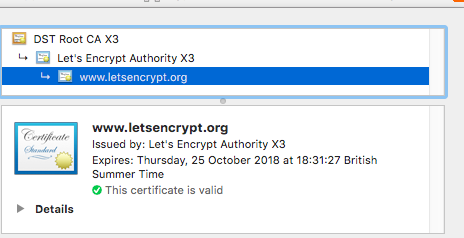
From research as examples: Letsencrypt
DST Root CA X3 (Included in windows) Let’s Encrypt Authority X3 (Not Present)
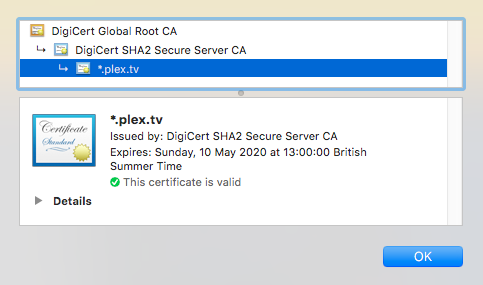
Digicert
DigiCert Global Root CA (inlcuded in windows) Digicert SHA2 Secure Server CA (not present)
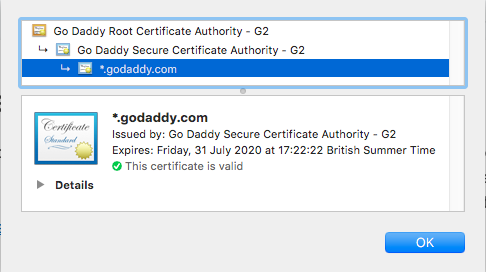
GoDaddy
Go Daddy Root Certificate Authority - G2 (included in windows) Go Daddy Secure Certificate Authority - G2 (not present)
Great news, mrz! I’m really glad you are working on this issue.
But I cannot get it to work. I have installed 6.44beta6 and I cannot find this option. Can you tell me how to configure it? Or maybe it just works automatically?
By the way, now I’m getting some other error when connecting from Windows 10: “The context has expired and can no longer be used”.
Sorry, my fault. It seems i was importing certificate private key with wrong password. I have imported it again and went back to the first error: “IKE authentication credentials are unacceptable”.
But after some more time I’ve got it working!
It seems for now we have to use terminal to configure that certificate chain option. Here is an example for Comodo:
ip ipsec peer set certificate=YOURCERTIFICATE.cer,comodorsadomainvalidationsecureserverca.crt
Of course, your certificate with private key and Comodo’s intermediate certificate should be imported to Mikrotik.
I hope this option will be added to winbox soon or maybe with stable firmware release.


 But what about non-domain PCs? Again we have to write some additional instructions to users regarding installing certificates.