the new look of the forum is absolutely confusing and confusing for me, but that's probably a matter of taste. Golden old system. 
If you mean mine mod looks confusing compared to original, pls tell what's wrong exactly?
I remember the old interface, I don't know if Mikrotik changed the interface and you made some changes, or if this entire change is yours. . . Answers: 3 were displayed somewhere under the post, when I clicked the answers were expanded, but then by scrolling down they reappeared as separate posts. . . I don't know, but don't take it personally, that's just for me, it was easier to view and read, although maybe sometimes the continuity of the posts was lost, but like I said, it's just for me. But now I found out that when I translate the page in chrome, the buttons Reply, share, etc. I don't respond. . . .
You missed a few things that happened:
- Mikrotik changed the WHOLE board software (not just the interface) from the old phpBB to the current Discourse.
- Discourse - while having some own "queer" (IMHO) peculiarities - is essentially a white canvas with basic (and often completely and utterly wrong) defaults.
- The old software was called phpBB where the BB meant Bulletin Board, it was specifically aimed to be a bulletin board/forum software
- Discourse is the new thing, defined as "A powerful platform for support, teamwork, and everything community", by default it is not suitable for support, let alone teamwork or everything community and needs to be painstakingly customized in each and every aspect.
- The good Mikrotik guys did a WONDERFUL work in the transition (honestly it is more than 20 years I am around on forums and never experienced such a smooth transition, often even new releases of same board software create havoc in past content) and are still doing a lot of background work to round corners and level bumps.
- BUT a large number of settings remain (and it is perfectly understandable why) the default ones, so Teslasystems put together an external (autonomous, not endorsed by Mikrotik) way to modify the looks of Discourse so that is more readable/usable
- This latter consists in a .css that you can (optionally) load on your browser.
Teslasystems is - within limits - very open to suggestion/ideas to make the .css "better" and - in any case - his work represents a good base for further modifications (if you feel like doing that).
So, if you can explain in detail the issues you are having and what you think could be changed to resolve them AND IF these changes are "reasonable" AND IF they can implemented through .css overlay, they may be included in the .css or however some hints may be given to make your own modifications to it.
Thanks again....
Thank you for the explanation and your time.
Small update
Firefox version: mtForum_FF_r14.zip (18.7 KB)
Other browsers version: mtForumOther_r14.zip (18.4 KB)
Fixes after recent site updates:
- Fixed incorrect position of 'New posts' notification
- Fixed incorrect borders around post edit history icon
- Fixed time gaps lost custom appearance
- Fixed oversized post actions buttons
- Removed rounded corners for post notices, that are out of place in there
- Restored previous Consolas font for code blocks
For me JetBrains looks awful. If you like the new font, just remove this line from the code:
--d-font-family--monospace: Consolas, Monaco, monospace !important;
(line 62 in the code for Firefox, line 61 in the code for other browsers)
Other fixes:
- Fixed incorrect 'Author' labels on embedded posts (site bug)
Orrendous...
Thank you.
If I could ask for a small favour: could you please include version number in the css file?
Yes, no problem. With next release then.
Would this be ok?
/*************************************/
/*  MikroTik forum appearance mod    */
/*  Version: r14 (2 Oct 2025)        */
/*************************************/
Almost perfect, where is (c) or licence? Sign of times 
I'll think about it 
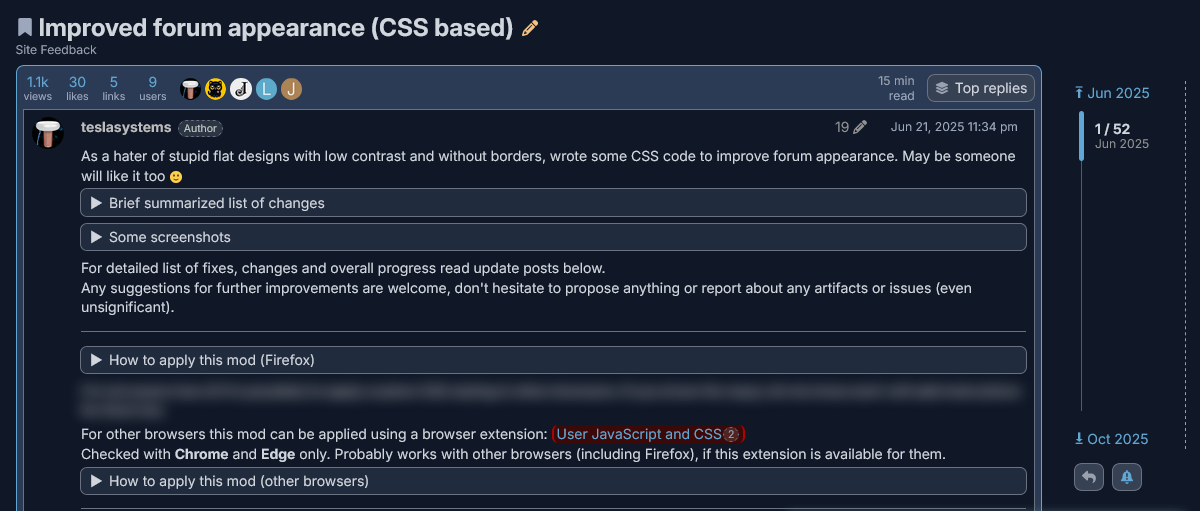
New big update:
Firefox version: mtForum_FF_r15.zip (31.3 KB)
Other browsers version: mtForumOther_r15.zip (30.4 KB)
Sorry for a long delay. The update was ready on 19 Feb 2026, but posting it only now. Say thanks to @normis, who banned me for truth about WinBox 4...
General changes:
 Improved appearance and compatibility with different font size settings in user preferences
Reduced many elements, gaps, texts in compact mode
Underline text on mouse hover for all URLs in posts
Added version info to CSS file
–
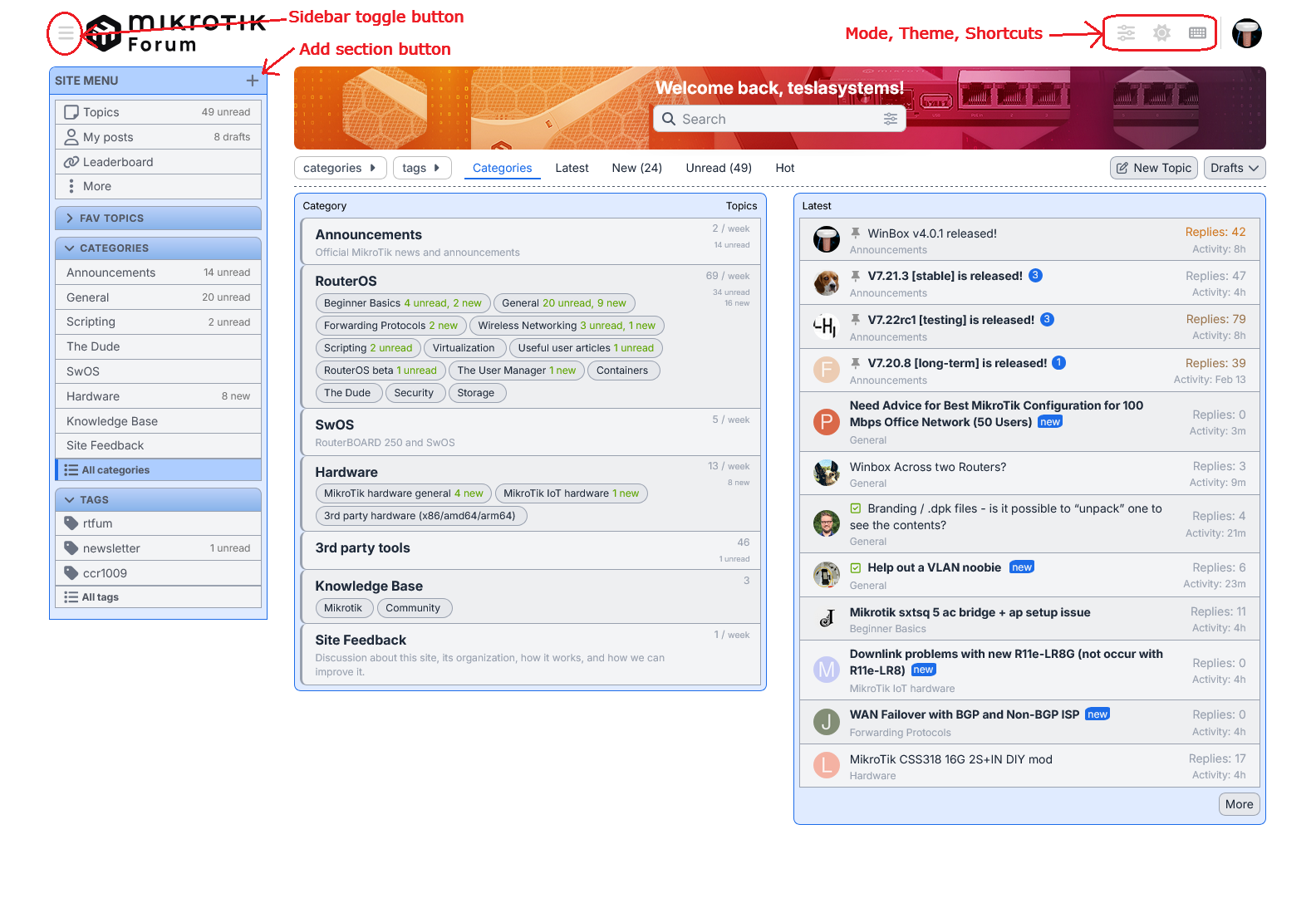
Redesigned left sidebar
- Table-like appearance with groups, instead of ungrouped separated items
Rearranged site control buttons 
- moved sidebar toggle button to the top-left corner near sidebar itself (won't comment placing it at the opposite edge, it's normal for MT...)
- moved 'Mode', 'Theme' and 'Keyboard Shortcuts' buttons to the top near user profile icon, adjusted size to fit the new place and added separator
 Unfortunately, it's impossible to always show them using CSS. They will be hidden, when sidebar is hidden, because of stupid site design and behavior
 - integrated 'Add custom section' button into sidebar frame
–
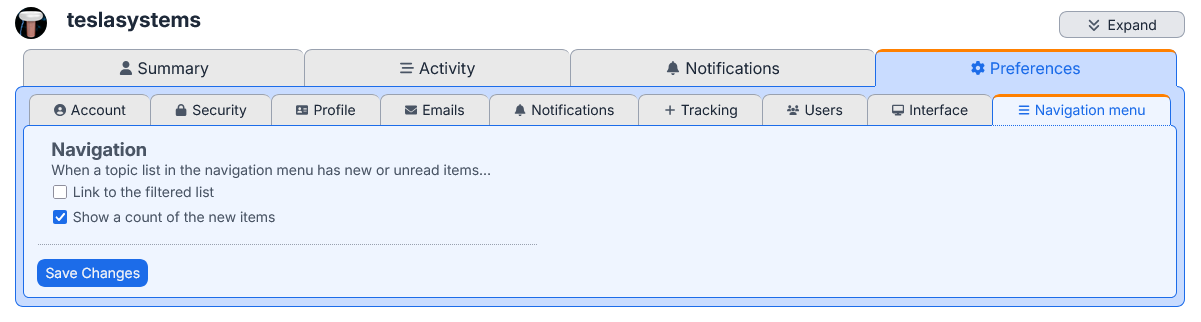
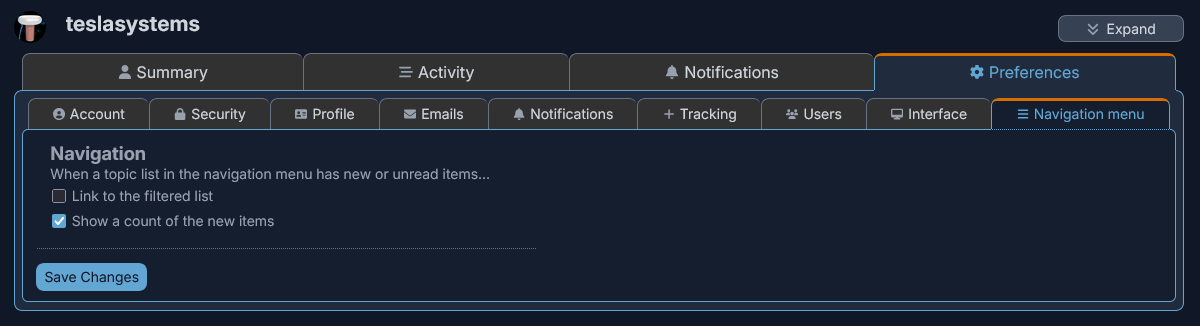
Updated appearance of user profile
- added outer frames
- made clear tabs design instead of ungrouped underlined labels
- more compact lists on Activity/Notifications pages
- interleaved background colors for rows in lists
- fixed checkboxes size was unchanged, when changing mode or text size, also fixed vertical misalignment with their captions
- some adjustments of spacing and offsets
–
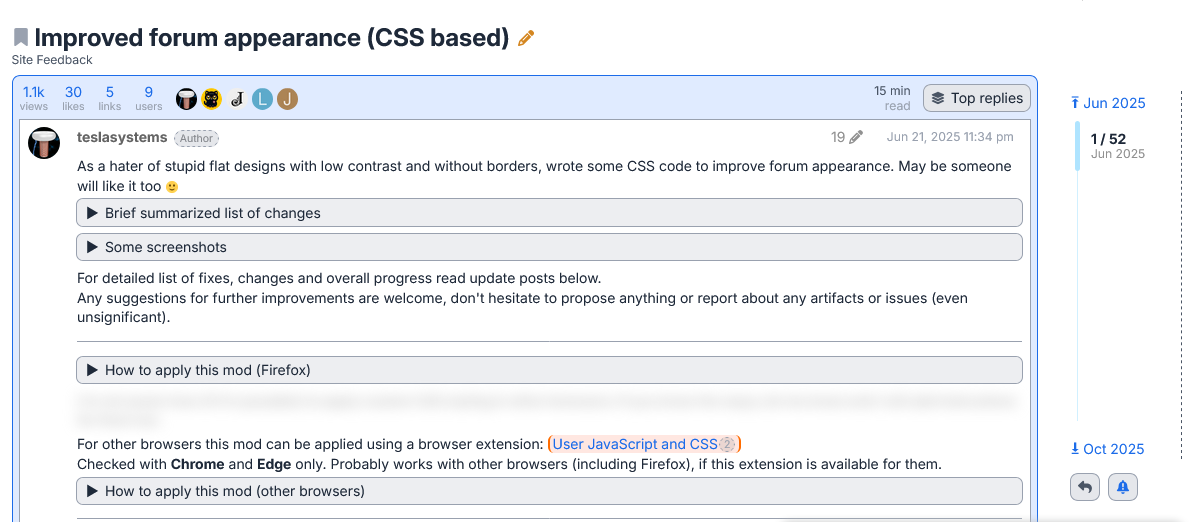
Changed posts appearance
- Added outer frame
- Moved topic summary from the bottom of the first post to the very top of the topic (don't understand, what it was doing below the first post, seems to be another one "genius" design solution)
- Integrated topic summaries (top and bottom) into frame
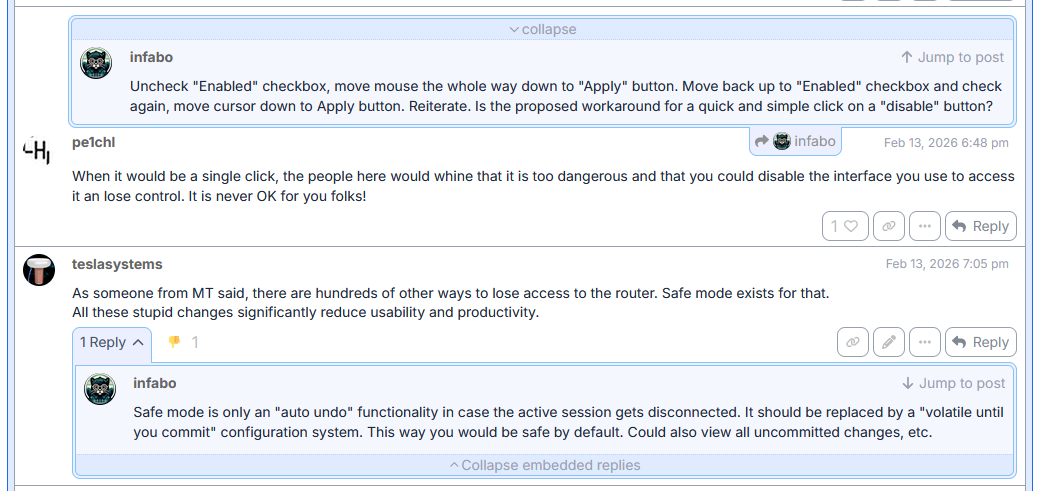
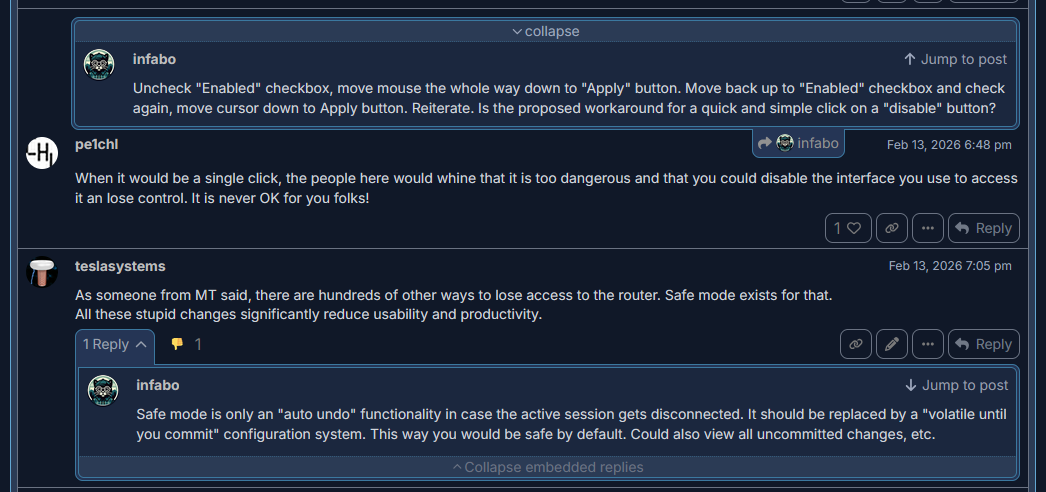
–Also fully redesigned embedded replies:
- grouped them into frame, so now they are clearly distinguishable from regular posts
- integrated 'collapse' buttons into frame
- for bottom embedded replies moved 'Jump to post' to the top for more compact view and to keep it away from post content
–
Highlight links in posts
The purpose is to warn users about potentially unsafe external links
- MikroTik links are considered safe and highlighted with green color (
mikrotik.com, mt.lv, box.mikrotik.com, download.mikrotik.com, forum.mikrotik.com, help.mikrotik.com, support@mikrotik.com, *<let me know about others, if I forgot, will add>*) - other links are considered potentially unsafe and highlighted with orange-red color, so the user can decide open it or not
- links to attached files are not highlighted
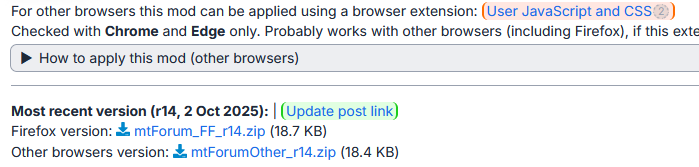
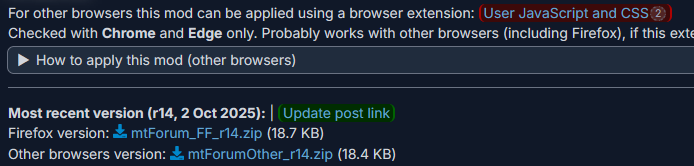
If you don't like it for some reason, you can remove the code from line 3021 to 3048.
–
Reworked forum logo
- separated icon and text into 2 images. When scrolling the topic down, only text image is hidden (and replaced by topic title), while the icon is always displayed. So, no any horizontal icon jumping because of bad misaligned images from MT.
- fits above sidebar
- fixed icon in dark mode (issue: Incorrect logo colors in dark mode )
- fixed incorrect vertical offset (own bug)
–
Improved polls appearance
- Rearranged layout
- Changed background colors
- Rounded corners for everything
- Fixed invisible bars (own bug)
- Fixed paddings
- By default, avatars of voters are now hidden (because it's a secondary information, that looks like some toxic multicolor ad, and it only distracts attention from vote results)
- Made voters to appear on mouse hover and added nicknames, because just avatars are mostly useless by themselves
- Same appearance in posts and on reply form for both preview panel and rich text editor view
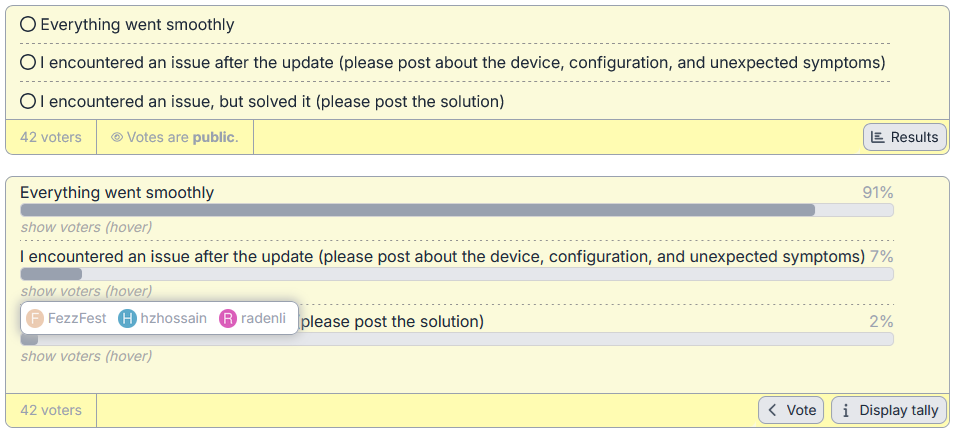
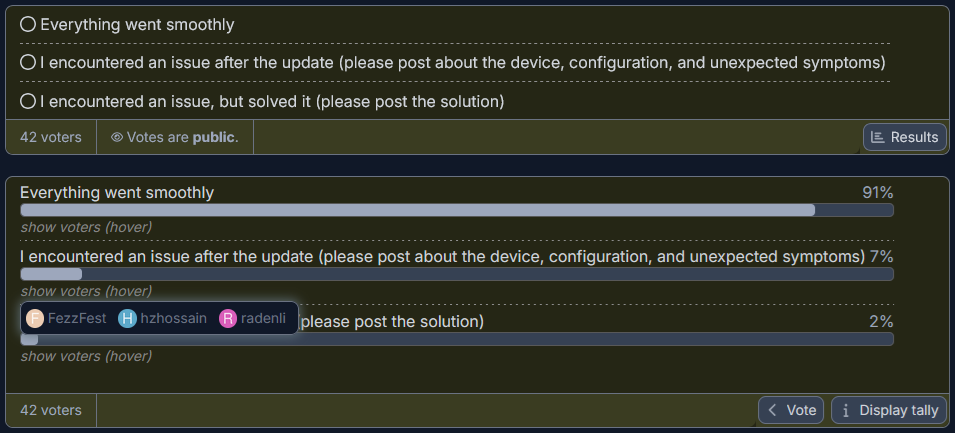
Fixes:
- Fixed excessive gap between reaction and counter (own bug, introduced in r14)
- Fixed inappropriate gray outline color on some 'Blue'and 'Red' buttons (own bug)
- Fixed strange moving of the bottom edge of reply form (site issue)
- Fixed dashed border color under topic navigation bar in dark mode (own bug)
- Fixed too wide 'More' popup menu on sidebar (relevant to smaller screens)
- Fixed incorrect hover color of ' v ' button in user dropdown menu
- Fixed row color interleaving wasn't applied to checkbox column on bookmarks page (own bug)
- Fixed misalignment in welcome banner, when reducing browser window width (site issue)
- Fixed incorrect top border color of first item in tables (own bug)
- Fixed some alignment and sizing issues of reply form on smaller screens
- Fixed vertical misalignment inside quote title
- Fixed misalignment of search suggestions popup under search box on welcome screen (own bug)
- Fixed labels misalignment on login/signup pages (site issues)
- Fixed oversized avatar flair, that was overlapping with count badge in users list popup menu, invoked from topic summary panel
- Fixed unneeded separators inside some dropdown menus (e. g. '+' menu in reply form)
- Fixed description text color in category dropdown menu on reply form for dark mode (own bug)
- Fixed barely visible background of additional menu button on reply form, when expanded
- Fixed some vertical alignment issues of topic status icons
- Fixed incorrect quote title background inside details block on preview panel of reply window
- Fixed incorrect quote title background in revision history window
- Fixed incorrect quote blocks appearance for rich text editor view in reply form
- Fixed overlapping of date with 'Back' button on timeline
- Fixed highlighting of vertical "tabs" in user menu after site updates
- Fixed erroneous horizontal scrollbar appeared on smaller screens (own issues)
- Fixed borders and paddings for buttons in "choose topic" window [appears, when you start to reply in one topic and then browse to another] (own bug)
- Fixed too much padding in 'Flag topic' window
- Fixed badges mess in 'Frequent posters' popup window
- Fixed paddings in 'Most liked replies', 'Popular links' and 'Frequent posters' popup windows
- Fixed imperfections of reply form in 'Saving' state (removed unneeded grippie, adjusted rotating circle position, reduced width)
- Fixed varying height of post actions buttons, also adjusted their width
- Fixed unread topics were not marked with bold font in topics list (own bug, but seems there were some site changes that revealed it)
- Fixed no separator under 'Unpinned' post notice followed by 'last visit' line
- Fixed incorrect separator between time gap and post underneath in compact mode for some cases (earlier, there were no time gaps in this mode)
- Fixed incorrect sharp corners, that stick out of some select fields (site bug)
- Fixed visual issues of 'details' blocks in compact mode (own bugs)
- Fixed visual issues of 'details' blocks in rich text editor mode in reply form
- Fixed 'Link copied' tick position in compact mode
- Fixed some spacing and sizing issues on password reset page
- Fixed incorrect background and borders around footnotes (own bug)
- Fixed no shadow/glow for some menus and reply form tooltips (own bug)
- Fixed little horizontal movements of post timestamp and 'replied-to' button, caused by hidden relative time changes in background
- Fixed cookies notice glow in dark mode and added dotted border on the top edge
- Fixed huge padding in tooltips on reply form (both site and own issues), also updated background colors
- Fixed avatar flair madness in user profile (site issue)
- Fixed bad visibility of 'last visit' line in some cases for dark mode (own issue)
- Fixed no outline for time select box
- Fixed abnormal highlighting of type selectors in 'Build poll' dialog (both site and own issues)
- Fixed attached GIFs jumping, when pausing/resuming them, also fixed no dashed frame, when paused (own issues)
- Fixed attached GIFs going out of bounds, when resizing browser window, while paused (both site and own issues)
- Fixed details blocks appearance in revision history dialog (both site and own issues)
- Fixed problems with attached images in Rich Text Editor (added dashed outline, removed round corners that clip an image, fixed incorrect bottom offset)
- Fixed no spacing between 2 consquent images in Rich Text Editor
Small changes:
- Adjusted 'Author' label colors, when solution post is topic author's post
- Aligned icon of post notices with avatar (again, was broken after some site update)
- Removed abnormal gaps in some dropdown menus
- Removed blue background for author's post to avoid visual issues with new design of embedded posts (hope, 'Author' label would be enough)
- Reduced simple code blocks' height to avoid their overlapping on adjacent lines
- Reduced time gaps height
- Reduced excessive width of some dropdown menus
- Adjusted some colors for better visibility on older TN screens ('Author' label background, solution post background)
- Improved 'New/updated topics' notification compatibility with smaller screens
- Improved alignment of some elements, when not logged in
- Changed appearance of 'last visit' line in topics list a little bit (transparent background)
- Removed out-of-place round corners for alerts in dialogs
- Changed arrow symbol in category paths from
>to➞ - New topics have clear 'new' label, instead of meaningless dot
- Made 'edit' button in topic title always visible, changed its color (how the user is supposed to know about its existence, when it's hidden?...)
- Adjusted topic popup window position, reduced padding, fixed incorrect appearance on smaller screens, lighter background color
- Adjusted position of topic progress counter window, made more clear design
- Changed color for tags
- Improved keyboard shortcuts help dialog (rounded corners, changed groups header color)
- Changed confusing and irrelevant 'Discard' caption of the button, that closes reply form (changed it to 'Close', as it was before)
- Green username color for moderators on 'Users' page
- Highlight background of solution post with green, when solution post = OP's post
- Added arrow indicator to columns in topics lists to indicate which of them are available for sorting
- Added dotted outline and round edges for search tips
- Improved and fixed appearance of ignored users list in preferences
- Returned round corners for some buttons, that lost them after some site updates
- Made blue color and added arrows for start/end date on timeline to indicate they are clickable (I didn't even suspect they are clickable, until one accidental click on them after half-year of using the forum, always used Home/End buttons on keyboard to navigate. Big hello to stupid discourse designers...)
- Changed the way of drawing background for small objects (simple code blocks, mentions, link counters). Now they use semi-transparent color and can be drawn on different backgrounds.
- Reduced onboarding banner in the topics list
Updated categories selector dialog
- Added dashed separator between filter panel and content
- Highlighted parent categories with bold font
- Rounded corners
- Added borders for groups and changed their background (they existed until recent site update)
- Fixed some spacing and alignment
Improved 'Links' footer under post
- blue color to make links look like links
- more compact
- added down arrow before 'More' button
- fixed separator alignment
Improved markdown/rich text switch in reply form
- added outlines
- matched corner radiuses of outline and thumb
- changed stupid hover color, that doesn't differ from slider color
Changed appearance of users list
- outside frame
- more compact view
- fixed oversized avatar flairs
- fixed vertical alignment of user name
Fixed consequences of site updates in Jan 2026.
- Fixed degraded appearance of reply form after site update near 10-15 Jan 2026 (returned top line color, fixed grippie position and returned previous design, reduced huge radius of corners, removed background highilighting on preview toggle button)
- Removed incorrect topics counter in category selection dropdowns
- Removed bad hover background in some flat buttons (expand/go-to buttons in quote blocks, copy/expand buttons in small popup inside code blocks, and similar)
- Fixed buggy quote popup window, that had jumpy share button on hover
What do you think about this update?
- Cool

- Garbage

- Don't like some changes (reply to this post)
- Other (reply to this post)
0
voters
Look, it's much nicer this way... Thanks for your time...
Actually, no, it's not only "nicer," it's clearly more functional than the useless, boundless void that's there by default.
I was already starting to wonder if a newer version would ever appear, or the previous was the last one. Not that it was bad, on the contrary 
This is very good work, Mikrotik should pay you for making their new forum actually usable and implement all the changes by default.
Oh, and a big THANK YOU for the borders!
Waiting my bitcoins 
But in reality, they paid me with a ban for almost 3 months.
For users wanting to try this in Violentmonkey/TamperMonkey, you need to wrap the .css code in this UserScript:
// ==UserScript==
// @name         MikroTik Forum Appearance Mod
// @namespace    MT Forum UserScripts
// @version      1.1
// @description  Native CSS injector for MikroTik forum
// @author       HAL9000
// @match        https://forum.mikrotik.com/*
// @grant        none
// @run-at       document-start
// ==/UserScript==

(function() {
    'use strict';

    const css = `
/* ========================================================= */
/* PASTE YOUR ENTIRE CSS CODE DIRECTLY BELOW THIS      */
/* ========================================================= */


/* ========================================================= */
/* DO NOT EDIT BELOW THIS                   */
/* ========================================================= */
    `;

    // Native way to inject CSS (no special permissions needed)
    const style = document.createElement('style');
    style.type = 'text/css';
    style.textContent = css;

    // Append as soon as the head element is available
    const injectStyle = () => document.head.appendChild(style);
    if (document.head) {
        injectStyle();
    } else {
        document.addEventListener('DOMContentLoaded', injectStyle);
    }
})();
I've tested it with the css file made for "Other browsers" in Edge, using Violentmonkey, use whatever monkey you see fit.
Seems to work.
If possible, could you test Firefox code too? I wonder if the forum logo will be visible or empty.
Besides the BIG thanks to teslasystems  , many, many thanks to znevna for the Tampermonkey mod, I was struggling to have the stupid Tampermonkey accept the script and his header/footer saved the little sanity I still have
  .
.
I know it is not very useful datapoint[1], however the CSS works fine (with the znevna's mods) in TamperMonkey in Supermium (a Chrome fork that I run on Windows XP) 132.0.6834.226.
[1] I don't think many people run the same things I do
Why would you think that ?