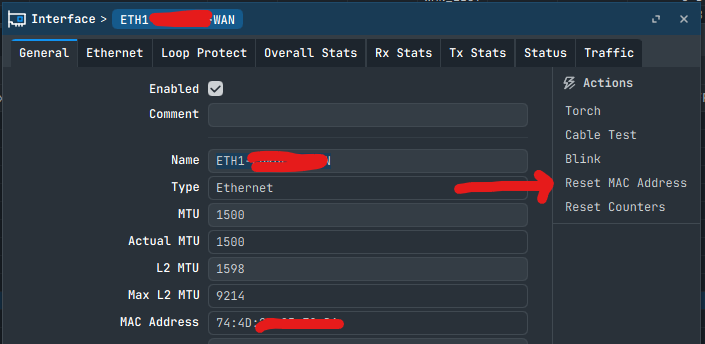
I am facing an issue regarding the MAC address displayed in WinBox on my MikroTik router.
When I look at the Quick Set tab in the software interface, it shows the router's MAC address as 78:9A:18:62:EC:5D. However, when I physically checked the router tray, the MAC address printed on the hardware sticker was completely different: 04:F4:1C:68:71:53.
Because these two MAC addresses do not match, could someone please clarify why this discrepancy is occurring? I would highly appreciate it if anyone could explain the root cause of this issue and let me know how to resolve it permanently so that the software reflects the actual physical hardware sticker.
In the WinBox Neighbors tab, I can see a different MAC address that does not match the physical MAC address printed on the hardware sticker. How can we change the MAC address manually? Any steps are there ?
If it was changed before, it's okay to put it back as it was,
but if the sticker is wrong, the sticker should stay wrong...
As has happened before, and documented several times, labels are swapped for some reason,
such as buying used hardware that wasn't actually new... but refurbished...
Just by searching for MAC on the internet, two people even "swapped" labels, which were different on their products, but each had the other's...
It changes nothing in the device funcionality except some "informational mess".
Compare serials if they match. If not, sticker swapped/changed. If yes, MAC reset should help if only the sticker is not "badly issued by the factory".
The case of the two MAC's/labels exchanged that happened is (was) understandable, as the two devices belonged to a same batch, or at least share the same OUI 78:9A:18.
so a mislabeling in factory was entirely possible.
This one is stranger as the two MAC's belong to different "series".
78:9A:18 belongs to a device that cannot have been manufactured before 05/2023
04:F4:1C belongs to a device that cannot have been manufactured before 03/2025