Insane Rx on WAN, even with a queue limit

Hello,

I have a main router CCR1036 (ROS 6.49.18), with a 1Gbit line on sfpp1-gw WAN, local ip range 192.168.168.0/24. I have a second router CCR2004 for a separate part of the network, with it’s WAN on 192.168.168.113 and LAN on bridge1, using 192.168.71.0/24. It has simple queues on bridge1 for 100M/100M and works like a charm, all speedtests etc get something like 98/98M and the traffic is pretty normal. No Fasttrack on any of the routers.

Now, there is a guy in the network behind both routers with 192.168.71.55, downloading something from amazon. He is fullfilling the 100M limit on CCR2004, I can handle that, but my WAN sfpp1-gw is jumping to insane numbers - like ~700 Mbit Rx for sfpp1 and Tx for bridge, and I can see this on CCR2004’s WAN port too.

If I mangle the traffic for 192.168.168.113 on the main router and create a queue tree for it, the speed stays 700Mbit on WAN, but finally drops to 100M for 192.168.168.113, internet is bad for other computers on 192.168.71.0/24 and it seems the router is giving way more traffic to 192.168.71.55.

What is really weird - if I mangle the traffic for the amazon ip on the main router to 50M, to leave the remaining traffic for others, it finally works well, the queue is red and shows 50M, but I still see 700M Rx on my sfpp1-gw WAN - which is eating my traffic, and the ip can (and does) change, so it is not a solution to limit the public ip outside.

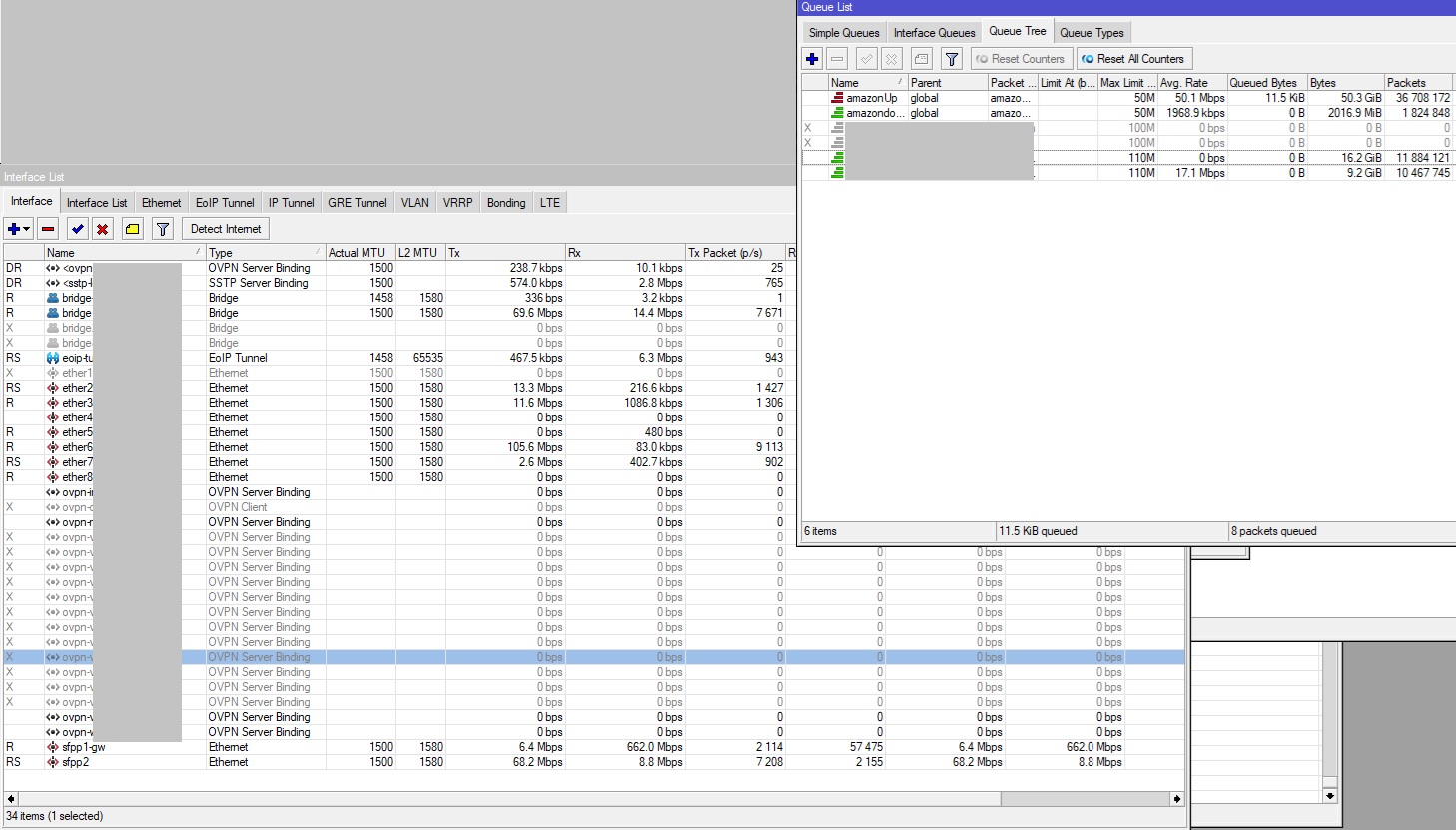
I know I can limit the local 192.168.71.55 ip on second router (although these change too nowadays), but - why the hell is this happening and how to get rid of this? If I had only 500M on WAN, it would totally kill my traffic.. is it some crap download service like aspera? Look at the pic - the amazon public ip is limited to 50M, total traffic on local interfaces is something below 200M (bridge2 is sfpp2+eth2) and sfpp1-gw WAN still jumps to 662 Mbit Rx and I can see it coming from the amazon ip.

So - to summarize it - I have a user with 192.168.71.55, downloading 50/50M, using a queue for his ip on router2(LAN 192.168.71.0/24). Using router 2’s WAN (192.168.168.113), the traffic passes to/from main router (LAN 192.168.168.0/24), I can see download 50M for 192.168.168.113, I can see queue limiting the amazon ip to 50M (red - working), but I see 662Mbit traffic from that ip to my main router’s WAN. Is the amazon server pushing the data hard itself to my wan, ignoring dropped packages by the queue and the speed of the downloading computer? How to get rid of that?

thanks
router poperly firewalled? no exposed services?
and fasttrack disabled?

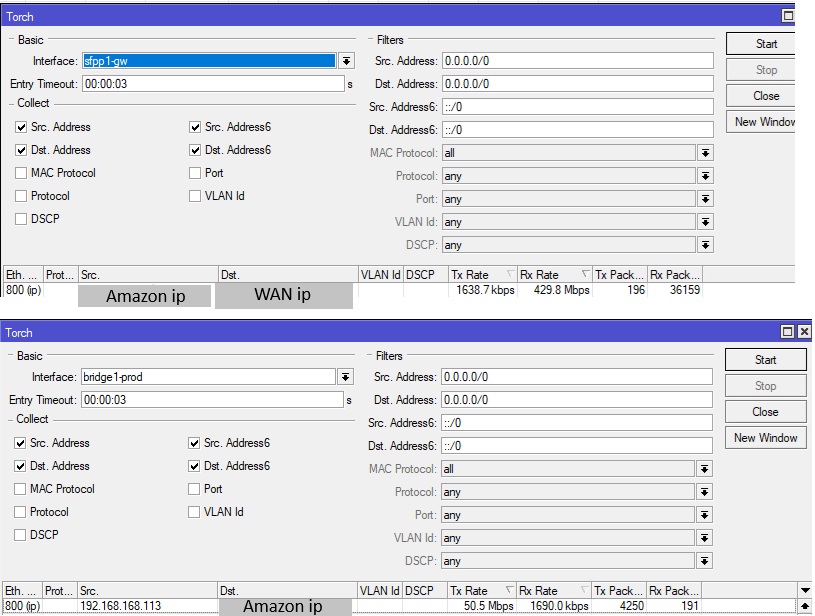
yes, no, yes. When the guy with 71.55 disconnects, it stops. The router must accept it in the established/related rule somehow. But the queue shows it is cut to 50M. The user downloads 50M from that ip. But the router gets 662M. The screen is torch for LAN (bridge1-prod) and WAN (sfpp1-gw) - the router is accepting 430M from the amazon ip, sending 50M to the user and - burning the rest somehow, while wasting my bandwidth

I use pretty standard way to mangle & shape, I’m pretty sure a very similar one is somewhere in Mikrotik’s “Securing your router” guide..

/ip firewall mangle 
add action=mark-connection chain=forward new-connection-mark=amazonconUp passthrough=yes src-address=amazonip
add action=mark-connection chain=forward dst-address=amazonip new-connection-mark=amazonconDown passthrough=yes
add action=mark-packet chain=forward connection-mark=amazonconUp new-packet-mark=amazonUp passthrough=no
add action=mark-packet chain=forward connection-mark=amazonconDown new-packet-mark=amazonDown passthrough=no
/queue tree
add max-limit=50M name=amazondown packet-mark=amazonDown parent=global
add max-limit=50M name=amazonUp packet-mark=amazonUp parent=global

The queue is working strange, the traffic somehow bypasses the queue. If I disable the queue on main router, the 430Mbit traffic gets to the bridge interface and to 192.168.168.113, which is router 2’s WAN ip. But router2 is shaping 192.168.71.55 to 50M/50M using simple queue at the same time, so it cuts the speed, but.. why does the 430Mbit pass all the way from main router’s WAN to LAN to router 2’s WAN? I have never seen that behavior.

router 2 is using the same mangle&queue tree rule to limit the 192.168.71.55:

[@] /queue/tree> print
Flags: X - disabled, I - invalid
0   name="55dup" parent=global packet-mark=55 Up limit-at=0 queue=default-small
priority=8 max-limit=50M burst-limit=0 burst-threshold=0 burst-time=0s bucket-size=0.1
1   name="55down" parent=global packet-mark=55Down limit-at=0 queue=default-small
 priority=8 max-limit=50M burst-limit=0 burst-threshold=0 burst-time=0s bucket-size=0.1
[@] /queue/tree>

damn, tcp 22, UDP 33001 - I had a feeling it looks like that Aspera FASP crap, spitting UDP on me :-/

I know it gives hell to routers, so i switched the queue to ethernet-default and switched the bucket size to 10 (don’t think the bucket had significant effect though) - It was slightly better, the traffic dropped to 300M, so I had to create a custom ethernet queue and raise the queue size - 100 was like 200M, 150 was like 150M and finaly I’m satisfied with 200, the speed on both WANs is 60-70M for the 50M queue, 80-90M for 70M queue, so I’m ok with that.

I am not a fan of these big queues though - anyone has experience with this? Is some queue kind bfifo/pcq/sfq/red etc better than the pfifo I use now?

Queues only work to limit bandwidth if the sender implements proper congestion control that backs off when it experiences signals of congestion. TCP works great (perhaps too well) at this, backing off very aggressively. That’s why “bulk send” systems like Aspera came into business, because they can bypass TCP’s congestion control by using UDP and implementing their own. It seems their system simply doesn’t respond to signs of congestion properly and continues bottlenecking the link in the name of speed.

As the intermediary, there isn’t much you can do about this. It’s not really much different than someone performing a DoS attack - once the traffic hits your WAN interface it’s too late to change it. Only the sender can control the rate, so unless you somehow figure out how Aspera’s congestion control works and trick it into thinking there is enough congestion to slow down, there is likely not much you can do.

I agree these systems don’t play nice with routers and flood it insanely, fortunately after raising the queue size significantly (I am now on 250 when the queue allows 100M/100M), Mikrotik handles it fine.

If I remember correctly my playing with aspera a few years ago, it just fires the udp packets, the receiving system tells it what pakets to resend and the sender slightly alters the speed to lower the amount of packets to resend, if the amount is too high