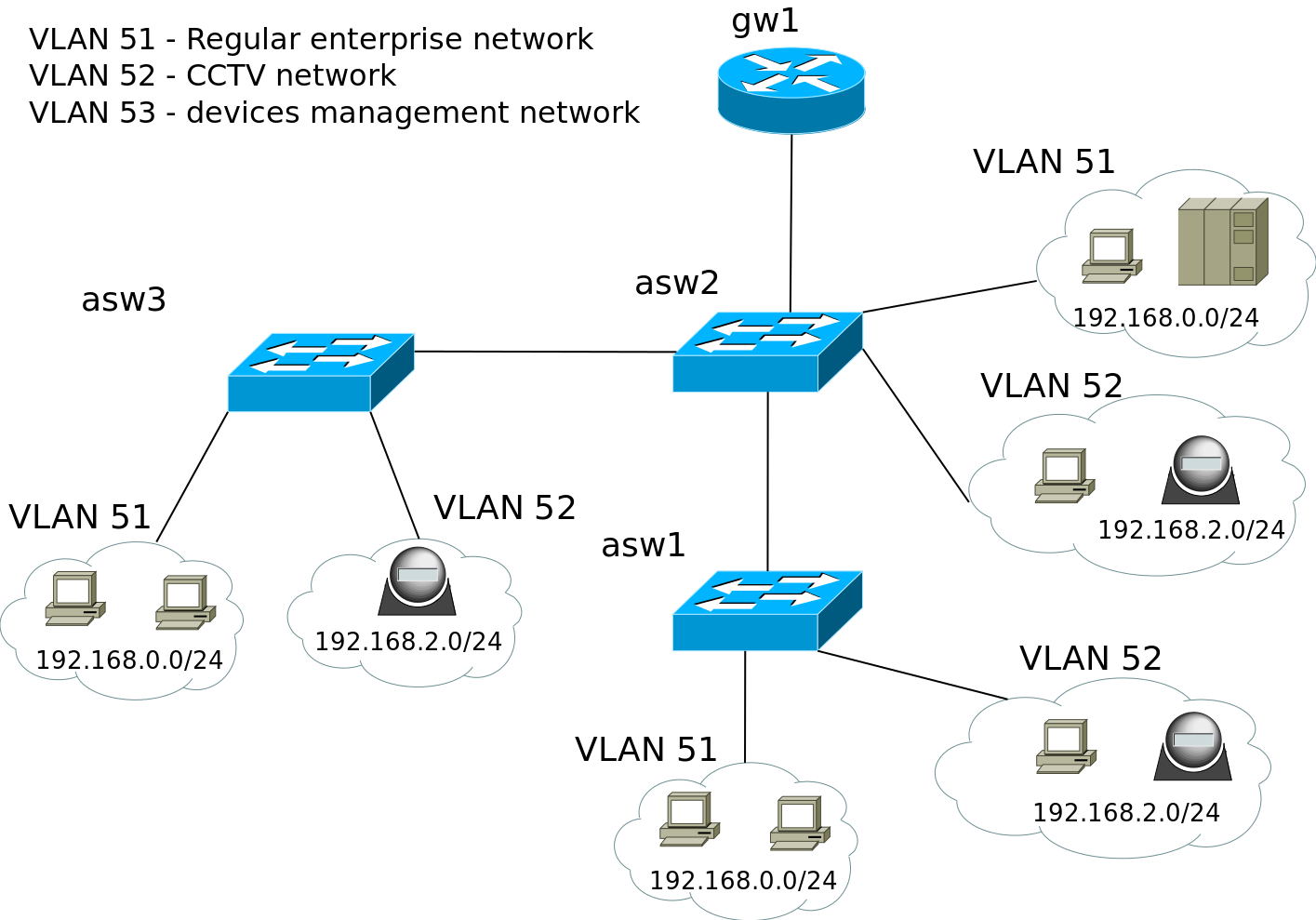
Good day to everyone! Please, do not rail me. I’m novice in serious networking.this manual tells i’ve created vlan interfaces
add name=VLAN51 vlan-id=51 interface=ether1 disabled=no
add name=VLAN52 vlan-id=52 interface=ether1 disabled=no
add name=VLAN53 vlan-id=53 interface=ether1 disabled=no
and then gave ip-addresses to vlans
add address=192.168.0.9/24 interface=VLAN51
add address=192.168.2.9/24 interface=VLAN52
add address=192.168.3.9/24 interface=VLAN53
in routes:
[admin@MikroTik] /ip route> print
Flags: X - disabled, A - active, D - dynamic,
C - connect, S - static, r - rip, b - bgp, o - ospf, m - mme,
B - blackhole, U - unreachable, P - prohibit
 #      DST-ADDRESS        PREF-SRC        GATEWAY            DISTANCE
 0 A S  0.0.0.0/0          192.168.0.9     192.168.0.133             1
 1 ADC  192.168.0.0/24     192.168.0.9     vlan51                    0
 2 ADC  192.168.2.0/24     192.168.2.9     vlan52                    0
 3 ADC  192.168.3.0/24     192.168.3.9     vlan53                    0
I’ve connecting my PC to “access” port on ASW2 belongs to VLAN 52 and in PC network adapter properties have pointing address from VLAN52 subnet and 192.168.2.9 as a gateway. But when I have try to ping address belongs to VLAN 51 I’ve got inaccessibility of that address. I’ve trying to add static route on my PC for VLAN 51 addresses as destination through 192.168.2.9 gateway, but also gave nothing.
efaden
March 13, 2014, 6:34pm
2
luter24:
Good day to everyone! Please, do not rail me. I’m novice in serious networking.this manual tells i’ve created vlan interfaces
add name=VLAN51 vlan-id=51 interface=ether1 disabled=no
add name=VLAN52 vlan-id=52 interface=ether1 disabled=no
add name=VLAN53 vlan-id=53 interface=ether1 disabled=no
and then gave ip-addresses to vlans
add address=192.168.0.9/24 interface=VLAN51
add address=192.168.2.9/24 interface=VLAN52
add address=192.168.3.9/24 interface=VLAN53
in routes:
[admin@MikroTik] /ip route> print
Flags: X - disabled, A - active, D - dynamic,
C - connect, S - static, r - rip, b - bgp, o - ospf, m - mme,
B - blackhole, U - unreachable, P - prohibit
 #      DST-ADDRESS        PREF-SRC        GATEWAY            DISTANCE
 0 A S  0.0.0.0/0          192.168.0.9     192.168.0.133             1
 1 ADC  192.168.0.0/24     192.168.0.9     vlan51                    0
 2 ADC  192.168.2.0/24     192.168.2.9     vlan52                    0
 3 ADC  192.168.3.0/24     192.168.3.9     vlan53                    0
I’ve connecting my PC to “access” port on ASW2 belongs to VLAN 52 and in PC network adapter properties have pointing address from VLAN52 subnet and 192.168.2.9 as a gateway. But when I have try to ping address belongs to VLAN 51 I’ve got inaccessibility of that address. I’ve trying to add static route on my PC for VLAN 51 addresses as destination through 192.168.2.9 gateway, but also gave nothing.
Post your full config… also the clients all have default gateways set?
Post your full config… also the clients all have default gateways set?
mikrotik config
/interface> print
Flags: D - dynamic, X - disabled, R - running, S - slave
 #     NAME                             TYPE               MTU L2MTU  MAX-L2MTU
 0  R  ether1                           ether             1500  1598       4074
 1     ether2                           ether             1500  1598       4074
 2     ether3                           ether             1500  1598       4074
 3     ether4                           ether             1500  1598       4074
 4     ether5                           ether             1500  1598       4074
 5  X  wlan1                            wlan              1500
 6  X  bridge-local                     bridge            1500
 7  R  vlan51                           vlan              1500  1594
 8  R  vlan52                           vlan              1500  1594
 9  R  vlan53                           vlan              1500  1594
10  X  ether_vlan_br                    bridge            1500

/ip address> print
Flags: X - disabled, I - invalid, D - dynamic
 #   ADDRESS            NETWORK         INTERFACE
 0 I ;;; default configuration
     192.168.88.1/24    192.168.88.0    bridge-local
 1   192.168.0.9/24     192.168.0.0     vlan51
 2   192.168.2.9/24     192.168.2.0     vlan52
 3   192.168.3.9/24     192.168.3.0     vlan53
Client PC connected to access port (VLAN52) on ASW2 switch and have settings:
Description  . . . . . . . . . . . . : Intel 8255x-based Ethernet 10/100 PCI adapter
        Physical address. . . . . . . . . : 00-E0-00-17-E4-AC
        Dhcp enabled. . . . . . . . . . . : no
        IP-address  . . . . . . . . . . . . : 192.168.2.3
        Network mask . . . . . . . . . . : 255.255.255.0
        Default gateway . . . . . . . . . . : 192.168.2.9
ping test from Mikrotik CLI passes to all subnets connected to all of described above switches.
[admin@MikroTik] > ping 192.168.2.3
HOST                                     SIZE TTL TIME  STATUS
192.168.2.3                                56 128 0ms
192.168.2.3                                56 128 0ms
192.168.2.3                                56 128 0ms
192.168.2.3                                56 128 0ms
    sent=8 received=8 packet-loss=0% min-rtt=0ms avg-rtt=0ms max-rtt=0ms

[admin@MikroTik] > ping 192.168.3.1
HOST                                     SIZE TTL TIME  STATUS
192.168.3.1                                56 255 10ms
192.168.3.1                                56 255 1ms
192.168.3.1                                56 255 1ms
192.168.3.1                                56 255 1ms
    sent=4 received=4 packet-loss=0% min-rtt=1ms avg-rtt=3ms max-rtt=10ms

[admin@MikroTik] > ping 192.168.0.100
HOST                                     SIZE TTL TIME  STATUS
192.168.0.100                              56 128 0ms
192.168.0.100                              56 128 0ms
192.168.0.100                              56 128 0ms
192.168.0.100                              56 128 0ms
    sent=5 received=5 packet-loss=0% min-rtt=0ms avg-rtt=0ms max-rtt=0ms
No, other clients have different gateway address. Does it matter?
Do you have proper forward rules accepting traffic (including icmp) between vlan interfaces?
Only those that were by default.
[admin@MikroTik] /ip firewall filter> print
Flags: X - disabled, I - invalid, D - dynamic
 0   ;;; default configuration
     chain=input action=accept protocol=icmp
 1   ;;; default configuration
     chain=input action=accept connection-state=established
 2   ;;; default configuration
     chain=input action=accept connection-state=related
 3   ;;; default configuration
     chain=input action=accept in-interface=ether1
 4   ;;; default configuration
     chain=forward action=accept connection-state=established
 5   ;;; default configuration
     chain=forward action=accept connection-state=related
 6   ;;; default configuration
     chain=forward action=drop connection-state=invalid
That’s why it is not working. Each vlan interface is a interface in its own rights.
Yes, it really works.
[admin@MikroTik] /ip firewall filter> print
Flags: X - disabled, I - invalid, D - dynamic
...
 7   chain=forward action=accept protocol=icmp src-address=192.168.0.0/16
     dst-address=192.168.0.0/16
 8   chain=forward action=accept protocol=tcp src-address=192.168.0.0/16
     dst-address=192.168.0.0/16
 9   chain=forward action=accept protocol=udp src-address=192.168.0.0/16
     dst-address=192.168.0.0/16
Thank you!
If those are the only vlans you plan to use its even simpler:
/ip firewall filter
add chain=forward action=accept in-interface=all-vlan out-interface=all-vlan
It seems that i must go to read manual. Thanks, I will try it.
jarda
March 18, 2014, 7:58am
11
Why to use vlans if everything has to pass everywhere?
Sent from Android by Tapatalk.
Actually i added same but icmp not working in vlan
Rajesh
TomosRider:
Very good point!
maybe broadcast traffic reduction if there are many hosts