Please bear with me as I’m new to all this and my terminology probably isn’t going to be correct.
I’ve been struggling with trouble shooting a microcontroller connection issue. It’s an ESP8266 connected to my 2.4 GHz wlan on my hAP ac2 ( RouterOS 6.42.2 ). The device is connecting to the AWS MQTT broker through the PPPoE Client.
I’ve done the packet capture two different ways. 1. Steam to Wireshark 2. By creating a file in the Packet Sniffer Settings on the router. Both reflecting the same results.
I’m getting intermittent disconnects and the first that I can diagnose it (in Wireshark) is a delay in the packet between being received on the wlan and then bridge. When it’s working I can see less than 0.1ms difference. The start of the problem is when the pcap shows more than a 700ms delay between the two.
Can anyone please help? How is it possible that there is a delay in the packet between wlan and bridge?
Almost 3/4 second until the frame gets from one interface to another through the bridge is definitely a crazy value. It may be a bit biased because the sniffing subsystem also has its caveats but as the issue has a real impact, I’d guess that the value is not a method error but at least good part of it is real.
What does the /tool profile show while this happens? If nothing special, do you need to have the wlan interface as a member port of a bridge or can you assign an IP address & subnet directly to it and route between the wlan interface and the PPPoE interface directly (if e.g. the bridge software had problems with core switching or something alike)?
Edit: Is there a way to check on the pcap packets what interface the packets are from?
Sorry, so I think I’ve got this a little wrong. The second packet is actually originating from the device so what I think I’m seeing is the complete failure of the bridge to receive anything from wlan.
I’ve changed the interface to just the wlan on the Mikrotik and done a capture. Now just waiting to do the same on the bridge. (difficult to capture as it is random) And then compare against each other.
Is it possible to have a failure of the bridge like this?
That’s the PITA of using plain pcap format where you cannot see which frame comes from which interface. But if the packet is in the capture, it must have get in somehow, and the only way is the wireless interface, so we may assume that the wireless path is OK. In both your screenshots, the packets have the same src and dst ports ans size and Wireshark interprets the second as a retransmission, so I’d assume they go in the same direction. But debugging on screenshots is a PITA too, so posting the pcaps with the two packets would be much more useful.
Well, it’s software and hAP ac² is quite a new platform, so everything is possible, the question is only the probability of various reasons.
Once again, what does /tool profile say about CPU load during normal operation and when the issue strikes?
Sorry, just watching the profile doesn’t show anything different. Is there a way to log values to a file to be sure?
Having looked at the pcap files I’m almost sure outgoing wlan packets are not getting to bridge and incoming bridge packets aren’t getting to wlan.
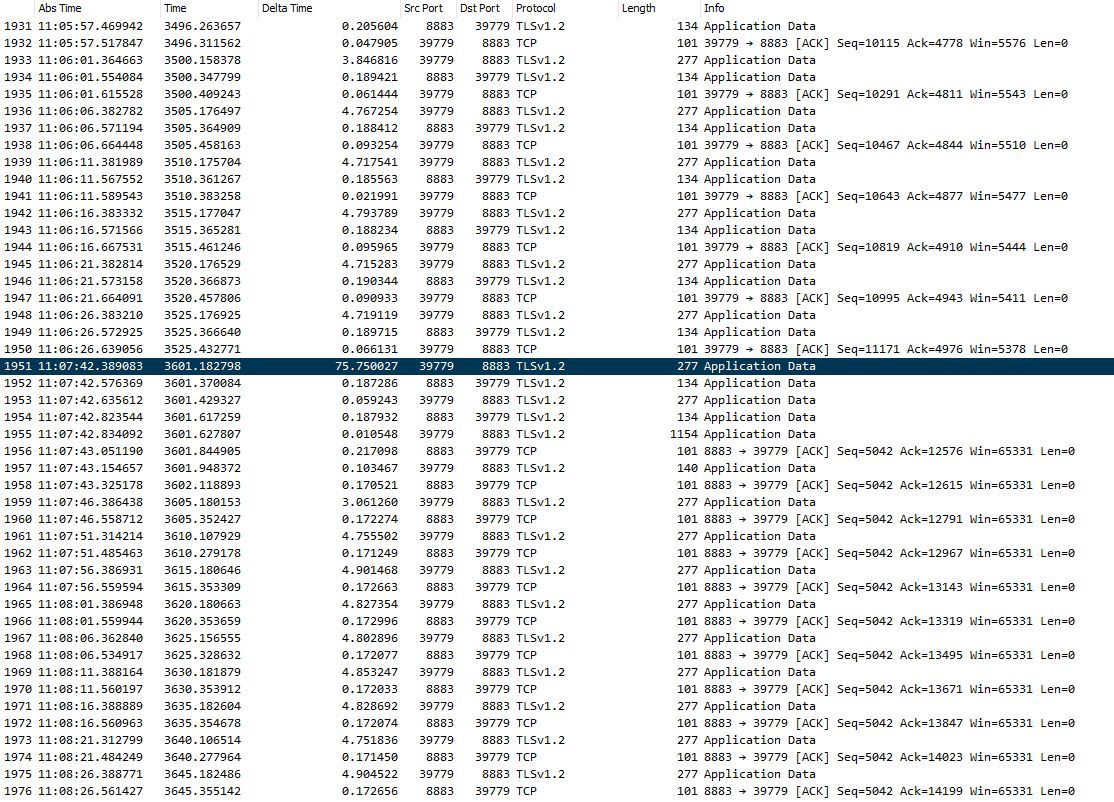
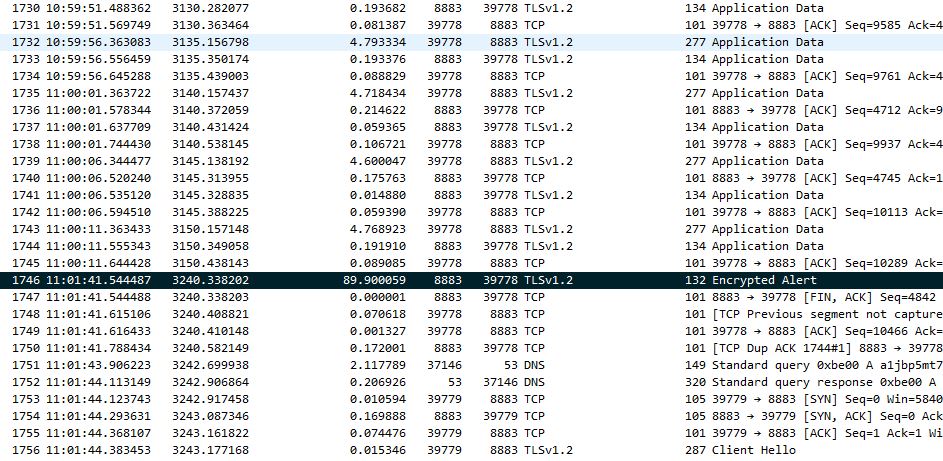
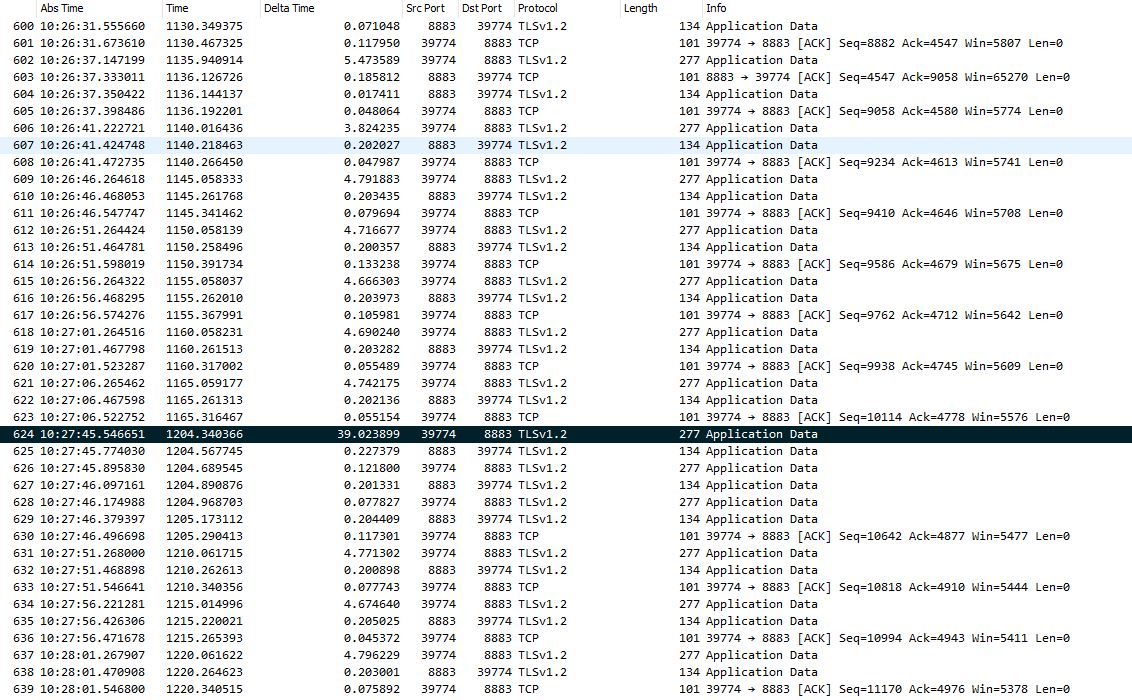
This happens for about 96 seconds and causes the break in connection.
If nothing special, do you need to have the wlan interface as a member port of a bridge or can you assign an IP address & subnet directly to it and route between the wlan interface and the PPPoE interface directly
You’ll need to dumb this down for me or link to a example so I can try.
I think no automated one, but there should be something visible if overload was the case. I suppose the profile says the cores are all bored up to 2%, am I right?
So when the issue is there, you can see some frames only once, when the issue is not there, you can see each frame twice, right?
Are you saying that the issue is active for 1.5 minute continuously and then disappears? And during that 1,5 minute, /tool profile shows business as usual?
The idea was that you remove the wlan1 interface from the bridge (/interface bridge port remove [find interface=wlan1]), of course while the PC from which you configure is connected using a cable), and assign its own IP address and subnet to it, and attach a dhcp-server with pool and network configuration to it, all by analogy with the existing ones for the bridge and differing only in the subnet prefix. Assuming that you use the default address and subnet 192.168.88.1/24 on the LAN bridge, you would add
Depending on your firewall rules, you may have to add wlan1 as a member of interface list LAN or use some other mid-level wizardry to permit routing between the new subnet and the rest of the world.
Normally yes if they contain nothing you would mind the whole world to see. Tracewrangler is a nice tool allowing you, among other things, to anonymize the pcap files, but sometimes anonymization makes troubleshooting impossible. Use cloudshark.org or any common file sharing service and put a login-free link to the capture here.
The ESP8266 (IoT device) is now publishing an MQTT message every 5 seconds to AWS (Amazon Web Service). I’ve got a command line console view on the ESP so I can see that it’s actually publishing when it should be. And confirming that messaged are received by AWS on their website.
I’m running Wireshark watching the bridge interface on the Mikrotik to see when the packets pass through and have Winbox /Tools Profile running watching the Usage.
So I know that the ESP is publishing every 5 seconds and I’m intermittently seeing gaps of 21s / 39s / 47s / 67s / 75s / 89s, on Wireshark, between packets on the bridge. So defiantly something wrong. Anything longer than 60s and the MQTT broker disconnects, which causes issues with the ESP. With the smaller breaks on the bridge, the MQTT protocol can deal with and probably why I haven’t picked them up until increased the publish time to 5 seconds.
As for the Profile I haven’t noticed anything it’s hard to say when trying to watch 3 windows at the same time, it happening randomly and there is now way to record short of doing a full screen recording.
Not sure if I can be of too much more help. Also think I’m going to shelf the router until there is a solution. (Happy to mail support with pcaps if required.)
This is a user forum frequently visited by support staff of Mikrotik but they are in no way obliged to read every single topic.
You can always create a supout.rif file and send it together with a link to this topic to support@mikrotik.com, but I’m still not sure that it is a bridge problem.
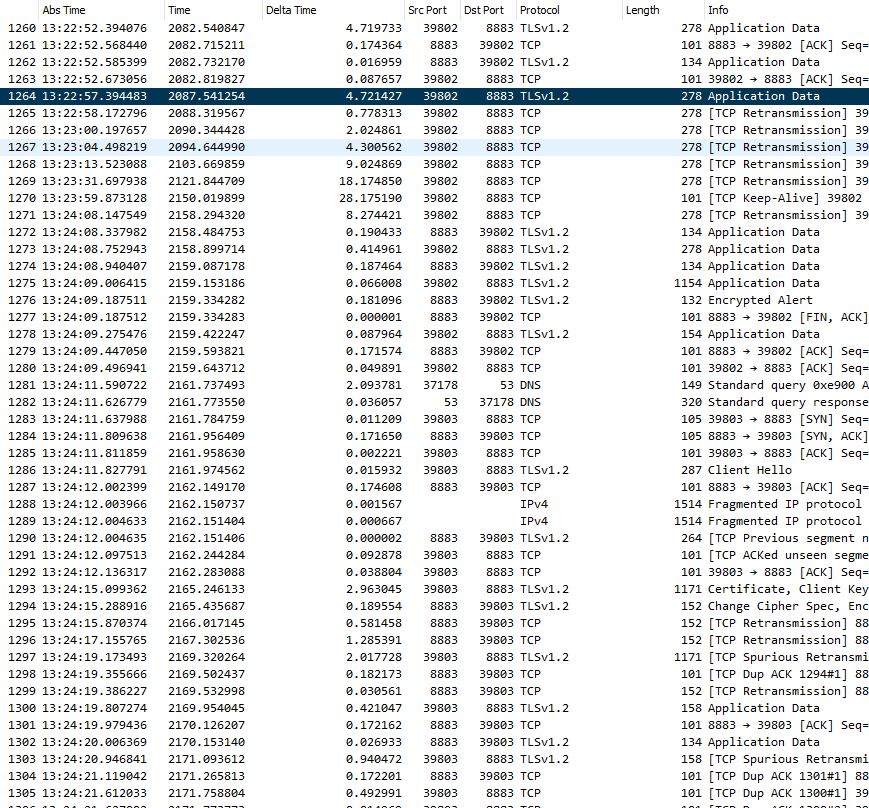
The screenshots you’ve posted now seem to come from sniffing on a single interface. If it is the one closer to the AWS end, fine, but if it is the one closer to the ESP end, where are the retransmissions which would have to be there if the packet was lost? A normal TCP stack would definitely start retransmitting if an ACK didn’t come back in units of seconds.
So taking the same captures on the wireless interface should shed more light.
OK. This second capture makes it clear (at least for me ) that the packets are lost on their way through Mikrotik’s bridge. Time to send the link to this topic to support, along with the supout.rif file.


 ) that the packets are lost on their way through Mikrotik’s bridge. Time to send the link to this topic to support, along with the supout.rif file.