Interface packets discard.

Hello guys,

N00b question here =)

I’m trying to understand when my router discards packets (e.g. the output interfaces cannot handle more traffic).

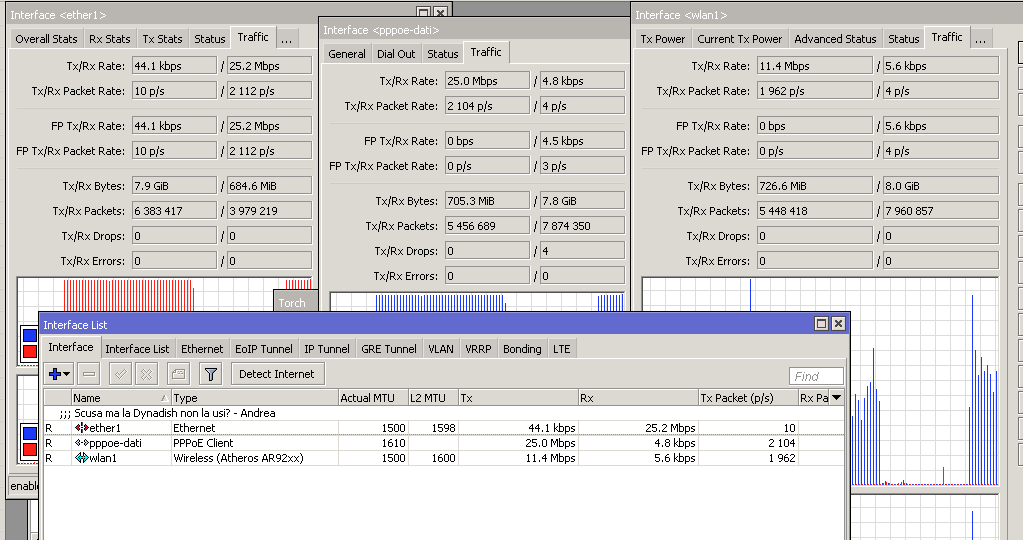
As you can see in the attachment, I was sending 25Mbps from ether1 inside the router, that was expected to be routed out on pppoe-dati (that it’s attached on wlan1).

Unfortunately wlan1 can handle just ~10Mbps, and as you can see in the attached picture, the router is blackholing ~14Mbps of traffic.

I was expecting the counters rx/tx-drop to increase on one of the interfaces involved but nothing happened :frowning:.

Do someone know where are the counters that I’m looking for?

Thanks =)
Screenshot 2019-06-09 22.10.19.png

Looks to me like traffic is going to pppoe-dait (internet?) from ether1 (lan?). Download probably. No drops. → upload

As the OP says pppoe-dait uses wlan1 as transport interface, it doesn’t seem plausible unless there was some mysteriously efficient compression. Is compression set to yes in the ppp profile?

right. any queueing in place which limits the traffic?

Or just post your config: /export hide-sensitive compact…

No queue configured :slight_smile:

It’s simply the interface wlan1 that it’s not able to dequeue from the interface queue as fast as pppoe-dati is fillling it :slight_smile:


I will double check the configuration of the pppoe but I doubt that compression is enabled.

Just to be clear, my laptop was connected to ether1 and was generating traffic towards a destination reachable via pppoe-dati (that is attached to wlan1)

No queues e no compression enabled :slight_smile:

/interface ethernet
set [ find default-name=ether1 ] comment=“”
/interface wireless
set [ find default-name=wlan1 ] adaptive-noise-immunity=ap-and-client-mode ampdu-priorities=0,1,2,3,4,5,6,7 band=5ghz-a/n
disabled=no ht-supported-mcs=
mcs-0,mcs-1,mcs-2,mcs-3,mcs-4,mcs-5,mcs-6,mcs-7,mcs-8,mcs-9,mcs-10,mcs-11,mcs-12,mcs-13,mcs-14,mcs-15
rate-set=configured ssid=yeah supported-rates-a/g=
6Mbps,9Mbps,12Mbps,18Mbps,24Mbps
/interface pppoe-client
add add-default-route=yes allow=pap disabled=no interface=wlan1 keepalive-timeout=60 max-mru=1450 max-mtu=1450 mrru=1614
name=pppoe-dati use-peer-dns=yes user=user
/interface list
add exclude=dynamic name=discover
/interface wireless security-profiles
set [ find default=yes ] supplicant-identity=MikroTik
/ip ipsec proposal
set [ find default=yes ] enc-algorithms=3des
/ppp profile
set *0 use-compression=no use-encryption=no
/snmp community
set [ find default=yes ] addresses=0.0.0.0/0
add addresses=0.0.0.0/0 name=test security=authorized
/system logging action
set 0 memory-lines=100
set 1 disk-lines-per-file=100
/interface bridge settings
set use-ip-firewall=yes use-ip-firewall-for-pppoe=yes use-ip-firewall-for-vlan=yes
/ip neighbor discovery-settings
set discover-interface-list=discover
/ipv6 settings
set max-neighbor-entries=1024
/interface list member
add interface=ether1 list=discover
add interface=wlan1 list=discover
/interface wireless snooper
set receive-errors=yes
/ip address
add address=192.168.7.1/30 interface=ether1 network=192.168.7.0
/ip dns
set servers=10.5.0.1
/ip firewall nat
add action=masquerade chain=srcnat out-interface=pppoe-dati
/ip proxy
set cache-path=web-proxy1 parent-proxy=0.0.0.0
/ip route
add distance=1 dst-address=192.168.0.0/24 gateway=192.168.7.2
add distance=1 dst-address=192.168.3.0/24 gateway=192.168.7.2
add distance=1 dst-address=192.168.6.0/24 gateway=192.168.7.2
add distance=1 dst-address=192.168.10.0/24 gateway=192.168.7.2
/ipv6 dhcp-client
add interface=pppoe-dati pool-name=pool-ipv6-delegation request=prefix
/radius
add address=1.2.3.4 service=login
/snmp
set contact=Me enabled=yes location=“” trap-community=“” trap-target=“” trap-version=3
/system clock
set time-zone-name=Europe/Rome
/system identity
set name=“Cpe”
/system leds
set 0 interface=ether1 leds=user-led type=interface-activity
/system logging
add topics=wireless
/system ntp client
set enabled=yes primary-ntp=193.204.114.232 secondary-ntp=193.204.114.233
/tool graphing interface
add interface=ether1
add interface=pppoe-dati
/user aaa
set default-group=full use-radius=yes

Any ideas? :slight_smile:

:frowning:

This looks like a bug.

How can I report it?