Intermittent 3-4 second freezes affecting RDP sessions to ESXi virtual machines

Hello,

I am using a MikroTik RB5009UG+S+ running RouterOS 7.23.1.

Behind this router, there is an ESXi host running two Windows Server virtual machines. Users access these servers via RDP and occasionally experience short freezes. During these periods, mouse and keyboard input stop responding for approximately 3–4 seconds and then continue normally.

The issue is intermittent. When it occurs, it may repeat every 2–3 minutes for a period of time and then disappear completely. There are no disconnects; only brief freezes.

At the moment, I have not observed high CPU or memory utilization on the MikroTik device. I would appreciate any recommendations regarding logs, diagnostics, or specific RouterOS settings that should be checked.

Could this behavior be related to network latency, packet loss, interface negotiation, bridge configuration, FastTrack, or any known issue with RouterOS 7.23.1 on RB5009UG+S+?

Thank you for your assistance.

Hello,

Does connecting to these servers via RDP only happen from the internal LAN or is it from outside? Use vpn? Is your firewall config configured as specified here?

1)check rb5009 packet loss... /tool ping 8.8.8.8 interval=100ms. And also ping the ESXi host:/tool ping 192.168.x.x interval=100ms

2)Check interface error - /interface ethernet print stats

  1. Check ESXi host performance, During a freeze, look for: CPU Ready time, storage latency, datastore latency,ballooning or swapping. Important ESXi metrics: CPU Ready > 5–10%,Disk latency > 20 ms, Storage spikes every few minutes..

A storage subsystem pausing for several seconds can make RDP appear frozen while the TCP connection remains alive.

  1. Duplex and speed mismatches, verify the ESXi uplink: /interface ethernet monitor etherX :1G full duplex?
    10G full duplex? no renegotiations
    If the interface occasionally renegotiates, RDP freezes of several seconds are very common.

  2. the probability ranking would be approximately: ESXi storage or CPU pauses, Physical network problem (errors, STP, switch issue), MikroTik FastTrack/queue/VPN interaction, and - ISP packet loss (if users connect remotely).

A guess:
There was quite a big thread some time ago on issues with UDP, and
RDP.

If your config was created on an older version routerOS, it is worth checking
that the UDP timeout is 30S.

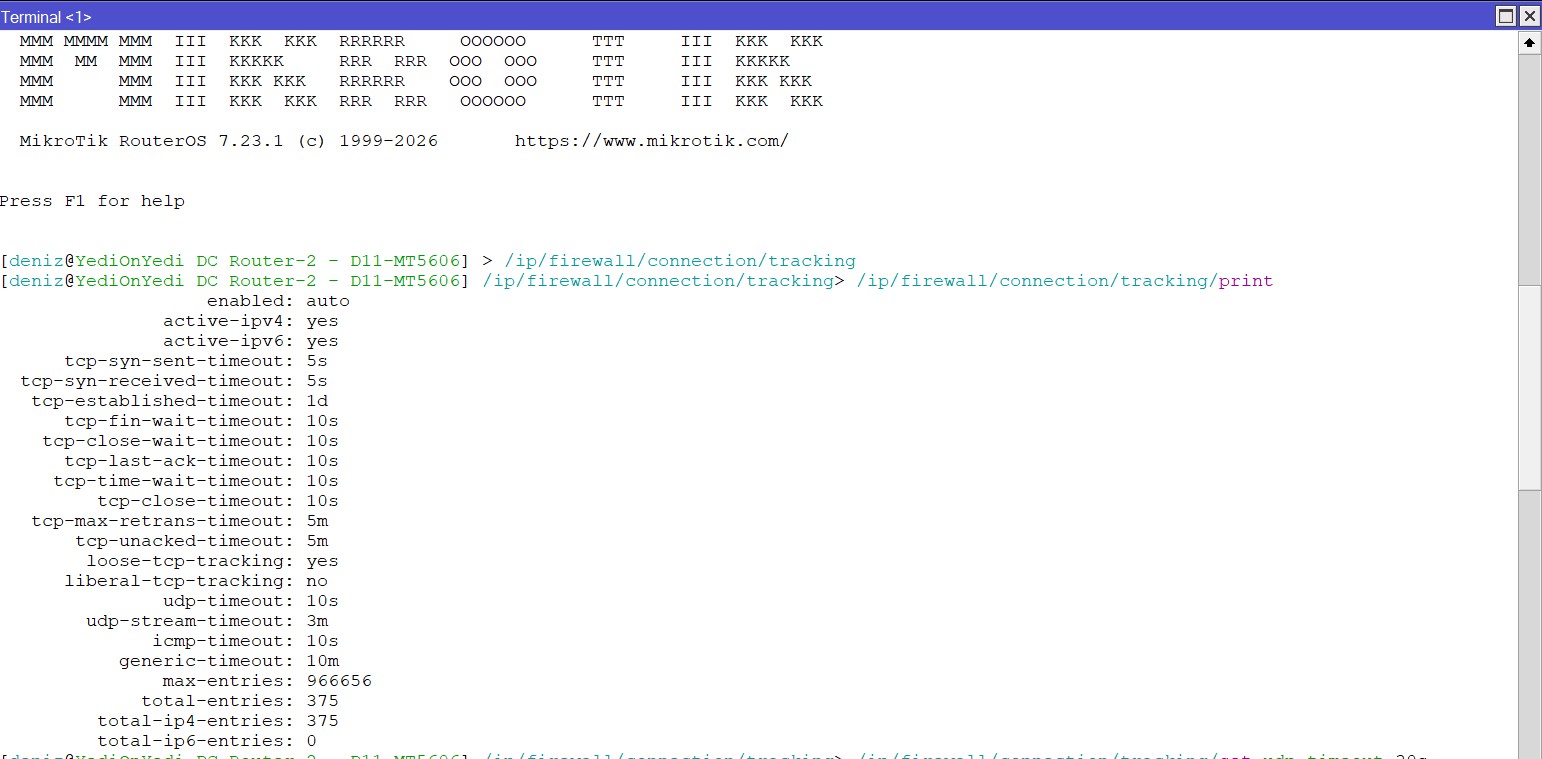
/ip/firewall/connection/tracking

You could try blocking UDP on 3389 and see if that has any effect.

Hello,

The UDP timeout was 10s, and I've now updated it to 30s

. I'm attaching the first screenshot.

Hello,

First of all, thank you for your help. I’ve attached the screenshots you requested. It’s connected via ESXi eth2.

The links to the screenshots are as follows:

Link:

https://streamable.com/zj1q45

https://streamable.com/hox6vo

It is impossible to help you properly because you are not answering the questions that are asked.

Even though I set the UDP timeout to 30S, the problem persisted. I’ve now started running the device through another MikroTik. Users are currently testing it; let’s see if the problem persists...

Thank you.

Hello,

Since I’m a new user, I may not have been able to attach a screenshot or include a link to the images you requested, so what I wrote might not have made sense.

I ran some additional tests and obtained the following results:

* Users connect to the servers via RDP port forwarding, not through a VPN.

* When the issue occurs, the RDP connection does not drop, but the mouse and keyboard stop responding for about 3–4 seconds, after which they return to normal.

* CPU and RAM usage on the RB5009 are at normal levels.

* There is no sign of overload in the Connection Tracking table.

* I ran continuous ping tests on the ESXi host and detected no packet loss.

* The ESXi uplink connection is operating at 1 Gbps Full Duplex.

* I saw no signs of errors or renegotiation on the Ethernet interfaces.

* There appears to be no critical issue with CPU or RAM resources on the ESXi host.

Following your recommendation, I checked the Connection Tracking settings. I saw that the UDP timeout value was set to 10 seconds and increased it to 30 seconds. I am currently monitoring the system in this configuration.

I will examine CPU Ready, datastore latency, and storage performance on the ESXi side in more detail.

I will share the results here.

Thank you.

Are there any users that are not seeing the problem?

You are assuming the problem is the RB5009.

Can you verify that the problem does not exist for a PC that is directly connected to the LAN that the ESXi host is connected to (in other words, if the problem exists without the RB5009 involved in any way, then trying to solve the problem by changing something on the RB5009 is going to be a waste of time.)

Intermittent problems are much harder to solve than problems can can be reproduced at will.

It's possible that the problem is in the RB5009, but as @johnson73 mentioned, it may not have anything to do with the RB5009.

Are there any uses of RDP on that are on the LAN that the ESXi host is on? Do those users also experience pauses? If so the problem is more likely to be in the ESXi.

Intermittent problems are some of the toughest to troubleshoot, so do anything you can to try to isolate/elimiate things as the cause. If you can remove the RB5009 from the test, and can verify that the problem goes away for users that aren't going through the RB5009, then at least you will know where the root cause has a low probability of being. But then you still have many other possible problems areas, network, router, even the PC that is the client.

Good luck narrowing down the issue. I think all the advice that @johnson gave were good things to investigate.

But you can also look at using something like wireshare to watch traffic (both on the client side and the ESXi side of the link) to look for clues (lost packets, etc.) But if you have never used wireshark, that's goint to be a whole new learning curve.

But if I were you, I would verify that the problem does not exist when the WAN/VPN/Router is out of the path. Otherwise you may be trying to fix a problem you think is related to the RB5009 when if may have absolutely nothing to do with the RB5009.

When troubleshooting intermittent problems, try with the simplest possible situation first, and try to stress it to hopefully trigger the issue.
What app is used on the Windows server when lagging occurs? The video links don’t work anymore..

@KadirCakir

Is your firewall config configured as specified here ? I am very interested in this question.

I haven't seen your firewall configuration, so I'm asking again.

/export hide-sensitive file=config

A little bit off topic but anyway.

You really should not be allowing direct RDP access these days. (Even via TS Gateway is dubious)

There are currently ai enabled bots scanning and attempting and succeeding in brute force attacks on most everything, including RDP servers. (Strict Source IP address restrictions would help this)

Use a VPN, wireguard works well.

Since I'm a new user, I can't upload the config file here—the system won't let me.

By the way, I connected the server to another MikroTik device, and there were no issues for 5–6 hours today. How can I send you the config file?

You can always paste config between < / > code quotes.
(make sure to leave out serial, passwds, ...)

All users are experiencing the issue. There are multiple servers running on ESXi, and they are all experiencing the same issue at the same time. Today, I connected the server to a different MikroTik device, and no issues occurred. This led me to conclude that the problem stems from the device itself or its settings.

@KadirCakir

Open mikrotik Terminal, copy the command- /export hide-sensitive file=config .Then paste config between < / > code quotes to the forum and that's it. No need to upload any files etc. You may have a problem with the configuration itself. Incorrect configuration can greatly affect the router's traffic flow, security, and everything else.

That was a good stratedgy.

Can you leave the "different MikroTik device" in place for a longer period? Intermittent problems don't alway present themselves while you are watching.

How frequently did the problem occur when using the RB5009? Was there any time during the day that is was more likely to happen, or was it "random".

What type of device did you replace the RB5009 with?

Are user complaints the "indicator of the problem", or do you have something that is doing active monitoring?

Do upload the configs (both of the RB5009 and the "different MikroTik device" where the problem does not exist. How to export, sanitize and correctly post your configuration on the MikroTik forum by gigabyte091.

Please leave the model from the header of the export, but do remove you serial number.

In addition remove any sensitive information (perhaps names, mac addresses, etc) or replace with something generic.

If there are global ip addresses, replace them with rfc5737 addresses (e.g. replace first three octects with one of 192.0.2 (TEST-NET-1), 198.51.100 (TEST-NET-2), or 203.0.113 (TEST-NET-3). Those address blocks are reserved for documentation and examples, and are much better for representing global ip addresses than rfc1918 private addresses (that MikroTik incorrectly uses in its documentation).

https://news.ycombinator.com/item?id=16982230
https://tools.ietf.org/html/rfc5735
https://tools.ietf.org/html/rfc1918

Hello,

The server has been connected to another MikroTik device for the past 4–5 days, and no issues have been reported.

Complaints were coming in during business hours and at random times. When the issue occurred, it would recur every 2–3 minutes and last 4–5 seconds.

It is currently running without any issues on the RB4011iGS+ device.

The issue was reported to us by users, and we observed the same problem during our tests at the same time.

I've attached the file contents. Thx.

# 2026-06-29 15:54:16 by RouterOS 7.23.1
# software id = A2IU-E55U
#
# model = RB5009UG+S+
# serial number = HFA0XXX
/interface bridge
add admin-mac=78:9A:18:9F:2C:43 auto-mac=no comment=defconf name=bridge-Lan \
    port-cost-mode=short
/interface ethernet
set [ find default-name=ether1 ] advertise=1G-baseT-full l2mtu=1514 name=\
    ether1-Wan
set [ find default-name=ether2 ] advertise=1G-baseT-full l2mtu=1514 name=\
    ether2-Esx4
set [ find default-name=ether3 ] l2mtu=1514
set [ find default-name=ether4 ] l2mtu=1514
set [ find default-name=ether5 ] l2mtu=1514
set [ find default-name=ether6 ] l2mtu=1514
set [ find default-name=ether7 ] l2mtu=1514
set [ find default-name=ether8 ] advertise="10M-baseT-half,10M-baseT-full,100M\
    -baseT-half,100M-baseT-full,1G-baseT-half,2.5G-baseT" l2mtu=1514
set [ find default-name=sfp-sfpplus1 ] l2mtu=1514
/interface wireguard
add listen-port=13231 mtu=1420 name=wg-system
/interface list
add comment=defconf name=WAN
add comment=defconf name=LAN
/interface wireless security-profiles
set [ find default=yes ] supplicant-identity=MikroTik
/ip pool
add name=default-dhcp ranges=192.168.190.10-192.168.190.254
add name=pool-vpn ranges=192.168.201.101-192.168.201.200
/ppp profile
add change-tcp-mss=no local-address=192.168.201.1 name=OpenVPN only-one=yes \
    remote-address=pool-vpn use-compression=no use-encryption=no use-mpls=no \
    use-upnp=no
/interface bridge port
add bridge=bridge-Lan comment=defconf interface=ether2-Esx4 \
    internal-path-cost=10 path-cost=10
add bridge=bridge-Lan comment=defconf interface=ether3 internal-path-cost=10 \
    path-cost=10
add bridge=bridge-Lan comment=defconf interface=ether4 internal-path-cost=10 \
    path-cost=10
add bridge=bridge-Lan comment=defconf interface=ether5 internal-path-cost=10 \
    path-cost=10
add bridge=bridge-Lan comment=defconf interface=ether6 internal-path-cost=10 \
    path-cost=10
add bridge=bridge-Lan comment=defconf interface=ether7 internal-path-cost=10 \
    path-cost=10
add bridge=bridge-Lan comment=defconf interface=ether8 internal-path-cost=10 \
    path-cost=10
add bridge=bridge-Lan comment=defconf interface=sfp-sfpplus1 \
    internal-path-cost=10 path-cost=10
/ip neighbor discovery-settings
set discover-interface-list=LAN
/interface list member
add comment=defconf interface=bridge-Lan list=LAN
add comment=defconf interface=ether1-Wan list=WAN
/interface ovpn-server server
add auth=sha1 certificate=server cipher=aes128-cbc disabled=no mac-address=\
    FE:CD:14:FC:D6:21 name=ovpn-server1 require-client-certificate=yes
/interface wireguard peers
add allowed-address=0.0.0.0/0 interface=wg-system name=wg-system \
    persistent-keepalive=10s public-key=\
    "xzitTZA6xWv0WFi9scDZXXXXXXXlqNuKLo+GJPgwVA="
/ip address
add address=192.168.190.1/24 comment=defconf interface=bridge-Lan network=\
    192.168.190.0
add address=10.250.1.1/30 interface=wg-system network=10.250.1.0
add address=185.126.XXX.XX/29 interface=ether1-Wan network=185.XXX.XXX.8
add address=185.126.XXX.XXX/29 interface=ether1-Wan network=185.XXX.XXX.8
add address=192.168.100.2/24 disabled=yes interface=ether1-Wan network=\
    192.168.100.0
/ip cloud
set ddns-enabled=yes ddns-update-interval=5m
/ip dhcp-client
add comment=defconf disabled=yes interface=ether1-Wan name=ether1-Wan
/ip dhcp-server
add address-pool=default-dhcp interface=bridge-Lan lease-time=10m name=\
    defconf
/ip dhcp-server network
add address=192.168.190.0/24 comment=defconf dns-server=192.168.190.1 \
    gateway=192.168.190.1
add address=192.168.201.0/24 gateway=192.168.201.1 netmask=24
/ip dns
set allow-remote-requests=yes servers=1.1.1.1,8.8.8.8
/ip dns static
add address=192.168.190.1 comment=defconf name=router.lan type=A
/ip firewall address-list
add address=78.181.XX.XX comment="YediOnYedi - Ev" list=YediOnYedi
add address=95.70.XXX.XXX comment="YediOnYedi - Ofis" list=YediOnYedi
add address=176.235.XX.XX comment="Alfabeta -Superonline" list=YediOnYedi
add address=176.236.XX.XX comment="Alfabeta -Merkez" list=YediOnYedi
add address=85.99.XXX.XX comment="Alfabeta -Valikona\F0\FD Ma\F0aza" list=\
    YediOnYedi
add address=81.215.XXX.XXX comment="Alfabeta -\DDzmir Ma\F0aza" list=\
    YediOnYedi
add address=78.188.XXX.XXX comment="Alfabeta -Kaz\FDm Orbay El Terminali" list=\
    YediOnYedi
add address=5.27.XXX.XXX comment="Alfabeta -Merkez (6. Kat)" list=YediOnYedi
add address=85.104.214.148 comment="Alfabeta -Merkez Defolu Depo" list=\
    YediOnYedi
add address=85.100.XXX.XXX comment="Alfbeta Akkavak" list=YediOnYedi
add address=92.45.XXX.XXX comment="Nebim Merkez" list=YediOnYedi
add address=159.146.XXX.XXX comment="Erden Bilgisayar-1" list=YediOnYedi
add address=89.145.XXX.XXX comment="Erden Bilgisayar-2" list=YediOnYedi
add address=78.188.XXX.XXX comment="Alfabeta -Bomonti" list=YediOnYedi
add address=31.141.XXX.XXX comment="Alfabeta -Merkez LC" list=YediOnYedi
add address=176.227.XXX.XXX comment="Alfabeta Valikona\F0\FD GSM" list=\
    YediOnYedi
add address=188.59.XXX.XXX comment="Kamer GSM" list=YediOnYedi
add address=178.242.XXX.XXX comment="Sad\FDk GSM" list=YediOnYedi
add address=172.XXX.XXX.0/24 comment="Voyar DC" list=Voyar
/ip firewall filter
add action=fasttrack-connection chain=forward connection-state=\
    established,related
add action=accept chain=input src-address=85.99.XXX.XXX
add action=accept chain=forward comment=\
    "defconf: accept established,related, untracked" connection-state=\
    established,related,untracked
add action=accept chain=input dst-port=13231 protocol=udp
add action=accept chain=input in-interface=wg-system
add action=accept chain=input dst-port=1194 protocol=tcp
add action=accept chain=input in-interface=all-ppp
add action=accept chain=input comment=\
    "defconf: accept established,related,untracked" connection-state=\
    established,related,untracked
add action=drop chain=input comment="defconf: drop invalid" connection-state=\
    invalid
add action=accept chain=input comment="defconf: accept ICMP" protocol=icmp
add action=accept chain=input comment=\
    "defconf: accept to local loopback (for CAPsMAN)" dst-address=127.0.0.1
add action=drop chain=input comment="defconf: drop all not coming from LAN" \
    in-interface-list=!LAN
add action=accept chain=forward comment="defconf: accept in ipsec policy" \
    ipsec-policy=in,ipsec
add action=accept chain=forward comment="defconf: accept out ipsec policy" \
    ipsec-policy=out,ipsec
add action=drop chain=forward comment="defconf: drop invalid" \
    connection-state=invalid
add action=drop chain=forward comment=\
    "defconf: drop all from WAN not DSTNATed" connection-nat-state=!dstnat \
    connection-state=new in-interface-list=WAN
add action=drop chain=input comment="defconf: drop all from WAN not DSTNATed" \
    connection-state=!established,related in-interface-list=WAN
add action=accept chain=forward
/ip firewall mangle
add action=change-mss chain=forward new-mss=1452 out-interface=ether1-Wan \
    protocol=tcp tcp-flags=syn
/ip firewall nat
add action=src-nat chain=srcnat src-address=192.168.190.0/24 to-addresses=\
    185.126.216.11
add action=masquerade chain=srcnat comment="defconf: masquerade" \
    ipsec-policy=out,none out-interface-list=WAN
add action=masquerade chain=srcnat comment="defconf: masquerade" \
    ipsec-policy=out,none out-interface=wg-system
add action=dst-nat chain=dstnat comment=185.126.XXX.XXX<>192.168.190.191 \
    dst-address=185.126.XXX.XXX dst-port=2019,1433 in-interface-list=WAN \
    protocol=tcp src-address-list=YediOnYedi to-addresses=192.168.190.191
add action=dst-nat chain=dstnat comment=185.126.216.10<>192.168.190.191 \
    dst-address=185.126.XXX.XXX0 dst-port=58291,8291 in-interface-list=WAN \
    protocol=tcp src-address-list="Voyar Ofis" to-addresses=192.168.190.1
add action=dst-nat chain=dstnat comment=185.126.216.10<>192.168.190.191 \
    dst-address=185.126.XXX.XXX in-interface-list=WAN protocol=tcp \
    src-address-list=Voyar to-addresses=192.168.190.2
add action=dst-nat chain=dstnat comment=185.126.XXX.XXX<>192.168.190.192 \
    dst-address=185.126.XXX.XXX dst-port=\
    2020,2101,2102,2103,2104,2017,2021,9100 in-interface-list=WAN protocol=\
    tcp src-address-list=YediOnYedi to-addresses=192.168.190.192
/ip firewall service-port
set ftp disabled=yes
set h323 disabled=yes
/ip ipsec profile
set [ find default=yes ] dpd-interval=2m dpd-maximum-failures=5
/ip route
add disabled=no dst-address=0.0.0.0/0 gateway=185.126.216.9 routing-table=\
    main
add disabled=no dst-address=0.0.0.0/0 gateway=192.168.100.1 routing-table=\
    main
add disabled=no dst-address=192.168.190.11/32 gateway=185.126.XXX.XXX \
    routing-table=main
/ip service
set ssh disabled=yes
set telnet disabled=yes
set www disabled=yes
set api disabled=yes
set api-ssl disabled=yes
/ip smb shares
set [ find default=yes ] directory=/flash/pub
/ipv6 firewall address-list
add address=::/128 comment="defconf: unspecified address" list=bad_ipv6
add address=::1/128 comment="defconf: lo" list=bad_ipv6
add address=fec0::/10 comment="defconf: site-local" list=bad_ipv6
add address=::ffff:0.0.0.0/96 comment="defconf: ipv4-mapped" list=bad_ipv6
add address=::/96 comment="defconf: ipv4 compat" list=bad_ipv6
add address=100::/64 comment="defconf: discard only " list=bad_ipv6
add address=2001:db8::/32 comment="defconf: documentation" list=bad_ipv6
add address=2001:10::/28 comment="defconf: ORCHID" list=bad_ipv6
add address=3ffe::/16 comment="defconf: 6bone" list=bad_ipv6
/ipv6 firewall filter
add action=accept chain=input comment=\
    "defconf: accept established,related,untracked" connection-state=\
    established,related,untracked
add action=drop chain=input comment="defconf: drop invalid" connection-state=\
    invalid
add action=accept chain=input comment="defconf: accept ICMPv6" protocol=\
    icmpv6
add action=accept chain=input comment="defconf: accept UDP traceroute" port=\
    33434-33534 protocol=udp
add action=accept chain=input comment=\
    "defconf: accept DHCPv6-Client prefix delegation." dst-port=546 protocol=\
    udp src-address=fe80::/10
add action=accept chain=input comment="defconf: accept IKE" dst-port=500,4500 \
    protocol=udp
add action=accept chain=input comment="defconf: accept ipsec AH" protocol=\
    ipsec-ah
add action=accept chain=input comment="defconf: accept ipsec ESP" protocol=\
    ipsec-esp
add action=accept chain=input comment=\
    "defconf: accept all that matches ipsec policy" ipsec-policy=in,ipsec
add action=drop chain=input comment=\
    "defconf: drop everything else not coming from LAN" in-interface-list=\
    !LAN
add action=accept chain=forward comment=\
    "defconf: accept established,related,untracked" connection-state=\
    established,related,untracked
add action=drop chain=forward comment="defconf: drop invalid" \
    connection-state=invalid
add action=drop chain=forward comment=\
    "defconf: drop packets with bad src ipv6" src-address-list=bad_ipv6
add action=drop chain=forward comment=\
    "defconf: drop packets with bad dst ipv6" dst-address-list=bad_ipv6
add action=drop chain=forward comment="defconf: rfc4890 drop hop-limit=1" \
    hop-limit=equal:1 protocol=icmpv6
add action=accept chain=forward comment="defconf: accept ICMPv6" protocol=\
    icmpv6
add action=accept chain=forward comment="defconf: accept HIP" protocol=139
add action=accept chain=forward comment="defconf: accept IKE" dst-port=\
    500,4500 protocol=udp
add action=accept chain=forward comment="defconf: accept ipsec AH" protocol=\
    ipsec-ah
add action=accept chain=forward comment="defconf: accept ipsec ESP" protocol=\
    ipsec-esp
add action=accept chain=forward comment=\
    "defconf: accept all that matches ipsec policy" ipsec-policy=in,ipsec
add action=drop chain=forward comment=\
    "defconf: drop everything else not coming from LAN" in-interface-list=\
    !LAN
/ppp secret
add name=kadircxxxxx profile=OpenVPN service=ovpn
/system clock
set time-zone-name=Europe/Istanbul
/system identity
set name="YediOnYedi DC Router-2 - D11xxxxx"
/tool mac-server
set allowed-interface-list=LAN
/tool mac-server mac-winbox
set allowed-interface-list=LAN