Internal HairPIN NAT Split DNS

Hello..

What are you guys using for this issue of “internal hairpin NAT” on local lookups reporting the GW instead of the internal host IP? It is sometimes a real pain when troubleshooting or looking for some security issues.

As pointed out in the Wiki:

However, the web server only ever sees a source IP address of 192.168.1.1 for all requests from internal clients regardless of the internal client's real IP address. There is no way to avoid this without either using a router that can do application level DNS inspection and can rewrite A records accordingly, or a split DNS server that serves the internal clients the internal server IP address and external clients the external server IP address.

It’s not perfect, but if you really need it, then instead of using simple masquerade (or sigle-address srcnat), you can use netmap with same sized fake/virtual subnet. Server will then see your 192.168.1.x clients as something else (e.g. 10.0.1.x or whatever you choose), but there will be clear 1:1 mapping between real and fake addresses, so you will be able to distinguish different clients from each other.

Users and servers should be in different vlan’s=subnet’s - and you not must use HairPin.
If one server have software (like JIRA) what must connect to Public IP with DNAT to itself then you do HairPinNat for only this one server.

this is just host to host..No JIRA hosted here.

Exacly. ( Host to himself OR host1 to host2 ) into the same subnet try reach subname.domain.tld = PublicIP at your local router who is DNAT-ed to him is not open.
HaiPinNat.
problem description step by step and solution = https://wiki.mikrotik.com/wiki/Hairpin_NAT

yes I quoted the same Wiki and outlined the statement at the bottom of that Wiki about possible split DNS.. looking for possible solutions

The best and winner is separate serwers from computers by separated vlan’s = subnet’s. Then your DNAT will works perfect. Remember to not add in-interface.
Every vm/pc who have access to him by DNAT should be in separated zone, you can say DMZ, Servers, Servers2 etc.

When we speak about traffic from host1 who enter to PublicIP with DNAT to host1 itself or other hostX in the same subnet what host1 then HairPinNat is the best way.
Not configure it as /24 subnet. Should be fix only /32 host-to-host problem when it’s to late to separate them as other network.

You can have SplitDNS but computers and programmers can use own server to resolve stg and skip your SplitDNS config. On some projects programmers use PublicIP and this skip SplitDNS. You can always try grab and redirect DNS but as you see… You must adopt the best solutions. SplitDNS can be easy skipped and in my schema, I use /32 HairPinNat (Host-to-host).

Other ways are not existed or I not know about them.

Ok, can you provide an example of using the /32 as current Servers LAN is /24

For schema, adressing like https://wiki.mikrotik.com/wiki/Hairpin_NAT
the correct way is:

/ip firewall nat add chain=srcnat src-address=192.168.1.10 dst-address=192.168.1.2 protocol=tcp dst-port=80 out-interface=LAN action=masquerade

or more realistic from real-life

/ip firewall nat add chain=srcnat src-address=192.168.1.10 dst-address=192.168.1.2 protocol=tcp dst-port=80 out-interface=LAN action=src-nat to-addresses=192.168.1.1

I use SplitDNS at every company who have got ADDS: domain.local and to fix some stuff sametime I must do this HairPinNat - but only at servers site - users in own subnet not have any DNAT to them. Recomend use always vlan’s: serves, devices, lan, iot

/ip firewall nat add chain=srcnat src-address=192.168.1.10 dst-address=192.168.1.2 protocol=tcp dst-port=80 out-interface=LAN action=src-nat to-addresses=192.168.1.1

>

In this case just hosting servers - like server1.local:

```text
/ip firewall nat
1 ;;; server1.local
chain=srcnat action=src-nat to-addresses=1.1.1.3 src-address=192.168.0.3 src-address-list="" out-interface=ether1_WAN log=no log-prefix=""
2 ;;; server2.local
chain=srcnat action=src-nat to-addresses=1.1.1.2 src-address=192.168.0.2 src-address-list="" out-interface=ether1_WAN log=no log-prefix=""
3 chain=srcnat action=masquerade out-interface=ether1_WAN log=no log-prefix=""
4 chain=dstnat action=netmap to-addresses=192.168.0.3 to-ports=25 protocol=tcp dst-address=1.1.1.1 dst-port=25 log=no log-prefix=""
5 chain=dstnat action=netmap to-addresses=192.168.0.2 to-ports=25 protocol=tcp dst-address=1.1.1.2 dst-port=25 log=no log-prefix=""

if server1.local sends packet to server2.local via port 25 packets arriving on server2.local are shown as arriving from ether1_WAN local GW IP.

My assumption that DNAT-SNAT we do with this schema, it’s more simple to analyze
1.1.1.2 ↔ 192.168.0.2
1.1.1.3 ↔ 192.168.0.3
MikroTik as gateway for both server is at 192.168.0.1

Your rule-print after reading-friendly modification with my assumption:

/ip firewall nat
chain=dstnat protocol=tcp dst-address=1.1.1.2 dst-port=25 action=netmap to-addresses=192.168.0.2 to-ports=25 comment="server1.local"
chain=dstnat protocol=tcp dst-address=1.1.1.3 dst-port=25 action=netmap to-addresses=192.168.0.3 to-ports=25 comment="server2.local"

chain=srcnat src-address=192.168.0.2 out-interface=ether1_WAN action=src-nat to-addresses=1.1.1.2 comment="server1.local" # <- wrong to-address
chain=srcnat src-address=192.168.0.3 out-interface=ether1_WAN action=src-nat to-addresses=1.1.1.3 comment="server1.local" # <- wrong to-address
chain=srcnat out-interface=ether1_WAN action=masquerade

Note: you can do SNAT rule only BY MikroTik Address IP existing one MikroTik interface, not connected devices but that address who is in /ip address print and with the same subnet with hostX. This means ServerX haven’t public IP on himself, ServerX have got with MikroTik 192.168.0.0/24 shared subnet.

corrected with my assumption :

/ip firewall nat
chain=dstnat protocol=tcp dst-address=1.1.1.2 dst-port=25 action=netmap to-addresses=192.168.0.2 to-ports=25 comment="server1.local"
chain=dstnat protocol=tcp dst-address=1.1.1.3 dst-port=25 action=netmap to-addresses=192.168.0.3 to-ports=25 comment="server2.local"

chain=srcnat src-address=192.168.0.2 dst-address=192.168.0.2 action=src-nat to-addresses=192.168.0.1 comment="HairPinNAT server1.local to himself"
chain=srcnat src-address=192.168.0.3 dst-address=192.168.0.3 action=src-nat to-addresses=192.168.0.1 comment="HairPinNAT server2.local to himself"
chain=srcnat src-address=192.168.0.2 dst-address=192.168.0.3 action=src-nat to-addresses=192.168.0.1 comment="HairPinNAT server1.local to server2.local"
chain=srcnat src-address=192.168.0.3 dst-address=192.168.0.2 action=src-nat to-addresses=192.168.0.1 comment="HairPinNAT server2.local to server1.local"
chain=srcnat out-interface=ether1_WAN action=masquerade

I not use it with DNAT by NetMAP action, I hope this will works as always.
Those 4x HairPinNat rule cover all possibility. You will see at packet counters that rule process package or not and not used rules can be removed.

Guys, as a self-proclaimed harpin NAT expert (but not in any kind of smug way :slight_smile:), I can tell you right away that you’re overthinking it.

If it’s about servers where there are already mappings between private and public addresses, and they need to either connect to internet or back to own subnet using dstnat (and nowhere else, see below), then it’s the easiest thing.

If you already have this as srcnat for connections to internet:

/ip firewall nat
chain=srcnat action=src-nat to-addresses=1.1.1.3 src-address=192.168.0.3 out-interface=ether1_WAN
chain=srcnat action=src-nat to-addresses=1.1.1.2 src-address=192.168.0.2 out-interface=ether1_WAN

then just remove out-interface options. Get rid of them, they are not needed. And bam, you have universal rules with hairpin NAT support built-in. Connections from 192.168.0.3 to public address bounced back to 192.168.0.x will show as from 1.1.1.3, and from 192.168.0.2 as 1.1.1.2.

If there’s requirement that servers must be able to directly connect to other local subnet(s), they can be simply exluded using dst-address(-list)=! or out-interface(-list)=!. That’s if you want to keep it as one rule and not split each it in two semi-duplicate ones, but that’ s a way too.

More generally, there’s nothing wrong with broad:

/ip firewall nat
add chain=srcnat src-address=192.168.0.0/24 dst-address=192.168.0.0/24 action=masquerade

If you’re bothered by the fact that it also matches connections initiated from router itself, just add src-address-type=!local. If you don’t like that connections still have router’s address as source, simply replace masquerade with action=src-nat to-addresses=. And I mean almost any address, except 192.168.0.x, those wouldn’t work, because server wouldn’t send responses to them back to router. But other than that, there are no restrictions. Use public address of your router as shown above, choose some random private address, or even any random public address. Last one doesn’t make much sense, because it wouldn’t make things more clear, but it would still work. Use to-addresses=8.8.8.8, literally this addreses that belongs to Google, and it will work too. But it’s just example, don’t do it for real.

But it’s still one address for whole subnet, right? And you really really must know if connection came from Bob’s computer 192.168.0.10 or Jane’s 192.168.0.20. I’d suggest to adopt use of usernames, as it’s more reliable, but no problem, it’s still doable:

/ip firewall nat
add chain=srcnat src-address=192.168.0.0/24 dst-address=192.168.0.0/24 action=netmap to-address=192.168.100.0/24

Bob will show as 192.168.100.10 and Jane as 192.168.100.20, so it’s not great, because 0 is not 100, but you will be able to tell them apart, it’s the best you can get.
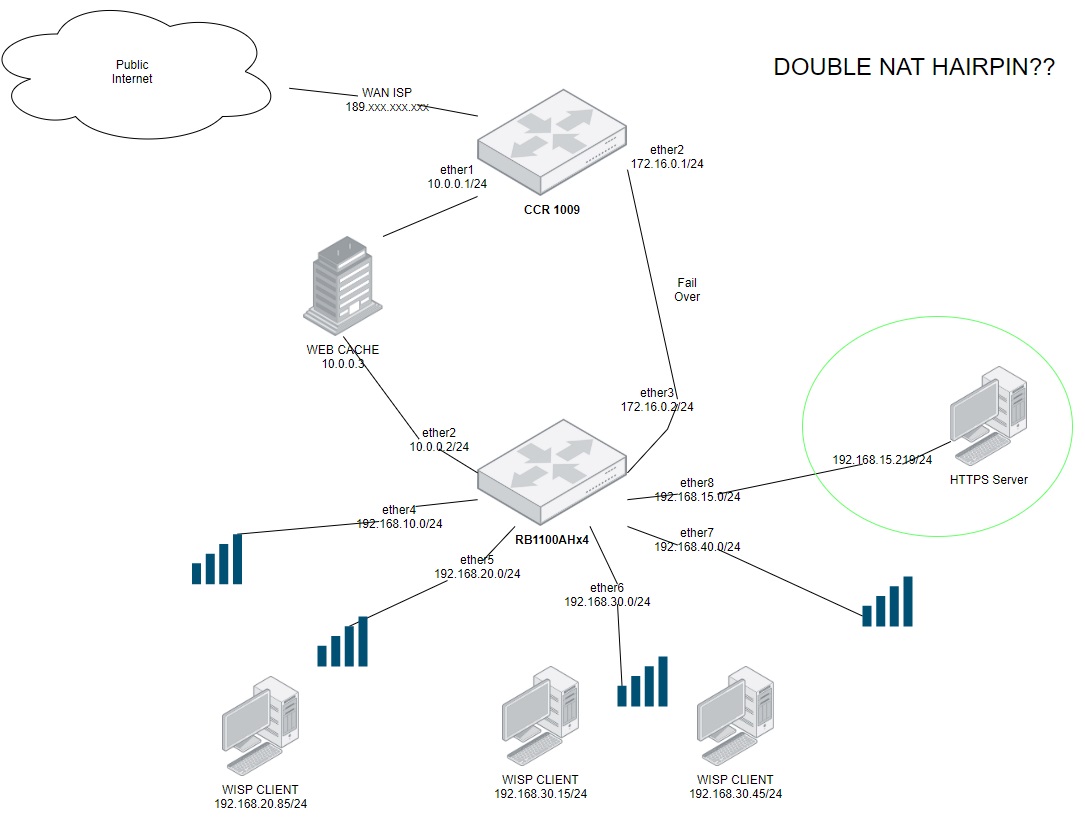
Hi, im from Argentina, my english is not very good…
I attach my actual topology in a .jpg where a wisp client under 192.168.30.0/24 (example) can not connect via URL to HTTPS Server in 192.168.15.219.
When we had only 1 router (RB1100) the problem was solve with HairPinNat, very easy… but now it´s like DOUBLE NAT HAIRPIN??
I will apreciatte any idea about this troubble…
Thanks a lot.
Double NAT Hairpin.jpg

This is not a HairPinNat but normal Firewall and Route regulation to allow and block traffic between subnets/vlans.
Create a new thread to this problem.