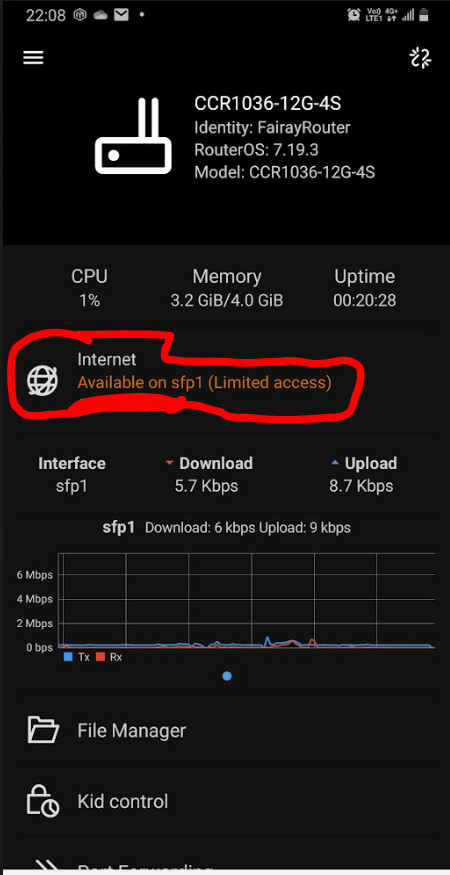
Yeah, Detect Internet brings many problems and should not be used. But OP is using the mobile MikroTik app, and that app prominently tells its users to turn on Detect Internet if they want to see that fancy traffic graph on the home page that you can see in the screenshot above.
I started seeing “(limited access)” since yesterday. I admit that I made a few small configuration changes yesterday but nothing even remotely related to this. I have a stable and fast fiber connection on ether8/vlan6/pppoe.
I am able to open UDP connection to cloud.mikrotik.com on port 30000 on my LAN:
$ nc -vzu cloud.mikrotik.com 30000
Connection to cloud.mikrotik.com (159.148.147.229) 30000 port [udp/*] succeeded!
I was unable to find a way to test this on the router itself. Someone please let me know if there is a way.
Could the absence of internet-interface-list be the problem?
[me@MikroTik] > interface/detect-internet/print
    detect-interface-list: all
       lan-interface-list: LAN
       wan-interface-list: all
  internet-interface-list: none
One change I implemented yesterday that I do not fully understand was this: /interface list member remove [find interface="*C" list=WAN]
I did this because I did not know why I had the add interface=*C list=WAN in my configuration and I decided to delete it. Could this action be the reason of internet detection failing?
The presence of *C means plainly that you had there an interface that has been either deleted or renamed, the RoS cannot find It anymore and uses a reference formed by asterisk and a hex number.
That is point #21 in GP&CSA:
If you prefer, it is a symptom of something else that happened before.
Since it was categorized as WAN, probably (It depends on devices of course) the referred interface Is ether1 (possibly renamed to something else).
I think this must be some wider scale issue, as I started having the same on my Mikrotik app this morning. Before this morning, this was green and did not say Limited access. I have made no changes from yesterday to today. Everything still appears to be working for me, so I’m not sure exactly what the error means.
Yes, of course it must be on to get the flow diagram. However, the Internet detection works fine until a few days ago it suddently shows “limited access”.
It makes me a little nervous, i had to restore the firmware back to the functioning well days, unfortunately, even restore configuration back to the normal function days, the “limited access”
error still showing up.
That makes me wonder if the ISP really doing something and asked it, then post here.
Neither had i made any change to my CCR1036 but however, i still restore the configuration back a few days to the normal function days configuration, but it still showed “limited access”, so i think the error has nothing to do with our change, must be something about RouterOS itself…
Me, too. Nothing changed on my end, however, it’s kind of rather serious warning, so i restored configuration a few days ago, therefore, it means the warning has nothing to do with the user end.
I hope Mikrotik can have a explanation to this and better not happen next time, better to revoke the feature if it’s still not yet stable…