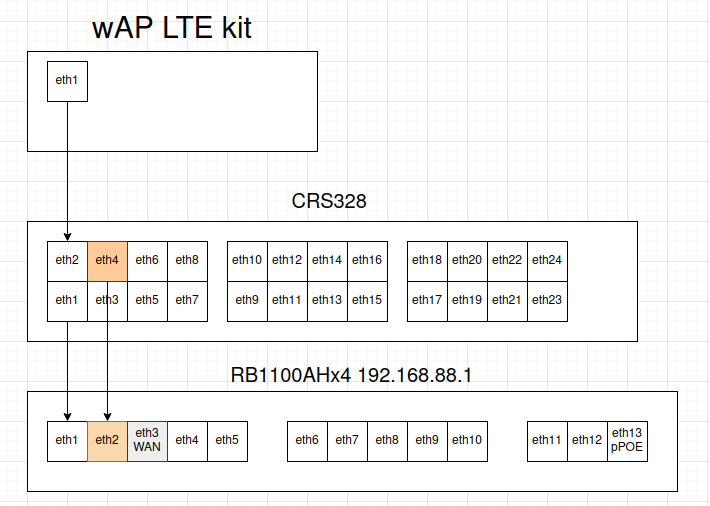
I currently have a network with a RB1100AHx4 router and CRS328 switch.
Router has a WAN connection on eth3 to the internet.
Switch is connected to the router with a trunk port with multiple vlans.
Since my internet has been going down regularly I am looking to add a backup LTE internet connection.
I am looking for advice on how to best configure this.
The LTE kit would be connected to the switch to use PoE.
Option 1:
Use LTE kit as a router and configure RB1100AHx4 eth1 with DHCP client.
Downside I see here is that I would like the RB1100AHx4 to do all the firewall rules.
In this setup the LTE kit would be responsible to mascarade the trafiic.
For the same money, and depending on what other features you need, the Ax Lite Lte6 is a better bang for the buck: https://mikrotik.com/product/hap_ax_lite_lte6
since it has 128 Mb (it is also faster on the LTE side and is wi-fi 6, even if only 2.4 GHz)
Personally (but this is not necessarily good advice) I would setup it in such a way that for all that matters it is a self-standing router, i.e. a sort of black box that you configure once and then just leave alone, as if it was a media converter, all you need to know once this is done is its IP address and set that as gateway on the “main” router as failover, your RB1100AHx4.
I wouldn’t even complicate the setup with a DHCP server and client on the RB1100AHx4, just set a couple of static /30 addresses and be done with it.
About firewall, I would keep on the LTE device the standard input chain (to make life more difficult for attackers looking for the Mikrotik LTE device), remove the forward ones and let the RB1100AHx4 deal with those, as if it was a third party router/adapter.
It is true that with such a setup you will have double NAT, but (in my perverted mind) this is not a real issue.
IMO both routing (option 1) and passthrough (option 2) are valid. Now speeds should be similar regardless, since LTE6 theoretical max speed is well within the routing limits of even 16MB wAP or hAP. The benefit of option 1 (routing) is the LTE backup can actually function independently via it’s Wi-Fi if needed or be a VRRP backup router for VLANs, which in some cases is handy. But option 2 (passthrough) is in many ways simpler and centralizes firewall in one place.