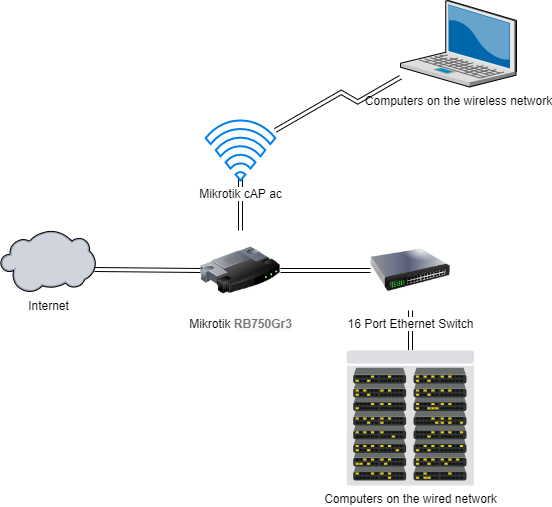
So I have followed every tutorial I could find here and in other places and have hit a dead end. I have xfinity internet at 1Gbps speed and when I run speed tests connected directly to the modem my average download/upload is 850/40 which I can live with. However once I connect the Mikrotik router into the loop the best I can get is 450/40. Attached is the details from the /export hide-sensitive compact command on the interface further sanitized in a couple areas to not give away any personal details. Any help/insight you guys could provide would be awesome as I’ve hit the end of what I think I can figure out on my own.
The only odd ball thing that I have on my network that others may not is a Pi-Hole for internet ad blocking, it is at IP 192.168.1.15 and my DNS is pointed at it as the below config will reflect.
# may/04/2020 14:59:51 by RouterOS 6.46.6
# software id = CMVH-K794
#
# model = RB750Gr3
# serial number = CC220B49A972
/interface bridge
add admin-mac=C4:AD:34:98:38:6C auto-mac=no comment=defconf name=bridge
/caps-man configuration
add datapath.bridge=bridge datapath.client-to-client-forwarding=yes datapath.local-forwarding=yes mode=ap name=\
    "XXXXX Main" security.authentication-types=wpa2-psk ssid=XXXXX
add datapath.bridge=bridge name="XXXXX Guest" security.authentication-types=wpa2-psk ssid=XXXXX-Guest
/caps-man interface
add configuration="XXXXX Main" disabled=no l2mtu=1600 mac-address=C4:AD:34:D2:48:46 master-interface=none name=\
    "WAP1 W1" radio-mac=C4:AD:34:D2:48:46 radio-name=C4AD34D24846
add configuration="XXXXX Guest" disabled=no l2mtu=1600 mac-address=C4:AD:34:D2:48:47 master-interface=none name=\
    "WAP1 W2" radio-mac=C4:AD:34:D2:48:47 radio-name=C4AD34D24847
/interface list
add comment=defconf name=WAN
add comment=defconf name=LAN
/interface wireless security-profiles
set [ find default=yes ] supplicant-identity=MikroTik
/ip hotspot profile
set [ find default=yes ] html-directory=flash/hotspot
/ip pool
add name=dhcp ranges=192.168.1.100-192.168.1.149
/ip dhcp-server
add add-arp=yes address-pool=dhcp disabled=no interface=bridge lease-time=20h name=defconf
/queue type
add kind=pcq name=PCQ_Download pcq-classifier=dst-address pcq-rate=64k
add kind=pcq name=PCQ_Upload pcq-classifier=src-address pcq-rate=32k
/queue interface
set ether1 queue=ethernet-default
set ether2 queue=ethernet-default
set ether3 queue=ethernet-default
/queue tree
add name="PCQ Down" packet-mark=client_download parent=global queue=PCQ_Download
add name="PCQ Up" packet-mark=client_upload parent=global queue=PCQ_Upload
/user group
set full policy=\
    local,telnet,ssh,ftp,reboot,read,write,policy,test,winbox,password,web,sniff,sensitive,api,romon,dude,tikapp
/caps-man manager
set ca-certificate=auto certificate=auto enabled=yes
/caps-man manager interface
set [ find default=yes ] forbid=yes
add disabled=no interface=bridge
/caps-man provisioning
add master-configuration="XXXXX Main" name-format=identity radio-mac=C4:AD:34:D2:48:44
/dude
set enabled=yes
/interface bridge port
add bridge=bridge comment=defconf interface=ether2 trusted=yes
add bridge=bridge comment=defconf interface=ether3 trusted=yes
add bridge=bridge comment=defconf interface=ether4 trusted=yes
add bridge=bridge comment=defconf interface=ether5 trusted=yes
/ip neighbor discovery-settings
set discover-interface-list=LAN
/interface detect-internet
set detect-interface-list=all
/interface list member
add comment=defconf interface=bridge list=LAN
add comment=defconf interface=ether1 list=WAN
/interface wireless cap
set certificate=request lock-to-caps-man=yes
/ip address
add address=192.168.1.1/24 comment=defconf interface=ether2 network=192.168.1.0
/ip cloud
set ddns-enabled=yes ddns-update-interval=15m
/ip dhcp-client
add comment=defconf disabled=no interface=ether1
/ip dhcp-server network
add address=192.168.1.0/24 comment=defconf dns-server=192.168.1.15 domain=XXXXX-Home gateway=192.168.1.1 netmask=24 \
    ntp-server=216.239.35.0
/ip dns
set allow-remote-requests=yes servers=192.168.1.15
/ip dns static
add address=192.168.1.1 name=router.lan
/ip firewall address-list
add address=XXXXXXXXXX.sn.mynetname.net list=WANIP
/ip firewall filter
add action=accept chain=forward comment="defconf: accept in ipsec policy" ipsec-policy=in,ipsec
add action=accept chain=forward comment="defconf: accept out ipsec policy" ipsec-policy=out,ipsec
add action=fasttrack-connection chain=forward comment="defconf: fasttrack" connection-state=established,related
add action=accept chain=input comment="defconf: accept established,related,untracked" connection-state=\
    established,related,untracked
add action=drop chain=input comment="defconf: drop invalid" connection-state=invalid
add action=accept chain=input comment="defconf: Allow ICMP" protocol=icmp
add action=accept chain=input comment="defconf: Allow Router Access from LAN" src-address=192.168.1.0/24
add action=drop chain=input comment="defconf: drop all not coming from LAN" in-interface-list=!LAN
add action=accept chain=forward comment="defconf: accept established,related, untracked" connection-state=\
    established,related,untracked
add action=drop chain=forward comment="defconf: drop invalid" connection-state=invalid
add action=drop chain=input comment="defconf: drop all from WAN not DSTNATed" connection-nat-state=!dstnat \
    connection-state=new in-interface=ether1
/ip firewall mangle
add action=mark-packet chain=prerouting comment="Packet Marking" in-interface=!ether1 new-packet-mark=client_upload \
    passthrough=yes
add action=mark-packet chain=prerouting in-interface=ether1 new-packet-mark=client_download passthrough=yes
/ip firewall nat
add action=masquerade chain=srcnat comment=HAIRPIN dst-address=192.168.1.0/24 src-address=192.168.1.0/24
add action=masquerade chain=srcnat comment="defconf: masquerade" ipsec-policy=out,none out-interface-list=WAN
add action=dst-nat chain=dstnat dst-address-list=WANIP dst-port=32400 protocol=tcp to-addresses=192.168.1.3
add action=dst-nat chain=dstnat dst-address-list=WANIP dst-port=443 protocol=tcp to-addresses=192.168.1.9
add action=dst-nat chain=dstnat dst-address-list=WANIP dst-port=21 protocol=tcp to-addresses=192.168.1.9
add action=dst-nat chain=dstnat disabled=yes dst-address-list=WANIP dst-port=22 protocol=tcp to-addresses=192.168.1.9
add action=dst-nat chain=dstnat comment="template port forward" disabled=yes dst-address-list=WANIP dst-port=8080 \
    protocol=tcp to-addresses=192.168.1.2
/ip service
set telnet disabled=yes
set ftp disabled=yes
set ssh port=2200
set api disabled=yes
set api-ssl disabled=yes
/ip upnp
set allow-disable-external-interface=yes enabled=yes
/ip upnp interfaces
add interface=ether1 type=external
add interface=ether2 type=internal
add interface=ether3 type=internal
/system clock
set time-zone-name=America/New_York
/system identity
set name=XXXXXX-Router
/system scheduler
add interval=1d name="Daily Reboot" on-event="/system reboot" policy=\
    ftp,reboot,read,write,policy,test,password,sniff,sensitive,romon start-date=may/01/2020 start-time=03:00:00
add interval=30m name=GoogleDNSUpdater on-event="/system  script  run  GoogleDNSUpdater\r \
    \n" policy=ftp,reboot,read,write,policy,test,password,sniff,sensitive,romon start-date=apr/30/2020 start-time=\
    09:57:53
/system script
add dont-require-permissions=no name=GoogleDNSUpdater owner=admin policy=\
    ftp,reboot,read,write,policy,test,password,sniff,sensitive,romon source="# credit to hhspiny\r\
    \n#\r\
    \n# Variables\r\
    \n# Username and password are long cryptic ones Google Domains generates for your dynDomain,\r\
    \n# IT IS NOT your regular Google account Username and Password\r\
    \n\r\
    \n:local GoogleDNSUsername \"XXXXXXXXXXXXX\"\r\
    \n:local GoogleDNSPassword \"XXXXXXXXXXXXXX\"\r\
    \n:local hostName \"XXXXXXXXXXXXXXXXXXX\"\r\
    \n:local currentIP \"\"\r\
    \n:local setResults \"\"\r\
    \n:local previousIP \"\"\r\
    \n\r\
    \n# Script\r\
    \n:set currentIP [/ip cloud get public-address]\r\
    \n:set previousIP [:resolve \"\$hostName\"]\r\
    \n:if (\$currentIP != \$previousIP) do={\r\
    \n:do {\r\
    \n/tool fetch url=\"https://\$GoogleDNSUsername:\$GoogleDNSPassword@domains.google.com/nic/update\?hostname=\$hostNam\
    e&myip=\$currentIP\" mode=https dst-path=GoogleDNS.txt\r\
    \n:set setResults [/file get GoogleDNS.txt contents];\r\
    \n:log info (\"GoogleDNS said this: \$setResults\")\r\
    \n} on-error={\r\
    \n:log error (\"GoogleDNS: script failed to set new IP address\") }}"
/system ups
add min-runtime=5m name="Main UPS" offline-time=5m port=usbhid1
/tool mac-server
set allowed-interface-list=LAN
/tool mac-server mac-winbox
set allowed-interface-list=LAN