LieTh
July 21, 2026, 10:08am
1
Hi,
we have two CRS326-24S+2Q+ (actual OS) with the following configs:
Router 1:
# 2026-07-02 11:17:35 by RouterOS 7.23.2
# software id = xxxx-xxxx
#
# model = CRS326-24S+2Q+
# serial number = HMxxxxxxxx
/interface bridge
add name=bridge vlan-filtering=yes
/interface vlan
add interface=sfp-sfpplus24 name="vlan100" vlan-id=100
add interface=sfp-sfpplus24 name="vlan200" vlan-id=200
/interface bridge port
add bridge=bridge frame-types=admit-only-untagged-and-priority-tagged interface=sfp-sfpplus1 pvid=100
add bridge=bridge frame-types=admit-only-untagged-and-priority-tagged interface=sfp-sfpplus2 pvid=100
add bridge=bridge frame-types=admit-only-untagged-and-priority-tagged interface=sfp-sfpplus3 pvid=100
add bridge=bridge frame-types=admit-only-untagged-and-priority-tagged interface=sfp-sfpplus4 pvid=100
add bridge=bridge frame-types=admit-only-untagged-and-priority-tagged interface=sfp-sfpplus5 pvid=100
add bridge=bridge frame-types=admit-only-untagged-and-priority-tagged interface=sfp-sfpplus6 pvid=100
add bridge=bridge frame-types=admit-only-untagged-and-priority-tagged interface=sfp-sfpplus7 pvid=100
add bridge=bridge frame-types=admit-only-untagged-and-priority-tagged interface=sfp-sfpplus8 pvid=100
add bridge=bridge frame-types=admit-only-untagged-and-priority-tagged interface=sfp-sfpplus9 pvid=100
add bridge=bridge frame-types=admit-only-untagged-and-priority-tagged interface=sfp-sfpplus10 pvid=100
add bridge=bridge frame-types=admit-only-untagged-and-priority-tagged interface=sfp-sfpplus11 pvid=100
add bridge=bridge frame-types=admit-only-untagged-and-priority-tagged interface=sfp-sfpplus12 pvid=100
add bridge=bridge frame-types=admit-only-untagged-and-priority-tagged interface=sfp-sfpplus13 pvid=100
add bridge=bridge frame-types=admit-only-untagged-and-priority-tagged interface=sfp-sfpplus14 pvid=100
add bridge=bridge frame-types=admit-only-untagged-and-priority-tagged interface=sfp-sfpplus15 pvid=100
add bridge=bridge frame-types=admit-only-untagged-and-priority-tagged interface=sfp-sfpplus16 pvid=100
add bridge=bridge frame-types=admit-only-untagged-and-priority-tagged interface=sfp-sfpplus17 pvid=100
add bridge=bridge frame-types=admit-only-untagged-and-priority-tagged interface=sfp-sfpplus18 pvid=100
add bridge=bridge frame-types=admit-only-untagged-and-priority-tagged interface=sfp-sfpplus19 pvid=100
add bridge=bridge frame-types=admit-only-untagged-and-priority-tagged interface=sfp-sfpplus20 pvid=100
add bridge=bridge frame-types=admit-only-untagged-and-priority-tagged interface=sfp-sfpplus21 pvid=100
add bridge=bridge frame-types=admit-only-untagged-and-priority-tagged interface=sfp-sfpplus22 pvid=200
add bridge=bridge frame-types=admit-only-vlan-tagged interface=sfp-sfpplus24
/interface bridge vlan
add bridge=bridge tagged=sfp-sfpplus24 vlan-ids=100,200
/system routerboard settings
set enter-setup-on=delete-key
Router 2:
# 2026-07-02 11:20:19 by RouterOS 7.23.2
# software id = xxxx-xxxx
#
# model = CRS326-24S+2Q+
# serial number = HKxxxxxxxx
/interface bridge
add name=bridge vlan-filtering=yes
/interface vlan
add interface=sfp-sfpplus24 name="vlan100" vlan-id=100
add interface=sfp-sfpplus24 name="vlan200" vlan-id=200
/interface bridge port
add bridge=bridge frame-types=admit-only-untagged-and-priority-tagged interface=sfp-sfpplus1 pvid=200
add bridge=bridge frame-types=admit-only-untagged-and-priority-tagged interface=sfp-sfpplus2 pvid=200
add bridge=bridge frame-types=admit-only-untagged-and-priority-tagged interface=sfp-sfpplus3 pvid=200
add bridge=bridge frame-types=admit-only-untagged-and-priority-tagged interface=sfp-sfpplus4 pvid=200
add bridge=bridge frame-types=admit-only-untagged-and-priority-tagged interface=sfp-sfpplus5 pvid=200
add bridge=bridge frame-types=admit-only-untagged-and-priority-tagged interface=sfp-sfpplus6 pvid=200
add bridge=bridge frame-types=admit-only-untagged-and-priority-tagged interface=sfp-sfpplus7 pvid=200
add bridge=bridge frame-types=admit-only-untagged-and-priority-tagged interface=sfp-sfpplus8 pvid=200
add bridge=bridge frame-types=admit-only-untagged-and-priority-tagged interface=sfp-sfpplus9 pvid=200
add bridge=bridge frame-types=admit-only-untagged-and-priority-tagged interface=sfp-sfpplus10 pvid=200
add bridge=bridge frame-types=admit-only-untagged-and-priority-tagged interface=sfp-sfpplus11 pvid=200
add bridge=bridge frame-types=admit-only-untagged-and-priority-tagged interface=sfp-sfpplus12 pvid=200
add bridge=bridge frame-types=admit-only-untagged-and-priority-tagged interface=sfp-sfpplus13 pvid=200
add bridge=bridge frame-types=admit-only-untagged-and-priority-tagged interface=sfp-sfpplus14 pvid=200
add bridge=bridge frame-types=admit-only-untagged-and-priority-tagged interface=sfp-sfpplus15 pvid=100
add bridge=bridge frame-types=admit-only-untagged-and-priority-tagged interface=sfp-sfpplus16 pvid=100
add bridge=bridge frame-types=admit-only-untagged-and-priority-tagged interface=sfp-sfpplus17 pvid=100
add bridge=bridge frame-types=admit-only-untagged-and-priority-tagged interface=sfp-sfpplus18 pvid=100
add bridge=bridge frame-types=admit-only-untagged-and-priority-tagged interface=sfp-sfpplus19 pvid=100
add bridge=bridge frame-types=admit-only-untagged-and-priority-tagged interface=sfp-sfpplus20 pvid=100
add bridge=bridge frame-types=admit-only-untagged-and-priority-tagged interface=sfp-sfpplus21 pvid=100
add bridge=bridge frame-types=admit-only-untagged-and-priority-tagged interface=sfp-sfpplus22 pvid=100
add bridge=bridge frame-types=admit-only-vlan-tagged interface=sfp-sfpplus24
/interface bridge vlan
add bridge=bridge tagged=sfp-sfpplus24 vlan-ids=100,200
/system routerboard settings
set enter-setup-on=delete-key
Now we want to establish interVLAN routing between Vlan100 and Vlan200.
In some HowTo's/Forumtopics (https://manual.mikrotik.com/docs/bridging-and-switching/#bridge-vlan-filtering ) I have read that the only steps to perform are:
/ip/address
add address=192.168.0.251/24 interface=Vlan100
add address=192.168.10.251/24 interface=Vlan200
In which Switch should these IP addresses be configured? 1 or 2 or both (with second IP)?
What am I missing?
anav
July 21, 2026, 10:43am
2
Are these acting as switches or routers and where is a network diagram to see how they fit into a larger context? For example no idea why you are identifying two vlans vice just the management vlan ( do you have a management vlan )?
LieTh
July 21, 2026, 1:02pm
3
Some additional context:
Switch1 is located at Building A
The VLANs are built up to separate the two Windows Domains with their DHCP servers.
Nice hw, these support hw routing: L3 Hardware Offloading | RouterOS Manual
currently routing is not cofigured, hence you'll need to add it and enable HW handling (link above)
adding addresses on both vlans is first step
check ip/settings/ip forwarding is enabled
LieTh
July 22, 2026, 7:16pm
6
Thnks for you answer sebastia and all others....but...these examples (Link to Docs)
Your link directs me to a full L3 routing config.
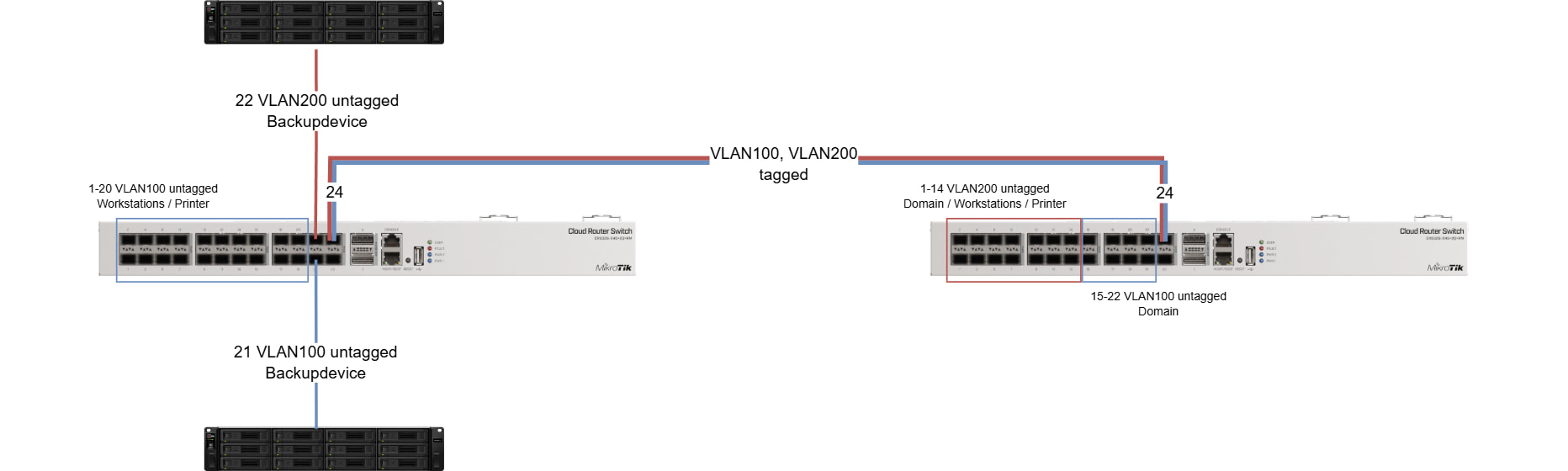
My setup (Switch 1 on the left):
The purpose is: Separate the two Domains on VLAN100 and VLAN200 as they handle DHCP requests.
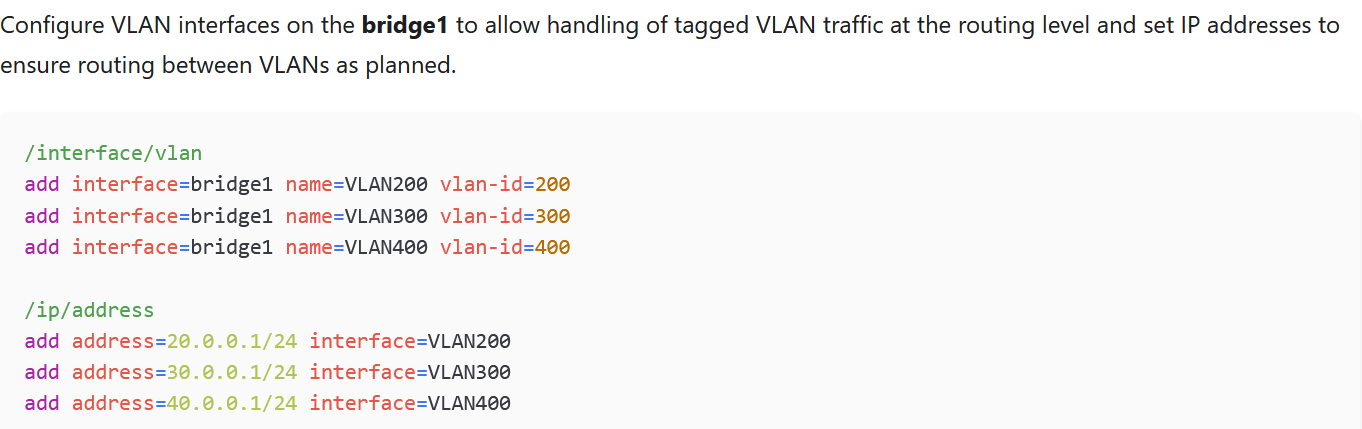
In the given Examples (Link at top of Post) is said that the only thing to do is, to add addresses to interfaces bound to the bridge:
I added my gateway addresses, 192.168.0.251/24 -> VLAN100 and 192.168.10.251/24 -> VLAN200 on Switch 1
Anyone an idea?
anav
July 22, 2026, 8:18pm
7
My best guess, but only if you assign a management vlan on your attached windows servers.
Lets give R1 192.168.99.1/24
I also would assign an offbridge port to ether1 and do my config from there and is an emergency access place as well. Just connect PC to ether1, change IPV4 settings to 192.168.77.2 and with username and password you should be in.
Config:
/interface bridgeframe-types=admit-only-vlan-tagged add interface=bridge name=vlanMGMT vlan-id=99 add bridge=bridge tagged=bridge,sfp-sfpplus24 vlan-ids=99
LieTh:
/ip/address
add address=192.168.0.251/24 interface=Vlan100
add address=192.168.10.251/24 interface=Vlan200
In which Switch should these IP addresses be configured? 1 or 2 or both (with second IP)?
It isn't clear to me what gateway address you are trying to ping from a host in vlan100.
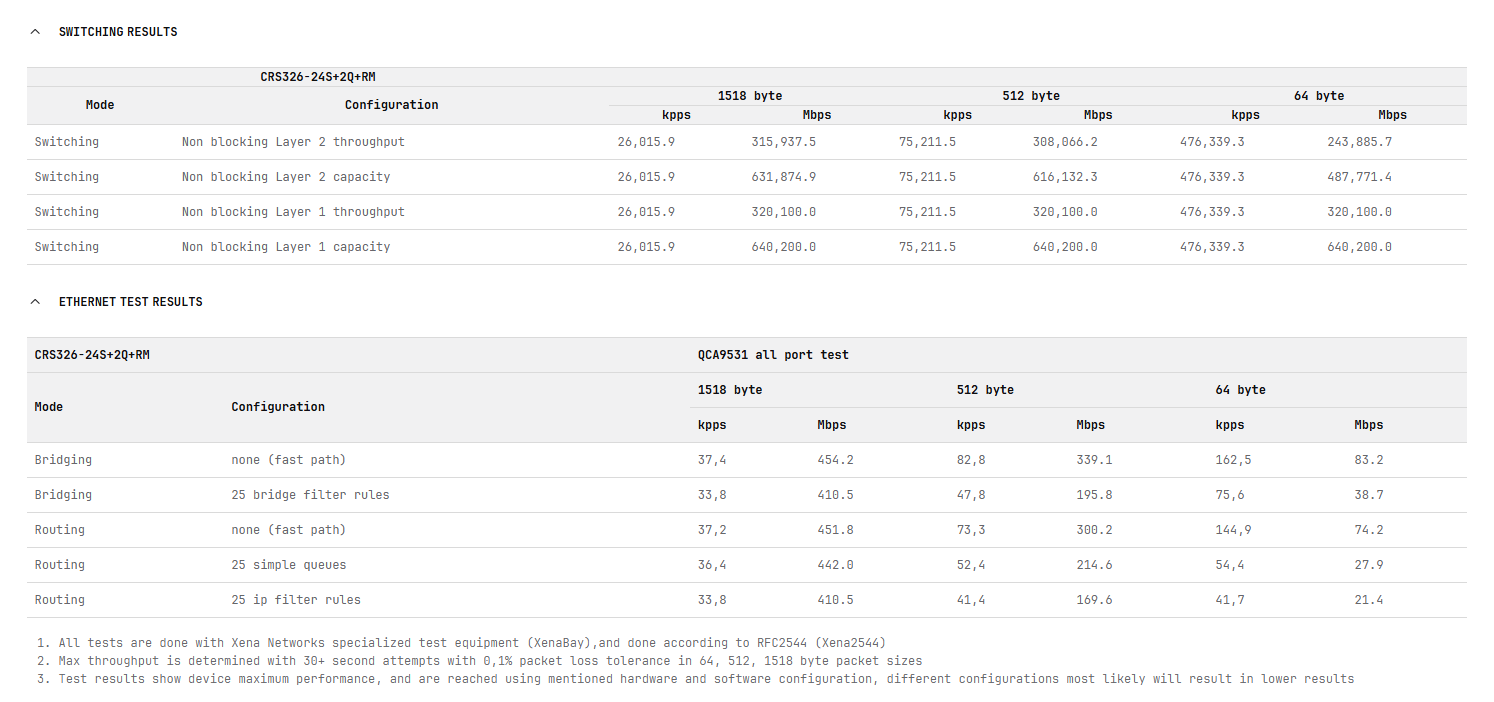
Be aware that these are primarily switches, and while they can run RouterOS, they are not meant to be used as routers. You can compare the switching speeds with the Ethernet speeds in the specifications
If you have only a small amount of traffic to route between 192.168.0.0/24 and 192.168.10.0/24 then it can route it, but it has only a single core 650MHz CPU, so the routing performance will be significanlty less than a RB750Gr3.
In the configuration you posted, you would normally choose one of the two switches to create the vlan interfaces for vlan100 and vlan200 on, and give those vlan interfaces the ip addresses. The vlan interfaces are the switches "connection" to the routing engine (the CPU). The the switch with the two vlan interfaces, each with their own ip subnet will then have "connected routes" to both 192.168.0.0/24 and 192.168.10.0/24 subnets, and if you don't do anything to prevent it, the traffic will be routed by the CPU.
Are your backup servers also your dhcp servers?
As sebasia noted, the switches have switch chips with the ability to do L3 routing, but the routing it can do is more limited than what can be done by the CPU, but what it can do is very fast; it's like a dragster, it is very fast but not a very good for general use. For example, no stateful firewall (at least that I am aware of).
LieTh
July 23, 2026, 6:56am
9
Hi buckeye, thanks for answering...
First: I'm trying to ping the Gateway 192.168.0.251 from a client connected to VLAN100. Tested from Port1/Switch1 and Port17/Switch2 both VLAN100
Second: No, the Backupdevices are Synology NAS
Next: I've changed the config of Switch2 to:
# 2026-07-02 11:20:19 by RouterOS 7.23.2
# software id = xxxx-xxxx
#
# model = CRS326-24S+2Q+
# serial number = HKxxxxxxxx
/interface bridge
add name=bridge vlan-filtering=yes
/interface vlan
add interface=sfp-sfpplus24 name="vlan100" vlan-id=100
add interface=sfp-sfpplus24 name="vlan200" vlan-id=200
/interface bridge port
add bridge=bridge frame-types=admit-only-untagged-and-priority-tagged interface=sfp-sfpplus1 pvid=200
add bridge=bridge frame-types=admit-only-untagged-and-priority-tagged interface=sfp-sfpplus2 pvid=200
add bridge=bridge frame-types=admit-only-untagged-and-priority-tagged interface=sfp-sfpplus3 pvid=200
add bridge=bridge frame-types=admit-only-untagged-and-priority-tagged interface=sfp-sfpplus4 pvid=200
add bridge=bridge frame-types=admit-only-untagged-and-priority-tagged interface=sfp-sfpplus5 pvid=200
add bridge=bridge frame-types=admit-only-untagged-and-priority-tagged interface=sfp-sfpplus6 pvid=200
add bridge=bridge frame-types=admit-only-untagged-and-priority-tagged interface=sfp-sfpplus7 pvid=200
add bridge=bridge frame-types=admit-only-untagged-and-priority-tagged interface=sfp-sfpplus8 pvid=200
add bridge=bridge frame-types=admit-only-untagged-and-priority-tagged interface=sfp-sfpplus9 pvid=200
add bridge=bridge frame-types=admit-only-untagged-and-priority-tagged interface=sfp-sfpplus10 pvid=200
add bridge=bridge frame-types=admit-only-untagged-and-priority-tagged interface=sfp-sfpplus11 pvid=200
add bridge=bridge frame-types=admit-only-untagged-and-priority-tagged interface=sfp-sfpplus12 pvid=200
add bridge=bridge frame-types=admit-only-untagged-and-priority-tagged interface=sfp-sfpplus13 pvid=200
add bridge=bridge frame-types=admit-only-untagged-and-priority-tagged interface=sfp-sfpplus14 pvid=200
add bridge=bridge frame-types=admit-only-untagged-and-priority-tagged interface=sfp-sfpplus15 pvid=100
add bridge=bridge frame-types=admit-only-untagged-and-priority-tagged interface=sfp-sfpplus16 pvid=100
add bridge=bridge frame-types=admit-only-untagged-and-priority-tagged interface=sfp-sfpplus17 pvid=100
add bridge=bridge frame-types=admit-only-untagged-and-priority-tagged interface=sfp-sfpplus18 pvid=100
add bridge=bridge frame-types=admit-only-untagged-and-priority-tagged interface=sfp-sfpplus19 pvid=100
add bridge=bridge frame-types=admit-only-untagged-and-priority-tagged interface=sfp-sfpplus20 pvid=100
add bridge=bridge frame-types=admit-only-untagged-and-priority-tagged interface=sfp-sfpplus21 pvid=100
add bridge=bridge frame-types=admit-only-untagged-and-priority-tagged interface=sfp-sfpplus22 pvid=100
add bridge=bridge frame-types=admit-only-vlan-tagged interface=sfp-sfpplus24
/interface bridge vlan
add bridge=bridge tagged=sfp-sfpplus24 vlan-ids=100,200
/ip/address
add address=192.168.0.251/24 interface=Vlan100
add address=192.168.10.251/24 interface=Vlan200
/system routerboard settings
set enter-setup-on=delete-key
But still pings from client connected to vlan100 to 192.168.0.251 are not successful.
rplant
July 23, 2026, 7:04am
10
My thought would be to add some routes to your PC's using DHCP option 121
(Assuming Mikrotik dhcp server)'
/ip dhcp-server option
add code=121 name=to10.0via0.251 value="0x18C0A80AC0A800FB00\$(NETWORK_GATEWAY)"
Then add this option to the dhcp network configuration for the 192.168.0.0/24 network.
You need to add the return route in the 192.168.10.0/24 device routing table before it will work.
It should then work, but will be slow (as going via the cpu on the CRS326)
Here you are putting the vlan100 and vlan200 interfaces directly on the sfp-sfpplus24 port. However, in the bridge port listing, you have this:
Which means sfp-sfpplus24 is a slave port of the bridge. It won't work like that. You need modify the two VLAN interfaces, and change the parent interface to bridge instead of sfp-sfpplus24.
/interface vlan
set [find name="vlan100"] interface=bridge
set [find name="vlan200"] interface=bridge
for Bridge VLAN Filtering and the IP address assignment to work properly.
You can see here in the example screenshot you made, that interface=bridge1 is set for the VLAN interfaces, not the port interface!
LieTh
July 23, 2026, 5:40pm
12
First: Thanks to all participants!
Second: Special thanks are going to cggxannx!
You pointed to my mistake...even the docs are warning about binding the ip direct to the sfp...I had done it.
My new config for completeness:
# 2026-07-02 11:20:19 by RouterOS 7.23.2
# software id = xxxx-xxxx
#
# model = CRS326-24S+2Q+
# serial number = HKxxxxxxxx
/interface bridge
add name=bridge vlan-filtering=yes
/interface vlan
add interface=bridge name="vlan100" vlan-id=100
add interface=bridge name="vlan200" vlan-id=200
/interface bridge port
add bridge=bridge frame-types=admit-only-untagged-and-priority-tagged interface=sfp-sfpplus1 pvid=200
add bridge=bridge frame-types=admit-only-untagged-and-priority-tagged interface=sfp-sfpplus2 pvid=200
add bridge=bridge frame-types=admit-only-untagged-and-priority-tagged interface=sfp-sfpplus3 pvid=200
add bridge=bridge frame-types=admit-only-untagged-and-priority-tagged interface=sfp-sfpplus4 pvid=200
add bridge=bridge frame-types=admit-only-untagged-and-priority-tagged interface=sfp-sfpplus5 pvid=200
add bridge=bridge frame-types=admit-only-untagged-and-priority-tagged interface=sfp-sfpplus6 pvid=200
add bridge=bridge frame-types=admit-only-untagged-and-priority-tagged interface=sfp-sfpplus7 pvid=200
add bridge=bridge frame-types=admit-only-untagged-and-priority-tagged interface=sfp-sfpplus8 pvid=200
add bridge=bridge frame-types=admit-only-untagged-and-priority-tagged interface=sfp-sfpplus9 pvid=200
add bridge=bridge frame-types=admit-only-untagged-and-priority-tagged interface=sfp-sfpplus10 pvid=200
add bridge=bridge frame-types=admit-only-untagged-and-priority-tagged interface=sfp-sfpplus11 pvid=200
add bridge=bridge frame-types=admit-only-untagged-and-priority-tagged interface=sfp-sfpplus12 pvid=200
add bridge=bridge frame-types=admit-only-untagged-and-priority-tagged interface=sfp-sfpplus13 pvid=200
add bridge=bridge frame-types=admit-only-untagged-and-priority-tagged interface=sfp-sfpplus14 pvid=200
add bridge=bridge frame-types=admit-only-untagged-and-priority-tagged interface=sfp-sfpplus15 pvid=100
add bridge=bridge frame-types=admit-only-untagged-and-priority-tagged interface=sfp-sfpplus16 pvid=100
add bridge=bridge frame-types=admit-only-untagged-and-priority-tagged interface=sfp-sfpplus17 pvid=100
add bridge=bridge frame-types=admit-only-untagged-and-priority-tagged interface=sfp-sfpplus18 pvid=100
add bridge=bridge frame-types=admit-only-untagged-and-priority-tagged interface=sfp-sfpplus19 pvid=100
add bridge=bridge frame-types=admit-only-untagged-and-priority-tagged interface=sfp-sfpplus20 pvid=100
add bridge=bridge frame-types=admit-only-untagged-and-priority-tagged interface=sfp-sfpplus21 pvid=100
add bridge=bridge frame-types=admit-only-untagged-and-priority-tagged interface=sfp-sfpplus22 pvid=100
add bridge=bridge frame-types=admit-only-vlan-tagged interface=sfp-sfpplus24
/interface bridge vlan
add bridge=bridge tagged=sfp-sfpplus24 vlan-ids=100,200
/ip/address
add address=192.168.0.251/24 interface=Vlan100
add address=192.168.10.251/24 interface=Vlan200
/system routerboard settings
set enter-setup-on=delete-key