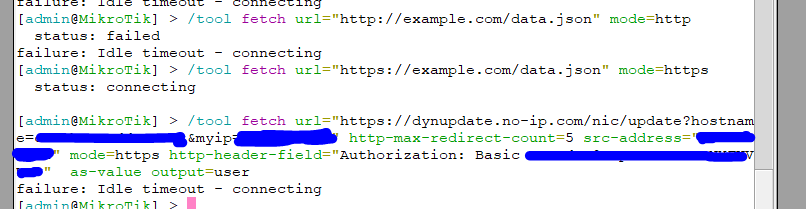
thank you for the fast reply,
I find out got some DNS resolve error before the fetch error,
it seems likt it redirect to other domain,
but the DNS resolve is not work
I try to able DNS resolve for router use the same DNS server as my PC using,
here a the dns status, I didn’t able to find any error
may I able to get you help for this issue?
[admin@MikroTik] /ip/dns> print
                      servers: 1.1.1.1
                               8.8.8.8
              dynamic-servers:
               use-doh-server:
              verify-doh-cert: no
   doh-max-server-connections: 5
   doh-max-concurrent-queries: 50
                  doh-timeout: 5s
        allow-remote-requests: yes
          max-udp-packet-size: 4096
         query-server-timeout: 2s
          query-total-timeout: 10s
       max-concurrent-queries: 100
  max-concurrent-tcp-sessions: 20
                   cache-size: 2048KiB
                cache-max-ttl: 1w
      address-list-extra-time: 0s
                          vrf: main
           mdns-repeat-ifaces:
                   cache-used: 68KiB
/export compact hide-sensitive
here are my config
# 2025-05-05 00:00:14 by RouterOS 7.18.2
# software id = HKJ2-B1GR
#
# model = RB5009UG+S+
# serial number = HEH08
/interface bridge
add admin-mac= auto-mac=no comment=defconf dhcp-snooping=yes \
    name=bridge port-cost-mode=short
/interface wireguard
/interface list
add comment=defconf name=WAN
add comment=defconf name=LAN
/ip pool
add name=dhcp ranges=192.168.8.10-192.168.8.254
add name=wifi ranges=192.168.20.100-192.168.20.200
/ip dhcp-server
add address-pool=dhcp interface=bridge lease-time=10m name=defconf
add address-pool=wifi interface=ether8 lease-time=5h name=wifiDHCP
/ip smb users
set [ find default=yes ] disabled=yes
/interface bridge port
add bridge=bridge comment=defconf interface=ether2 internal-path-cost=10 \
    path-cost=10 trusted=yes
add bridge=bridge comment=defconf interface=ether3 internal-path-cost=10 \
    path-cost=10 trusted=yes
add bridge=bridge comment=defconf interface=ether4 internal-path-cost=10 \
    path-cost=10
add bridge=bridge comment=defconf interface=ether5 internal-path-cost=10 \
    path-cost=10
add bridge=bridge comment=defconf interface=ether6 internal-path-cost=10 \
    path-cost=10
add bridge=bridge comment=defconf interface=ether7 internal-path-cost=10 \
    path-cost=10
add bridge=bridge comment=defconf interface=sfp-sfpplus1 internal-path-cost=10 \
    path-cost=10
/ip firewall connection tracking
set udp-timeout=10s
/ip neighbor discovery-settings
set discover-interface-list=LAN lldp-med-net-policy-vlan=1
/interface detect-internet
set detect-interface-list=all
/interface list member
add comment=defconf interface=bridge list=LAN
add comment=defconf interface=ether1 list=WAN
add interface=ether8 list=LAN
add interface=vpn list=LAN
/interface ovpn-server server
/interface wireguard peers

/ip address
add address=192.168.8.1/24 comment=defconf interface=bridge network=192.168.8.0
add address=192.168.20.1/24 interface=ether8 network=192.168.20.0
add address=192.168.11.1/24 interface=vpn network=192.168.11.0
/ip cloud
set ddns-update-interval=5m
/ip cloud advanced
set use-local-address=yes
/ip dhcp-client
add comment=defconf interface=ether1 use-peer-dns=no
/ip dhcp-server network
add address=10.120.8.0/24 comment=defconf dns-server=1.1.1.1,8.8.8.8 gateway=\
    10.120.8.1 netmask=24
add address=192.168.20.0/24 dns-server=1.1.1.1,8.8.8.8 gateway=192.168.20.1 \
    netmask=24
/ip dns
set allow-remote-requests=yes servers=1.1.1.1,8.8.8.8
/ip dns static
add address=192.168.8.1 address-list=192.168.8.0/24 comment=defconf name=\
    router.lan type=A
add address=192.168.20.1 address-list=192.168.20.0/24 name=wifihost type=A
add address=223.255.185.3 name=stdtime.gov.hk type=A
add address=159.148.172.251 name=cloud2.mikrotik.com type=A
add address=159.148.147.229 name=cloud.mikrotik.com type=A
add address=158.247.7.204 disabled=yes name=dynupdate.no-ip.com type=A
add address=159.148.172.226 name=upgrade.mikrotik.com type=A
/ip firewall address-list
add address=192.168.11.0/24 list=vpn_list
/ip firewall filter
add action=drop chain=forward comment=\
    "defconf: accept established,related,untracked" connection-state=\
    established,related,untracked disabled=yes in-interface-list=WAN protocol=\
    icmp
add action=drop chain=forward disabled=yes dst-port=80,22,443,8291 \
    in-interface=ether1 protocol=tcp
add action=accept chain=input protocol=udp src-port=53
add action=accept chain=input dst-port=53 protocol=udp
add action=drop chain=input comment="defconf: drop invalid" connection-state=\
    invalid
add action=accept chain=forward disabled=yes in-interface-list=LAN \
    out-interface-list=WAN
add action=accept chain=input dst-port=13355 in-interface=ether1 protocol=udp
add action=accept chain=input comment="defconf: accept ICMP" protocol=icmp
add action=accept chain=output comment="Allow HTTP traffic" dst-port=80 \
    protocol=tcp
add action=drop chain=forward out-interface-list=WAN src-address-list=\
    "server"
add action=drop chain=input comment="defconf: drop all not coming from LAN" \
    in-interface-list=!LAN
add action=accept chain=forward comment=\
    "defconf: accept established,related, untracked" connection-state=\
    established,related,untracked
add action=fasttrack-connection chain=forward comment="defconf: fasttrack" \
    connection-state=established,related hw-offload=yes
add action=accept chain=input comment=\
    "defconf: accept to local loopback (for CAPsMAN)" dst-address=127.0.0.1
add action=accept chain=forward comment="defconf: accept in ipsec policy" \
    ipsec-policy=in,ipsec
add action=accept chain=forward comment="defconf: accept out ipsec policy" \
    ipsec-policy=out,ipsec
add action=drop chain=forward comment="defconf: drop invalid" \
    connection-state=invalid
add action=drop chain=forward comment=\
    "defconf: drop all from WAN not DSTNATed" connection-nat-state=!dstnat \
    connection-state=new in-interface-list=WAN
add action=accept chain=forward
add action=accept chain=forward disabled=yes
/ip firewall nat
add action=masquerade chain=srcnat comment="defconf: masquerade" \
    out-interface-list=WAN
/ip firewall service-port
set sip disabled=yes
/ip ipsec profile
set [ find default=yes ] dpd-interval=2m dpd-maximum-failures=5
/ipv6 firewall address-list
add address=::/128 comment="defconf: unspecified address" list=bad_ipv6
add address=::1/128 comment="defconf: lo" list=bad_ipv6
add address=fec0::/10 comment="defconf: site-local" list=bad_ipv6
add address=::ffff:0.0.0.0/96 comment="defconf: ipv4-mapped" list=bad_ipv6
add address=::/96 comment="defconf: ipv4 compat" list=bad_ipv6
add address=100::/64 comment="defconf: discard only " list=bad_ipv6
add address=2001:db8::/32 comment="defconf: documentation" list=bad_ipv6
add address=2001:10::/28 comment="defconf: ORCHID" list=bad_ipv6
add address=3ffe::/16 comment="defconf: 6bone" list=bad_ipv6
/ipv6 firewall filter
add action=accept chain=input comment=\
    "defconf: accept established,related,untracked" connection-state=\
    established,related,untracked
add action=drop chain=input comment="defconf: drop invalid" connection-state=\
    invalid
add action=accept chain=input comment="defconf: accept ICMPv6" protocol=icmpv6
add action=accept chain=input comment="defconf: accept UDP traceroute" port=\
    33434-33534 protocol=udp
add action=accept chain=input comment=\
    "defconf: accept DHCPv6-Client prefix delegation." dst-port=546 protocol=\
    udp src-address=fe80::/10
add action=accept chain=input comment="defconf: accept IKE" dst-port=500,4500 \
    protocol=udp
add action=accept chain=input comment="defconf: accept ipsec AH" protocol=\
    ipsec-ah
add action=accept chain=input comment="defconf: accept ipsec ESP" protocol=\
    ipsec-esp
add action=accept chain=input comment=\
    "defconf: accept all that matches ipsec policy" ipsec-policy=in,ipsec
add action=drop chain=input comment=\
    "defconf: drop everything else not coming from LAN" in-interface-list=!LAN
add action=accept chain=forward comment=\
    "defconf: accept established,related,untracked" connection-state=\
    established,related,untracked
add action=drop chain=forward comment="defconf: drop invalid" \
    connection-state=invalid
add action=drop chain=forward comment=\
    "defconf: drop packets with bad src ipv6" src-address-list=bad_ipv6
add action=drop chain=forward comment=\
    "defconf: drop packets with bad dst ipv6" dst-address-list=bad_ipv6
add action=drop chain=forward comment="defconf: rfc4890 drop hop-limit=1" \
    hop-limit=equal:1 protocol=icmpv6
add action=accept chain=forward comment="defconf: accept ICMPv6" protocol=\
    icmpv6
add action=accept chain=forward comment="defconf: accept HIP" protocol=139
add action=accept chain=forward comment="defconf: accept IKE" dst-port=\
    500,4500 protocol=udp
add action=accept chain=forward comment="defconf: accept ipsec AH" protocol=\
    ipsec-ah
add action=accept chain=forward comment="defconf: accept ipsec ESP" protocol=\
    ipsec-esp
add action=accept chain=forward comment=\
    "defconf: accept all that matches ipsec policy" ipsec-policy=in,ipsec
add action=drop chain=forward comment=\
    "defconf: drop everything else not coming from LAN" in-interface-list=!LAN
/snmp
set enabled=yes
/system clock
set time-zone-name=Asia/Hong_Kong
/system logging
add topics=dns
add topics=fetch
/system note
set show-at-login=no
/system ntp client
set enabled=yes
/system ntp client servers
add address=stdtime.gov.hk
/system routerboard settings
set auto-upgrade=yes
/tool mac-server
set allowed-interface-list=LAN
/tool mac-server mac-winbox
set allowed-interface-list=LAN