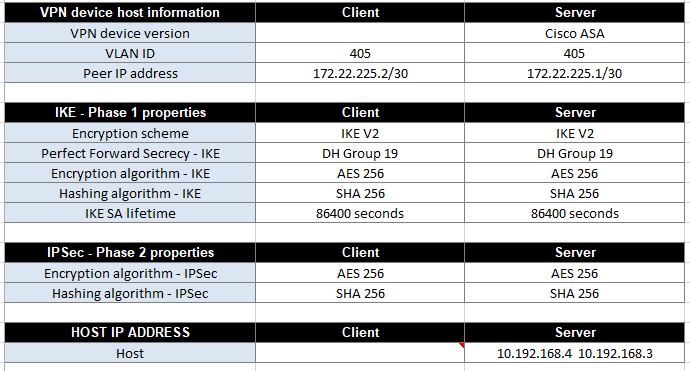
The configurations in the attached image has been given to me from a service provider who provides an api on 10.192.168.3 and .4. Me as a client, I got my 172.18.188.11 allowed to access the API endpoint.
Unfortunatly, my host somtimes can connect as telnet 10.192.168.3 443 and without changing any thing sometimes it stops.
it somtimes work for a while without any change then it stops also without any change then works and stops cyclical.
Taking note, the service provider does not want to modify anything from their side because the api is working in different sites with the same configurations and different equepments.
As Mikrotik network experts, please check this configurations and find the issues and give me practical solution.
My configurations are as:
[admin@MikroTik] > /export hide-sensitive
2026-10-01 14:21:00 by RouterOS 7.14.1
software id = 1X8U-5QFF
model = CRS326-24G-2S+
serial number = < removed >
/interface bridge
add admin-mac=D4:01:C3:B0:9C:78 auto-mac=no comment=defconf name=bridge vlan-filtering=yes
/interface ethernet
set [ find default-name=ether3 ] loop-protect=on
set [ find default-name=ether24 ] disabled=yes
/interface wireguard
add listen-port=51820 mtu=1420 name=wg-admin
/interface vlan
add interface=bridge name=vlan36-production vlan-id=36
add interface=bridge name=vlan200-management vlan-id=200
add interface=bridge name=vlan405 vlan-id=405
/ip hotspot profile
set [ find default=yes ] html-directory=hotspot
/ip ipsec profile
add dh-group=ecp256 dpd-interval=10s dpd-maximum-failures=3 enc-algorithm=aes-256 hash-algorithm=sha256 name=GIA-profile nat-traversal=no
/ip ipsec peer
add address=172.22.225.1/32 exchange-mode=ike2 name=GIA-peer profile=GIA-profile
/ip ipsec proposal
add auth-algorithms=sha256 enc-algorithms=aes-256-cbc lifetime=1d name=GIA-proposal pfs-group=none
/ip pool
add name=ProductionPool ranges=172.18.188.15-172.18.188.29
add name=ManagementPool ranges=30.60.60.2-30.60.60.30
add name=Main ranges=192.168.11.2-192.168.11.250
/ip dhcp-server
add address-pool=ProductionPool interface=vlan36-production name=ProductionDHCP
add address-pool=ManagementPool interface=vlan200-management name=ManagementDHCP
/port
set 0 name=serial0
/interface bridge port
add bridge=bridge interface=ether2 pvid=405
add bridge=bridge interface=ether3 pvid=200
add bridge=bridge interface=ether4 pvid=200
add bridge=bridge interface=ether5 pvid=200
add bridge=bridge interface=ether6 pvid=200
add bridge=bridge interface=ether7 pvid=36
add bridge=bridge interface=ether8 pvid=36
add bridge=bridge interface=ether9 pvid=36
add bridge=bridge interface=ether10 pvid=36
add bridge=bridge interface=ether11 pvid=36
add bridge=bridge interface=ether12 pvid=36
add bridge=bridge interface=ether13 pvid=36
add bridge=bridge interface=ether14 pvid=36
add bridge=bridge interface=ether15 pvid=36
add bridge=bridge interface=ether16 pvid=36
add bridge=bridge interface=ether17 pvid=36
add bridge=bridge interface=ether18 pvid=36
add bridge=bridge interface=ether19 pvid=36
add bridge=bridge interface=ether20 pvid=36
add bridge=bridge interface=ether21 pvid=36
add bridge=bridge interface=ether22 pvid=36
add bridge=bridge interface=ether23
add bridge=bridge interface=ether24
add bridge=bridge interface=sfp-sfpplus1
add bridge=bridge interface=sfp-sfpplus2
/ip settings
set allow-fast-path=no
/interface bridge vlan
add bridge=bridge tagged=bridge untagged=ether7,ether8,ether9,ether10,ether11,ether12,ether13,ether14,ether15,ether16,ether17,ether18,ether19,ether20,ether21,ether22 vlan-ids=36
add bridge=bridge tagged=bridge untagged=ether3,ether4,ether5,ether6 vlan-ids=200
add bridge=bridge tagged=bridge untagged=ether2 vlan-ids=405
/interface wireguard peers
add allowed-address=10.0.10.2/32,172.18.188.0/27,30.60.60.0/27 interface=wg-admin private-key="" public-key=""
add allowed-address=10.0.10.3/32,172.18.188.0/27,30.60.60.0/27 interface=wg-admin private-key="" public-key=""
/ip address
add address=172.18.188.30/27 comment=Production interface=vlan36-production network=172.18.188.0
add address=30.60.60.30/27 comment=Management interface=vlan200-management network=30.60.60.0
add address=172.22.225.2/30 interface=vlan405 network=172.22.225.0
add address=47.108.61.203/25 interface=ether1 network=47.108.61.128
add address=10.0.10.1/24 interface=wg-admin network=10.0.10.0
/ip dhcp-server network
add address=30.60.60.0/27 dns-server=9.9.9.9,8.8.8.8 gateway=30.60.60.30
add address=172.18.188.0/27 dns-server=9.9.9.9,8.8.8.8 gateway=172.18.188.30
/ip dns
set allow-remote-requests=yes servers=62.68.42.2,41.208.117.231
/ip firewall address-list
add address=172.18.188.6 list=web-servers
add address=172.18.188.7 list=web-servers
add address=172.18.188.8 list=web-servers
add address=172.18.188.14 list=web-servers
add address=10.192.168.3 list=remote-api-endpoints
add address=10.192.168.4 list=remote-api-endpoints
add address=172.18.188.13 list=web-servers
add address=172.18.188.9 list=web-servers
add address=10.192.168.1 list=remote-api-endpoints
add address=172.18.188.11 disabled=yes list=web-servers
add address=172.18.188.10 disabled=yes list=web-servers
add address=172.18.188.12 disabled=yes list=web-servers
/ip firewall filter
add action=accept chain=forward comment="Accept established inbound IPsec traffic" connection-state=established,related ipsec-policy=in,ipsec
add action=accept chain=forward comment="Accept established outbound IPsec traffic" connection-state=established,related ipsec-policy=out,ipsec
add action=accept chain=forward comment="Allow web servers to API HTTPS" dst-address=10.192.168.3 dst-port=443 protocol=tcp src-address-list=web-servers
add action=accept chain=forward comment="Allow web servers to API DNS UDP" dst-address=10.192.168.4 dst-port=53 protocol=udp src-address-list=web-servers
add action=accept chain=forward comment="Allow web servers to API DNS TCP" dst-address=10.192.168.4 dst-port=53 protocol=tcp src-address-list=web-servers
add action=accept chain=input comment="Allow Internal DNS (Production)" dst-port=53 in-interface=vlan36-production protocol=udp
add action=accept chain=input comment="Allow Internal DNS (Production TCP)" dst-port=53 in-interface=vlan36-production protocol=tcp
add action=accept chain=input comment="Allow Internal DNS (Management)" dst-port=53 in-interface=vlan200-management protocol=udp
add action=accept chain=input comment="Allow Internal DNS (WireGuard)" dst-port=53 in-interface=wg-admin protocol=udp
add action=accept chain=input comment="Allow Input Established/Related" connection-state=established,related
add action=fasttrack-connection chain=forward comment="FastTrack established non-IPsec inbound" connection-state=established,related disabled=yes hw-offload=yes ipsec-policy=in,none
add action=fasttrack-connection chain=forward comment="FastTrack established non-IPsec outbound" connection-state=established,related disabled=yes hw-offload=yes ipsec-policy=out,none
add action=accept chain=input comment="To allow wireguard" dst-port=51820 in-interface=ether1 protocol=udp
add action=accept chain=forward comment="Allow Established/Related" connection-state=established,related
add action=drop chain=forward comment="Drop Invalid Packets" connection-state=invalid
add action=jump chain=input comment="Check SYN Flood" connection-state=new in-interface=ether1 jump-target=syn-flood protocol=tcp tcp-flags=syn
add action=accept chain=forward comment="Allow remote access to 172.18.188.0/27" dst-address=172.18.188.0/27 in-interface=wg-admin
add action=drop chain=input comment="BLOCK Public WAN DNS Amplification" dst-port=53 in-interface=ether1 protocol=udp
add action=accept chain=input comment="Limit WAN ICMP (Ping)" in-interface=ether1 limit=10,5:packet protocol=icmp
add action=accept chain=forward comment="Allow remote access to 30.60.60.0/27" dst-address=30.60.60.0/27 in-interface=wg-admin
add action=drop chain=input comment="BLOCK Public WAN DNS Amplification TCP" dst-port=53 in-interface=ether1 protocol=tcp
add action=drop chain=input comment="Drop Excess ICMP" in-interface=ether1 protocol=icmp
add action=drop chain=syn-flood comment="Drop excess SYN connections" connection-state=new limit=200,50:packet protocol=tcp tcp-flags=syn
add action=accept chain=syn-flood comment="Accept safe SYN rate"
add action=drop chain=input comment="DEFAULT DROP ALL OTHER WAN INPUT" in-interface=ether1
add action=accept chain=forward comment="To Allow WAN traffic to HAProxy" dst-address=172.18.188.11 dst-port=80,443 in-interface=ether1 protocol=tcp
add action=accept chain=forward comment="Allow Production to Internet" in-interface=vlan36-production out-interface=ether1
add action=accept chain=forward comment="Allow Management to Internet" in-interface=vlan200-management out-interface=ether1
add action=drop chain=forward comment="DEFAULT DROP UNALLOWED WAN FORWARDING" connection-nat-state=!dstnat in-interface=ether1
/ip firewall nat
add action=src-nat chain=srcnat comment="API SNAT web servers to approved source .11 for 10.192.168.3:443" dst-address=10.192.168.3 dst-port=443 protocol=tcp src-address-list=web-servers
to-addresses=172.18.188.11
add action=src-nat chain=srcnat comment="API SNAT web servers to approved source .11 for 10.192.168.4:53 UDP" dst-address=10.192.168.4 dst-port=53 protocol=udp src-address-list=web-servers
to-addresses=172.18.188.11
add action=src-nat chain=srcnat comment="API SNAT web servers to approved source .11 for 10.192.168.4:53 TCP" dst-address=10.192.168.4 dst-port=53 protocol=tcp src-address-list=web-servers
to-addresses=172.18.188.11
add action=masquerade chain=srcnat comment="WAN Masquerade (Internet)" out-interface=ether1
add action=masquerade chain=srcnat comment="To access 172.18.188.0 remotly" out-interface=vlan36-production src-address=10.0.10.0/24
add action=dst-nat chain=dstnat comment="To forward HTTP to HAProxy" dst-address=41.208.71.203 dst-port=80 protocol=tcp to-addresses=172.18.188.11 to-ports=80
add action=dst-nat chain=dstnat comment="To forward HTTPs to HAProxy" dst-address=41.208.71.203 dst-port=443 protocol=tcp to-addresses=172.18.188.11 to-ports=443
add action=masquerade chain=srcnat comment="To allow local users to access mohe.edu.ly internally" dst-address=172.18.188.11 dst-port=80,443 protocol=tcp src-address=172.18.188.0/27
/ip ipsec identity
add my-id=address:172.22.225.2 peer=GIA-peer remote-id=address:172.22.225.1
/ip ipsec policy
add dst-address=10.192.168.3/32 peer=GIA-peer proposal=GIA-proposal src-address=172.18.188.11/32 tunnel=yes
add dst-address=10.192.168.4/32 peer=GIA-peer proposal=GIA-proposal src-address=172.18.188.11/32 tunnel=yes
add dst-address=10.192.168.1/32 peer=GIA-peer proposal=GIA-proposal src-address=172.18.188.11/32 tunnel=yes
/ip route
add comment="Rout to API via VPN Tunnel" disabled=no distance=1 dst-address=10.192.168.0/24 gateway=172.22.225.1 pref-src="" routing-table=main scope=30 suppress-hw-offload=no target-scope=10
add comment="Default WAN Gateway" disabled=no distance=1 dst-address=0.0.0.0/0 gateway=41.208.71.129 pref-src="" routing-table=main scope=30 suppress-hw-offload=no target-scope=10
/ip service
set telnet disabled=yes
set ftp disabled=yes
set ssh address=10.0.10.0/24,30.60.60.0/27
set api disabled=yes
set winbox address=10.0.10.0/24,30.60.60.0/27
set api-ssl disabled=yes
/system clock
set time-zone-name=Africa/Tripoli
/system note
set show-at-login=no
/system routerboard settings
set boot-os=router-os enter-setup-on=delete-key
/tool traffic-monitor
add disabled=yes interface=ether1 name=tmon1 traffic=received trigger=always