dave3
March 13, 2024, 1:07pm
1
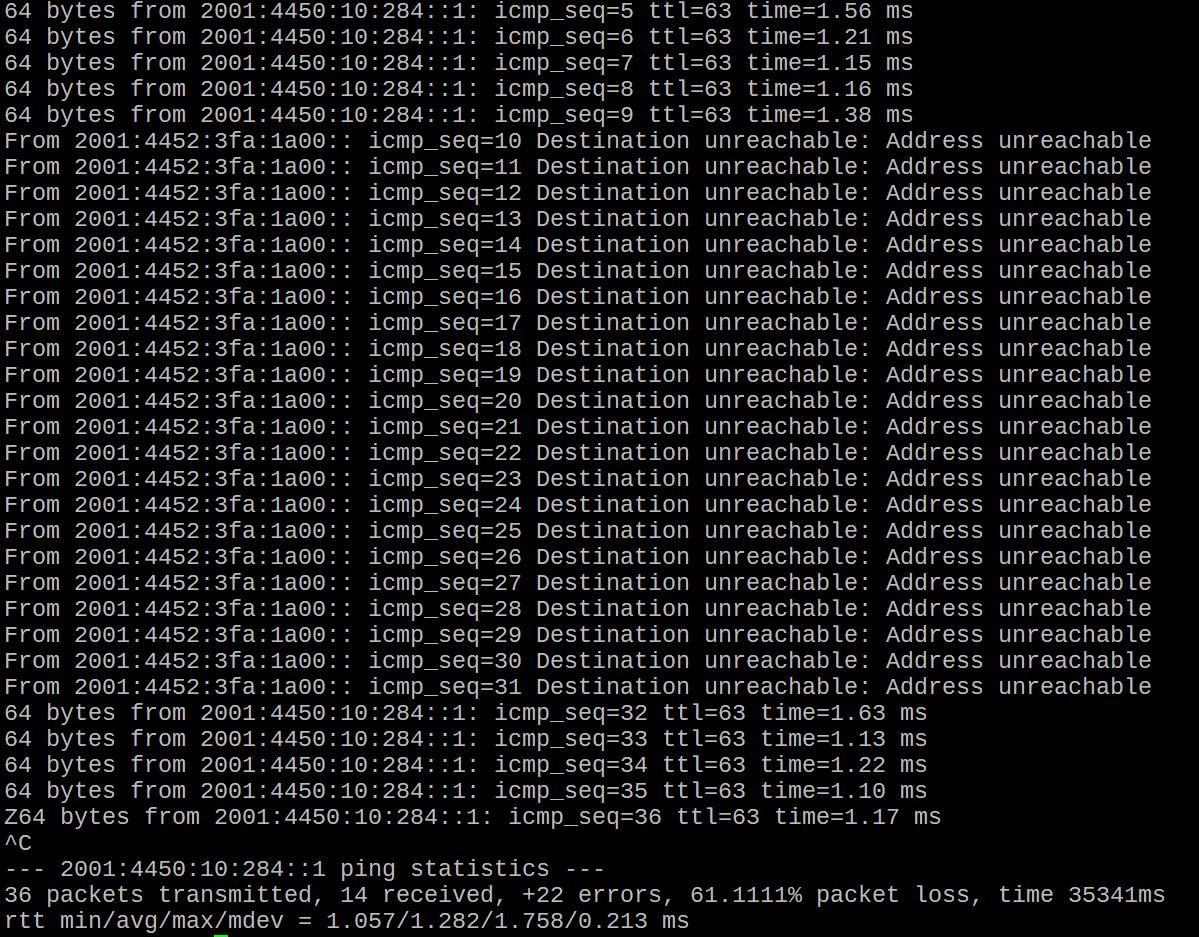
I’ve been having this problem with my IPv6 connection. Every 5 or 10 minutes or so, it just drops out, and I get “Destination unreachable” errors for a few seconds, then it’s back. This is with any IPv6 address, even the first hop on the traceroute. And if I’ve got multiple pings running, they all drop out at the same time.
It’s not just a “ping” problem, either, everything IPv6 drops out, ssh connection, https, etc. IPv4 remains fine.
This is an rb750gr3, currently on v7.14. I tried netinstalling v6.49.13 also, and still experienced the same problem.
Is there any chance this could be due to the Mikrotik, perhaps some configuration issue? Or is it almost certainly an ISP issue? Can you think of anything I could check that might help?
We can start guessing, or maybe call in someone with psychic abilities, or we can look at your config and give you some advice.
dave3
March 13, 2024, 1:38pm
3
Here are the IPv6 settings. The firewall is the default setup.
/ipv6 settings
set accept-redirects=no accept-router-advertisements=no disable-ipv6=yes
/ipv6 address
add from-pool=ipv6-pool interface=bridge
/ipv6 dhcp-client
add add-default-route=yes disabled=yes interface=ether1 pool-name=ipv6-pool prefix-hint=::/56 rapid-commit=no request=prefix \
    use-peer-dns=no
/ipv6 firewall address-list
add address=::/128 comment="defconf: unspecified address" list=bad_ipv6
add address=::1/128 comment="defconf: lo" list=bad_ipv6
add address=fec0::/10 comment="defconf: site-local" list=bad_ipv6
add address=::ffff:0.0.0.0/96 comment="defconf: ipv4-mapped" list=bad_ipv6
add address=::/96 comment="defconf: ipv4 compat" list=bad_ipv6
add address=100::/64 comment="defconf: discard only " list=bad_ipv6
add address=2001:db8::/32 comment="defconf: documentation" list=bad_ipv6
add address=2001:10::/28 comment="defconf: ORCHID" list=bad_ipv6
add address=3ffe::/16 comment="defconf: 6bone" list=bad_ipv6
/ipv6 firewall filter
add action=accept chain=input comment="defconf: accept established,related,untracked" connection-state=established,related,untracked
add action=drop chain=input comment="defconf: drop invalid" connection-state=invalid
add action=accept chain=input comment="defconf: accept ICMPv6" protocol=icmpv6
add action=accept chain=input comment="defconf: accept UDP traceroute" port=33434-33534 protocol=udp
add action=accept chain=input comment="defconf: accept DHCPv6-Client prefix delegation." dst-port=546 protocol=udp src-address=\
    fe80::/10
add action=accept chain=input comment="defconf: accept IKE" dst-port=500,4500 protocol=udp
add action=accept chain=input comment="defconf: accept ipsec AH" protocol=ipsec-ah
add action=accept chain=input comment="defconf: accept ipsec ESP" protocol=ipsec-esp
add action=accept chain=input comment="defconf: accept all that matches ipsec policy" ipsec-policy=in,ipsec
add action=drop chain=input comment="defconf: drop everything else not coming from LAN" in-interface-list=!LAN
add action=accept chain=forward comment="defconf: accept established,related,untracked" connection-state=\
    established,related,untracked
add action=drop chain=forward comment="defconf: drop invalid" connection-state=invalid
add action=drop chain=forward comment="defconf: drop packets with bad src ipv6" src-address-list=bad_ipv6
add action=drop chain=forward comment="defconf: drop packets with bad dst ipv6" dst-address-list=bad_ipv6
add action=drop chain=forward comment="defconf: rfc4890 drop hop-limit=1" hop-limit=equal:1 protocol=icmpv6
add action=accept chain=forward comment="defconf: accept ICMPv6" protocol=icmpv6
add action=accept chain=forward comment="defconf: accept HIP" protocol=139
add action=accept chain=forward comment="defconf: accept IKE" dst-port=500,4500 protocol=udp
add action=accept chain=forward comment="defconf: accept ipsec AH" protocol=ipsec-ah
add action=accept chain=forward comment="defconf: accept ipsec ESP" protocol=ipsec-esp
add action=accept chain=forward comment="defconf: accept all that matches ipsec policy" ipsec-policy=in,ipsec
add action=drop chain=forward comment="defconf: drop everything else not coming from LAN" in-interface-list=!LAN
/ipv6 nd
set [ find default=yes ] advertise-dns=no
/ipv6 nd prefix default
set preferred-lifetime=20m valid-lifetime=12h
I’ve got ipv6 disabled at the moment, so you’ll see it disabled in the settings. Since it’s unusable as it is.
Huh?
/ipv6 settings
set accept-redirects=no accept-router-advertisements=no disable-ipv6=yes
/ipv6 address
add from-pool=ipv6-pool interface=bridge
/ipv6 dhcp-client
add add-default-route=yes disabled=yes interface=ether1 pool-name=ipv6-pool prefix-hint=::/56 rapid-commit=no request=prefix use-peer-dns=no
ipv6 disabled? where is WAN ipv6? dhcp6-client disabled?
dave3
March 13, 2024, 1:59pm
5
Here are the settings with IPv6 enabled.
/ipv6 settings
set accept-redirects=no accept-router-advertisements=no
/ipv6 address
add from-pool=ipv6-pool interface=bridge
/ipv6 dhcp-client
add add-default-route=yes interface=ether1 pool-name=ipv6-pool prefix-hint=::/56 rapid-commit=no request=prefix use-peer-dns=no
/ipv6 firewall address-list
add address=::/128 comment="defconf: unspecified address" list=bad_ipv6
add address=::1/128 comment="defconf: lo" list=bad_ipv6
add address=fec0::/10 comment="defconf: site-local" list=bad_ipv6
add address=::ffff:0.0.0.0/96 comment="defconf: ipv4-mapped" list=bad_ipv6
add address=::/96 comment="defconf: ipv4 compat" list=bad_ipv6
add address=100::/64 comment="defconf: discard only " list=bad_ipv6
add address=2001:db8::/32 comment="defconf: documentation" list=bad_ipv6
add address=2001:10::/28 comment="defconf: ORCHID" list=bad_ipv6
add address=3ffe::/16 comment="defconf: 6bone" list=bad_ipv6
/ipv6 firewall filter
add action=accept chain=input comment="defconf: accept established,related,untracked" connection-state=established,related,untracked
add action=drop chain=input comment="defconf: drop invalid" connection-state=invalid
add action=accept chain=input comment="defconf: accept ICMPv6" protocol=icmpv6
add action=accept chain=input comment="defconf: accept UDP traceroute" port=33434-33534 protocol=udp
add action=accept chain=input comment="defconf: accept DHCPv6-Client prefix delegation." dst-port=546 protocol=udp src-address=\
    fe80::/10
add action=accept chain=input comment="defconf: accept IKE" dst-port=500,4500 protocol=udp
add action=accept chain=input comment="defconf: accept ipsec AH" protocol=ipsec-ah
add action=accept chain=input comment="defconf: accept ipsec ESP" protocol=ipsec-esp
add action=accept chain=input comment="defconf: accept all that matches ipsec policy" ipsec-policy=in,ipsec
add action=drop chain=input comment="defconf: drop everything else not coming from LAN" in-interface-list=!LAN
add action=accept chain=forward comment="defconf: accept established,related,untracked" connection-state=\
    established,related,untracked
add action=drop chain=forward comment="defconf: drop invalid" connection-state=invalid
add action=drop chain=forward comment="defconf: drop packets with bad src ipv6" src-address-list=bad_ipv6
add action=drop chain=forward comment="defconf: drop packets with bad dst ipv6" dst-address-list=bad_ipv6
add action=drop chain=forward comment="defconf: rfc4890 drop hop-limit=1" hop-limit=equal:1 protocol=icmpv6
add action=accept chain=forward comment="defconf: accept ICMPv6" protocol=icmpv6
add action=accept chain=forward comment="defconf: accept HIP" protocol=139
add action=accept chain=forward comment="defconf: accept IKE" dst-port=500,4500 protocol=udp
add action=accept chain=forward comment="defconf: accept ipsec AH" protocol=ipsec-ah
add action=accept chain=forward comment="defconf: accept ipsec ESP" protocol=ipsec-esp
add action=accept chain=forward comment="defconf: accept all that matches ipsec policy" ipsec-policy=in,ipsec
add action=drop chain=forward comment="defconf: drop everything else not coming from LAN" in-interface-list=!LAN
/ipv6 nd
set [ find default=yes ] advertise-dns=no
/ipv6 nd prefix default
set preferred-lifetime=20m valid-lifetime=12h
can you also show (with some part of addr hidden) your
/ipv6/address/print
/ipv6/route/print
/ipv6/neighbor/print
?
dave3
March 13, 2024, 2:27pm
7
Here’s the additional info:
[admin@MikroTik] > /ipv6/address/print
Flags: D - DYNAMIC; G - GLOBAL, L - LINK-LOCAL
Columns: ADDRESS, FROM-POOL, INTERFACE, ADVERTISE
#    ADDRESS                       FROM-POOL  INTERFACE  ADVERTISE
0  G 2001:4452:AAA:BB00::/64       ipv6-pool  bridge     yes
1 D  ::1/128                                  lo         no
2 DL fe80::de2c:5555:7777:2946/64             bridge     no
3 DL fe80::de2c:5555:7777:2945/64             ether1     no

[admin@MikroTik] > /ipv6/route/print
Flags: D - DYNAMIC; A - ACTIVE; c - CONNECT, d - DHCP
Columns: DST-ADDRESS, GATEWAY, DISTANCE
    DST-ADDRESS              GATEWAY                           DISTANCE
DAd ::/0                     fe80::86a9:c4ff:fed2:b3c0%ether1         1
DAc ::1/128                  lo                                       0
DAd 2001:4452:AAA:BB00::/56                                           1
DAc 2001:4452:AAA:BB00::/64  bridge                                   0
DAc fe80::%ether1/64         ether1                                   0
DAc fe80::%bridge/64         bridge                                   0

[admin@MikroTik] > /ipv6/neighbor/print
Flags: R - router
 0   address=ff02::11 interface=bridge mac-address=33:44:00:00:00:11 status="noarp"

 1   address=fe80::93ca:9999:333:cccc interface=bridge mac-address=0C:CC:FF:EE:33:33 status="stale"

 2 R address=fe80::86a9:c4ff:fed2:b3c0 interface=ether1 mac-address=84:AA:CC:DD:BB:CC status="stale"

 3   address=2001:4452:AAA:BB00:3404:9999:4444:cccc interface=bridge mac-address=B8:22:EE:AA:99:BB status="stale"

 4   address=fe80::b0e5:bbbb:eeee:fff interface=bridge mac-address=B8:22:EE:AA:99:BB status="stale"

 5   address=2001:4452:AAA:BB00:1b70:fff:888:3333 interface=bridge mac-address=02:88:99:88:FF:22 status="stale"

 6   address=fe80::ba3e:dddd:2222:aaa interface=bridge mac-address=02:88:99:88:FF:22 status="stale"

 7   address=2001:4452:AAA:BB00:b5fe:3333:ffff:aaaa interface=bridge mac-address=38:00:77:11:77:DD status="reachable"

 8   address=fe80::2361:bbbb:8888:2222 interface=bridge mac-address=38:00:77:11:77:DD status="reachable"
looks ok for me, have you tried to ask your ISP?
dave3
March 13, 2024, 3:31pm
9
Yes, it’s the same thing with “Destination unreachable.” I haven’t tried to ask my ISP. I’m pretty sure they won’t do anything, based on previous interactions. If there’s nothing I can do configuration-wise, the solution is to not use IPv6.