Has anyone created a network with IV6 on only one vlan?
just wondering how that might be done.
I would like to have IPv6 on only one vlan at home and perhaps have the v6 network have it’s own ssid so i can test it out without it being on the whole network for now. It seems like that ought to be possible on one L2 segment/vlan (?)
I’ve had the whole home network on IPv6 via a Hurricane Electric tunnel but it wasn’t great for everyday use due to poor geolocation… thought it might be fun to have it avaialble on a more limited basis until my ISP gets around to proper v6. I could also set up different SIT tunnels and switch them possibly
When setting up IPv6, one usually sets a proper (i.e. not a link-local) IPv6 address to individual interfaces. When VLANs are in the mix, this means assigning IPv6 address to vlan interface. And MT router will, by default, send out router advertisements on interfaces with proper IPv6 address. So if you don’t want to run IPv6 on sone VLAN, you just don’t set up IPv6 address on corresponding vlan interface. If clients don’t receive RAs, they can’t perform SLAAC and hence don’t have IPv6.
Thanks @mkx
I’ll give it a shot (weekend project . In theory I should just be able to remove my ipv6 address assignment in the bridge and create one on the vlan interface. That allows me to keep the HE tunnel up and ipv6 running but only in the vlan I want.
I can then add an SSID on that vlan if I want to experiment more easily from a laptop or phone… Also I don’t “break the internet” for the family
Make sure you have no Windows systems where your normal network is received “untagged” and your “one VLAN” is received “tagged”, because that will seriously foul up the Windows broken networking!
(When a Windows system is not configured for tagged VLAN handling, which usually requires installation of manufacturer drivers for the network card instead of the default Windows-supplied drivers, it will by default just delete all VLAN tags and merge the network traffic into the same “interface”. This isn’t an issue with IPv4 but with IPv6 SLAAC it will cause surprises).
thanks
the vlan will only have one wired host other than the router initially… not sure yet what that device might be
the home “main” network has no tagged traffic on it at all. (AFAIK unless i messed something up badly) and is working fine.
I did note with a quick look that the ND is set for interface “all”.. guessing that is incorrect. should it be only on my v6 vlan?
Also, my current (working) setup appears to dynamically create ipv6 addresses on every interface… presumably that is a manual setting somewhere or is that jsut normal behaviour as all interfaces have a link local address
sorry for the newbie questions… i feel like I’ve been an ipv6 newbie for 20 years
as with all things ipv6 I know this will never be as simple as I expect/want/hope
more time on the MT forums and youtube again…
so, in theory I have configured only the vlan to have an interface that is advertising.
under ipv6 interfaces on the mikrotik there is an ipv6 address on the bridge but i have unticked “advertise” (using Winbox … for now)
only the vlan interface is identified as “advertising” under the IPV6 addresses section
however on my main lan my desktop is still somehow getting an IP address using the hurricane electric (HE) /64 prefix
I am seeing IPV6 assigned DNS servers on the main lan as well so presumably that means that RA advertisements are going on on the bridge despite my efforts?
on the main lan which should not have IPv6 at all I am seeing 2001 and fbd0 addresses marked as preferred. I can ping the router from there on ipv6 though it seems using its link local address so v6 data of a sort is moving
I am also getting an ipv6 address with the HE prefix on my testing vlan (which is good i hope)
I am seeing no DNS6 server info on the PC on the vlan
over time i see that that IP addresses on my vlan in the 2001 range are marked deprecated and only the FE80 marked as active
both devices are showing the default gateway as their own FE80 ethernet IP address? is that normal? presumably with a fully routable IPv6 address it would use that?
I did note that when I assigned the HE prefix on the bridge interface it immediately came up with a full (SLAAC?) IP address that looks random but may include the mac address. When I do the same on the VLAN interface no such address guest assigned but the router does not complain (mac mac address to use?).. it didn’t seem right so I gave it a manual ip ending in :17:1 (as my vlan is 17 so trying to keep things straightish)
IPv4 working as expected (I’m using my “guest network” as the test… all firewall rules are defconf )
The HE sit link seems happy enough and stable (my only route to IPv6 for now)
but home lan and guest vlan fail ipv6 online test https://test-ipv6.com
debugging clues and strategies gratefully received. (I have wireshark on both segments)
The whole ordeal depends very much on how things are physically connected and how’s router set-up. Bridge is s switch-like entity and won’t block traffic passing between diferent ports (that includes RAs).
So show us actual layout and actual config of your device.
I’ll try to draw a picture that isn’t just a scribble.. just need to figure out what software or site is best to do that on (is there a consensus for such things? Draw.io? )
(The text version is that I have a ln RB750gr2 on fibre broadband (NATed). Both PCs in are physically connected to a zyxel wsm20 running openwrt (but not doing ipv6). Openwrt is VLANing locally.. GigE trunk directly back to the RB but untagged for main network traffic. Vlans seem to work fine at layer2 and ipv4)
The RB is also connected to two MT APs and a Dell 2816 switch altgough technically they should not be in the path to the test PCs
And I’ll post an export of the config.. stay tuned.
(I only recently got the vlans and ssids for guest and iot working so don’t want to break those.. maybe v6 is a step too far… But every the optimist I hoped it might be easy or I would be lucky .. but yes, ordeal may be a better word;)
Hopefully this makes sense… just learning draw.io and probably one of the only network diagrams I have made since, oh, 1995 or so!
Everything seems to be working fine on L2 and Ipv4
NB: ipv6 currently disabled in the config but nothing else changed… just didn’t want it left running “broken”
Hopefully there is something obvious I have screwed up.
Just like in IPv4 also IPv6 addresses need to be accompanied with apropriate prefix length to indicate which address space is available as directly connected subnet via certain interface. In IPv6 the most common (and sometimes the only supported) prefix size for end subnets is /64.
And the prefix length is missing in all your address assignments. If it’s not set, then a /128 is used (similarly to /32 for IPv4 addresses).
thanks… not sure why that was missing in the config… when i went back and looked on winbox/webfig the /64 was there so perhaps it was finger trouble
pretty sure everything now has the correct length now
i still don;t have connectivity though.
I can ping ipv6 addresses including the other end of the HE tunnel and cloudflare dns from the router but not from devices on the guest network although those devices seems to be getting an address with the correct prefix 2001:470:1f1d:8de::/64
i can ping the ipv6 address on the vlan18 interface (2001:470:1f1d:8de::17:1) from the router
i don’t see any ipv6 dns servers listed on the client. should I? I have them configured in /ip/dns
ping to google.com on the command line is using ipv4 but that may be the default (?).. i cant find a command line equivalent of ping6
command line ping to ipv6.google.com fails with some odd mesaging
ping ipv6.google.com
invalid value for argument address:
invalid value of mac-address, mac address required
invalid value for argument ipv6-address
failure: dns name exists, but no appropriate record
Another thing to check: /ipv6/setttings/print … forward setting should be set to “yes”
Regarding DNS servers: it’s not critical to tell clients about IPv6 addresses of DNS servers, but it’s good to do it. It’s been a while since I verified my setup, but I think that setting IPv6 address of DNS servers in /ip/dns should do the trick. There’s another place where it seems it’s possible to set IPv6 DNS server addresses: /ipv6/nd/ (my setup doesn’t have it set though) … there’s default ND profile (not shown in export as it’s all default), it can be changed by e.g. running set 0 dns=,.
Just noticed this IPv6 firewall filter entry (the last one):
add action=drop chain=forward comment=“defconf: drop everything else not coming from LAN” in-interface-list=!LAN
and I couldn’t see command that adds your VLAN17 interface to LAN interface list … if that’s indeed so, then this firewall filter rule blocks your IPv6 connectivity towards internet.
i have ipv6 servers DNS servers set in /ip/dns
I had tried with DNS servers in the ND settings with no luck in the past but will try again (I have the option in winbox and webfig)
iirc correctly when it was working on jsut the lan config (before i added vlans into the mix) i didn’t need it in the ND section and it just worked
(perhaps my vlan config or how MT delas with vlans is messing things up… bridges/vlan1 etc)
you are right about vlan17 not being in the LANS list!. I’ll change that and give it another go
In the back of my mind I think i was thinking that for secure separation that vlan17 and 19 should not be in LANs… the interaction of all these things is perplexing (but I guess that is the power of MT!)
btw, I just tried another export and it did indeed leave off the prefix length in the config file under /ipv6/addresses but they are there in /ipv6/address/print
I’ll report that to MT support
now i have ipv6 on my guest network so real progress (on wifi and ethernet) … apparently it was the firewall rule/LAN list issue
many thanks @mkx
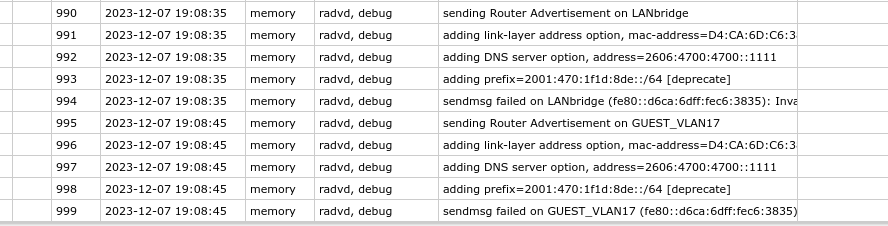
i note however that my devices on the main lan are still getting ipv6 address assignments on the HE prefix and I can see RAs in wireshark coming from the MT router
my understanding was that as there is no ipv6 address set on the bridge that RA’s should not go out there?
i do not have ipv6 access on the main lan though (https://test-ipv6.com)
little side note related to HE geolocation .. the BBC thinks I am in the UK, the Guardian thinks I am in the US! (HE tunnel geolocation remains flaky even though I am in the UK using a London tunnel)
I spoke too soon.
if i connect on the guest LAN via wifi on another AP (the MT HAP AC) i seem to get an ip address in the correct prefix but no routing. (tried android, chromeos and win11)
a wired connection on vlan17 on the dell switch behaves the same.. (ipv4 works fine and ipv4 addresses are assigned by DHCP from the router)
Its odd as it all seems to work perfectly for ipv4 and layer2 and is on the same vlan as the zyxel/openwrt box (but it is ROS this time)
no firewalls on the HAP and indeed no IPv6 yet but I didn’t think there needed to be as it should be connected as layer2 and acting more or less as just a switch with vlans
to add complication I guess I am going to need a /48 or /56 from Hurricane if I want to have separate subnets for my guest and IOT networks as otherwise any separation via IPv4 firewall is pointless since ipv6 will let everyhting through as they’re all on one subnet… but that is a step too far as well for the moment
just adding to the mystery… and the learning
looks like Mikrotik is sending the RAs on the bridge despite it having no IPv6 address (that is on VLAN17)
more confusingly the RAs are sent even if IPv6 is disabled in ipv6 settings
i see that all interfaces seem to be getting Link Local addresses including the lanbridge and they are added automatically.
is that configurable? and would turning it off be sensible?
(and interestingly google hubs seem to send RAs in the Unique Local Address (ULA) range but that is a mystery for another day .. some google fu)
 . In theory I should just be able to remove my ipv6 address assignment in the bridge and create one on the vlan interface. That allows me to keep the HE tunnel up and ipv6 running but only in the vlan I want.