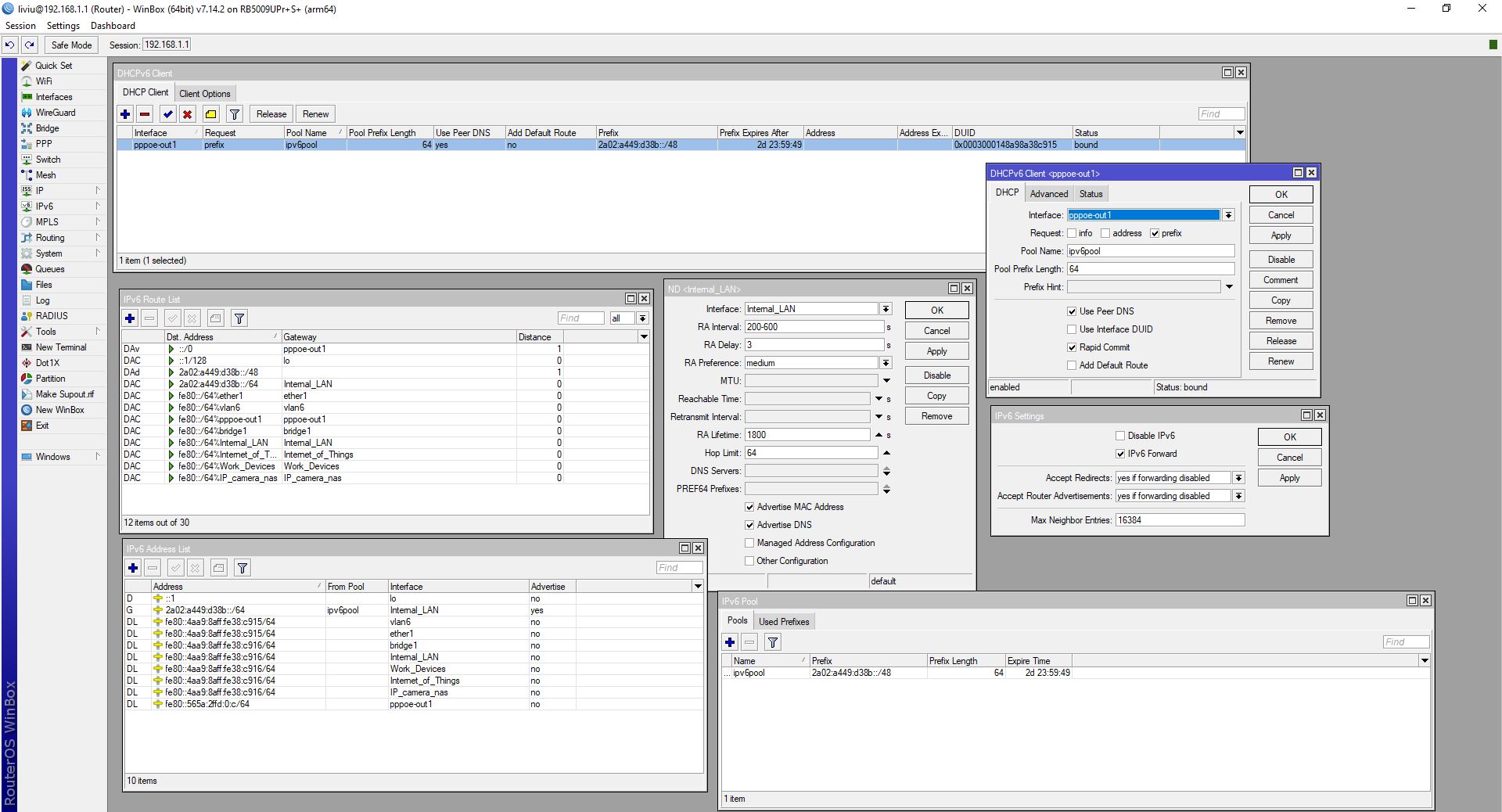
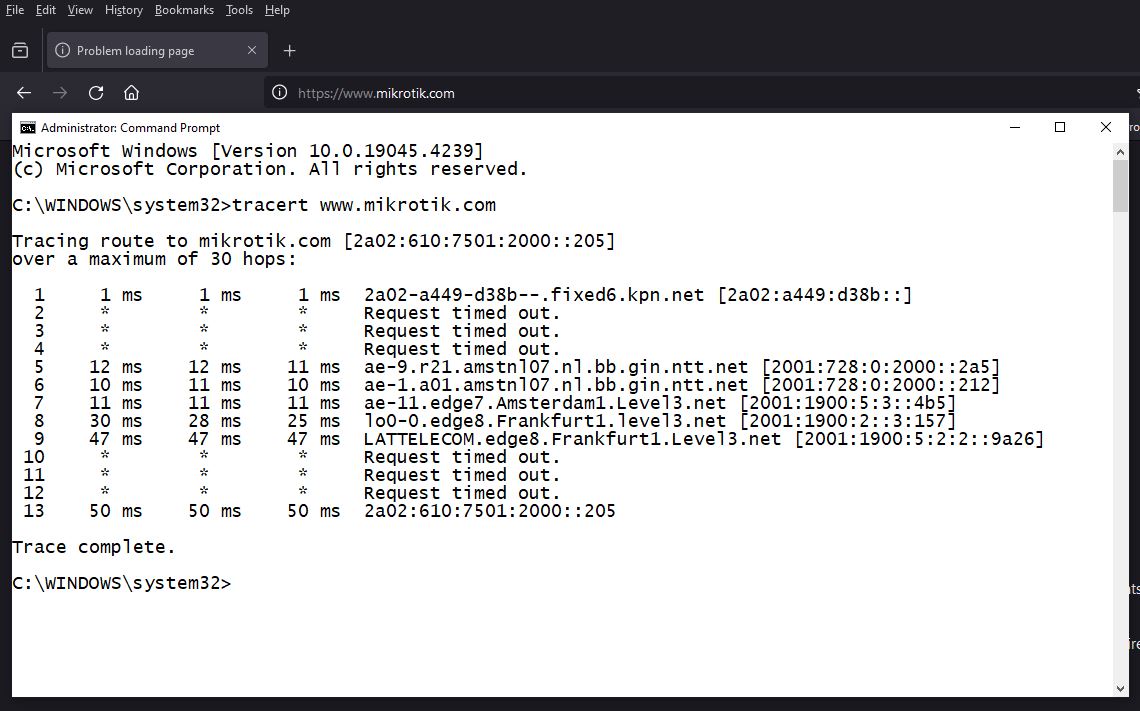
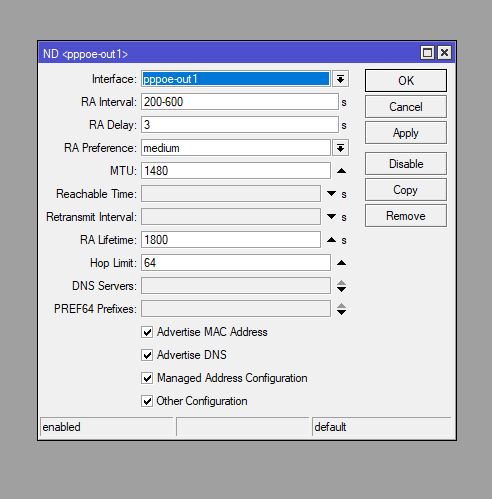
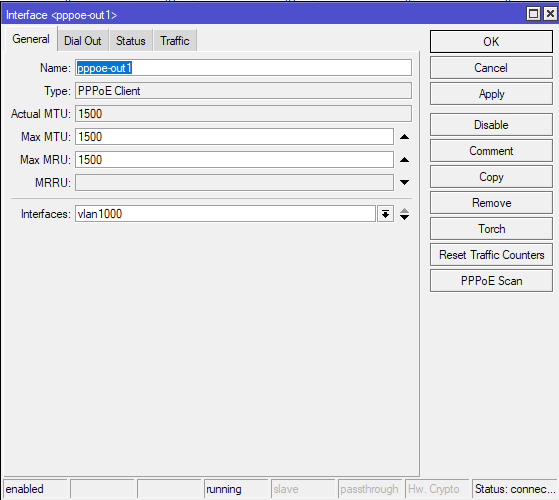
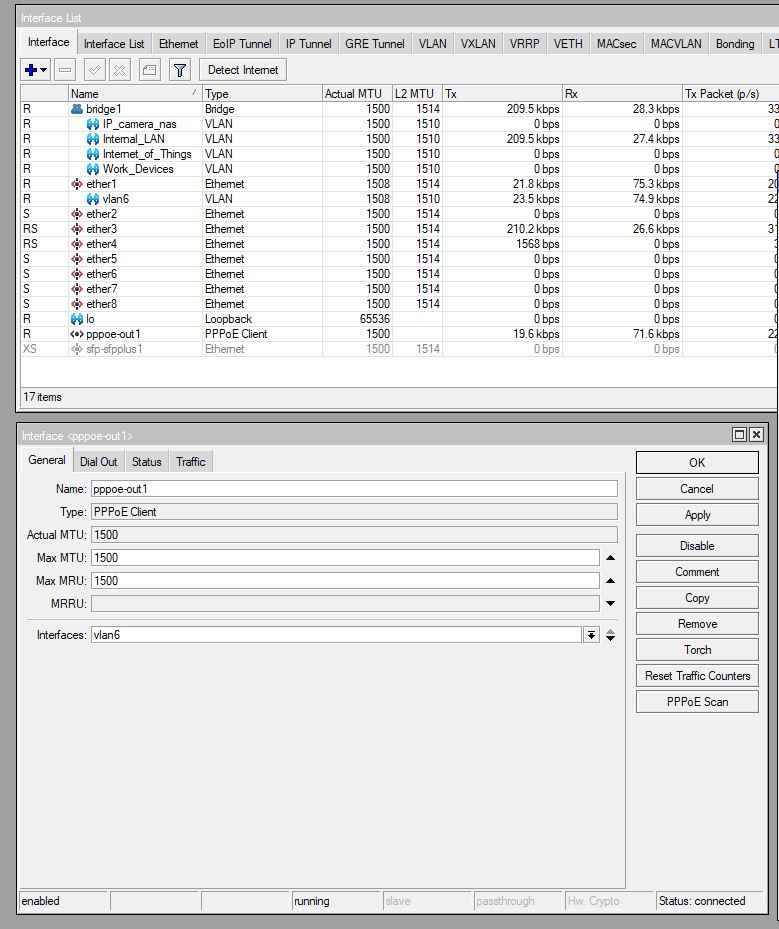
Hi, trying to get my ipv6 going, I'm not fully grasping on the basics and settings.It appears I can obtain an prefix from my ISP, I seem to get an IPv6 address for my PC but when I activate dhcp client on ipv6, I cannot access mikrotik.com anymore and ipv6 test website shows me fail all tests.
I'm for sure missing something, or forgot something but can't figure out what .... Anyone can see the obvious?
Attached my network layout and config export with hide sensitive.
# 2024-04-01 10:15:22 by RouterOS 7.14.2
# software id =
#
# model = RB5009UPr+S+
# serial number =
/interface bridge
add frame-types=admit-only-vlan-tagged name=bridge1 vlan-filtering=yes
/interface ethernet
set [ find default-name=ether1 ] poe-out=off
set [ find default-name=ether2 ] poe-out=off
set [ find default-name=ether3 ] poe-out=off
set [ find default-name=ether5 ] poe-out=off
set [ find default-name=ether6 ] poe-out=off
set [ find default-name=ether7 ] poe-out=off
set [ find default-name=ether8 ] poe-out=off
set [ find default-name=sfp-sfpplus1 ] disabled=yes
/interface vlan
add interface=bridge1 name=IP_camera_nas vlan-id=40
add interface=bridge1 name=Internal_LAN vlan-id=10
add interface=bridge1 name=Internet_of_Things vlan-id=20
add interface=bridge1 name=Work_Devices vlan-id=30
add interface=ether1 name=vlan6 vlan-id=6
/interface list
add name=WAN
add name=VLAN
/ip pool
add name=Internal_LAN ranges=192.168.1.100-192.168.1.200
add name=Internet_of_Things ranges=10.0.20.100-10.0.20.200
add name=Work_Devices ranges=10.0.30.100-10.0.30.200
/ip dhcp-server
add address-pool=Internal_LAN interface=Internal_LAN lease-time=1d name=\
    Internal_LAN
add address-pool=Internet_of_Things interface=Internet_of_Things lease-time=\
    1d name=Internet_of_Things
add address-pool=Work_Devices interface=Work_Devices lease-time=1d name=\
    Work_Devices
/ppp profile
set *FFFFFFFE only-one=yes remote-ipv6-prefix-pool=ipv6pool use-upnp=no
/interface pppoe-client
add add-default-route=yes disabled=no interface=vlan6 keepalive-timeout=30 \
    max-mtu=1492 name=pppoe-out1 profile=default-encryption use-peer-dns=yes \
    user=hide
/interface bridge port
add bridge=bridge1 frame-types=admit-only-untagged-and-priority-tagged \
    interface=ether2 pvid=10
add bridge=bridge1 frame-types=admit-only-vlan-tagged interface=ether3
add bridge=bridge1 frame-types=admit-only-vlan-tagged interface=ether4
add bridge=bridge1 frame-types=admit-only-untagged-and-priority-tagged \
    interface=ether5 pvid=10
add bridge=bridge1 frame-types=admit-only-untagged-and-priority-tagged \
    interface=ether6 pvid=10
add bridge=bridge1 frame-types=admit-only-untagged-and-priority-tagged \
    interface=ether7 pvid=10
add bridge=bridge1 frame-types=admit-only-untagged-and-priority-tagged \
    interface=ether8 pvid=10
add bridge=bridge1 frame-types=admit-only-untagged-and-priority-tagged \
    interface=sfp-sfpplus1 pvid=10
/interface bridge vlan
add bridge=bridge1 tagged=bridge1,ether3,ether4 untagged=\
    ether2,ether5,ether6,ether7,ether8,sfp-sfpplus1 vlan-ids=10,20,30,40
/interface list member
add interface=pppoe-out1 list=WAN
add interface=Internal_LAN list=VLAN
add interface=Internet_of_Things list=VLAN
add interface=Work_Devices list=VLAN
add interface=ether1 list=WAN
add interface=IP_camera_nas list=VLAN
add interface=*13 list=WAN
/ip address
add address=10.0.0.2/24 interface=ether1 network=10.0.0.0
add address=192.168.1.1/24 interface=Internal_LAN network=192.168.1.0
add address=10.0.20.1/24 interface=Internet_of_Things network=10.0.20.0
add address=10.0.30.1/24 interface=Work_Devices network=10.0.30.0
add address=10.0.40.1/24 interface=IP_camera_nas network=10.0.40.0
/ip dhcp-server lease
add address=10.0.20.196 mac-address=24:94:94:16:3C:F5 server=\
    Internet_of_Things
/ip dhcp-server network
add address=10.0.10.0/24 gateway=10.0.10.1
add address=10.0.20.0/24 gateway=10.0.20.1
add address=10.0.30.0/24 gateway=10.0.30.1
add address=192.168.1.0/24 gateway=192.168.1.1
/ip firewall filter
add action=accept chain=input comment="Allow established, related, untracked" \
    connection-state=established,related,untracked
add action=drop chain=input comment="drop invalid" connection-state=invalid
add action=reject chain=input comment="drop dns resolver" dst-port=53 \
    in-interface-list=WAN protocol=udp reject-with=icmp-network-unreachable
add action=reject chain=input comment="drop dns resolver" dst-port=53 \
    in-interface-list=WAN protocol=tcp reject-with=icmp-network-unreachable
add action=accept chain=input comment="accept icmp" protocol=icmp
add action=drop chain=input comment="drop all not coming from VLAN" \
    in-interface-list=!VLAN
add action=fasttrack-connection chain=forward comment=fasttrack hw-offload=\
    yes
add action=accept chain=forward comment=\
    "accept established, related, untracked" connection-state=\
    established,related,untracked
add action=accept chain=forward comment=\
    "allow control of bedroom light from internal lan" dst-address=\
    10.0.20.196 in-interface=Internal_LAN out-interface=Internet_of_Things
add action=accept chain=forward comment=\
    "Allow access to IP camera from Internal LAN" dst-address=10.0.40.64 \
    in-interface=Internal_LAN
add action=accept chain=forward comment=\
    "Allow access to NAS surveillance from Internal LAN" dst-address=\
    10.0.40.182 in-interface=Internal_LAN
add action=accept chain=forward comment=\
    "allow printer to VLAN30 Work Devices" dst-address=192.168.1.5 \
    dst-address-list="" in-interface=Work_Devices out-interface=Internal_LAN
add action=drop chain=forward comment=\
    "no outside access to IP_camera_nas VLAN" in-interface=IP_camera_nas \
    out-interface-list=WAN
add action=accept chain=forward comment="VLAN internet access only" \
    connection-state=new in-interface-list=VLAN out-interface-list=WAN
add action=drop chain=forward comment="VLAN no inter communication" \
    in-interface=all-vlan out-interface=all-vlan
add action=drop chain=forward comment="drop all from WAN not DSTNATed" \
    connection-nat-state=!dstnat in-interface-list=WAN
add action=drop chain=forward comment="drop invalid" connection-state=invalid
/ip firewall nat
add action=masquerade chain=srcnat out-interface-list=WAN
/ip service
set telnet disabled=yes
set ftp disabled=yes
set ssh disabled=yes
set api disabled=yes
set api-ssl disabled=yes
/ipv6 address
add from-pool=ipv6pool interface=Internal_LAN
/ipv6 dhcp-client
add interface=pppoe-out1 pool-name=ipv6pool pool-prefix-length=48 request=\
    prefix
/ipv6 firewall address-list
add address=fe80::/10 comment="defconf: RFC6890 Linked-Scoped Unicast" list=\
    no_forward_ipv6
add address=ff00::/8 comment="defconf: multicast" list=no_forward_ipv6
add address=::1/128 comment="defconf: RFC6890 lo" list=bad_ipv6
add address=::ffff:0.0.0.0/96 comment="defconf: RFC6890 IPv4 mapped" list=\
    bad_ipv6
add address=2001::/23 comment="defconf: RFC6890" list=bad_ipv6
add address=2001:db8::/32 comment="defconf: RFC6890 documentation" list=\
    bad_ipv6
add address=2001:10::/28 comment="defconf: RFC6890 orchid" list=bad_ipv6
add address=::/96 comment="defconf: ipv4 compat" list=bad_ipv6
add address=100::/64 comment="defconf: RFC6890 Discard-only" list=\
    not_global_ipv6
add address=2001::/32 comment="defconf: RFC6890 TEREDO" list=not_global_ipv6
add address=2001:2::/48 comment="defconf: RFC6890 Benchmark" list=\
    not_global_ipv6
add address=fc00::/7 comment="defconf: RFC6890 Unique-Local" list=\
    not_global_ipv6
add address=::/128 comment="defconf: unspecified" list=bad_dst_ipv6
add address=::/128 comment="defconf: unspecified" list=bad_src_ipv6
add address=ff00::/8 comment="defconf: multicast" list=bad_src_ipv6
/ipv6 firewall filter
add action=accept chain=input comment="defconf: accept ICMPv6 after RAW" \
    protocol=icmpv6
add action=accept chain=input comment=\
    "defconf: accept established,related,untracked" connection-state=\
    established,related,untracked
add action=accept chain=input comment="defconf: accept UDP traceroute" \
    dst-port=33434-33534 protocol=udp
add action=accept chain=input comment=\
    "defconf: accept DHCPv6-Client prefix delegation." dst-port=546 protocol=\
    udp src-address=fe80::/10
add action=accept chain=input comment="defconf: accept IKE" dst-port=500,4500 \
    protocol=udp
add action=accept chain=input comment="defconf: accept IPSec AH" protocol=\
    ipsec-ah
add action=accept chain=input comment="defconf: accept IPSec ESP" protocol=\
    ipsec-esp
add action=drop chain=input comment="defconf: drop all not coming from VLAN" \
    in-interface-list=!VLAN
add action=accept chain=forward comment=\
    "defconf: accept established,related,untracked" connection-state=\
    established,related,untracked
add action=drop chain=forward comment="defconf: drop invalid" \
    connection-state=invalid
add action=drop chain=forward comment="defconf: drop bad forward IPs" \
    src-address-list=no_forward_ipv6
add action=drop chain=forward comment="defconf: drop bad forward IPs" \
    dst-address-list=no_forward_ipv6
add action=drop chain=forward comment="defconf: rfc4890 drop hop-limit=1" \
    hop-limit=equal:1 protocol=icmpv6
add action=accept chain=forward comment="defconf: accept ICMPv6 after RAW" \
    protocol=icmpv6
add action=accept chain=forward comment="defconf: accept HIP" protocol=139
add action=accept chain=forward comment="defconf: accept IKE" dst-port=\
    500,4500 protocol=udp
add action=accept chain=forward comment="defconf: accept AH" protocol=\
    ipsec-ah
add action=accept chain=forward comment="defconf: accept ESP" protocol=\
    ipsec-esp
add action=accept chain=forward comment=\
    "defconf: accept all that matches IPSec policy" ipsec-policy=in,ipsec
add action=drop chain=forward comment=\
    "defconf: drop everything else not coming from VLAN" in-interface-list=\
    !VLAN
/ipv6 nd
set [ find default=yes ] advertise-dns=no advertise-mac-address=no hop-limit=\
    64 interface=Internal_LAN
/system identity
set name=Router
/system note
set show-at-login=no
/system ntp client
set enabled=yes
/system ntp server
set broadcast=yes enabled=yes manycast=yes multicast=yes
/system ntp client servers
add address=0.nl.pool.ntp.org
add address=1.nl.pool.ntp.org
add address=2.nl.pool.ntp.org
add address=3.nl.pool.ntp.org
diagram.pdf (124 KB)