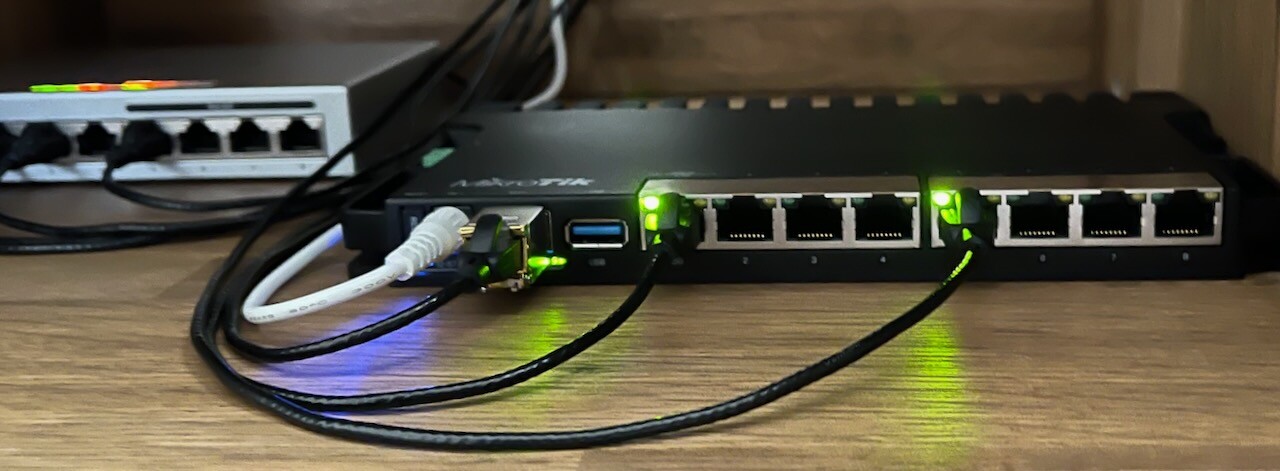
Is CCR2004-1G-12S+2XS a good fit for this use-case?

I am looking to replace my ageing RB2011UAS with a new MikroTik router.

This is important to me:

  • fast and stable PPPoE client connection (an ISP pre-requisite)
  • bonding support (there are 2 x 1Gbps ISP connections)
  • fast single TCP stream (RB2011UAS TCP maxes out at 750Mbps)
  • multiple 10Gbit ports (whole network is 10Gbit, and I expect to add more 10Gbit capable hosts next year)
  • fastest single-core performance

I am currently leaning towards CCR2004-1G-12S+2XS with S+RJ10 modules (network is Cat6A):

Does anyone run this router? Is it a good fit for my use-case?

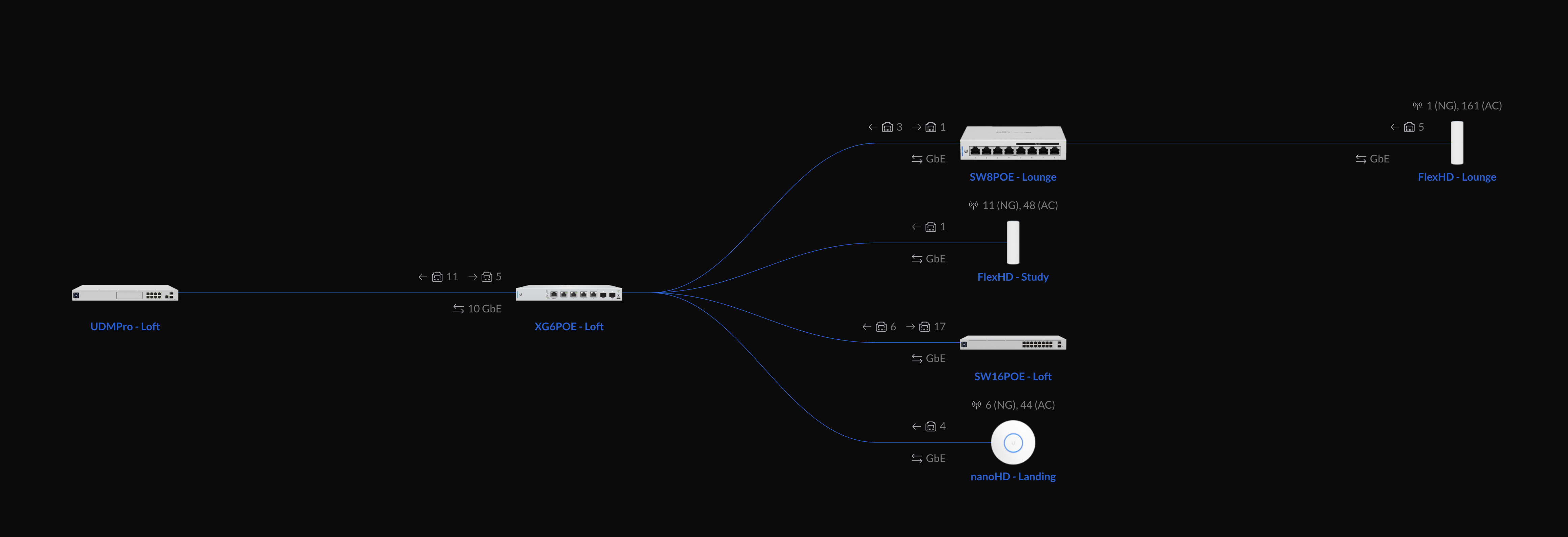
This is my current network topology, and the new MikroTik router would sit in front of the UDMPro:

The UDMPro has proven to be an unreliable PPPoE client, and while it has other advantages, I know that I can depend on MikroTik for ISP connectivity: http://forum.mikrotik.com/t/wan-throughput-degradation-after-terminating-pppoe-with-rb2011uas/152962/3

Thanks!

http://forum.mikrotik.com/t/the-big-ccr2004-reboot-thread-was-2004-hardware-issues/141913/1

I’d advise you to read through this thread. There are a few. Also, there are limitations to how many s+rj10 you can put in close proximity. I don’t have the link off hand, but I’d suggest you search for it.

I am faced with the same decision. For me (maybe for you too) the CCR2004-16G-2S+ would fit better as the network still uses Cat6A.
But until the severe problems with the CCR2004-1G-12S+2XS are solved, I won’t buy the CCR2004-16G-2S+ with the same CPU. Especially since it only runs with a special ROS V7.0, and V7.1 is not ready yet.

So, my approach is just keeping the existing device with some limitations (using a CRS328-24P-4S+ as a router).

After ROSv7.1 gets stabilized, you might want to keep using yor CRS328 as router with its L3 HW offloading vastly improving routing speed in certain conditions.

https://wiki.mikrotik.com/wiki/S%2BRJ10_general_guidance

@mkx, thanks for the tip, L3 HW Offloading looks very promising.
However

  1. it looks like some tinkering because of the numerous constraints, whereas CCR2004 or RB5009 achieve the same goal with sheer power. Interestingly, these two do not support L3 HW Offloading, only the CRS3xx models can (currently),
  2. fasttrack and NAT with HW Offloading are not supported by the switch chip (98DX3236) of CRS326 and CRS328.

But I will try it. However, to do that I need to choose another small spare router (Hex?) so my network won’t stand still.

The successor to what you have, the RB3011, can route 1Gbps just fine (at 50-60% CPU), and would probably max out trying to do 1.5-2Gbps, depending on how you hand the traffic off downstream.

If I were you, I’d do the RB4011. Two of the 1G ports would face your ISP, then the 10G port could go into your UDM Pro. Unless you’re planning to do dozens of IPSEC VPN tunnels or other processor-intensive stuff, you’ll be surprised how underutilized the lower-cost quad-core routers would be. The 4011 can also run RouterOS 6, so you can buy yourself some time on something stable (6.47.10 or 6.48.4) until 7.1 (or later) comes out.

I own an ISP with ~300 subscribers. The border router on my 1Gbps fiber link is an RB4011. With minimal firewall rules and limited connection tracking, this router hits 25-30% running 900Mbps inbound during peak hours. A second RB4011 handles CGNAT (89K connections/900Mbps) and runs at 52% during peak. A 4 year-old CCR1009 sits in the middle at 2%, routing only (no filters), and a pair of RB4011’s (8%) and one RB3011 (30%/500Mbps during peak hours) handle the routing facing the customers.

I do have a CCR2004-1G-12S+2XS as the border router for my 10Gbps connection in a data center, but it’s basically twiddling its thumbs because the data center isn’t tied back to the network yet. A CCR2004-16G-2S+ and two RB5009’s just arrived today for testing.

Hello @sirbryan, it would be very courteous if you could share your experiences with your two new devices (CCR2004 and RB5009) here in the forum.
I could imagine that their comparison to your other devices would be very interesting for many readers.

So far they’re pretty minimally configured mainly due to 7.1’s fragility in Webfig and only slightly better configurability via Winbox. I haven’t done anything with the RB5009’s yet.

I have a CHR with a Wireguard link to the CCR2004, being used to tunnel traffic between two different networks. I have a VRF for the “internal” network, where the internal interface on each device and the wireguard interfaces have been added to the VRF. OSPFv2 is running across the wireguard tunnel, essentially joining the networks. As of 7.1rc6, OSPFv3 doesn’t work over wireguard (supposedly coming in a future RC).

I’m only pushing 50-200Mbps across the link, so the CPUs of both machines are relatively untouched.

I’m not using IPSEC or BGP (yet), nor any PPP of any kind (PPPoE, L2TP). I do have a Cake queue on the CHR’s wireguard interface (towards the CCR2004) and it seems to be working OK. It was configured but disabled on the CCR2004; nothing has crashed yet.

Thank you all for the great answers.

I ended up going for the RB5009UG+S+IN. While PPPoE has been rock solid ever since, and I am now able to max out the 1Gbps WAN @ 45% CPU utilisation, the SFP+ has been a let-down.

There is not much more to tell about the PPPoE WAN connection: it just works.

This is how the four ARMv8 1.4GHz CPUs are handling this speedtest: https://www.speedtest.net/my-result/d/446928339

  cpu-used-per-cpu: 1%,3%,41%,42%
       free-memory: 832000KiB
-- [Q quit|D dump|C-z pause]
  cpu-used-per-cpu: 8%,3%,69%,33%
       free-memory: 832000KiB
-- [Q quit|D dump|C-z pause]
  cpu-used-per-cpu: 49%,37%,49%,41%
       free-memory: 832000KiB
-- [Q quit|D dump|C-z pause]
  cpu-used-per-cpu: 48%,45%,57%,37%
       free-memory: 832192KiB
-- [Q quit|D dump|C-z pause]
  cpu-used-per-cpu: 44%,44%,54%,41%
       free-memory: 832384KiB
-- [Q quit|D dump|C-z pause]
  cpu-used-per-cpu: 45%,52%,50%,41%
       free-memory: 833280KiB
-- [Q quit|D dump|C-z pause]

Downloading pushes all four cores to ~50%, and uploading pushes two cores to ~40%. I am assuming that this is related to the download vs upload speedtest.net streams.

As for the SFP+, the S+RJ10 r2 module runs super hot. With minimal traffic (Mbps), it reaches 80C when connected to UDMPro's 10G interface and it approaches the shutdown limit (92C) when connected to the CRS312. In other words, when used with RJ45 connectors and Cat6A cables, the SFP+ mode is impractical. Debugging this specific issue is definitely a different thread.

To wrap this up, this is my current home trunk network setup:

GPON ONT (1Gbps, symmetric)
|
| GPON ONT (100Mbps/20Mbps, asymmetric)
| |
v v
MikroTik RB5009UG - terminates PPPoE WAN connections & runs DHCP
  |
  |-> Airport Extreme (1Gbps) - backup AP
  |
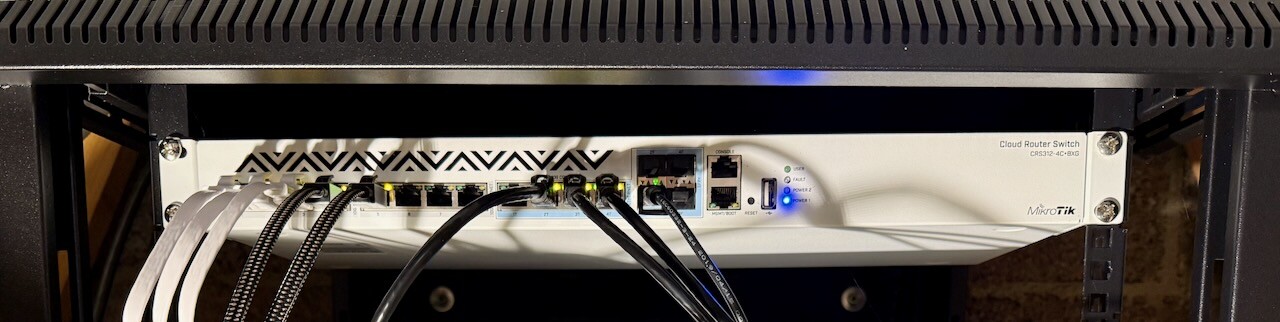
  |-> MikroTik CRS312 (10Gbps) - 10G trunk edge (hw offloaded switching only)
      |
      |-> UDMPro (10Gbps) - runs primary APs & CCTV
      |-> XG6POE (10Gbps with POE) - networks multiple 10Gbps hosts (also CRS312 backup)

While some of the above is not ideal (RB & CRS single points of failure, Airport Extreme AP, etc.) there is a good story to it. This is the first part: :headphone: How I found my lost network packets - check the screenshots & pictures under Notes & Links. There are other devices in this network (~30 clients in total), and the 10Gbps is important for media production (the Mac & Linux hosts push a lot of traffic).

After 6 months+ of running the RB5009, I like it - especially the fanless part. Apart from SFP+, it mostly works as expected (there is at least one other thread in here which I am leaving for another time). If I had to do it all over again, I would get the POE version, specifically RB5009UPr+S+IN (it was not available 6 months ago).

Thank you all for your feedback - especially @sirbryan.

Re. high temperature of SFP+ module: the fact is that RJ45 modules operating at 10Gbps all run very hot and only devices with active cooling and appropriate heat sinks on SFP+ cages can deal with it gracefully. In your case I strongly suggest you to use FO connection between RB5009 and CRS312 … those modules run quite much colder and (perhaps doesn’t apply to your use case) support longer distances (specially if using single mode fiber and modules). Not to mention that the whole connection (two SFP+ modules, patch cord) is cheaper when using FO than when using UTP.

If stuck with SFP+ RJ45, you can add these which may help a little bit and also there are fans you can add USB powered directed at the connection.
https://www.amazon.ca/gp/product/B07Q8RW5Y2/ref=ppx_yo_dt_b_asin_title_o00_s00?ie=UTF8&psc=1


Fans can be as simple as this
https://www.youtube.com/watch?v=xfat9RDt6YE

or wild’’
https://www.youtube.com/watch?v=H2nLIxRlW_E

I like that idea! I am assuming that the XS+DA0001 will do the trick.


I like the fanless setup too much to add fans, but thanks for the crazy idea - that last video is wild! I’m going fanless even for my main Linux compute.

That DAC should do the trick if the lengths available fit your use case.

RJ45 SFP modules do run warmer than their fiber counterparts, but those that use the Marvell chip like the S+RJ10 run particularly hot.

If the SFP only needs to run at 10G instead of multi-G, you can try the Broadcom-based SFP modules which run much cooler and can be used for distances up to 80m, compared to 30m for the Marvell variants. Check out some of the reviews in Amazon.

https://www.amazon.com/SFP-10G-T-80-Compatible-10GBASE-T-Copper-Transceiver/dp/B08P32B1Y7

My argument about price still stands. The RJ45 SFP+ module, linked, is being sold for $69 a piece. DAC XS+DA0001 goes for MSRP of $29 (for complete connection). And still consumes much less power and thus produces much less heat.
If you want to go with longer distances, one can select a pair of S+85DLC03D (MSRP $59 a piece, up to 300m fibre length). 3rd party modules, compatible with Mikrotik gear, can be found even cheaper.

IMO, copper cables are obsolete with speeds of 10Gbps or higher. Specially so as those speeds require bulky cat6+ or cat7 cables which are RPITA to install. One thing to keep in mind when installing FO, though, is that multi mode fiber currently seems to cap at 40Gbps per pair of fiber strands … single mode fiber supports much more than this and also allows for much longer distances.

That’s what I ended up doing and everything now works as expected - thank you!

The DAC also addressed my flapping ethernet links issue.

After 4 years & a WAN upgrade to 2.5Gbps, I have reached the limits of RB5009. I wanted to take a moment to share the journey so far, talk about the current setup, and share what is coming next. I am making this time to acknowledge all the great answers in this thread, and share something that I hope will be useful to others as they experience the best that MikroTik has to offer.

To set the context, I have just under 10 hosts which are 10Gbps capable. Most are running Linux (including a TrueNAS host), a few Macs and one Windows machine. I have a home office, have a few TBs of 4k content that I produce, transfer large files on a daily basis and my TrueNAS + another Linux host are often sync-ing 4k video files @ 10Gbps. Two of my Linux hosts are 100Gbps capable (Mellanox ConnectX-5 via DAC) and I often benchmark CDN-like software that hits CPU & NVMe limits first, before it maxes out 100Gbps (the goal is to benchmark the software, not be bottlenecked by the network).

HOW IT STARTED: RB5009 running 1Gbps PPPoE WAN & 10Gbps LAN

THE GAME CHANGER: CRS312

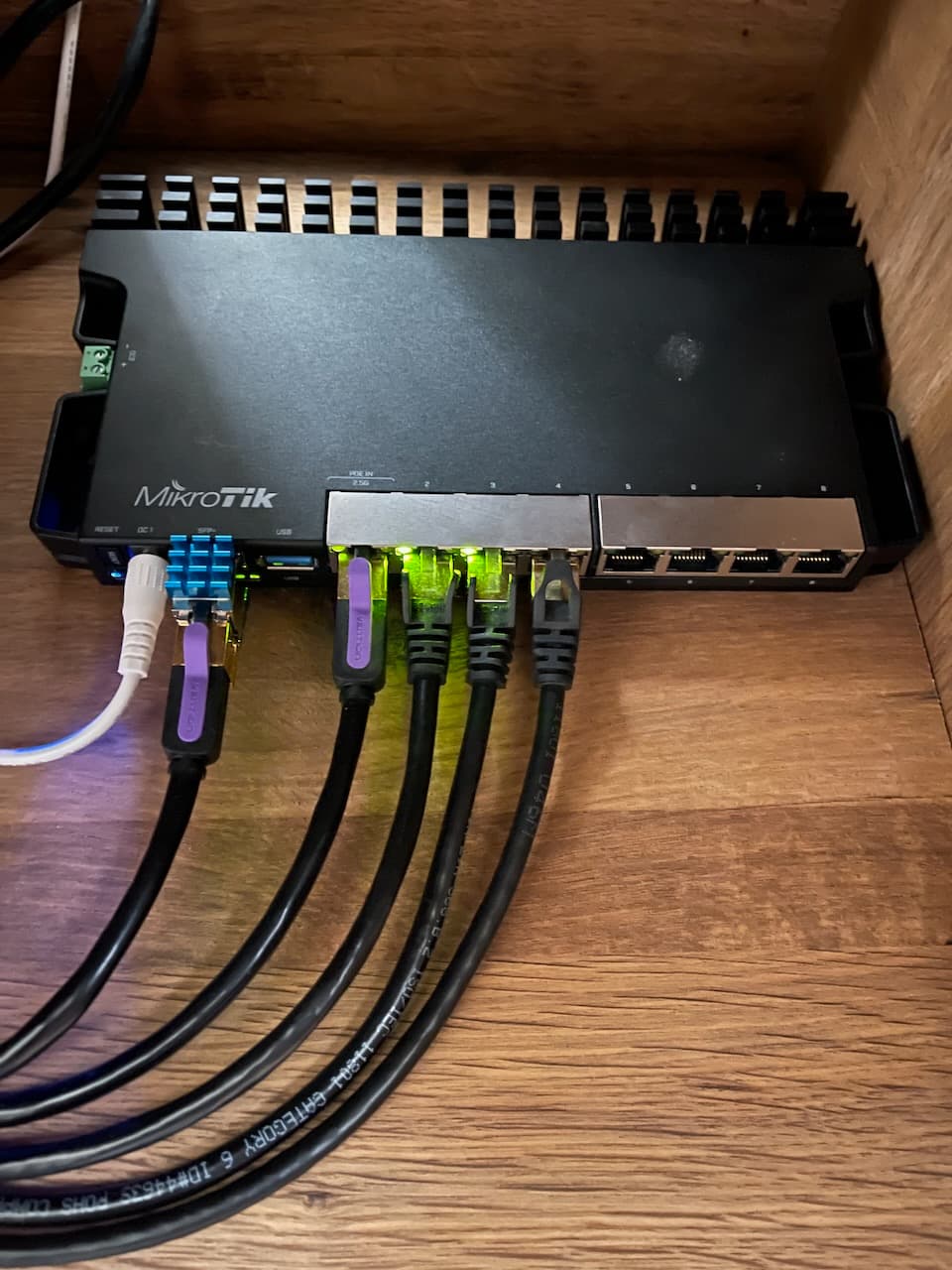
The only significant network equipment that I added in the last years was the CRS312-4C+8XG-RM which is the core switch for all 10Gbps-capable devices. It’s a fantastic piece of kit! Once I got some proper CAT6A cables for the long runs, and CAT7 & CAT8 for the short runs (including patch cables) I had 0 issues since (2+ hassle-free years). Cables are super important important. I had issues with some thin & fancy patch network cables that looked good (like the ones on the RB5009), but ended up introducing instability in the network (packet loss, random connection drops, etc.).

As my hardware kept improving, the RB5009UG+S+IN has been chugging along like a champ, providing a consistent 2Gbps symmetric WAN. It’s running a lightweight firewall & some simple queues, but nothing else (no BGP, VPN, etc.). I had no reboots, no heat issues, the RB5009 is as solid as they come.

As for the S+RJ10 module that I mentioned previously, I ended up fitting a few tiny Pi Zero heatsinks. While it still ran hot - ~80C - after years of use, it turned out to be OK.

END OF THE ROAD: RB5009 running 2.5Gbps PPPoE WAN & 10Gbps LAN

4 years later, as I started preparing for the 5Gbps WAN upgrade, the RB5009 is no longer sufficient. It has a single (10Gbps) SFP+ port, and a single 2.5Gbps RJ45 port which forced me to look at alternatives. As far as MikroTik routers go, there are only three alternatives today:

  1. CCR2004-1G-12S+2XS
  2. CCR2216-1G-12XS-2XQ
  3. RDS2216

Considering the price of 2 & 3, the only sensible alternative for a 5Gbps WAN and 10Gbps LAN is the CCR2004.

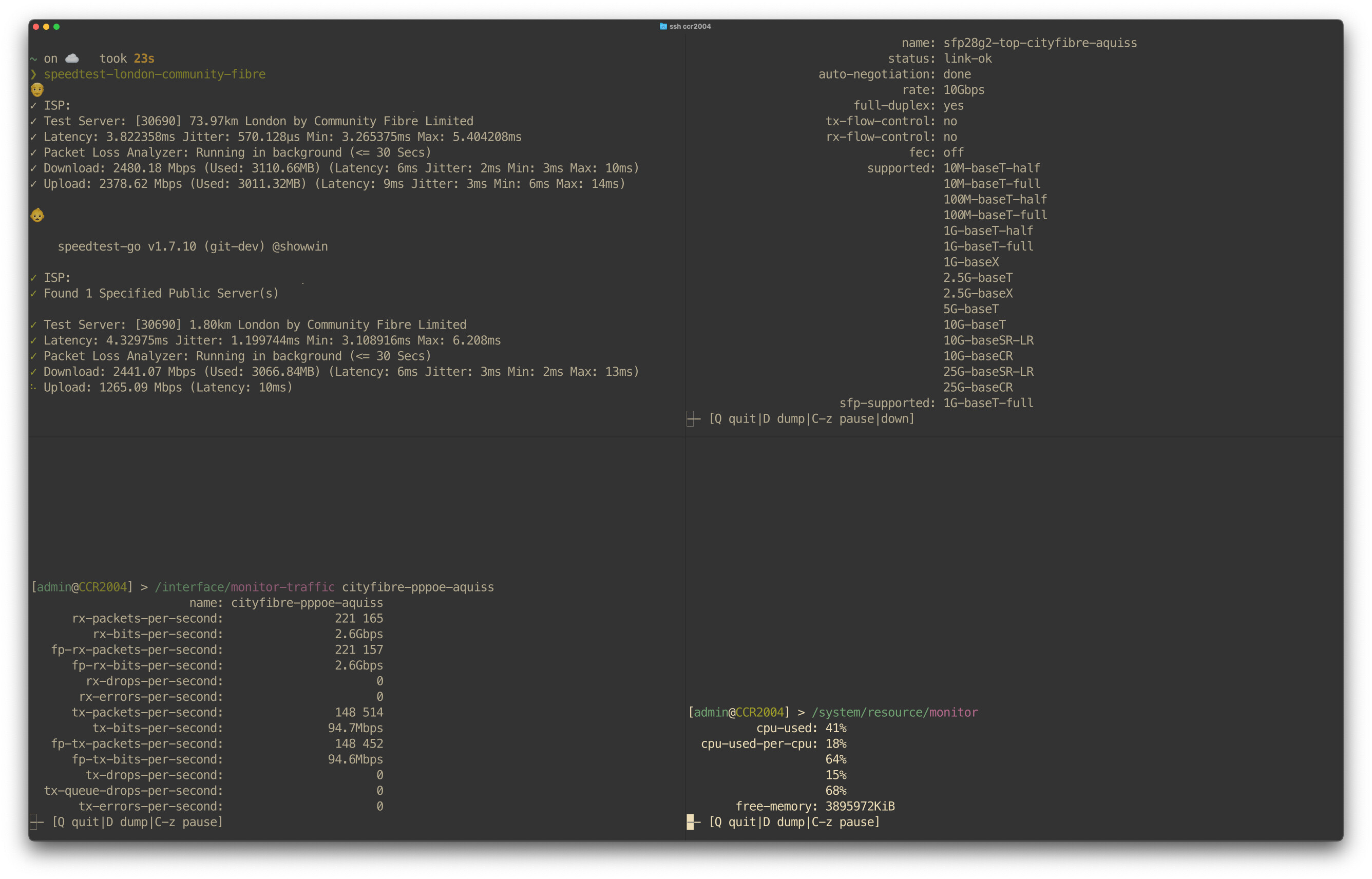
I now have the CCR2004 finally set up, the 10Gbps capable WAN uplink is running on one of the SFP28 ports via the S+RJ10 and while I am still waiting for 5Gbps to become available, here is a speedtest on the 2.5Gbps WAN to see how much CPU pressure this puts on the CCR2004:

To be honest, I was not expecting the CCR2004 CPUs to run at 41% utilisation across all cores, with 2/4 cores at 66% capacity for 2.5Gbps WAN. That PPPoE penalty seems to be more significant than I initially thought…

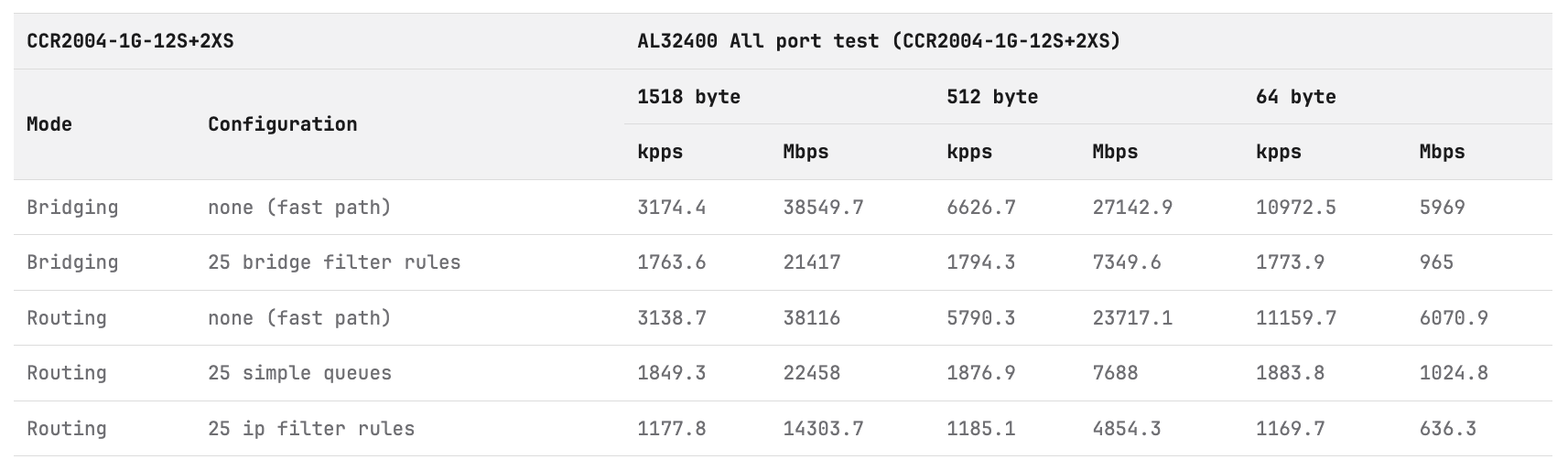
I have FastTrack enabled, and I have confirmed that the packets are using it, but this makes me wonder if the 5Gbps WAN is going to be as much as the CCR2004 is able to handle. Given that 2.5Gbps use 41% of the CPU, simple math makes me assume that 7-8Gbps PPPoE WAN is the most that this router can handle. If I am still running the CCR2004 by the time I get the 5Gbps upgrade, I intend to circle back with those numbers.

By the way, I benchmarked 2 of the hosts connected directly to the router, and iperf3 topped at 8Gbps after I tuned the interface queues (only-hardware-queue was maxing out at 6Gbps). CPU utilisation was at 80-90%, with 3/4 cores fully maxed out. This makes me realise that the “all port” wording in the ethernet test results is important. FWIW:

Some resources that I found useful when considering the CCR2004:

While I expect a 5Gbps PPPoE WAN to be the most that the CCR2004 can handle, I don’t see myself keeping it for 10Gbps, and definitely not for 25Gbps. While today my primary core router after the RB5009 is the CCR2004, it’s hard to imagine sticking with it long-term.

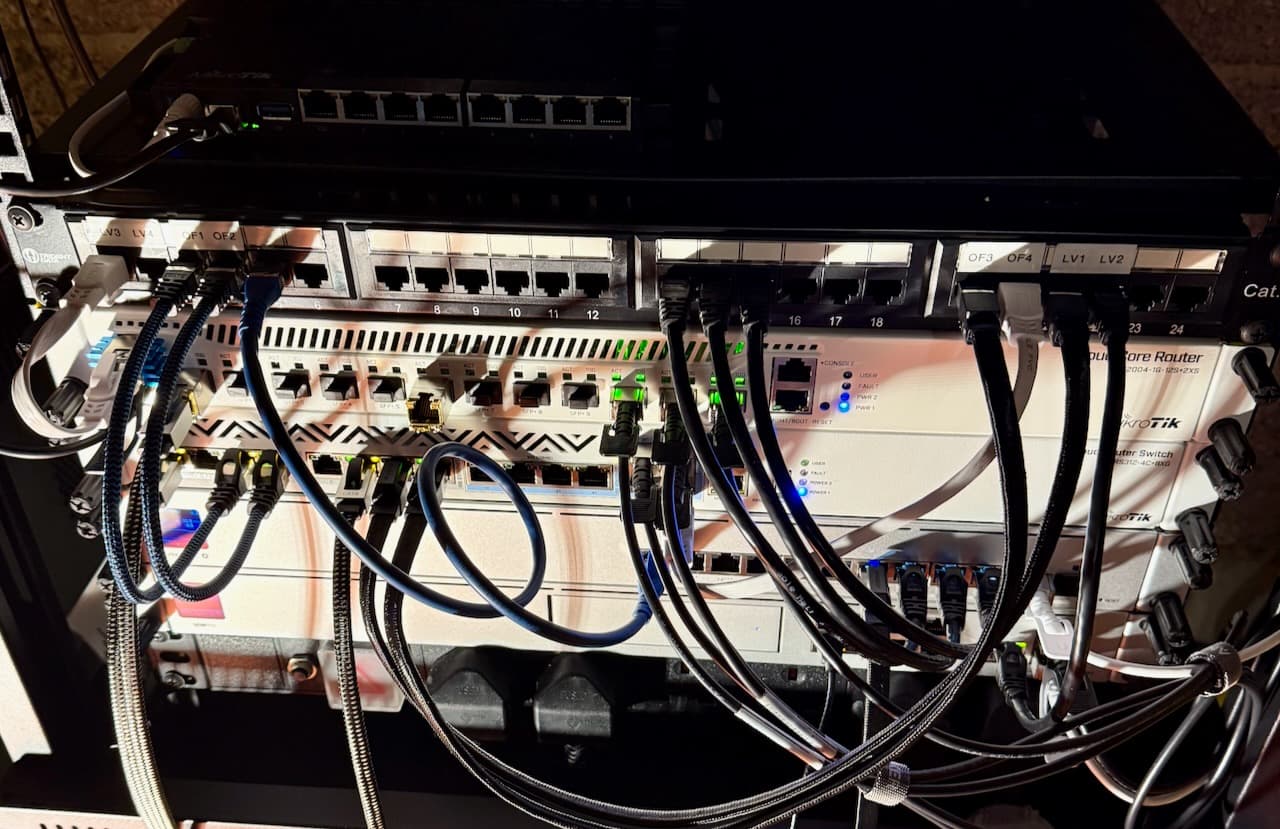
As I take a step back and consider upgrade paths, I wanted to share one last picture from 2025, with my network cabinet that got some care & attention over the winter holidays (even though that patch panel needs an entire strip-down so that ports can be re-arranged - they are all over the place):

I’m curious, what would the seasoned MikroTik users recommend for a 10Gbps PPPoE WAN?
1 Like

I’m in the same situation - currently have an RB5009 and preparing for 5Gbps service in a few weeks. Ultimately there is no Mikrotik equipement that meets my budget so I’ve decided for WAN and VLAN routing and firewalling to go with OPNsense on a Lenovo Mini PC with a dual 10Gbps NIC.

That sounds like a sensible option to me. Dual 10Gbps NICs are plentiful and well-priced. Same for dual 25Gbps.

Dual 100Gbps NICs are a bit trickier from the cooling & PCIe lanes perspective, but if you don’t have a dedicated GPU card, consumer-grade hardware is sufficient and it can be bought used for the price of a brand new CCR2004. I enjoyed reading this: 25 Gigabit Linux internet router PC build (2021)

What made you pick OPNsense over CHR?