is there a way to count hotspot users?

hello ,
does anyone know how can I make a script that count me the numbers of active users that using my hotspot?
every time I get a new entry (new person in start using the hotspot) the counter will get +1 , and in the end of the day I will get the number (and at the end of the day I will reset the counter)?

can it be done?
I have try to do this but without any luck so far

any help will be good ,

Thanks ,

http://wiki.mikrotik.com/wiki/Manual:IP/Hotspot/User#Properties_2
Read about ‘on-login’ property.
Create script which increase (+1) global variable every run, and reset it at midnight.

HTH,

o.k. ,
this is very good
thank you!

No need for counter, etc.

/ip hotspot active print count-only

but this will print me the number at the current time and i will not see how many where before…
I need it for statistics.
that way I can say - yesterday were 100 people
and one week ago were 6000 people
.

if you have better way to do this - I will love to hear it

something is not working for me

I did what you advice me to do
and this is the script I wrote:

:global counter;
:set counter ($counter+1);

:log warning "numbers of users so far is $counter";

global systemTime [/system clock get time];
global systemDate [/system clock get date];  
:global hotusers "The time is - $systemDate $systemTime
Numbers of hot spot users so far-$counter";

/file set [/file find name=hotusers.txt] contents=$hotusers;

but it won’t count me
every time I get counter=1

in the hostpot on loggin script I wrote:
/system script run hotusers;(this is the name of the script above - I can see he is working ,I see the log..)

What did I miss?

Thanks ,

This script works for me as expected:

:global counter;
:set counter ($counter + 1);
:log info "number of logged users: $counter";

Tested 5 minutes ago :slight_smile:

HTH,

and you tried it in the hotspot- loggin script?

it’s work for me also
but when I disconnect from the hotspot and after an hour connect again -
I still get the number 1
even when i delete the dhcp-server and hotspot host of my device

and you tried it in the hotspot- loggin script?

Yes, this script works from hotspot ‘on-login’ and counts every new-connected user.

Regards,

What your script does is it counts total logins .. not logged in users at the time.

still something is wrong
I get log people=1 even that I have 2 people connected

look -

I want to know what did I do wrong?

thanks,
Capture.PNG

@mrz

What your script does is it counts total logins .. not logged in users at the time.

You are right, but David1234 asked for this.

@David1234
I don’t know what’s wrong with your script.
As I wrote earlier it works for me (RB450G, ROS 5.4)

Regards,

you can see at the log and in the counter more then 1?
what kind of hotspot did you config?
I have a free one and all the people who want to connect have the same user&pass
maybe this is the problem?
its count the names of the users and not the amount?

It is free hotspot, only two users (standard & vip).
Log shows number of user logins.
HS_logins.JPG
HTH,

still not good for me
all I get is : 1

this is what I have:
hotspot-user-profile-scripts-On login:
/system script run hotusers;

this is the hotusers script:

:global counter;
:set counter ($counter+1);

:log warning "numbers of users so far is $counter";

global systemTime [/system clock get time];
global systemDate [/system clock get date];  
:global hotusers "The time is - $systemDate $systemTime
Numbers of hot spot users so far-$counter";

/file set [/file find name=hotusers.txt] contents=$hotusers;

and all I get in the Log file (and in the file ) is :

“The time is - jun/24/2012 09:50:52
Numbers of hot spot users so far-1”

and I can see that there is only 1 user at active (and I know that were 10 people connected since the lest time I did reset)

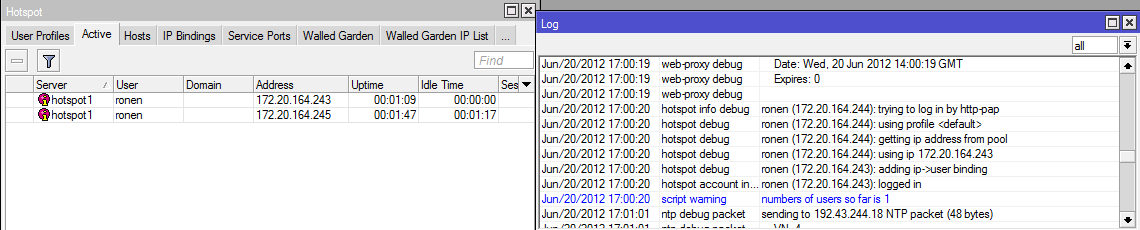
help?
Thank ,

Did you try my script without any modifications?
If not, try it, check how it work and next add new functionality (date, time, etc.)

HTH,

did it
and again I only get - “1”
I connected to the HotSpot with 2 computers - I can see there is 2 active
but in the log I only see 1

this is the config of my Hotspot

/ip hotspot profile
set [ find default=yes ] login-by=http-pap
add dns-name=Free-Wifi hotspot-address=172.20.164.254 login-by=http-pap \
    name=hsprof1
/ip hotspot
add address-pool=hs-pool-1 disabled=no interface=wlan1 name=hotspot1 profile=\
    hsprof1
/ip hotspot user profile
set [ find default=yes ] address-pool=hs-pool-1 idle-timeout=5m \
    keepalive-timeout=2m on-login=":global counter;\r\
    \n:set counter (\$counter + 1);\r\
    \n:log warning \"number of logged users: \$counter\";" session-timeout=1d \
    shared-users=60
/ip hotspot user
add name=admin password=1234
add name=david

and in the login.html
is said that

<html><head><title>Free WIFI</title><meta http-equiv="Content-Type" content="text/html; charset=UTF-8" />
<meta name="viewport" content="width=320" /><script type="text/javascript">window.addEventListener('load', function() { setTimeout(scrollTo, 0, 0, 1); }, false);</script> 
<body  leftmargin="0" topmargin="0" marginwidth="0"><center><form name="login" action="http:login" method="post"><input type="hidden" name="dst" value="http://www.google.com" /><input type="hidden" name="popup" value="true" />
<INPUT CLASS="button" TYPE="image" src="img/top1.gif"/><center><a href="disclaimer.htm"><img src="img/but1.gif"></a></center><input type="hidden" style="width: 80px" name="username" type="text" value="david"/>
</form></center>

maybe now it will help more?

You simply misunderstood meaning of ‘on-login’ property.
Do not put your script here, only script name.

/ip hotspot user profile
add idle-timeout=5m keepalive-timeout=2m name=standard on-login=HSU_Count shared-users=200 status-autorefresh=1m transparent-proxy=no

Script must be defined in ‘System/Scripts’:

/system script
add name=HSU_Count policy=ftp,reboot,read,write,policy,test,winbox,password,sniff,sensitive,api source=":global counter;\r\
    \n:set counter (\$counter + 1);\r\
    \n:log info \"number of HS logins: \$counter\";"

HTH,

I have done this with my script and also yours.
but again all I get is -

number of HS logins: 1

even when I have connected with 3 devices and I can see 3 on Active.
every time someone connecting I see on the log

number of HS logins: 1

what else may be wrong?

Change your script to one line only:

:log info "New HotSpot user connected."

and observe log after user login to hotspot.
You should see this info in log.

HTH,
