Is there any sort of Memtest function? "probably kernel failure"

CCR1009-8G-1S-1S+ is rebooting itself multiple times a day.

13:16:46 system,error,critical router was rebooted without proper shutdown, probably kernel failure

Showing in the log after it comes back up, followed by

13:16:47 system,error,critical kernel failure in previous boot

"Throwing stuff at the wall to see what sticks" troubleshooting because I don't know what to look for.

I formatted the NAND, used Netinstall for the current version (v7.12.2 to v7.24.2) and reloaded the configuration line by line instead of using the backup - this seemed to help the slow VPN speeds I've been having. Made a couple tweaks for newer RouterOS features (using the lo interface instead of bridges as an example), otherwise just loaded the configuration as it was.

Disabled jumbo frames, trying to turn off non-critical functions..

Went from rebooting every 2-4 hours to 4-18 now.

Before CPU usage was normally 32-37%, now 5-15% - the updated version broke a number of scripts we were using so they simply aren't running anymore (going to need to hire someone to fix them), so the drop in CPU usage was expected.

Where should I be looking?

Previously used a CCR1036-8G-2S+ upgraded to 16GB RAM, suspected that the power supply was failing so it was pulled, replaced the caps and power supplies, it just hasn't been put back into use yet.

Mikrotik support suggested to upgrade RouterOS and RouterBoot then provide updated supout if it continued. They haven't responded since so hoping the community might have a suggestion.
Connect with serial cable (115200 8N1) and enter routerboot. There is a " t - test ram memory " option in it. But i think this one has failing cap as well. Swap it with 1036 and take a look at it.

I was going to call myself an idiot because I really didn't recall seeing that before but no, it isn't there... When did it get added?

CPU frequency: 1200 MHz
  Memory size:  16 GiB
    NAND size: 1024 MiB

Press Ctrl+E to enter etherboot mode
Press any key within 2 seconds to enter setup

RouterBOOT-7.12.2
What do you want to configure?
   d - boot delay
   k - boot key
   s - serial console
   n - silent boot
   o - boot device
   h - preboot etherboot
   f - cpu frequency
   a - memory frequency
   r - reset booter configuration
   e - format nand
   w - repartition nand
   g - upgrade firmware
   i - board info
   p - boot protocol
   b - booter options
   x - exit setup
your choice:

No.. It doesn't exist even when updated..

RouterBOOT booter 7.24.2

CCR1036-8G-2S+

CPU frequency: 1200 MHz
  Memory size:  16 GiB
    NAND size: 1024 MiB

Press Ctrl+E to enter etherboot mode
Press any key within 2 seconds to enter setup

RouterBOOT-7.24.2
What do you want to configure?
   d - boot delay
   k - boot key
   s - serial console
   n - silent boot
   o - boot device
   h - preboot etherboot
   f - cpu frequency
   a - memory frequency
   r - reset booter configuration
   e - format nand
   w - repartition nand
   g - upgrade firmware
   i - board info
   p - boot protocol
   b - booter options
   x - exit setup
your choice:

RouterBOOT booter 6.49.19

CRS226-24G-2S+

CPU frequency: 400 MHz
Memory size: 64 MiB
NAND size: 128 MiB
NAND partitions: 2

Press any key within 2 seconds to enter setup

RouterBOOT-6.49.19
What do you want to configure?
d - boot delay
k - boot key
s - serial console
n - silent boot
o - boot device
r - reset booter configuration
e - format nand
w - repartition nand
y - active partition
g - upgrade firmware
i - board info
p - boot protocol
b - booter options
t - test ram memory
x - exit setup
your choice:

Seems removed who knows.

Likely just different architecture.

The RouterBOOT manual pages show it slightly different for the CRS328-24P-4S+ but still present.

I have two CCR1072 machines that have also experienced the same problem. They will restart themselves, but sometimes the restart still fails and requires manual power-off. This fault occurred about two years after the devices were online. This is a very serious accident, and it should be a hardware problem that cannot be repaired (some people say that the capacitor on the motherboard is broken, causing unstable power supply, so replacing the capacitor is enough, but I have observed that there is no abnormality in the appearance of the capacitor). I also have 4 CCR1036 in the same batch, one of which has experienced a self restart once, and the other 3 have been online for 5 years and are normal
I replaced the two CCR1072 machines that were broken with CCR2216 and CCR2116. They have been online for over 2 years and have not experienced any downtime so far. I feel they are relatively stable

While that can be done, it isn't easy.. Yes, I have "repaired" the 1036 by replacing its caps, putting it back into service isn't easy (why it hasn't been done yet) they are ~1600km (1000 miles) apart. haha

That is very interesting. I've been dealing with the issue for 2+ years now, it is just getting worse now that it is happening daily vs once every couple months or weeks.

Honestly, that doesn't mean much. If the capacitor is deformed then it is definitely bad but they can still be bad without changing their shape.

Been looking at the CCR2116s, haven't "pulled the trigger" yet because hoping to get confirmation that it is a hardware issue and not some sort of DoS attack that reboots it or even a config issue. I'm not really impressed with the port configuration either.. Something between the CCR2216 and CCR2116; would like to see 6 or 8 SFP+ interfaces instead of 4, however 4 is still acceptable, still better than the CCR1036-8G-2S+..

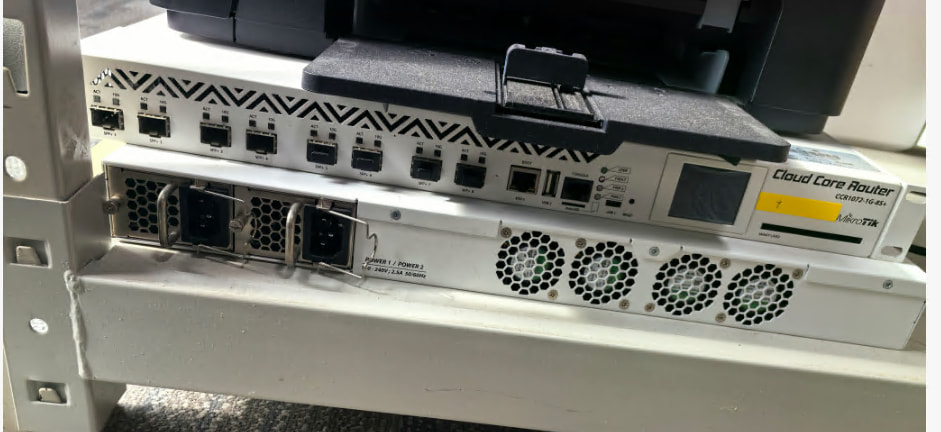
Now are stands for printer?

Just today replaced one CCR1036-12G-4S with CCR1036-8G-2S+
For 2 reason:
I needed an SFP+.
It had to run on 48V instead of 24V.

Don't doubt it, it must be a hardware issue. Just replace it. The CPU performance of CCR2116 is much stronger and supports HW. Also, this is a router. Don't worry about interface configuration, use a switch to expand the interface

Temporarily make a set of luxurious printer stands, before I fix them, haha

Interface configuration is always something to worry about!

Adding a switch, would need to confirm it won't leak an additional MAC address onto the upstream network otherwise the far-end shuts the port down. Would need to create virtual interfaces with tagging on the router's port connected to the switch to separate the ports back out for the router's configuration. How is that be better than just having a physical port.

Only 10gbps ports, not difficult to saturate, especially when connecting to multiple networks at 10gbps, might be practical on a 40gbps port.

CCR2216 is a huge jump in price for faster ports.. Same CPU and RAM, just the faster internal switch that supports faster interfaces. That switch changes the router's throughput from 40gbps to 100gbps.

Something between the two would be much better!

Still needing confirmation on this.