Hello everyone,
I’m trying to replace the IliadBox with an RB4011 on my FTTH GPON line. As many of you might know, configuring a personal router on this line is not straightforward. Although I’m not a networking expert, I’ve done my best to set up a working configuration.
Current network topology:
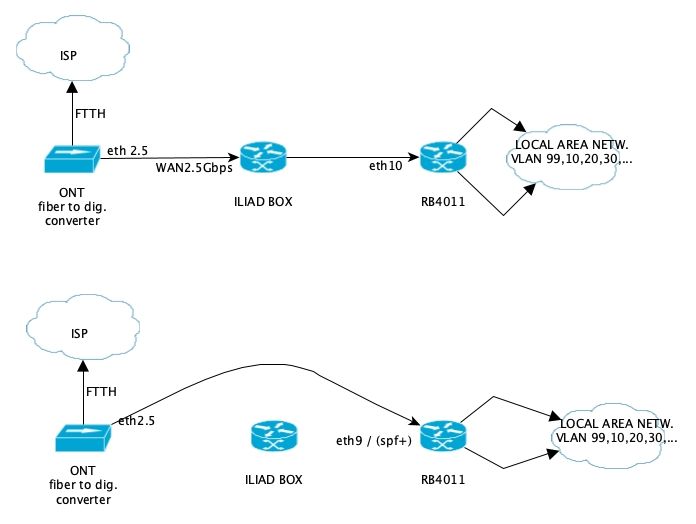
Currently, I’m using the RB4011 in cascade with the IliadBox, which forwards all traffic to an Ethernet port of the MikroTik. However, this setup limits the maximum speed to 1 Gbps (Ethernet), while the IliadBox has a single 2.5 Gbps port. For this reason, I want to remove the IliadBox and connect the ONT output directly to the RB4011’s SFP+ port via an adapter.
Details about the Iliad connection:
The IPv4 connection provided by Iliad seems to rely on IPv6 encapsulation. For clarity, I intercepted a TCP packet between the ONT and the IliadBox using an hAP ac2 in switch mode with mirroring enabled:
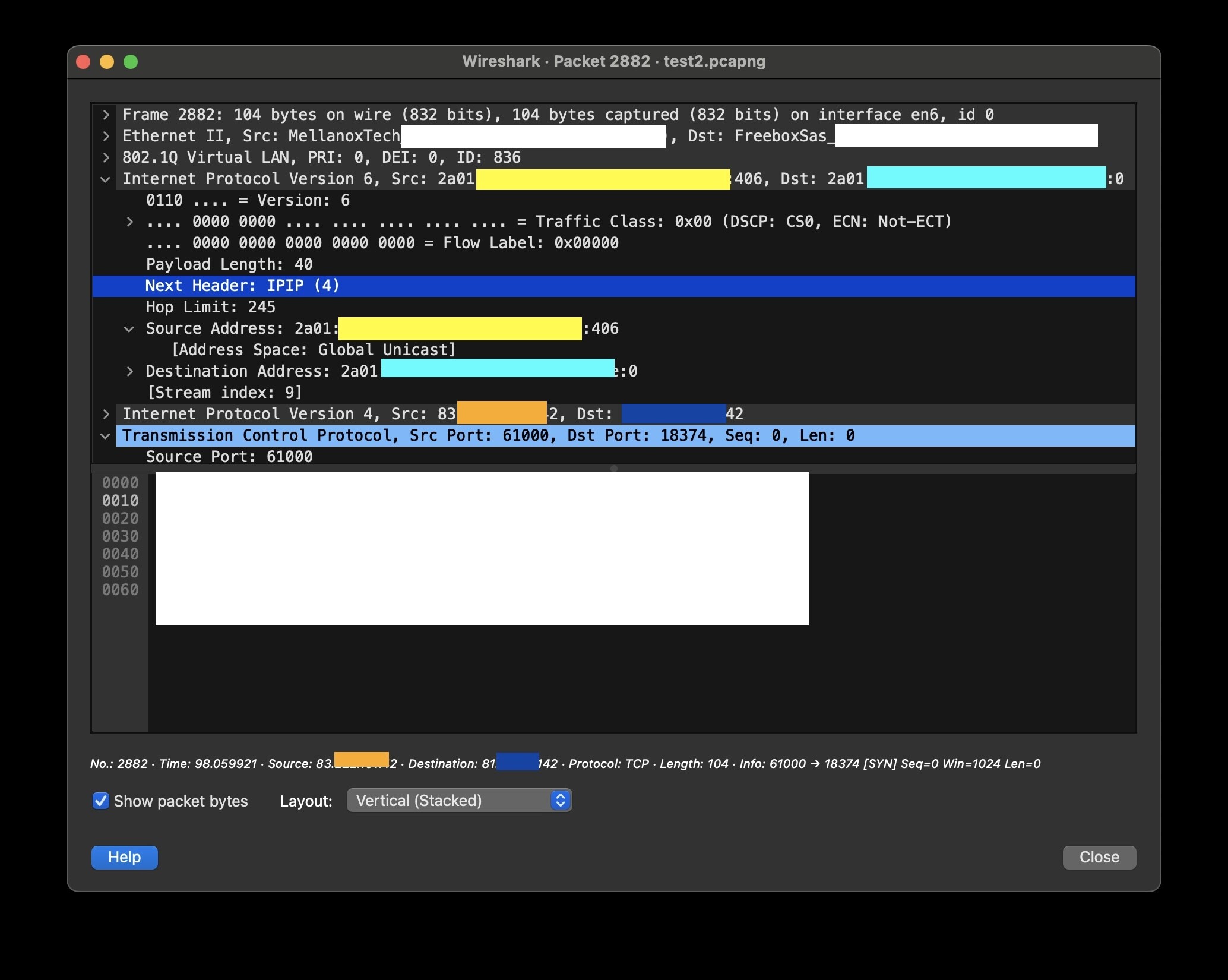
From what I’ve found online:
Iliad’s connection is IPv6 only, and IPv4 connectivity is achieved through MAP-E.
The assigned IPv4 is usually shared with four users, but in my case, I have a full IP range (all ports are available to me).
Iliad provides a guide for custom configurations (Guide MikroTik and VoIP), but it seems incomplete or incorrect.
As far as I understand, MAP-E requires IPIPv6 (supported by RouterOS), and since I have access to the full range of ports, I don’t need to configure NAT for port redirection.
To configure a personal router on the Iliad FTTH network, the following steps are required:
-Creation of the IPIP6 tunnel
+IPv6 of the tunnel (calculated by combining the IPv6-PD, IPv4 in hexadecimal format, and the assigned port range).
+IPv6 of the remote BR (obtained by analyzing an IPv4 packet encapsulated in IPv6).
+Public IPv4 assigned by the ISP.
-DHCPv6 configuration on VLAN 836
- cloning the MAC address and ClientID of IBox (not sure about that, and I don’t know how to get DUID from the IliadBox) for proper authentication.
This allows obtaining the IPv6, IPv6-PD, and properly configuring the tunnel.
Attempted configuration:
I found a configuration online that appears to work in similar scenarios. I tried to adapt it to my network, connecting the ONT to RB4011’s Ethernet port 9 (temporarily via Ethernet). However, I couldn’t connect to the internet, and the IliadBox was not correctly “replaced”.
2024-12-24 12:06:40 by RouterOS 7.16.2
software id = YIFI-TGP1
model = RB4011iGS+
serial number = xxxxxxxxxxxx
/interface bridge
add name=BR-WAN
add name=BR1 protocol-mode=none vlan-filtering=yes
/interface ethernet
set [ find default-name=ether1 ] comment=WAN
set [ find default-name=ether2 ] comment=CAPs-LAB
set [ find default-name=ether3 ] comment=CAPs-cantina
set [ find default-name=ether4 ] comment=cap-SALA
set [ find default-name=ether5 ] comment=PTOPM_link
set [ find default-name=ether9 ] comment=WAN-TEST mac-address=
38:aa:bb:cc:dd:ee mtu=1540
set [ find default-name=ether10 ] comment=WAN-IBOX
/interface ipipv6
add !keepalive local-address=2a01:—:----:----:0:----:----:0 mtu=1540 name=
ipipv6-tunnel1 remote-address=2a01:----:----:----:----:----:----:406
/interface wireguard
add listen-port=13231 mtu=1420 name=wireguard1/interface vlan
add interface=BR1 name=BASE_VLAN vlan-id=99
add interface=BR1 name=GUEST_VLAN vlan-id=20
add interface=BR1 name=IOT_VLAN vlan-id=10
add interface=BR1 name=PRV_VLAN vlan-id=30
add interface=BR-WAN mtu=1540 name=WAN-836 vlan-id=836
/interface list
add name=WAN
add name=VLAN
add name=BASE
add name=IOT
add name=PRV
add name=alowed_to_PRINT
add name=GUEST
/interface wifi channel
add band=2ghz-n comment=iot disabled=no name=channel-iot reselect-interval=
2h58m..3h
add band=5ghz-n comment=prv disabled=no name=channel-prv reselect-interval=
3h1m..3h4m
add band=5ghz-n comment=guests disabled=no name=channel-gst
/interface wifi datapath
add bridge=BR1 disabled=no name=DP_MANUAL/ip pool
add name=IOT_POOL ranges=192.168.10.2-192.168.10.254
add name=GUEST_POOL ranges=192.168.20.2-192.168.20.254
add name=PRV_POOL ranges=192.168.30.2-192.168.30.254
add name=BASE_POOL ranges=192.168.0.10-192.168.0.254
/ip dhcp-server
add address-pool=IOT_POOL interface=IOT_VLAN name=IOT_DHCP
add address-pool=GUEST_POOL interface=GUEST_VLAN lease-time=20m name=
GUEST_DHCP
add address-pool=PRV_POOL interface=PRV_VLAN name=PRV_DHCP
add address-pool=BASE_POOL interface=BASE_VLAN name=BASE_DHCP
/ipv6 pool
add name=ipv6-pool1 prefix=::/64 prefix-length=64
/port
set 0 name=serial0
set 1 name=serial1/interface bridge port
add bridge=BR1 interface=ether2
add bridge=BR1 interface=ether3
add bridge=BR1 interface=ether4
add bridge=BR1 interface=ether5
add bridge=BR1 disabled=yes interface=cap-wifi24-iot-CANTINA pvid=10
add bridge=BR1 disabled=yes interface=cap-wifi50-prv-CANTINA pvid=30
add bridge=BR1 disabled=yes interface=wifi50-gst-CANTINA pvid=20
add bridge=BR-WAN interface=WAN-836
add bridge=BR-WAN interface=ether9
/ip neighbor discovery-settings
set discover-interface-list=!dynamic/interface bridge vlan
add bridge=BR1 tagged=BR1,ether2,ether3,ether4,ether5 vlan-ids=10
add bridge=BR1 tagged=BR1,ether2,ether3,ether4,ether5 vlan-ids=20
add bridge=BR1 tagged=BR1,ether2,ether3,ether4,ether5 vlan-ids=30
add bridge=BR1 tagged=BR1,ether3,ether4,ether5,ether2 vlan-ids=99/interface list member
add interface=ether1 list=WAN
add interface=BASE_VLAN list=VLAN
add interface=IOT_VLAN list=VLAN
add interface=GUEST_VLAN list=VLAN
add interface=PRV_VLAN list=VLAN
add interface=BASE_VLAN list=BASE
add interface=wireguard1 list=VLAN
add interface=PRV_VLAN list=PRV
add interface=IOT_VLAN list=IOT
add interface=BASE_VLAN list=alowed_to_PRINT
add disabled=yes interface=IOT_VLAN list=alowed_to_PRINT
add interface=GUEST_VLAN list=GUEST
add interface=ether10 list=WAN
/interface wifi capsman
set ca-certificate=none enabled=yes interfaces=BR1 package-path=“”
require-peer-certificate=no upgrade-policy=none
/interface wifi provisioning
add action=create-enabled disabled=no
add action=create-dynamic-enabled disabled=no master-configuration=cfg-prv
slave-configurations=cfg-gst supported-bands=5ghz-ax
/interface wireguard peers
add allowed-address=192.168.100.99/32 …
add allowed-address=192.168.100.100/32 …
/ip address
add address=<84…IPv4-from ISP>/32 interface=ipipv6-tunnel1 network=<84…IPv4-from ISP>add address=192.168.0.1/24 interface=BASE_VLAN network=192.168.0.0
add address=192.168.10.1/24 interface=IOT_VLAN network=192.168.10.0
add address=192.168.20.1/24 interface=GUEST_VLAN network=192.168.20.0
add address=192.168.30.1/24 interface=PRV_VLAN network=192.168.30.0
add address=192.168.100.1/24 comment=Wireguard interface=wireguard1 network=
192.168.100.0/ip dhcp-server lease
…
/ip dhcp-server network
add address=192.168.0.0/24 dns-server=192.168.0.1 gateway=192.168.0.1
add address=192.168.10.0/24 dns-server=192.168.0.1 gateway=192.168.10.1
add address=192.168.20.0/24 dns-server=192.168.0.1 gateway=192.168.20.1
add address=192.168.30.0/24 dns-server=192.168.0.1 gateway=192.168.30.1
/ip dns
set allow-remote-requests=yes servers=8.8.8.8,1.1.1.1/ip firewall filter
/ip firewall nat
add action=masquerade chain=srcnat comment=“IPv6-tunnel masquerade”
out-interface=ipipv6-tunnel1
/ip firewall raw/ip route
add disabled=no distance=1 dst-address=0.0.0.0/0 gateway=ipipv6-tunnel1
routing-table=main scope=30 suppress-hw-offload=no target-scope=10
/ipv6 route
add disabled=no distance=1 dst-address=2a01:----:----:PREFIX-ipv6::/60 gateway=BR-WAN
routing-table=main scope=30 suppress-hw-offload=no target-scope=10
/ip service
set www-ssl disabled=no
/ipv6 address
add address=2a01:----:----:PREFIX-ipv6::/60 advertise=no interface=ipipv6-tunnel1
add address=::192.168.0.1 from-pool=ipv6-pool interface=BASE_VLAN
/ipv6 dhcp-client
add add-default-route=yes interface=WAN-836 pool-name=ipv6-pool request=
address,prefix/tool sniffer
set filter-interface=ether8 streaming-enabled=yes streaming-server=
192.168.0.14
Request for assistance:
Could someone kindly guide me through the configuration process? I’m sure many people are in the same situation, “left stranded” by the ISP, which prefers to enforce the use of their router.
I also tried sniffing packets on eth9 (mirrored on eth8 and streamed to my local address on the Wireshark port), but it seems there is no destination found for the packets. I’m not an expert, so can someone suggest a way to debug my configuration, establish an IPv6 connection, and hopefully achieve full IPv4 and IPv6 connectivity?
Thank you very much to anyone who can help!