Unlike most people owning MikroTik gear, I’m really not that much into network terminology.
I’ve been using a hap ac2 for the past few years because it’s a great little router and have used it pretty much configured “out of the box”.
I did change a couple of things like SSID and channels etcetera but basically that’s it.
I do keep Router OS and the firmware up to date though.
Now I was forced to choose a different ISP because the company I was subscribed to was bought by some other company.
I really would like to keep using the hap ac2 though but from what I’m reading the WAN needs VLAN 300 tag?
I have no idea how and where to accomplish this though and can’t find a clear description anywhere. I use WinBox (no command line guy either) and have no clue what to do.
Is there anyone who can help me with this?
Thanks in advance
Basically you add VLAN interface (with VLAN ID set to required value) and anchor it to your WAN interface. Then move WAN setup (DHCP client or whatever needed) to the just created VLAN interface. This will then add/remove VLAN tags to packets passing WAN port.
Additionally you have to add the VLAN interface to interface list WAN, default firewall setup (including NAT) relies on proper interface list membership.
I was thinking creating a VLAN on the bridge which already has DHCP client on it.
Will this work?
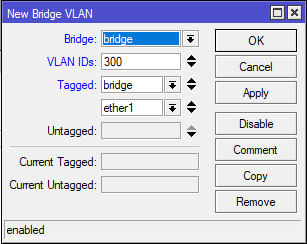
It depends on how much your actual setup deviated from default. My suggestion was based on assumption that it’s close enough. For any better advice we have to see config (complete if possible) … open terminal, execute /export file=anynameyouwish (if you’re running ROS v6, add hide-sensitive option), fetch resulting file to your PC, ooen it with favoutite text editor, redact any remaining sensitive data (like serial number or wifi passwords) and post it inside [__code] [/code] environment ( icon in toolbar of post editor).
Thanks for the help mkx
Here’s my config. Is this complete?
# 2024-01-23 22:39:46 by RouterOS 7.13.2
# software id = A6T6-3TA5
#
# model = RBD52G-5HacD2HnD
# serial number = xxxxxxxxxxxx
/interface bridge
add admin-mac=xx:xx:xx:xx:xx:xx auto-mac=no comment=defconf name=bridge \
    port-cost-mode=short
/interface wireless
set [ find default-name=wlan1 ] antenna-gain=6 band=2ghz-b/g/n disabled=no \
    distance=indoors frequency=2472 installation=indoor mode=ap-bridge ssid=\
    xxxxxx station-roaming=enabled wireless-protocol=802.11 wps-mode=\
    disabled
set [ find default-name=wlan2 ] band=5ghz-a/n/ac basic-rates-a/g=12Mbps \
    channel-width=20/40/80mhz-XXXX disabled=no distance=indoors frequency=\
    5260 hw-retries=4 installation=indoor mode=ap-bridge ssid=xxxxxx \
    station-roaming=enabled supported-rates-a/g=\
    12Mbps,18Mbps,24Mbps,36Mbps,48Mbps,54Mbps wireless-protocol=802.11 \
    wps-mode=disabled
/interface list
add comment=defconf name=WAN
add comment=defconf name=LAN
/interface lte apn
set [ find default=yes ] ip-type=ipv4 use-network-apn=no
/interface wireless security-profiles
set [ find default=yes ] authentication-types=wpa2-psk mode=dynamic-keys \
    supplicant-identity=MikroTik
/ip pool
add name=dhcp ranges=192.168.88.10-192.168.88.99
/ip dhcp-server
add address-pool=dhcp interface=bridge lease-time=10m name=defconf
/interface bridge port
add bridge=bridge comment=defconf ingress-filtering=no interface=ether2 \
    internal-path-cost=10 path-cost=10
add bridge=bridge comment=defconf ingress-filtering=no interface=ether3 \
    internal-path-cost=10 path-cost=10
add bridge=bridge comment=defconf ingress-filtering=no interface=ether4 \
    internal-path-cost=10 path-cost=10
add bridge=bridge comment=defconf ingress-filtering=no interface=ether5 \
    internal-path-cost=10 path-cost=10
add bridge=bridge comment=defconf ingress-filtering=no interface=wlan1 \
    internal-path-cost=10 path-cost=10
add bridge=bridge comment=defconf ingress-filtering=no interface=wlan2 \
    internal-path-cost=10 path-cost=10
/ip neighbor discovery-settings
set discover-interface-list=LAN
/ip settings
set max-neighbor-entries=8192
/ipv6 settings
set disable-ipv6=yes max-neighbor-entries=8192
/interface detect-internet
set detect-interface-list=all
/interface list member
add comment=defconf interface=bridge list=LAN
add comment=defconf interface=ether1 list=WAN
/interface ovpn-server server
set auth=sha1,md5
/ip address
add address=192.168.88.1/24 comment=defconf interface=ether2 network=\
    192.168.88.0
/ip dhcp-client
add comment=defconf interface=ether1
/ip dhcp-server lease
add address=192.168.88.99 client-id=x:xx:x:xx:xx:xx:x mac-address=\
    xx:xx:xx:xx:xx:xx server=defconf
/ip dhcp-server network
add address=192.168.88.0/24 comment=defconf dns-server=8.8.8.8,8.8.4.4 \
    gateway=192.168.88.1
/ip dns
set allow-remote-requests=yes
/ip dns static
add address=192.168.88.1 comment=defconf name=router.lan
/ip firewall filter
add action=accept chain=input comment=\
    "defconf: accept established,related,untracked" connection-state=\
    established,related,untracked
add action=drop chain=input comment="defconf: drop invalid" connection-state=\
    invalid
add action=accept chain=input comment="defconf: accept ICMP" protocol=icmp
add action=accept chain=input comment=\
    "defconf: accept to local loopback (for CAPsMAN)" dst-address=127.0.0.1
add action=drop chain=input comment="defconf: drop all not coming from LAN" \
    in-interface-list=!LAN
add action=accept chain=forward comment="defconf: accept in ipsec policy" \
    ipsec-policy=in,ipsec
add action=accept chain=forward comment="defconf: accept out ipsec policy" \
    ipsec-policy=out,ipsec
add action=fasttrack-connection chain=forward comment="defconf: fasttrack" \
    connection-state=established,related hw-offload=yes
add action=accept chain=forward comment=\
    "defconf: accept established,related, untracked" connection-state=\
    established,related,untracked
add action=drop chain=forward comment="defconf: drop invalid" \
    connection-state=invalid
add action=drop chain=forward comment=\
    "defconf: drop all from WAN not DSTNATed" connection-nat-state=!dstnat \
    connection-state=new in-interface-list=WAN
/ip firewall nat
add action=masquerade chain=srcnat comment="defconf: masquerade" \
    ipsec-policy=out,none out-interface-list=WAN
/ip service
set www disabled=yes
/routing bfd configuration
add disabled=no
/system clock
set time-zone-name=Europe/Amsterdam
/system note
set show-at-login=no
/tool mac-server
set allowed-interface-list=LAN
/tool mac-server mac-winbox
set allowed-interface-list=LAN
Looks like a standard config. Just follow the mkx advice. Here are step by step instructions:
- Open Interfaces and add a new interface of type VLAN. Name it vlan300 (or vlan-isp, or any name you like), set VLAN ID to 300 and master interface to ether1.
- Open IP/DHCP Client and change interface from ether1 to vlan300.
- Open Interfaces / Interface List and add a new entry for list WAN with interface vlan300.
- Fix an issue in the standard config by changing the interface from ether2 to bridge in the IP/Addresses for 192.168.88.1/24.
Thank you so much!!
Will try as soon as I’ve switched to the new ISP.