Hello Guys ,
I have multiple dedicated servers with VMware installed on them . These servers each have a ROS installed on them which connects them to each other in a private network . ROS purpose in this setup is to act as a firewall so only whitelisted IPs can connect to VMware and also the connection among VMware servers and vCenter is in an internal private network .
Recently , I have added a server in a new data center and I installed ROS on it but as soon as I created a bridge , my whole port shut down . I contacted data center and they told me my port is sending BPDU to their switch and they have BPDU guard enabled .
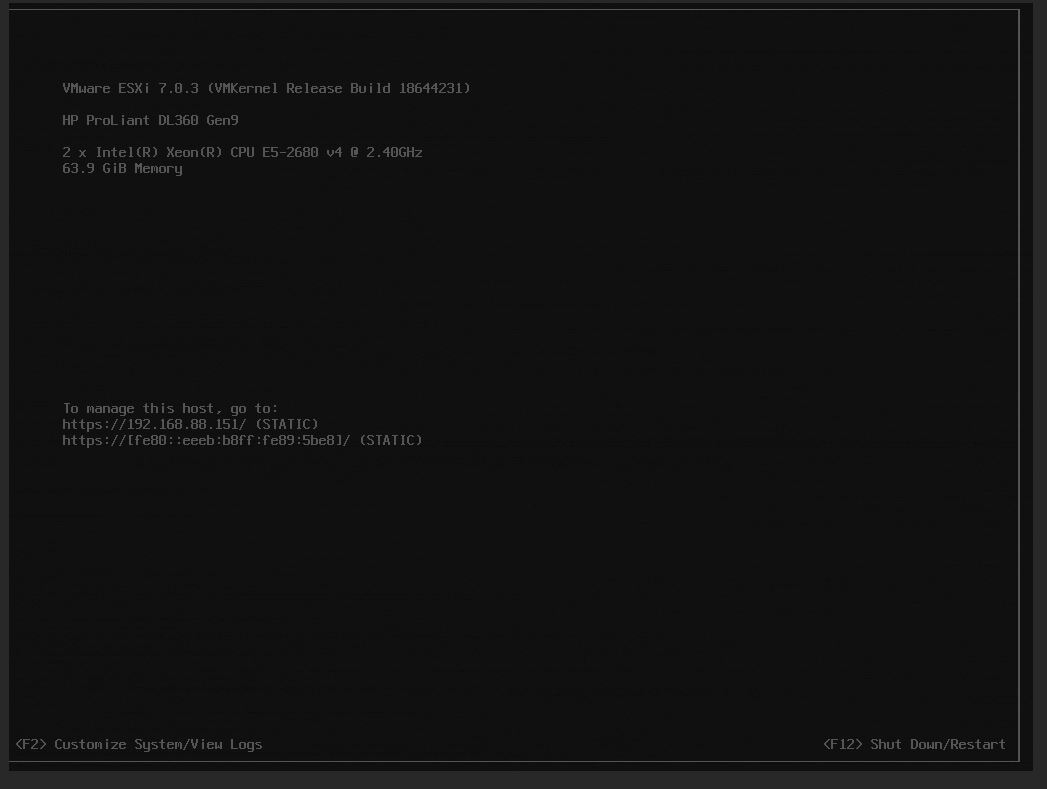
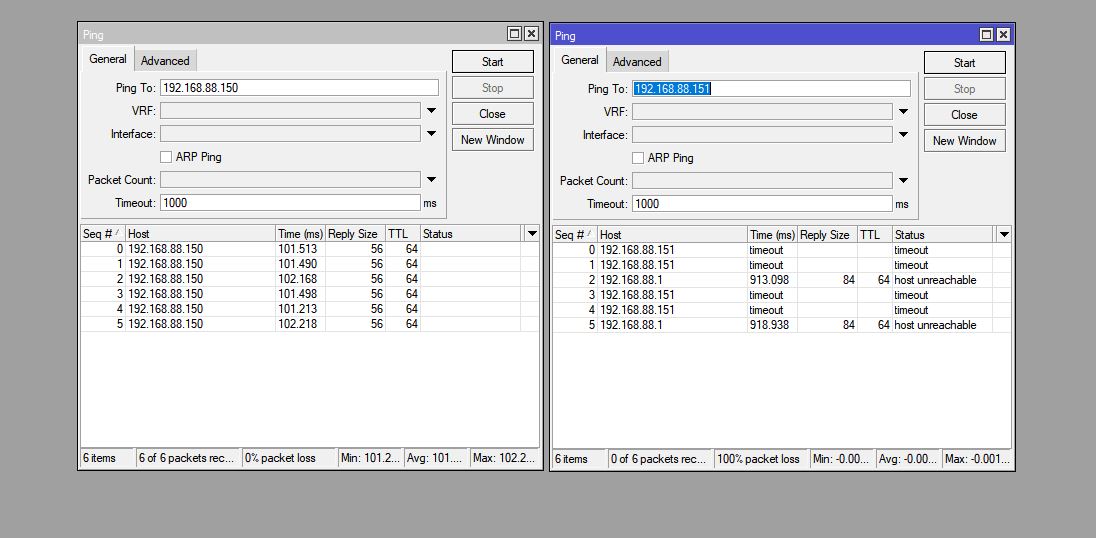
They asked me to disable it and I did it . This stopped the issue with port shut down but now this VMware esxi (192.168.88.151 ) on the new data center is not seen by other servers . although the tunnel is OK and I can ping the gateway of the new server which is 192.168.88.150 in other data center mikrotiks .
Does anyone have any idea on what my issue could be?
Kind Regards ,
This is the export of my ROS in the data center that has BPDU guard enabled :
/interface bridge
add name=bridge1 protocol-mode=none
/interface ethernet
set [ find default-name=ether1 ] disable-running-check=no name=ether1-WAN
set [ find default-name=ether2 ] disable-running-check=no name=ether2-LAN
/interface eoip
add local-address=33.233.77.53 mac-address=02:0E:58:47:6F:74 name=eoip-tunnel-TO-IR-01 remote-address=33.229.204.55 tunnel-id=13
/port
set 0 name=serial0
set 1 name=serial1
/interface bridge filter
add action=drop chain=drop in-interface=ether2-LAN mac-protocol=ipv6
add action=drop chain=output comment="disable BPDU sending frame on one port." dst-mac-address=01:80:C2:00:00:00/FF:FF:FF:FF:FF:FF \
    out-interface=ether2-LAN
# in/out-bridge-port matcher not possible when interface (ether1-WAN) is not slave
add action=drop chain=output comment="disable BPDU sending frame on one port." dst-mac-address=01:80:C2:00:00:00/FF:FF:FF:FF:FF:FF \
    out-interface=ether1-WAN
/interface bridge port
add bridge=bridge1 interface=eoip-tunnel-TO-IR-01
add bridge=bridge1 interface=ether2-LAN
/ip firewall connection tracking
set udp-timeout=10s
/ipv6 settings
set disable-ipv6=yes
/ip address
add address=33.233.77.53/29 interface=ether1-WAN network=33.233.77.48
add address=192.168.88.150/24 interface=bridge1 network=192.168.88.0
add address=33.233.77.54/29 disabled=yes interface=ether1-WAN network=33.233.77.48
/ip dns
set allow-remote-requests=yes servers=8.8.8.8
/ip dns static
add address=192.168.89.3 name=vcenter.local
/ip firewall address-list
add address=141.95.12.51 list=whitelist-Firewall
add address=92.183.25.2 list=whitelist-Firewall
add address=81.211.18.13 list=whitelist-Firewall
add address=91.129.93.189 list=whitelist-Firewall
add address=126.203.142.73 list=whitelist-Firewall
add address=51.212.85.176 list=whitelist-Firewall
add address=5.171.134.171 list=whitelist-Firewall
add address=212.180.222.110 list=whitelist-Firewall
/ip firewall filter
add action=accept chain=input comment="Allow Established connections" connection-state=established
add action=accept chain=forward comment="allow already established connections" connection-state=established
add action=drop chain=forward comment="drop invalid connections" connection-state=invalid protocol=tcp
add action=drop chain=input comment="Drop Invalid connections" connection-state=invalid
add action=drop chain=input comment=DNS dst-port=53 in-interface=ether1-WAN protocol=udp
add action=drop chain=input comment=DNS dst-port=53 in-interface=ether1-WAN protocol=tcp
/ip firewall nat
add action=src-nat chain=srcnat comment=Allow-Snat-ESXI out-interface=ether1-WAN src-address=192.168.88.151 to-addresses=33.233.77.53
add action=src-nat chain=srcnat comment=Allow-Snat-Vcenter disabled=yes out-interface=ether1-WAN src-address=192.168.89.3 to-addresses=\
    51.212.85.176
add action=src-nat chain=srcnat comment=Allow-Snat-Autovm disabled=yes out-interface=ether1-WAN src-address=192.168.89.4 to-addresses=\
    88.198.158.49
add action=src-nat chain=srcnat comment=Allow-Snat-VPS-Windows disabled=yes out-interface=ether1-WAN src-address=192.168.89.5 \
    to-addresses=51.212.85.176
add action=dst-nat chain=dstnat comment=DNAT-ESXI dst-address=33.233.77.53 dst-port=80 protocol=tcp src-address-list=whitelist-Firewall \
    to-addresses=192.168.88.151 to-ports=80
add action=dst-nat chain=dstnat comment=DNAT-ESXI dst-address=33.233.77.53 dst-port=443 protocol=tcp src-address-list=whitelist-Firewall \
    to-addresses=192.168.88.151 to-ports=443
add action=dst-nat chain=dstnat comment=DNAT-ESXI disabled=yes dst-address=33.233.77.54 dst-port=22 protocol=tcp src-address-list=\
    whitelist-Firewall to-addresses=192.168.88.151 to-ports=22
add action=dst-nat chain=dstnat comment=DNAT-Vcenter disabled=yes dst-address=33.233.77.53 dst-port=80 protocol=tcp src-address-list=\
    whitelist-Firewall to-addresses=192.168.89.3 to-ports=80
add action=dst-nat chain=dstnat comment=DNAT-Vcenter disabled=yes dst-address=33.233.77.53 dst-port=443 protocol=tcp src-address-list=\
    whitelist-Firewall to-addresses=192.168.89.2 to-ports=443
add action=dst-nat chain=dstnat comment=DNAT-Autovm disabled=yes dst-address=33.233.77.53 dst-port=80 protocol=tcp src-address-list=\
    whitelist-Firewall to-addresses=192.168.89.4 to-ports=80
add action=dst-nat chain=dstnat comment=DNAT-Autovm disabled=yes dst-address=33.233.77.53 dst-port=443 protocol=tcp src-address-list=\
    whitelist-Firewall to-addresses=192.168.89.4 to-ports=443
add action=dst-nat chain=dstnat comment=DNAT-VPS-Windows disabled=yes dst-address=33.233.77.53 dst-port=5850 protocol=tcp \
    src-address-list=whitelist-Firewall to-addresses=192.168.89.5 to-ports=5850
/ip route
add gateway=33.233.77.49
add disabled=yes distance=1 dst-address=192.168.88.0/24 gateway=192.168.91.1 routing-table=main scope=30 suppress-hw-offload=no \
    target-scope=10
/ip service
set telnet disabled=yes
set ftp disabled=yes
set www disabled=yes
set ssh disabled=yes
set api disabled=yes
set winbox port=5858
set api-ssl disabled=yes
/system clock
set time-zone-name=Asia/Shanghai
/system hardware
set allow-x86-64=yes
/system identity
set name=Mik-Firewall-IR-03
/system note
set show-at-login=no
/system ntp client
set enabled=yes
/system ntp client servers
add address=time1.google.com
/tool bandwidth-server
set enabled=no
/tool mac-server
set allowed-interface-list=none
/tool mac-server mac-winbox
set allowed-interface-list=none
/tool mac-server ping
set enabled=no
The ROS on other VMware servers in the network can ping this server’s gateway address which is 192.168.88.150 so the tunnel is OK but they can’t ping the esxi IP address which is 192.168.88.151 (see mik1 attachment) . I don’t know what I’m doing wrong . The only difference in the new datacenter with other datacenters that I have the same setup in , is the bpdu-guard . Is this the reason other mikrotiks can’t see Esxi ? Can anyone help me how I should solve this ? Thanks .