it’s not a bad idea, however it did not affect the issue…
I am also more than a bit confused.
You have to imagine the bridge as a non-transparent box in which you put one or more interfaces.
When you put an interface in this box (let's say ether2 for the sake of the example) you add on the outside of the box a label with "contains ether2".
You cannot see anymore ether2 and as well an IP (if any) assigned to it won't be visible externally.
In old, now deprecated, terms bridge is a "master" interface and the ethernet (or wifi) interfaces inside it are "slave".
The only IP (and network) that can be accessed/has relevance is that assigned to the bridge (and added to another label on the box).
BUT all interfaces inside the box (bridge) have the same dignity, so there is no reason why a connection through wifi/wlan1 should get an IP address from the ASUS DHCP server but one through etrherenet won't.
The pwr-line is an interface common on some older devices, including - say - the AC lite, nothing to worry about it is normal.
Thanks for the explanation.
I am also kinda hopeless, that is why I have create this post in this forum. I think the next logical step is to find a device with ethernet port and connect it to the hAP mini. If it get’s the IP → there has to be some issue with the network card (well actually there are 3 in the server and none of them is getting any IP) or some motherboard issue or whatever. If it does not receive an IP, than it has to be some issue with the hAP and I am byuing a new router the other day. 
One more thing to be added, I do not think it’s relevant, but I am gonna mention it - I am not using an original power adapter. I am using a combination of a USB-C - Micro USB cable and ChoeTech PD20W Type-C PD (can do up to 5V and 3A). As per docs, it says “up to 2A”, however since current is affected by the device power consumption (simplified), I think this cannot not cause any issues (lower current than recommended could have been an issue).
You can use any standard 0.5 - 2A USB adapter that usually comes with smartphones.
Well. I have found a ThinkPad with Windows installed, connected through ethernet and almost instantly I have received the IP address. I do not understand how that possible, why is the issue only on the Ubuntu server, I do not know honestly. Maybe I will buy one more ethernet card into PCI just for tests, I do not know. I will also might buy a wifi router just for testing this…
Thank you all for your time and effort.
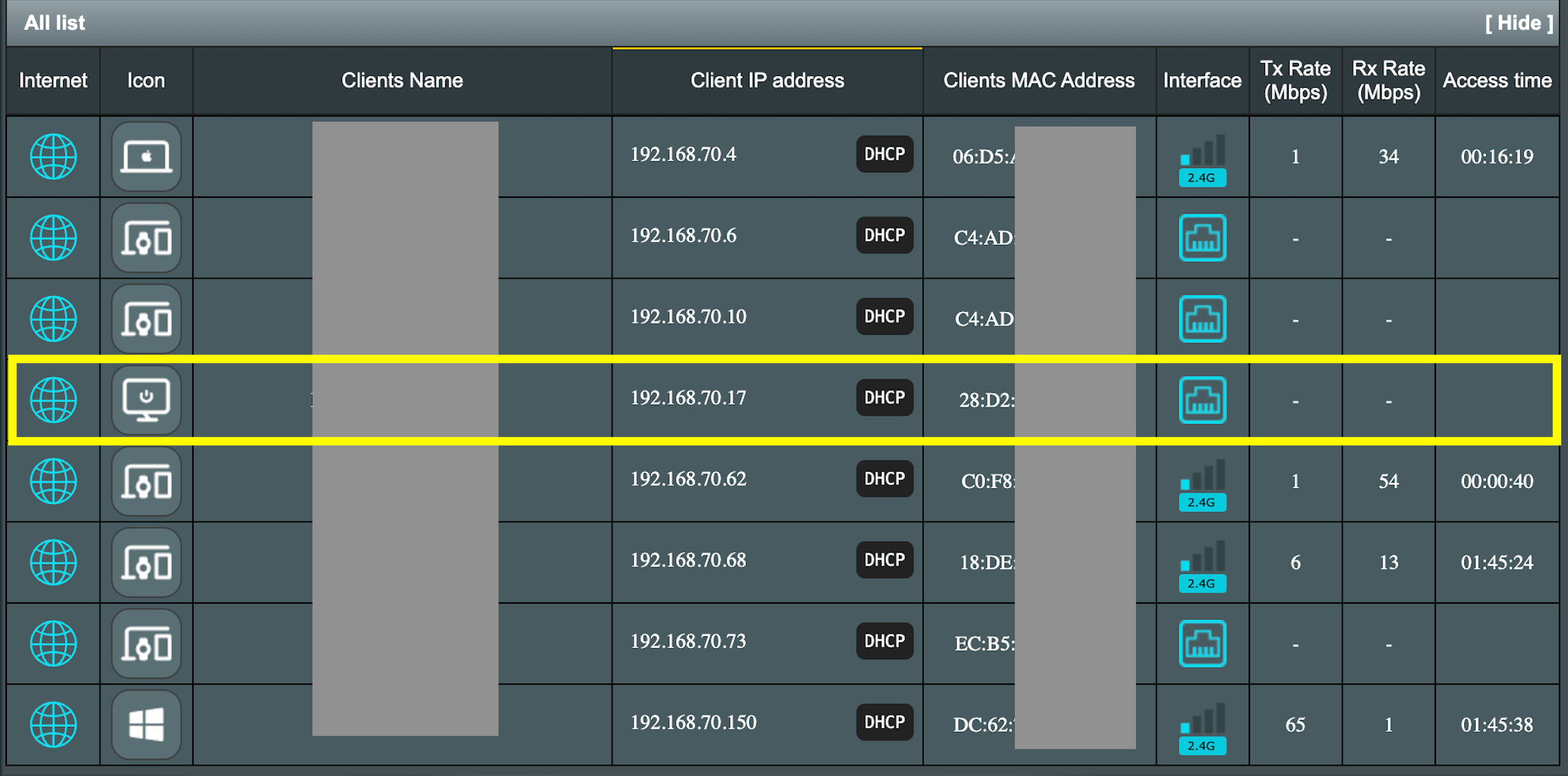
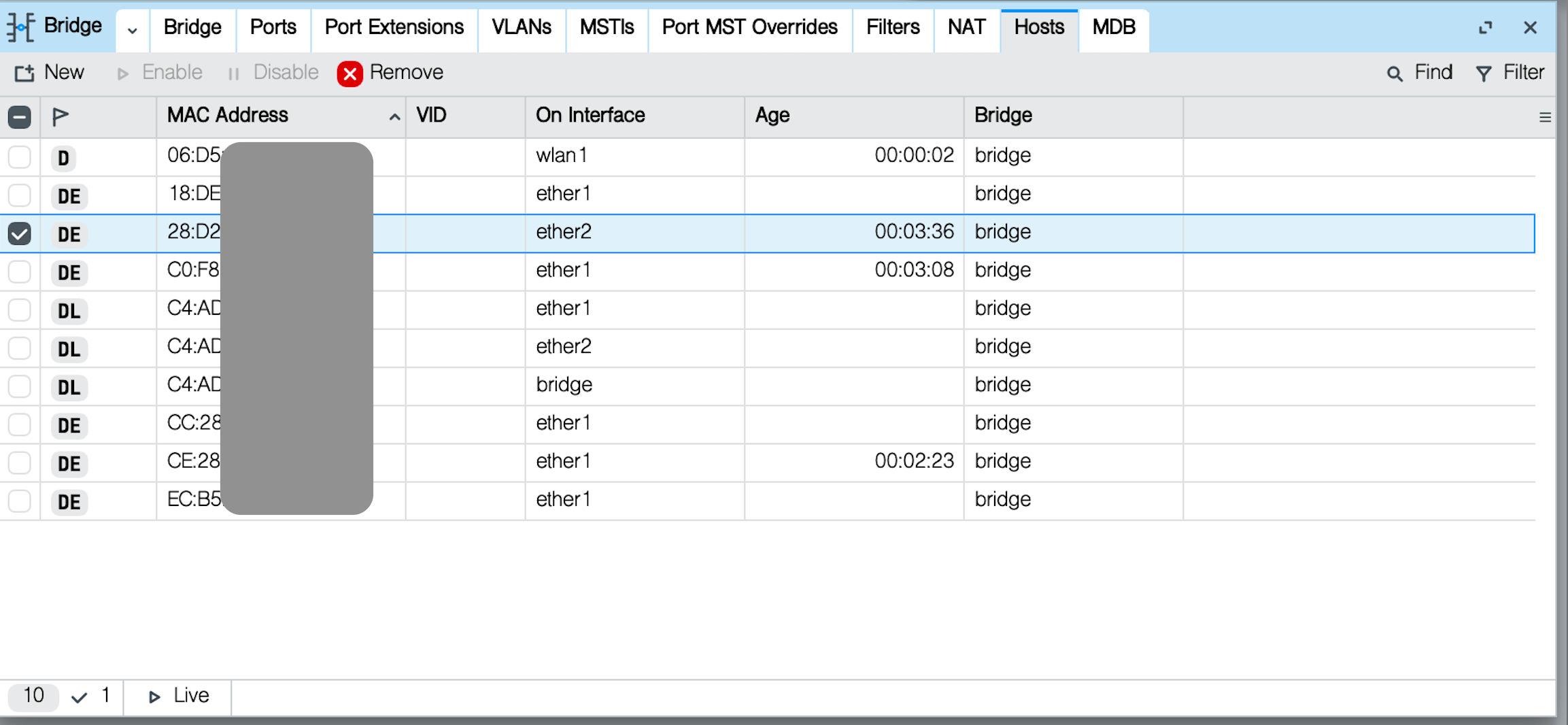
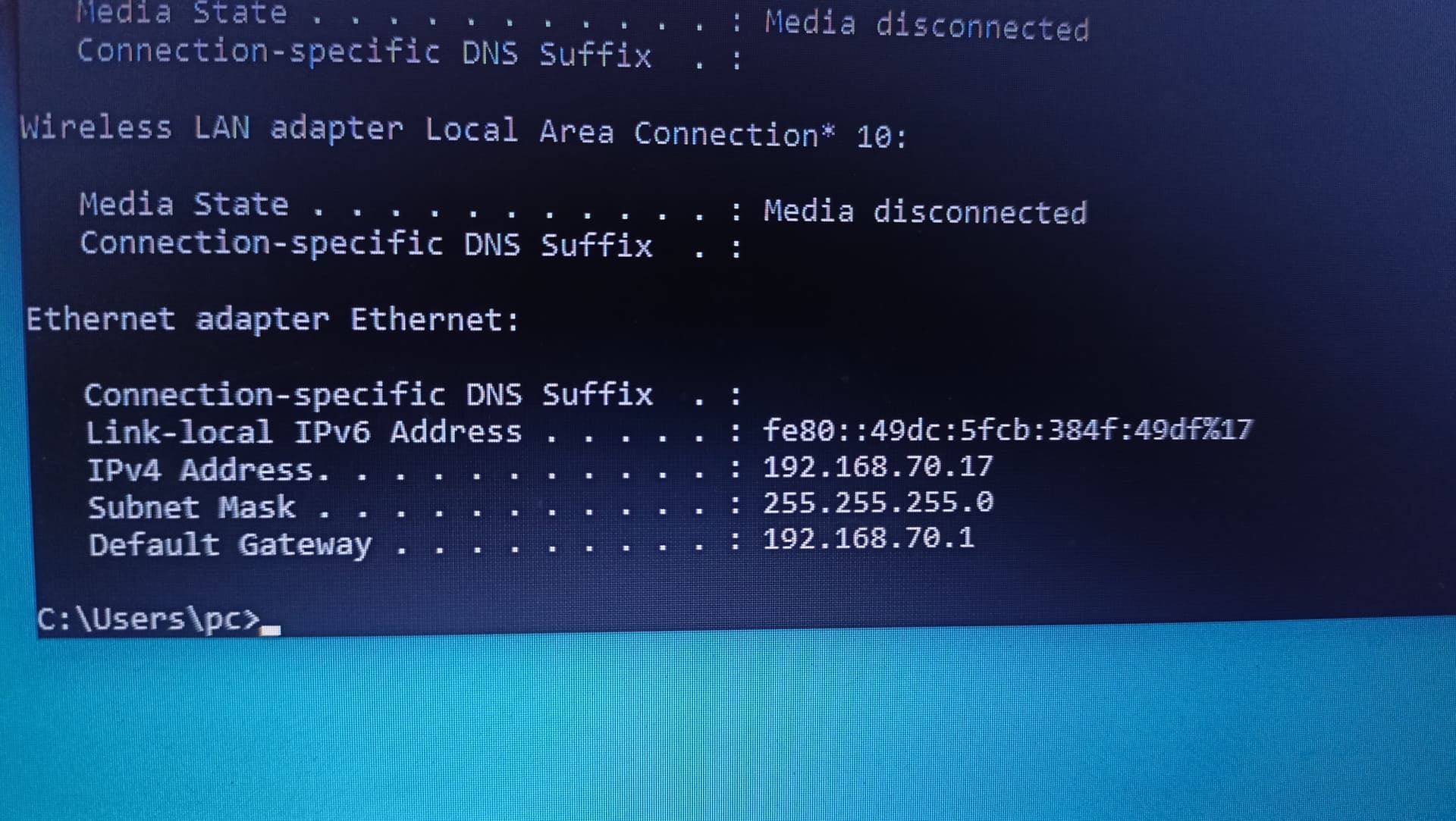
Ok, It Is a good thing that we are back to normality.
So the issue Is somehow on the Ubuntu server.
Since It works with another PC, power supply Is NOT and issue, but It Is completely "wrong" (generally speaking).
JFYI:
Some Mikrotik devices (including yours) can be powered at 5V through an USB C connector.
The use of an USB C connector does not imply USB C Power delivery compatibility.
If you use an AC to 5V Power supply with an USB A socket and and USB A to USB C cable, the connection will be limited by what the power supply can delivery (a 1A@5V will be able to give 1A, a - say to exaggerate - 12A@5V will be able to give 12A.
Adapters with an USB C socket may - if they do not respect the standard - behave the same, but if they are actually compliant to standard they won't deliver more than 0.9 or 1.5A.
As well, if you try powering a device from a USB C Port (say from a laptop) or from a plain USB A (3/3.1) of a desktop you won't get more than 0.9A, 1.5A if USB 3.2, because the max current out of an USB 3/3.1 port Is 900 mA or 1500 mA for 3.2 (was 500 mA for USB 2) according to standard.
USB C can deliver not only 5V, but also 9V and higher voltages, so It needs to negotiate with the powered devices.
This negotiation Is complex BUT a simplified version exists that can allow delivery of up to 3A@5V.
Mikrotik devices miss however this provision (two 5.1 KOhm resistors towards ground) so without a mod/hack they cannot be fully powered from a fully compliant USB C source.
Details here:
Very likely your device Is 7W or less, so It draws less than 1.5A@5V and everything Is working, but if you try the same with a more power hungry device results may vary.
One more thing to try, would be disabling RSTP on the bridge. see DHCP client on bridge does not work? - #3 by 2frogs However this was from a dhcp client on the bridge, not for a down stream device. This is mostly last resort change that I can't explain why it should work, but it may be worth trying to see if if makes any difference.
It is a really odd problem because:
- ubuntu works when directly connected to ASUS
- windows works through hap lite, but ubuntu does not. (and the bridge should be "transparent", i.e. it isn't configured for dhcp snooping).
Has your config changed since the last posted config?
Are you still "cloning" the mac address of the ubuntu host on the bridge? If so I would reset to the original, because when in bridge mode, it does seem is would cause the bridge confusion (duplicate macs).
This is an odd problem, it seems that you have demonstrated that the ASUS dhcp server does work with the ubuntu host. Have you verified that the other adapters on the ubuntu machine can also get in ip address when directly connected to the ASUS. Have you verified that the ubuntu can obtain in IP with both cables involved (one at a time)? Just to verify that cables are working.
Does the ASUS router have Gb ports? That's one diffenence. If the ubuntu ethernet adapter won't auto negotiate with the 100 Mbps on the hap mini. But that doesn't seem to make sense either based on the top right screen in Screenshot 2025-11-29 at 18.48.39, which shows R (running) and traffic for ether1 ether2 and wlan1.
Edit: I see that you found another host that does work.
About the only option at this time would be to load wireshark on your ubuntu and capture traffic. Perhaps compare to tool/sniffer on the hap lite (but hw offload must be disabled). I have never tried using sniffer when configured as a bridge only, so perhaps it works differently than when running as a router.
Do you have a usb to ethernet adapter you could try with the ubuntu server? It really seems odd that none of the servers adapters are able to get ip addresses. Are you the ubuntu interfaces are correctly configured to use dhcp?
Thanks for your inputs and suggestions. I will share more info and steps that I have tried.
- Disabled RSTP (showing actual full config below, just to be sure)
- The ASUS router is RT-AX52 with 1 Gbps ports and using CAT6 cable from the ASUS
Are you still "cloning" the mac address of the ubuntu host on the bridge?
No, I have removed the MAC and using ‘native’ one from the hAP / routerOS.
Have you verified that the other adapters on the ubuntu machine can also get in ip address when directly connected to the ASUS. Have you verified that the ubuntu can obtain in IP with both cables involved (one at a time)? Just to verify that cables are working.
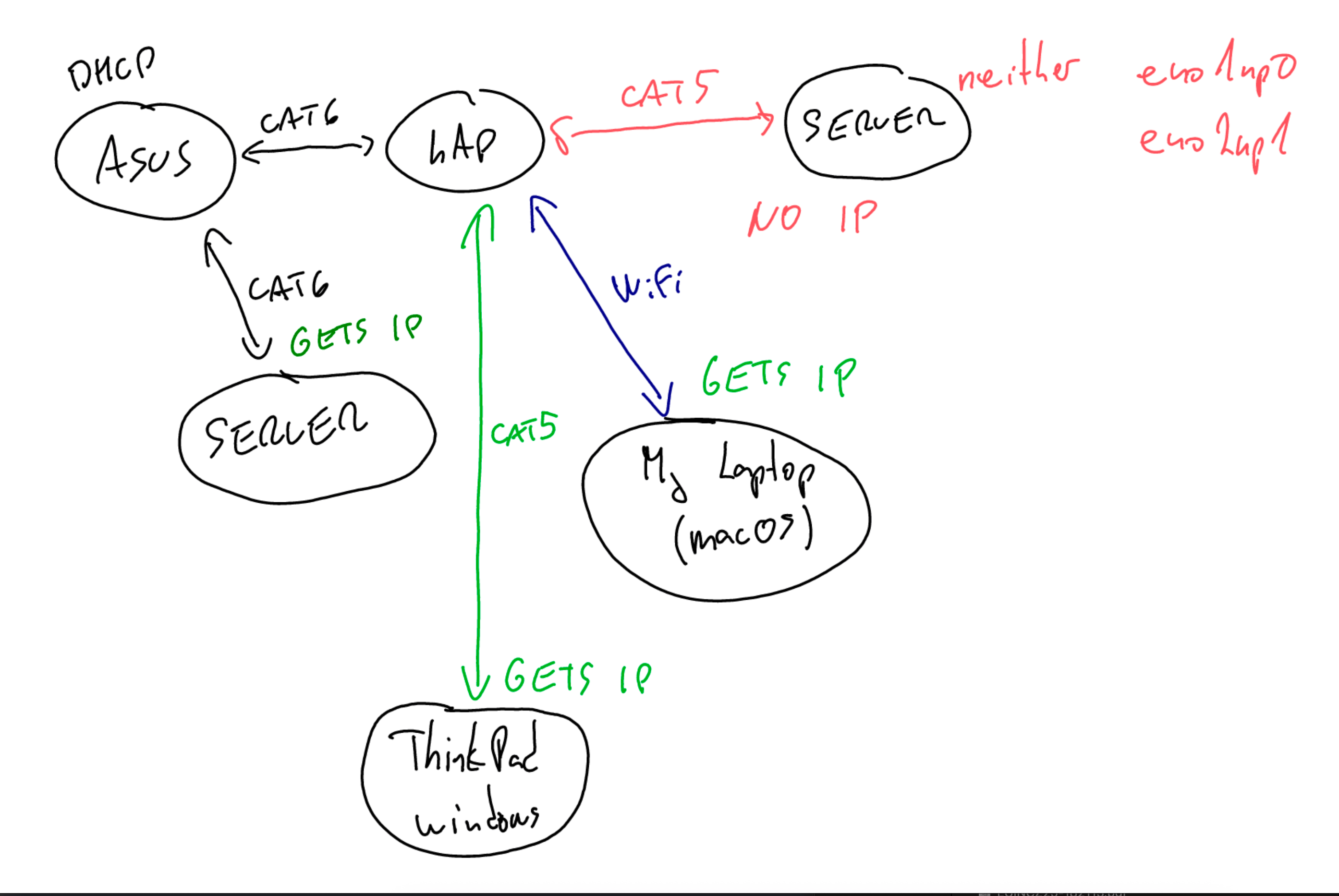
I will share screenshots and schema showing what is actually working and how. It’s ASUS to eno1np0 and eno2np1(both working). Also I have tested 2 cables between hAP to the server - same result.
About the only option at this time would be to load wireshark on your ubuntu and capture traffic.
Thanks for this input, I will try that tomorrow probably.
Do you have a usb to ethernet adapter you could try with the ubuntu server?
Unfortunately I do not have one, I will maybe buy one and test.
Are you the ubuntu interfaces are correctly configured to use dhcp?
I hope yes. I have also tried to boot ubuntu and debian from the USB drive (freshly created) in order to test ‘100 % clean’ system. Same result - no IP from the DHCP.
Full config (the running version)
/interface bridge
add name=bridge protocol-mode=none
/interface ethernet
set [ find default-name=ether2 ] comment="to SERVER"
/interface list
add comment=defconf name=TRUSTED
/interface wireless security-profiles
set [ find default=yes ] supplicant-identity=MikroTik
add authentication-types=wpa2-psk,wpa2-eap mode=dynamic-keys name=profile1 \
    supplicant-identity="" wpa2-pre-shared-key=xxx
/interface wireless
set [ find default-name=wlan1 ] band=2ghz-b/g/n channel-width=20/40mhz-XX \
    country="xxx" disabled=no distance=indoors frequency=auto \
    installation=indoor mode=ap-bridge security-profile=profile1 ssid=xxx \
    wireless-protocol=802.11
/interface bridge port
add bridge=bridge comment="to SERVER" interface=ether2
add bridge=bridge interface=wlan1
add bridge=bridge interface=ether1
add bridge=bridge interface=ether3
/ip neighbor discovery-settings
set discover-interface-list=TRUSTED
/interface list member
add interface=bridge list=TRUSTED
/ip dhcp-client
add disabled=no interface=bridge
/ip dns
set servers=192.168.70.1
/system clock
set time-zone-name=xxx
/tool mac-server
set allowed-interface-list=none
/tool mac-server mac-winbox
set allowed-interface-list=TRUSTED
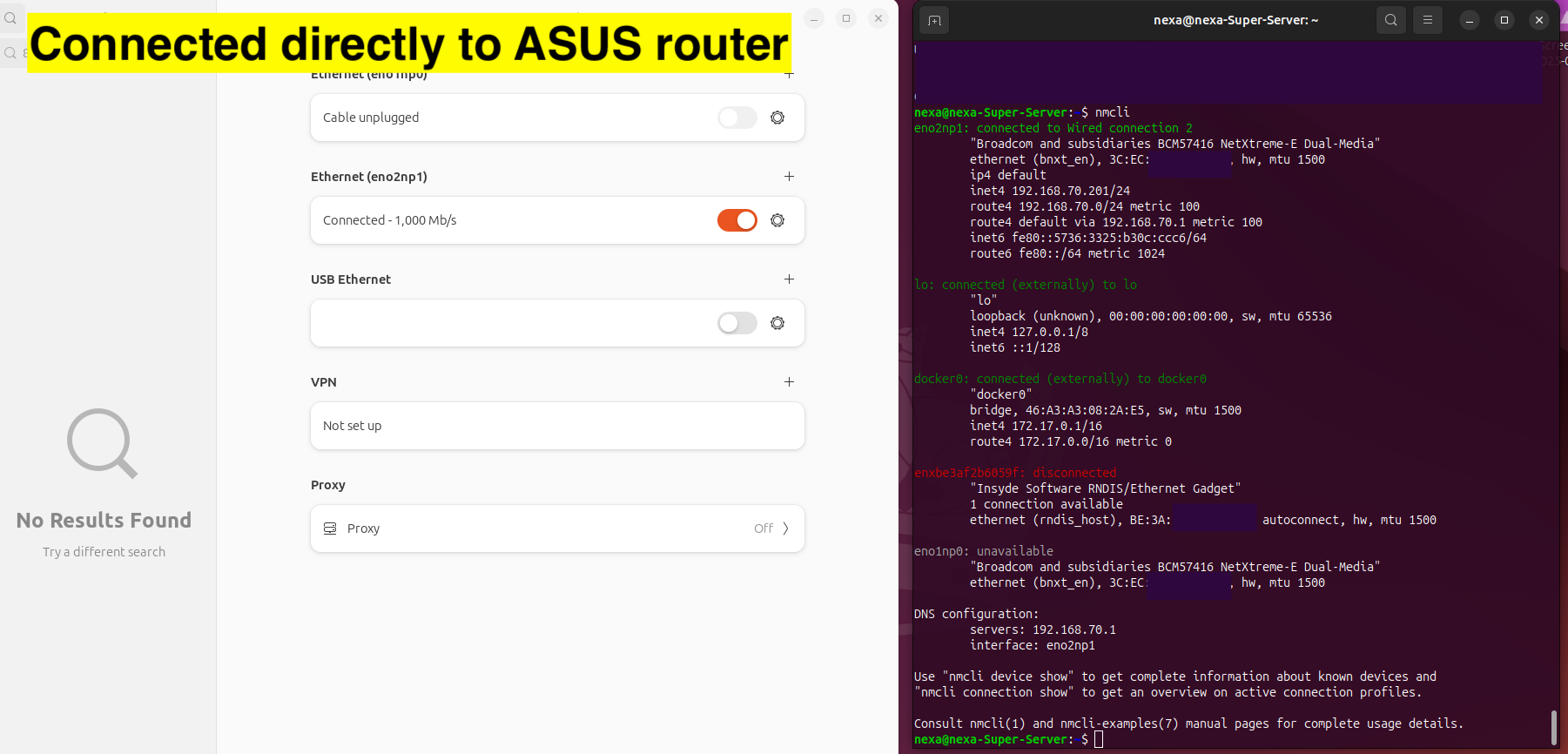
At the time when directly connected to the server from the ASUS
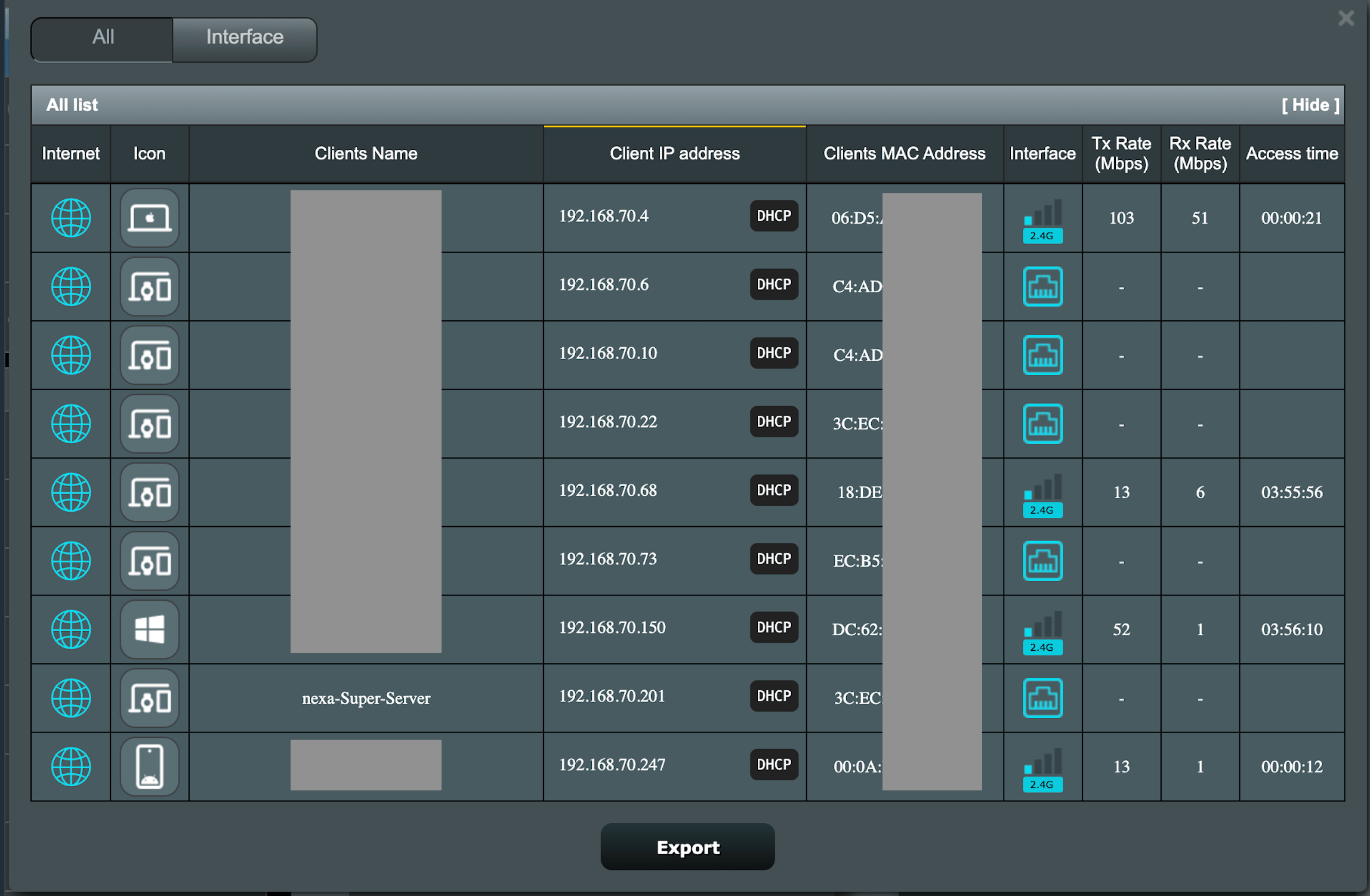
Connected to the hAP using both cables (just to be sure)
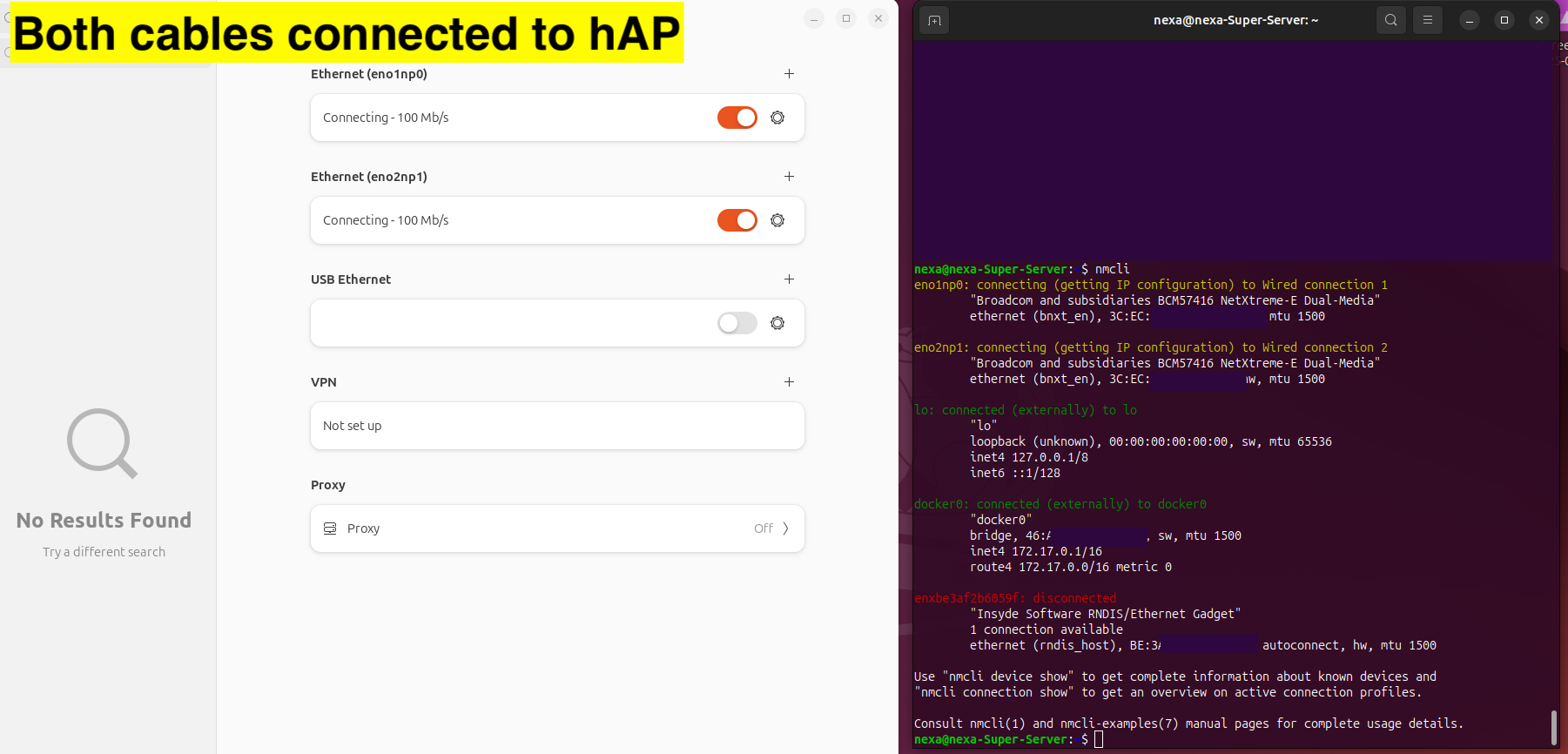
Server side when directly connected to the ASUS
Scheme showing what is working and what is not
Now - mind you I am old fashioned besides being old - what I would personally do Is:
- limit the DHCP server leases (assuming It can be done on the ASUS), let's say, to IP's 192.168.70.11-192.168.70.254
- manually give to the interfaces on the server addresses 192.168.70.7/8/9
- go and get some good coffee and relax

This thread https://community.hpe.com/t5/servers-general/10gb-base-t-network-adapter/td-p/7181985 claims that the Broadcom BCM57416 Ethernet 10Gb 2-port BASE-T OCP3 Adapter for HPE (P10097-B21) only supports 1G and above. It is a 10Gbps adapter, with backward compatibility with 1Gbps, but evidently not 100M or 10M.
Is there a reason you can't bypass the hap mini for the wired connection to the ASUS? And then use the hap mini as just an AP and support for 100Mbs or lower devices.
Or pick up a cheap 1Gbps dumb switch. and then connect the hap mini to it and the server at 1G.
Edit: The screenshot with the two cables attempting to connect to the hap, it does show that they were "Connecting - 100Mb/s" so it seems that the adapter was at least able to determine it was a 100Mbps link. So I don't know. The hap mini is old. It is possible it just is incompatible with 10 Gbps adapters.
I had a Toshiba laptop that had an m.2 wifi N card that would not connect to a Netgear ax router at a relative's house, and I had to use a wired connection until I replaced the m.2 wifi card with a newer AX210NGW based m.2 card. Now it will connect. And the Netgear AX was supposed to be backward compatible, but it wasn't for the specific m2 adapter I had (which got disposed of, so I don't know what it was).
Now it gets insteresting. The internet is also not accessible when static IP is set. Says
192.168.70.10 Destination Host Unreachable
where 192.168.70.10 is the servers IP. 
Is there a reason you can't bypass the hap mini for the wired connection to the ASUS?
The reason for using (old) hAP mini is, that I have it from times when I was actively using Mikrotik devices. So I wanted to use device I have instead of buying a new one.
But anyways, I will end up buying a new AP on Tuesday or Wednesday…
@Buckeye
Sure, but wifi is a different beast, "normal"[1] ethernet should be as plain as possible and as "universal" as possible, while we have tens of reports of issues with this (or that) wifi card or chipset, I cannot remember having ever read a similar incompatibility report.
It is anyway good to know that this kind of things can happen, another box to tick when troubleshooting similar issues.
@Psycho
The final test, if you have a few bucks to spend on it would be the one suggested earlier by Buckeye, try with a cheap USB-> 10/100 ethernet adapter.
[1] if we enter the realm of SFP and SFP+, then it is yet another thing.

If you are going to buy a USB to RJ45 ethernet adapter, buy a 1000/100/10 Mbps USB3 version, so it will be useful for more things. They usually aren't that much more expensive, and are much more useful.
The hap mini will be able to connect to the 1G interface at 100Mb, but the BCM57416 10G adapter evidently is only backward compatible to 1G.
And if you are replacing the hap mini with a router with built in 1Gbps switch-ports then the problem should go away, so unless you have a need for the USB to RJ45 wired ethernet (they are handy for an extra ethernet interface for testing, etc. but if networking isn't what you are interested it, it may just sit in junk box after you get the replacement router.
I just found another thread on Reddit discussing another 10Gb/s device that won't negotiate with anything lower than 1Gb/s. Mac Studio Ethernet Port Restricting Speeds
There were more problems with early 10Gb/s adapters, since they were so expensive, you would never buy one unless you expected to utilized 10Gb/s. Newer chipsets support more speeds, including 2.5G and 5G beteen 1G and 10G, as well as 10M and 100M (for backward compatibility).
Ethernet is a really old standard, it is surprising how well it works while still maintaining backward compatibility. (even the ability to support half duplex and collision detection is a remnant of when ethernet was base band coax based, shared segments). FYI my "avatar" is a picture on an old DEC H4000 10Mbs 10BASE5 ethernet transciever, the type I first used, before the cheaper Cabletron became available.
We'll have to get used that new NICs don't support ancient ethernet speeds. For example: NIC NetXtreme-E, utilizing BCM57454 (lspci says it supports "10Gb/25Gb/40Gb/50Gb/100Gb Ethernet", in reality it's "only" 10Gbps). And ethtool says:
        Advertised link modes:  1000baseT/Full
                                10000baseT/Full
So it does support lower than 10Gbps (lower limit as per lspci) but doesn't support old speeds (10BaseT, 100BaseTx, etc.)
Same host, different NIC (gigabit, utilizing Intel I350 chipset) does support whole plethora of lower speeds:
        Advertised link modes:  10baseT/Half 10baseT/Full
                                100baseT/Half 100baseT/Full
                                1000baseT/Full
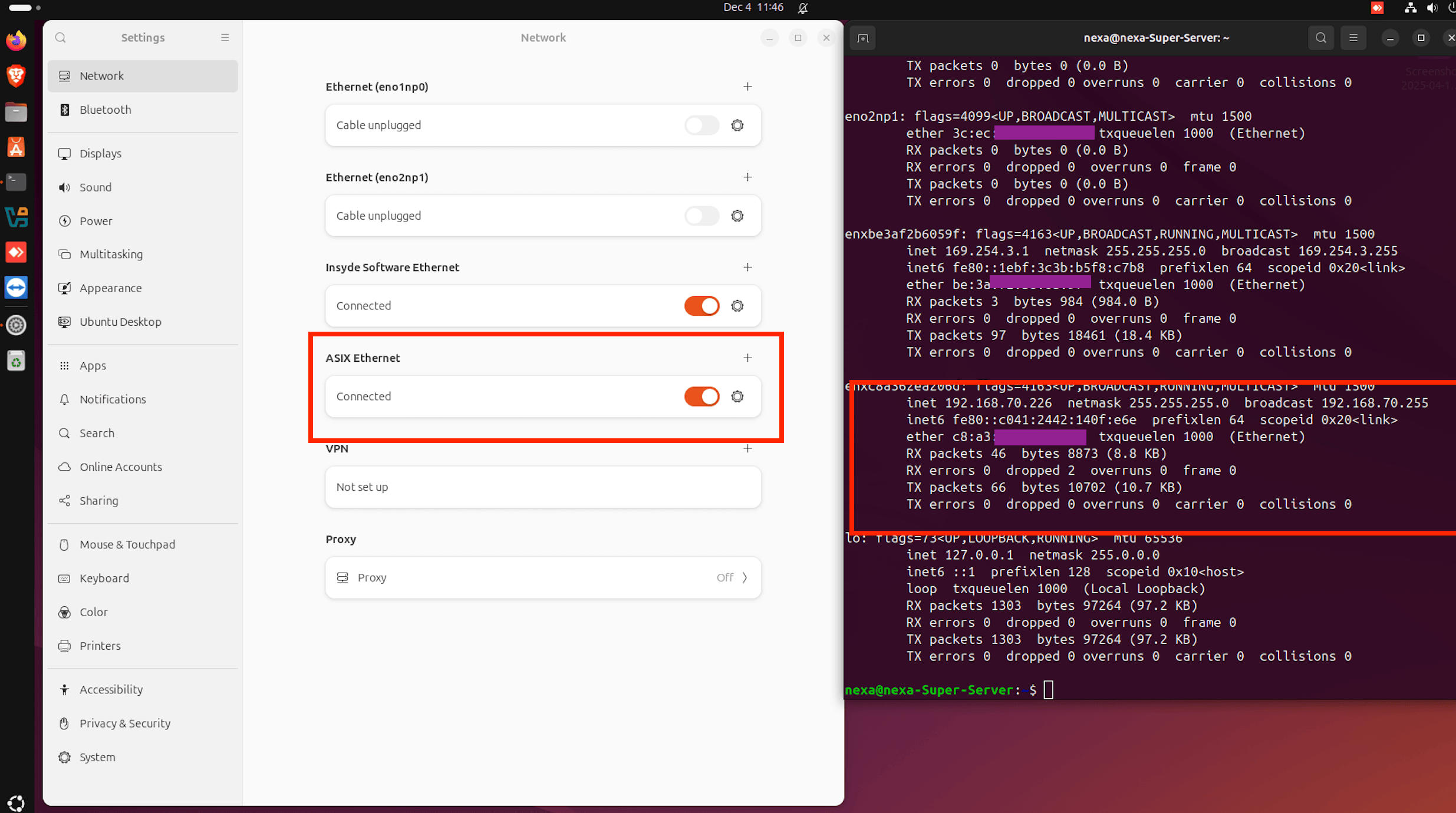
Or was it really, 10G adapter cannot handle 100Mbps device?