Issue with getting IP over LAN

Hi, I wanted to extend my home network using hAP mini. I have configured it to run in a bridge mode, which means that the DHCP is done from my main ASUS router and the hAP mini extends the wifi and (should extend) LAN too. However I am having issues with getting IP on my ubuntu server that is connected to the hAP mini over LAN. Getting IP over WiFi works fine.

What I have tried:

  • configuring hAP mini as router with own DHCP server (same issue)
  • connect server directly to the ASUS → I am getting the IP fine
  • turn off HW offload (bridge config)
  • using a different ethernet cable in order to eliminate faulty cable

Setup

  • router OS version 6.49.19
  • DHCP IP pool 192.168.70.0/24
  • gw IP 192.168.70.1
[admin@MikroTik] > ip address print
Flags: X - disabled, I - invalid, D - dynamic 
 #   ADDRESS            NETWORK         INTERFACE                               
 0   ;;; IP of the bridge itself (this device)
     192.168.70.200/24  192.168.70.0    bridge

[admin@MikroTik] > ip route print
Flags: X - disabled, A - active, D - dynamic, 
C - connect, S - static, r - rip, b - bgp, o - ospf, m - mme, 
B - blackhole, U - unreachable, P - prohibit 
 #      DST-ADDRESS        PREF-SRC        GATEWAY            DISTANCE
 0 A S  ;;; default route to ASUS (main)
        0.0.0.0/0                          192.168.70.1              1
 1 ADC  192.168.70.0/24    192.168.70.200  bridge                    0

[admin@MikroTik] > interface bridge port print
Flags: X - disabled, I - inactive, D - dynamic, H - hw-offload 
 #     INTERFACE                                                     BRIDGE                                                     HW  PVID PRIORITY  PATH-COST INTERNAL-PATH-COST    HORIZON
 0     ;;; to SERVER
       ether2                                                        bridge                                                     no     1     0x80         10                 10       none
 1 I   ether3                                                        bridge                                                     no     1     0x80         10                 10       none
 2 I   pwr-line1                                                     bridge                                                     no     1     0x80         10                 10       none
 3     wlan1                                                         bridge                                                            1     0x80         10                 10       none
 4     ;;; to ASUS
       ether1                                                        bridge                                                     no     1     0x80         10                 10       none
[admin@MikroTik] > 

What might be the issue? Thank you very much

Post the full configuration of your hAP mini, instructions here:

My bad!

# nov/29/2025 15:36:52 by RouterOS 6.49.19
# software id = IDMA-YSCH
#
# model = RB931-2nD
# serial number = B7B10Bxxx
/interface bridge
add admin-mac=C4:AD:xxx auto-mac=no comment=defconf name=bridge
/interface list
add comment=defconf name=WAN
add comment=defconf name=LAN
/interface wireless security-profiles
set [ find default=yes ] supplicant-identity=MikroTik
add authentication-types=wpa2-psk,wpa2-eap mode=dynamic-keys name=profile1 \
    supplicant-identity="" wpa2-pre-shared-key=xxx
/interface wireless
set [ find default-name=wlan1 ] band=2ghz-b/g/n channel-width=20/40mhz-XX \
    country="xxx" disabled=no distance=indoors frequency=auto \
    installation=indoor mode=ap-bridge security-profile=profile1 ssid=xxx \
    wireless-protocol=802.11
/interface bridge port
add bridge=bridge comment="to SERVER" hw=no interface=ether2
add bridge=bridge hw=no interface=ether3
add bridge=bridge hw=no interface=pwr-line1
add bridge=bridge interface=wlan1
add bridge=bridge comment="to ASUS" hw=no interface=ether1
/ip neighbor discovery-settings
set discover-interface-list=LAN
/interface list member
add comment=defconf interface=bridge list=LAN
add comment=defconf interface=ether1 list=WAN
/ip address
add address=192.168.70.200/24 comment="IP of the bridge itself (this device)" \
    interface=bridge network=192.168.70.0
/ip dns
set allow-remote-requests=yes
/ip dns static
add address=192.168.88.1 comment=defconf name=router.lan
/ip route
add comment="default route to ASUS (main)" distance=1 gateway=192.168.70.1
/system clock
set time-zone-name=xxx
/tool mac-server
set allowed-interface-list=LAN
/tool mac-server mac-winbox
set allowed-interface-list=LAN

also when I ask for IP on the server side, I cannot see any activity on the eth2 interface… :frowning:

[admin@MikroTik] > interface bridge host print
Flags: X - disabled, I - invalid, D - dynamic, L - local, E - external 
 #       MAC-ADDRESS        VID ON-INTERFACE                                                                      BRIDGE                                                                      AGE                 
 0   D   06:D5:AA:48:A5:9D      wlan1                                                                             bridge                                                                      0s                  
 1   D   18:DE:50:01:87:5C      ether1                                                                            bridge                                                                      3s                  
 2   D   72:75:DE:BE:07:A0      wlan1                                                                             bridge                                                                      53s                 
 3   DL  C4:AD:34:79:90:BA      ether1                                                                            bridge                                                                     
 4   DL  C4:AD:34:79:90:BB      bridge                                                                            bridge                                                                     
 5   DL  C4:AD:34:79:90:BE      wlan1                                                                             bridge                                                                     
 6   D   CC:28:AA:BF:EA:BA      ether1                                                                            bridge                                                                      0s                  
 7   D   EC:B5:FA:BE:57:63      ether1                                                                            bridge                                                                      36s                 

Ensure you get rid of the iP DNS Static setting you had ( go to IP DNS, find static in the upper right menu selection)
There is no wan and lan, its a switch,

/interface bridge
add admin-mac=C4:AD:xxx auto-mac=no comment=defconf name=bridge
/interface list
add comment=defconf name=TRUSTED
/interface wireless security-profiles
set [ find default=yes ] supplicant-identity=MikroTik
add authentication-types=wpa2-psk,wpa2-eap mode=dynamic-keys name=profile1 \
    supplicant-identity="" wpa2-pre-shared-key=xxx
/interface wireless
set [ find default-name=wlan1 ] band=2ghz-b/g/n channel-width=20/40mhz-XX \
    country="xxx" disabled=no distance=indoors frequency=auto \
    installation=indoor mode=ap-bridge security-profile=profile1 ssid=xxx \
    wireless-protocol=802.11
/interface bridge port
add bridge=bridge comment="to SERVER"  interface=ether2
add bridge=bridge  interface=ether3
add bridge=bridge  interface=pwr-line1
add bridge=bridge interface=wlan1
add bridge=bridge comment="to ASUS" hw=no interface=ether1
/ip neighbor discovery-settings
set discover-interface-list=TRUSTED
/interface list member
add comment=defconf interface=bridge list=TRUSTED
/ip address
add address=192.168.70.200/24 comment="IP of the bridge itself (this device)" \
    interface=bridge network=192.168.70.0
/ip dns
set server=192.168.70.1   { edited: thanks psycho }
/ip route
add comment="default route to ASUS (main)" distance=1 gateway=192.168.70.1
/system clock
set time-zone-name=xxx
/tool mac-server
set allowed-interface-list=none
/tool mac-server mac-winbox
set allowed-interface-list=TRUSTED

Thanks for your outputs. I have polished the hAP config, but I think the DNS address u shared should be 182.168.70.1, right?

But anyways, the IP is still not given. I am now suspecting the issue with a network card, or I do not know… what else might be wrong :’( EDIT: I have tried direct connection to the ASUS router and IP address was given almost instantly

/interface bridge
add admin-mac=C4:AD:xxx auto-mac=no name=bridge
/interface list
add comment=defconf name=WAN
add comment=defconf name=LAN
add comment=defconf name=TRUSTED
/interface wireless security-profiles
set [ find default=yes ] supplicant-identity=MikroTik
add authentication-types=wpa2-psk,wpa2-eap mode=dynamic-keys name=profile1 \
    supplicant-identity="" wpa2-pre-shared-key=xxx
/interface wireless
set [ find default-name=wlan1 ] band=2ghz-b/g/n channel-width=20/40mhz-XX \
    country="czech republic" disabled=no distance=indoors frequency=auto \
    installation=indoor mode=ap-bridge security-profile=profile1 ssid=xxx \
    wireless-protocol=802.11
/interface bridge port
add bridge=bridge comment="to SERVER" interface=ether2
add bridge=bridge interface=ether3
add bridge=bridge interface=pwr-line1
add bridge=bridge interface=wlan1
add bridge=bridge comment="to ASUS" hw=no interface=ether1
/ip neighbor discovery-settings
set discover-interface-list=TRUSTED
/interface list member
add interface=bridge list=TRUSTED
/ip address
add address=192.168.70.200/24 comment="IP of the bridge itself (this device)" \
    interface=bridge network=192.168.70.0
/ip dns
set servers=192.168.70.1
/ip route
add comment="default route to ASUS (main)" distance=1 gateway=192.168.70.1
/system clock
set time-zone-name=xxx
/tool mac-server
set allowed-interface-list=none
/tool mac-server mac-winbox
set allowed-interface-list=TRUSTED

You shouldn't need a static route at all, if you run in terminal
/ip route print
you should see two routes, one (the static one you added manually) marked with S (or AS) and one marked as DAC (this is created automatically by the assigned IP address for 192.168.70.0/24), this latter, being Dynamic, will have distance 0.

Only as a test:

  1. take ether3 out of the bridge
  2. add a DHCP client on ether3

Remove the cable (coming from the ASUS) from ether1 and connect it to ether3.

Check ip addresses with your PC connected to ether2, ether3 should get an address from the DHCP of the ASUS.

If this works:

  1. remove the manually set IP address from bridge
  2. re-add the ether3 to the bridge
  3. remove the DHCP client from ether3
  4. add a DHCP client to the bridge

You should have now a DHCP address given to the bridge.

To do these changes use Winbox connected via MAC (this way changes in IP addresses will be irrelevant), see here:

As per your suggested test, I did:

  1. :white_check_mark: Removed eth3 from the bridge
  2. :white_check_mark: Added DHCP client on the eth3 iface
  3. :white_check_mark: Pluged cable from ASUS into the eth3 iface
  4. :white_check_mark: Observed IP from the ASUS’s DHCP (see below)
  5. :white_check_mark: Removed the manually set IP on the bridge iface
  6. :white_check_mark: Added eth3 to the bridge (again)
  7. :white_check_mark: Removed DHCP client from eth3 and added to bridge
  8. :white_check_mark: Observed assigned address from a DHCP & dynamically set route (DAS)

After first test (up to point 5, excluded)

[admin@MikroTik] > interface bridge port print
Flags: X - disabled, I - inactive, D - dynamic, H - hw-offload 
 #     INTERFACE                        BRIDGE                        HW  PVID PRIORITY  PATH-COST INTERNAL-PATH-COST    HORIZON
 0 I H ;;; to SERVER
       ether2                           bridge                        yes    1     0x80         10                 10       none
 1 I H pwr-line1                        bridge                        yes    1     0x80         10                 10       none
 2     wlan1                            bridge                               1     0x80         10                 10       none
 3 I   ;;; to ASUS
       ether1                           bridge                        no     1     0x80         10                 10       none
[admin@MikroTik] > ip dhcp-client print
Flags: X - disabled, I - invalid, D - dynamic 
 #   INTERFACE                                                               USE-PEER-DNS ADD-DEFAULT-ROUTE STATUS        ADDRESS           
 0   ;;; demo client
     ether3                                                                  yes          yes               bound         192.168.70.8/24   

After all steps, you are right, the static router as obsolete.

[admin@MikroTik] > ip add print
Flags: X - disabled, I - invalid, D - dynamic 
 #   ADDRESS            NETWORK         INTERFACE                                                                                           
 0 D 192.168.70.7/24    192.168.70.0    bridge                                                                                              
[admin@MikroTik] > ip dhcp-client print
Flags: X - disabled, I - invalid, D - dynamic 
 #   INTERFACE                                                               USE-PEER-DNS ADD-DEFAULT-ROUTE STATUS        ADDRESS           
 0   ;;; demo client
     bridge                                                                  yes          yes               bound         192.168.70.7/24   
[admin@MikroTik] > ip route print
Flags: X - disabled, A - active, D - dynamic, C - connect, S - static, r - rip, b - bgp, o - ospf, m - mme, 
B - blackhole, U - unreachable, P - prohibit 
 #      DST-ADDRESS        PREF-SRC        GATEWAY            DISTANCE
 0 ADS  0.0.0.0/0                          192.168.70.1              1
 1 ADC  192.168.70.0/24    192.168.70.7    bridge                    0

However the IP is still not given to the server.

EDIT: also here is the full config

/interface bridge
add admin-mac=C4:AD:xxx auto-mac=no name=bridge
/interface list
add comment=defconf name=TRUSTED
/interface wireless security-profiles
set [ find default=yes ] supplicant-identity=MikroTik
add authentication-types=wpa2-psk,wpa2-eap mode=dynamic-keys name=profile1 \
    supplicant-identity="" wpa2-pre-shared-key=xxx
/interface wireless
set [ find default-name=wlan1 ] band=2ghz-b/g/n channel-width=20/40mhz-XX \
    country="czech republic" disabled=no distance=indoors frequency=auto \
    installation=indoor mode=ap-bridge security-profile=profile1 ssid=xxx \
    wireless-protocol=802.11
/interface bridge port
add bridge=bridge comment="to SERVER" interface=ether2
add bridge=bridge interface=pwr-line1
add bridge=bridge interface=wlan1
add bridge=bridge comment="to ASUS" hw=no interface=ether1
add bridge=bridge interface=ether3
/ip neighbor discovery-settings
set discover-interface-list=TRUSTED
/interface list member
add interface=bridge list=TRUSTED
/ip dhcp-client
add comment="demo client" disabled=no interface=bridge
/ip dns
set servers=192.168.70.1
/system clock
set time-zone-name=xxx
/tool mac-server
set allowed-interface-list=none
/tool mac-server mac-winbox
set allowed-interface-list=TRUSTED

EDIT2: The odd thing is, there is nothing on the iface eth2… (never)

[admin@MikroTik] > interface bridge host print
Flags: X - disabled, I - invalid, D - dynamic, L - local, E - external 
 #       MAC-ADDRESS        VID ON-INTERFACE                                   BRIDGE                                   AGE                 
 0   D   06:D5:...      wlan1                                          bridge                                   2s                  
 1   D E 18:DE:...      ether3                                         bridge                                  
 2   DL  C4:AD:...      bridge                                         bridge                                  
 3   DL  C4:AD:...      ether3                                         bridge                                  
 4   DL  C4:AD:...      wlan1                                          bridge                                  
 5   D E CC:28:...      ether3                                         bridge                                  
 6   D E CE:28:...      ether3                                         bridge                                  
 7   D E EC:B5:...      ether3                                         bridge                                   

Yes that was my bad, 192.168.70.1

Try this:
ensure you connect with your PC again, write down the iP address given and the mac address of your PC nic card used. unplug PC,
Go to MT switch device, clone your PC mac address to the bridge mac address
go to IP address settings and give the bridge the same address as your PC, then plug the MT router back into the ASUS router.

So, the ASUS DHCP server works just fine and now your bridge (on Mikrotik) gets an IP (and route) from it, right now 192.168.70.7/24.

BUT for some reasons this DHCP IP assignment is not "passsing through" to ether2 or ether3, right?

Strange. :confused:

Can you try connecting to the wi-fi and see if on that interface (still part of the bridge like ether2 and ether3) an IP address is provided?

Configured the MAC of the bridge to be the same as the MAC of the interface of my Ubuntu server (starting 3C:EC). Using also same IP that was given by the DHCP (ASUS) to the Ubuntu server (192.168.70.201).

Than I have tested that the internet works from the hAP device (works). I did not connect the Ubuntu server in this setup to the Mikrotik router (wouldn’t be nasty to have 2 same MACs in the network?).

The original issue remains unresolved.

expected command name (line 1 column 1)
[admin@MikroTik] > ping 8.8.8.8
  SEQ HOST                                     SIZE TTL TIME  STATUS                                                                        
    0 8.8.8.8                                    56 110 21ms 
    1 8.8.8.8                                    56 110 13ms 
    2 8.8.8.8                                    56 110 45ms 
    3 8.8.8.8                                    56 110 9ms  
    4 8.8.8.8                                    56 110 20ms 
    sent=5 received=5 packet-loss=0% min-rtt=9ms avg-rtt=21ms max-rtt=45ms 

[admin@MikroTik] > ip address print
Flags: X - disabled, I - invalid, D - dynamic 
 #   ADDRESS            NETWORK         INTERFACE                                                                                           
 0   192.168.70.201/32  192.168.70.201  bridge                                                                                              
 1 D 192.168.70.201/24  192.168.70.0    bridge 

[admin@MikroTik] > interface bridge print
Flags: X - disabled, R - running 
 0 R name="bridge" mtu=auto actual-mtu=1500 l2mtu=1598 arp=enabled arp-timeout=auto mac-address=3C:EC:xxx protocol-mode=rstp 
     fast-forward=yes igmp-snooping=no auto-mac=no admin-mac=3C:EC:xxx ageing-time=5m priority=0x8000 max-message-age=20s 
     forward-delay=15s transmit-hold-count=6 vlan-filtering=no dhcp-snooping=no 

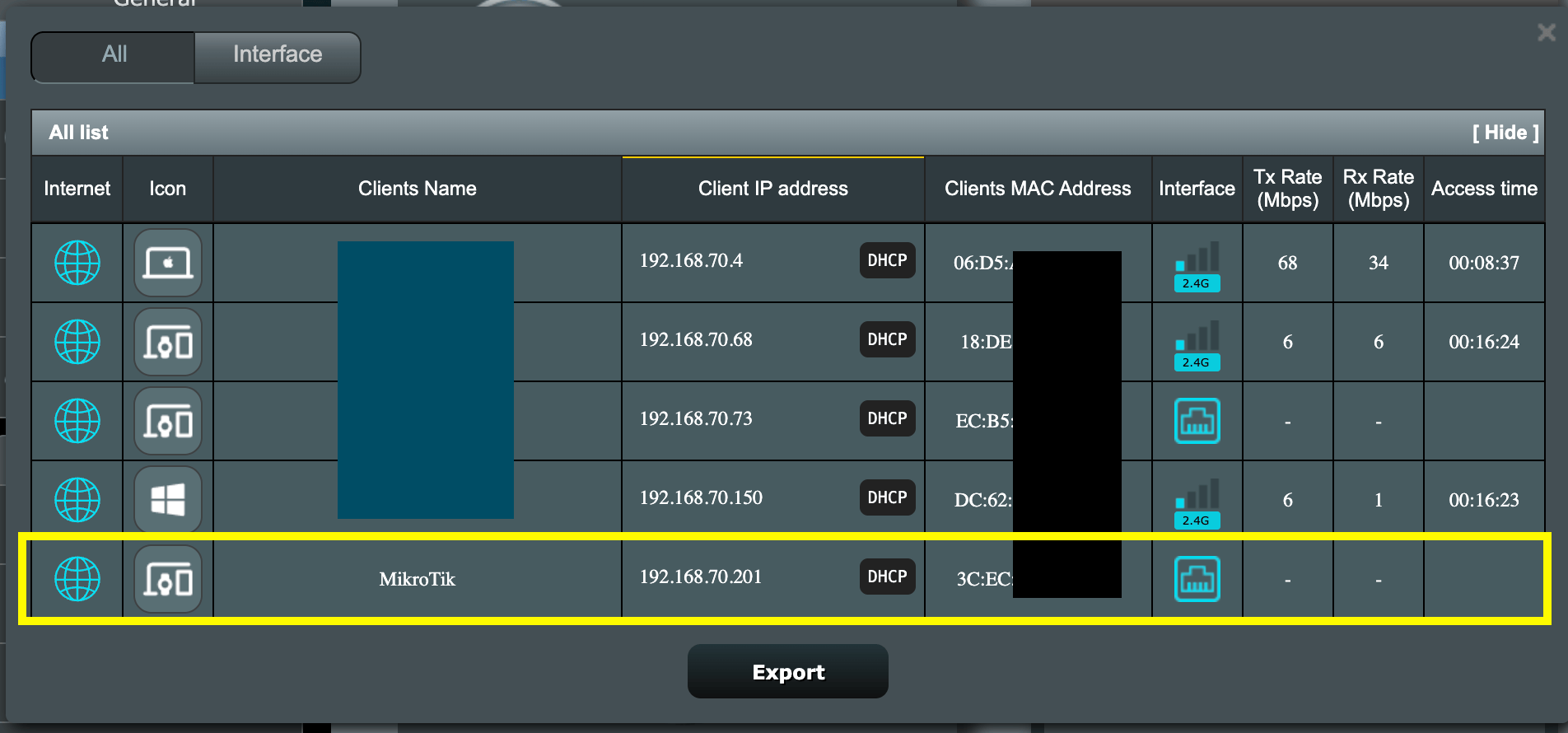
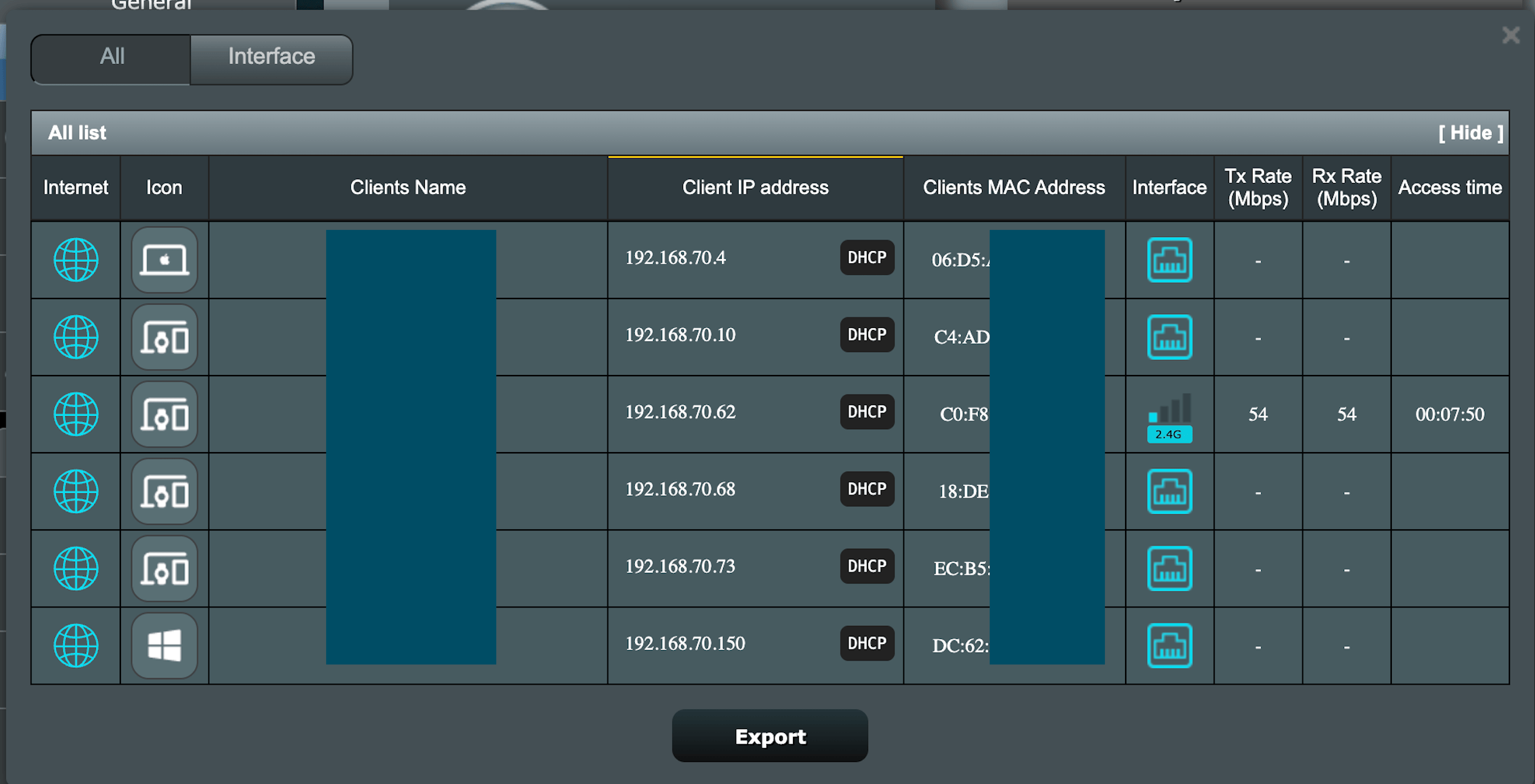
Screenshot from the ASUS admin.

Not sure I understand, what did you end up doing that now works ????

I am sorry, I was refering to a deleted post by me asking how to configure a MAC on the BRIDGE. Which I have figured out, deleted the post but it might “wrongly looked” like the initial issue was solved. I will edit the post to be more clear! My bad.

Well, post your current configuration (that works) so that we can (maybe) understand what was happening.
But it makes no sense (to me) that a DHCP server gives an address to a MAC (with the original mikrotiik router value) and this does not "pass through".
And then with another MAC it passes through.

Yes, that is correct. I can ge the IP while connected over WiFi, but as soon as I connect something to the ethernet (I have sadly just 1 computer right now), no IP is given.

I hope that I understand the assigment correctly. When I am connected through a WiFi on the Mikrotik, I am part of the ASUS network and I cannot see any IP assigned to the Ubuntu server network iface (MAC 3C:EC) - screenshot below.

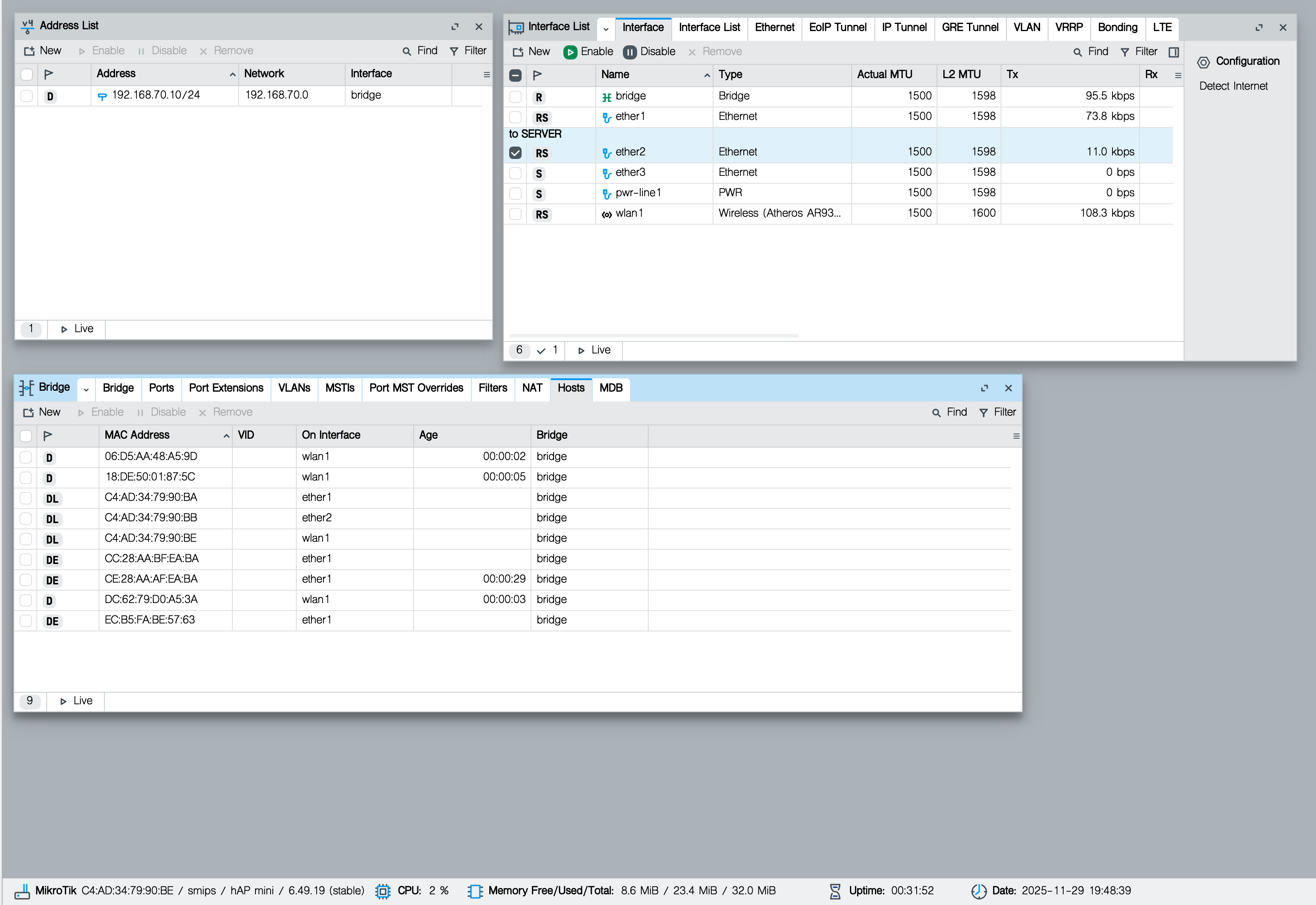
Also in the Winbox Ip → Addresses I cannot see anything related to the eth2. Only stuff I see is inside Bridge → Hosts. Also showing screenshot, cuz I am getting confused a bit. Sorry.

I am very sorry, english is not my primary language and I made it very confusing now and unclear! The initial issue is not solved. I have used wrong words so it looked like it it. The only thing that I solved what the “how to change MAc of the bridge itself”. Nothing else on the pass “through issue”. Thank you very much for being so patient.

Sorry sorry sorry :smiley:

Isn’t possible that the hAP mini is just “too old” and maybe there is some HW error that causes this and I should get a new device…?

When I look at the block diagram for hap mini, it has 3 ports plus wifi. What is "pwr-line1" in this line referring to? Oh, I see there is a microusb with an ethernet connection to it... Is there anything connected to the usb?

add bridge=bridge interface=pwr-line1

Yes, I am powering the hAP mini using the micro USB cable and some adapter (power supply). Maybe the pwr-line1 can be removed from the bridge, since is not used… ¯\_(ツ)_/¯

So becomes

[admin@MikroTik] > interface bridge port print
Flags: X - disabled, I - inactive, D - dynamic, H - hw-offload 
 #     INTERFACE                              BRIDGE                              HW  PVID PRIORITY  PATH-COST INTERNAL-PATH-COST    HORIZON
 0   H ;;; to SERVER
       ether2                                 bridge                              yes    1     0x80         10                 10       none
 1     wlan1                                  bridge                                     1     0x80         10                 10       none
 2   H ether1                                 bridge                              yes    1     0x80         10                 10       none
 3 I H ether3                                 bridge                              yes    1     0x80         10                 10       none

I would remove it, just to eliminate the possibility it is related to the issue. I can't find a lot of information about it other than some threads in the forum. This doesn't even mention the pwr-line1 port. hAP mini - User manuals - MikroTik Documentation