Hi Guys,
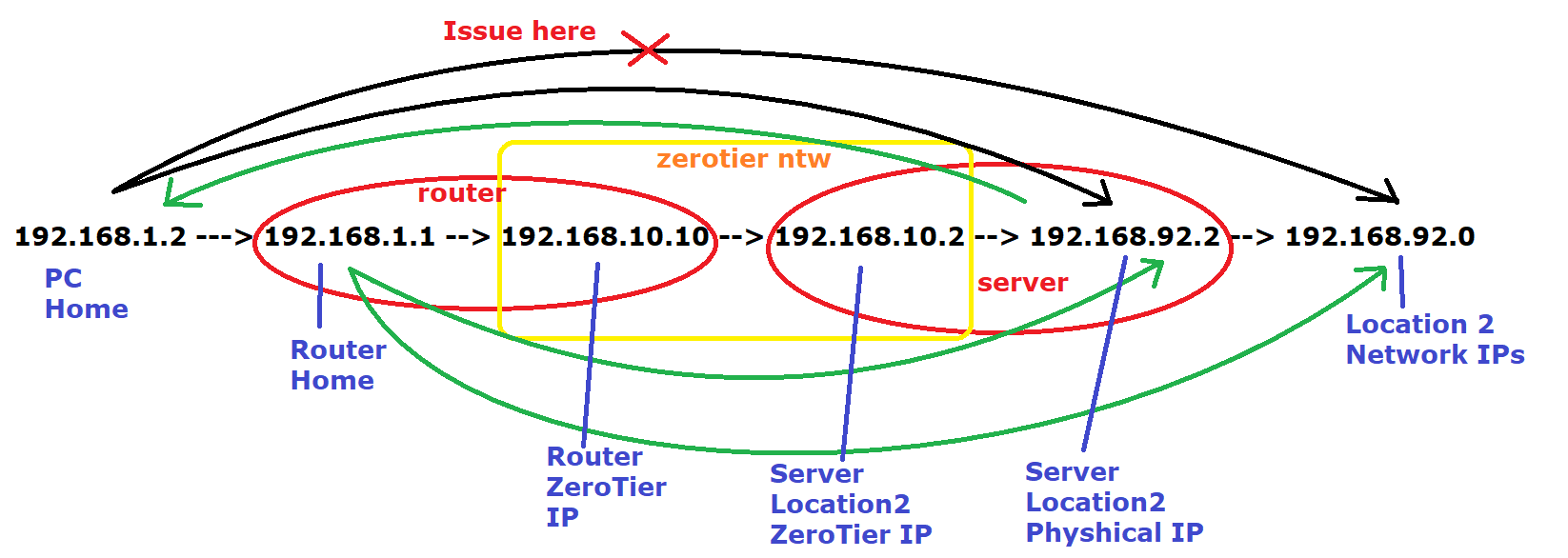
I need some help getting access to the other network using Zerotier. I attached a picture with the network and the issue.
Basically from Mikrotik router I can ping and access the zerotier server in another location AND other devices inside that devices.
From the server I can reach my home network.
The issue is that from my home network I can ONLY access the zerotier server in that location but not the other network. It’s not a firewall issue since if I ping the other network devices from Mikrotik it works so my suspicion is that the issue is between my network and Mikrotik router that won’t allow LAN devices to communicate to the LAN devices on the other network.
My PC 192.168.1.2 → Router Mikrotik 192.168.1.1 → Mikrotik ZeroTier Interface 192.168.10.10 → Server Zerotier Interface → Server Physical Interface 192.168.92.2 WORKS
My PC 192.168.1.2 → Router Mikrotik 192.168.1.1 → Mikrotik ZeroTier Interface 192.168.10.10 → Server Zerotier Interface → Server Physical Interface 192.168.92.2 → Other location Router 192.168.92.1 DON’T WORK
But from Mikrotik 192.168.1.1 I can ping any of 192.168.92.0/24 devices only.
From the Server 192.168.92.0/24 can ping any device on 192.168.1.0/24 devices!
I have configured the static route on Mikrotik using Gateway 192.168.10.10 which is the Mikrotik zerotier interface to destination 192.168.92.0/24 but did not solve the issue
I also tried with 192.168.10.2 as Gateway (which is the other network where Zerotier is hosted) to Destination 192.168.92.0/24 and again doesn’t work.
Only from Router Mikrotik works but not from elsewhere in my network and I am out of ideeas already.
Any help is much appreciated.
Thank you.
And “Managed Addresses” is checked on the Mikrotik. If you look at your /ip/route/print on the Mikrotik, you see the new ZeroTier routes injected. Similar on the “server”, a similar “ip route print” can be used on most OS.
You may need a NAT masquerade or static route in 192.168.1.0/24 for ZT since I’m not sure what “server” is doing in your diagram…e.g. if 192.168.92.0 has a different default router than your 192.168.10.2 server… it won’t have a route to 192.168.1.0/24 since the default route may not have a static route to the 192.168.1.0/24 and try to send that out 192.168.92.0/24’s default route (which likely drop it).
e.g. EITHER, (1) add a static route on the [presumed] 192.168.92.1 router for 192.168.1.0/24 → 192.168.92.2 (assuming the server is enabled to forward IP packets), or (2) masquerade all traffic out to 192.168.92.0/24 on the Mikrotik side, so it uses the ZeroTier address. The (2) option is less ideal however since you have a NAT when a static route(s) on the 192.168.92.0/24 side would avoid that.
Thanks for the reply,
Yes, I have the following Static routing configuration to Zerotier as following:
192.168.1.0/24 via 192.168.10.10
192.168.10.0/24 (LAN)
192.168.92.0/24 via 192.168.10.2
Otherwise I wouldn’t have access from my server to my network or from my Mikrotik Router (ping) to the server and that network.
It’s the issue on Mikrotik configuration only because like I mentioned earlier, from the server, I can reach my network devices that pass through Mikrotik but not the other way.
And yes, the Mikrotik ZeroTier is set ‘Allow Managed’.
[admin@MikroTik] > ip route print
Flags: D - DYNAMIC; I, A - ACTIVE; c, s, v, y - BGP-MPLS-VPN; H - HW-OFFLOADED
Columns: DST-ADDRESS, GATEWAY, DISTANCE
DST-ADDRESS GATEWAY DISTANCE
DAv 0.0.0.0/0 pppoe-out1 1
DAc 10.0.0.1/32 pppoe-out1 0
DAc 192.168.1.0/24 bridge 0
DAc 192.168.10.0/24 Zerotier 0
0 IsH 192.168.92.0/24 192.168.1.1 1
1 As 192.168.92.0/24 192.168.10.2 1
2 IsH 192.168.92.0/24 192.168.1.1 1
3 IsH 192.168.92.0/24 192.168.10.10 1
Also mentioning that the router on the other network where Zerotier is hosted have the following static routing configuration
network / subnet / gateway
192.168.92.0 255.255.255.0 192.168.10.2
192.168.10.0 255.255.255.0 192.168.92.2
lol! It worked! That was!
I just added on the router 192.168.92.1 another static route
192.168.1.0 255.255.255.0 192.168.92.2
But I’m kind of confused why from Mikrotik Router that have 192.168.1.1 local IP address can PING any device from 192.168.92.0/24 but not from any device in my network 192.168.1.0/24 and I was 100% sure that was a Mikrotik misconfiguration instead but instead it was a missing route on the destination router.
Many many thanks! I was struggling for the whole day with that.
Edit:
It is a windows server in which I already have made that registry setting you mentioned.
It is the default gateway for 192.168.92.0/24 that needs the route to 192.168.1.0/24 via 192.168.92.2. Is your default gateway on that side 192.168.92.1 or is the “server” at 92.2 also the router for the “un-pingable LAN clients” in 192.168.92.0/24?
Little hard to visualize what was going on when.. But the Mikrotik side got the route from ZeroTier, and it using its ZeroTier address to the “server”. And on the other side the LAN clients were using their own address, and which didn’t have a route back to 192.168.1.0/24 via ZT…
Plus ZeroTier does have some non-standard ARP handling that might have come into play. Not sure really, but yeah 192.168.92.1 is what needed some routes, since the default gateway is what those ping were going BACK to Mikrotik via… so that 92.1 would send those out it’s WAN/internet, which then drop it as it’s private address.
It the benefit and curse with static routes, it all trace-able/no-magic… but you end up with a lot of routing tables to update — in this case 4 routing tables (ZeroTier, Mikroitk Site, Remote Server, Remote Router) with slight different variants. Your diagram helped a lot here – you had 4 links in it, so 4 routing tables that need to be updated.
Right,
I haven’t visualized that Mikrotik could acces the 92.0/24 network without static routing because it uses the zerotier interface 192.168.10.10 and that IP was allowed from the router on the other side. Makes sense now.
Thank you again.