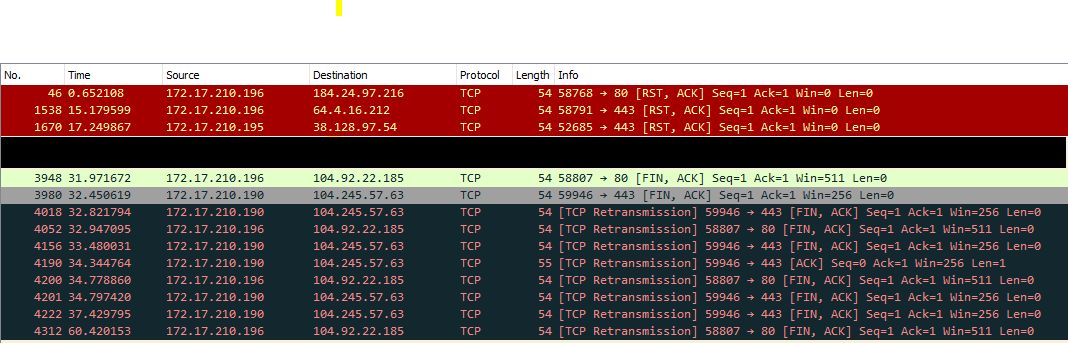
I have a situation in which a Mikrotik router has internal traffic “leaking” to the public interface. Normally this would not be an issue, as most devices upstream would simply pass it on and the packets would be lost somewhere along the way. However, I have issues with cellular networks kicking me off the network momentarily when they see this traffic. It happens when connected via ethernet to a Cradlepoint with a cellular card, or when I have a USB Modem plugged into the USB port of my Mikrotik. We utilize cellular connections as backup internet connections. Even the simplest config has this issue for me:
Taking a packet capture from ether1 shows normal traffic coming from the public IP on ether1. However, there is also random packets showing a source of my internal 172.17.210.x IP address to a public IP. The router in question is an RB2011UAS-2HnD, and it is currently running v6.44.2. I have seen this behavior on at least 6 different RB2011 routers over the last year, resulting in my failover connections not working properly. If I block ALL forward out ether1, I no longer have the issue. I do not know how to block the traffic AFTER the SrcNat, as the forward filter rules take place before SrcNat. Otherwise, I would simply block traffic leaving ether1 with sources from internal.
I am hoping there is a setting somewhere that I am missing that would easily fix this issue. It appears to me that the traffic is skipping the SrcNAT somehow. If anyone has any experience with this issue, I would be greatly appreciative.
It is not recommended to use masquerade when using multiple WAN interfaces for failover. It is recommended to use src-nat instead. This is related to the way the connections table is built (and purged) when using a masquerade.
If you have a packet capture of the traffic to evaluate that would be nice, as the masquerade is a special kind of src-nat, I suspect there is a parameter that is not causing a match
In the case of my most recent issue, it is the only WAN interface. I have had the issue in the past, but because it was a backup connection, it was not as high of a priority. For this situation, it is connected to a Cradlepoint via Ethernet. Since it is utilizing DHCP, I am not sure how to NAT outbound without a masquerade. As for the parameter, at the moment, the following statement is what is actually in use:
/ip firewall nat add action=masquerade chain=srcnat out-interface=ether1
I have attached a screenshot of the packet capture. I know it is not super useful, but I would prefer to limit certain information. The screenshot has MAC addresses redacted and a filter on the packet capture to remove the public IP address from view.
You may want to try srcnat rule with action=sct-nat instead of masquerade using an address within DHCP subnet range of your cellular modem/router.
Set this address on ether1 manually instead of DHCP client and also manually add the same default route as DHCP client did.
I would do this where I can, such as when the modem is the gateway, but most of the time I get a public IP assignment that would will end up changing. I do not wish to have an issue with IP conflicts at a later time when the ISP hands my IP to someone else.
As for the rules, they have worked very well for my most recent issue. I have a test scheduled for one of my more prominent problem children this Friday. I will update again at after that.
So while adding the below rules into the firewall has helped on the connection where it was on a single connection, it has not helped during a failover situation.
/ip firewall filter
add action=drop chain=input comment=“Drop invalid Input” connection-state=invalid
add action=drop chain=forward comment=“Drop invalid Forward” connection-state=invalid
add action=drop chain=forward comment=“Drop all from WAN not DSTNATed” connection-nat-state=!dstnat connection-state=new in-interface-list=WAN-Zone
I believe the problem still lies in the fact that I am utilizing Masquerade on my LTE interface. When the wrong IP goes out on that interface, it drops the connection (LTE interface goes away and then comes back). I get a public IP on that interface, and it will change from one instance of the interface being up to the next. The LTE interface is the backup, and ether1 is my primary. I have a static on ether1 and a action=src-nat NAT rule for ether1 instead of masquerade. How would I set this up without a Masquerade rule for the LTE interface?
To clarify, my packet captures no longer show internal traffic going out either public interface after adding the rules above. So we’ve got that solved. Instead, after a failover, ether1’s IP is seen going out on LTE. When failing back, the LTE’s IP is seen going out on ether1.
As a test to see if related to Masquerade, I set up a test environment with ether1 as my primary connection and ether2 as my secondary. ether1 had an IP of 10.12.1.2/24 and ether2 had an IP of 192.168.0.2/24. Primary route was 10.12.1.1 with distance 1 and I added the Pref source (for good measure) of 10.12.1.2. Secondary route was 192.168.0.1 with distance 2 and pref source of 192.168.0.2. I have removed all masquerade rules in favor of action=src-nat rules. Packet capture of traffic out ether2 once I physically disconnected ether1 showed traffic with a source of 10.12.1.2. As such, it does not seem to be related to masquerade at all in this case of failover.
The forward filter takes place before src-nat, and when I add passthrough Mangle rules (forward, output, and postrouting) with 10.12.1.2 as the source address and ether2 as the out interface, I see no packets hitting. Where else would I block or change this?
Looks like the only thing you can do to stop this leaking is to clear connection tracking table with “/ip firewall connection remove [find ]”, or at least to delete those records that have Reply-Dst-Address that equals to public IP of “failed” interface.
Is a manual or scripted option of clearing connections the only thing anyone can see? While it wouldn’t be the first time I’ve scripted solutions, I was hoping for a more built in solution than this.
Yes, drop invalid fixed the main issue of internal traffic not getting NATed. However, the secondary issue that was realized while troubleshooting is that when I have multiple WAN and it fails over from one to the other, there are packets showing a source IP from WAN1 going out on the WAN2 interface. As McSee had mentioned, we can manually or script to drop delete all connections after a failover, but I would prefer something like a rule to a script for automation.
The difference between action=src-nat and action=masquerade is not only that you have to specify the new source address (or range) manually in the former one (using to-addresses) while the latter automatically uses the current address of the interface, but also that whenever the interface through which the connection has been established goes down or changes its address (due to DHCP or PPPoE lease renewal), the connection is automatically dropped from the tracking.
So if you mention problems on failover, I’d assume that although you use an action=masquerade rule on the LTE interface, you use an action=src-nat one on the primary WAN, which means that when primary WAN goes down, the connections which were established via the primary WAN are not removed and so they keep assigning packets the IP address of the primary WAN before sending them out the LTE.
I’m afraid scripting wouldn’t help here because it would too often be too slow to react in time. I’m actually not sure whether even the automatic drop triggered by the masquerade handling mode is fast enough if you have a large list of connections, but I’ve never tried practically whether forwarding of all traffic is stopped until all connections are dropped.
In what mode does the LTE interface run? Do you have a dhcp client attached to it? I could imagine inserting an /interface bridge filter rule to prevent packets with a wrong source address from leaking out the backup WAN, but doing so requires the output interface to be a member port of a bridge rather than to have the IP configuration attached directly to itself.
I have tried two methods in a lab setup of the failover issue. In both cases, I had two ethernet interfaces (to avoid issues with LTE for now) both set up as WAN. The first method was with both interfaces using action=src-nat and the other method with both interfaces using action=masquerade. I started each method testing with a fresh boot to avoid existing connections. Both methods resulted in the primary wan IP showing up as source going out the secondary wan. Not all packets, of course. Just a few, but enough to be potentially a problem if it WERE an LTE interface.
Ignoring this lab setup and going back to the actual user with an LTE interface, I want to answer your questions. I am not familiar with a mode for the LTE interface. It is a USB modem that I plug in. I also have the LTE package installed. When I plug the modem in, a dynamic interface is created. It is dynamically added to DHCP clients. The only changes aside from default I have made are to the default APN. I just changed the default route distance to 3 and removed “Use peer DNS”.