@BitHaulers, next time create a new topic, rather post half the question in the v7.2rc2 thread and half someplace else (e.g. here)…
I guess if Quectel is involved, it’s not a simple firmware upgrade. But I’m curious what specific issues/error your seeing with CA using ATT/VZW… “strange errors” isn’t quite helpful.
Maybe the QLogger may help, but it’s typically not some panacea to fix problems – just log viewer for very detailed LTE protocol stuff, so you may be like looking for a “needle in haystack”. YMMV.
Hello SiB,
I had just bought a new 5G LTE module:RG200U-CN for my RBM11G routerboard. It’s a new Production with miniPCIE interface.And it supports well in China in 5G NR.
But when I pluged into my Board,it doesn’t work well,I can’t see a New USB peripheral device just as My EC20 do. And I can’t see a LTE interface also.
I hope to use this module,Please,Can You Help Me?
Thank you so much.
While perhaps this could work in V6, you’d should be using V7 as it has WAY better LTE support.
Before the LTE interface can appear, the modem needs to be found on the USB bus & have a serial port (which is used to send AT commands to control modem). To do that:
. In winbox, under System>Ports (or CLI /port/print), see if you see your modem there and pay attention to the channels, you need a “channel count” > 0. With a port and channel, you can try /system/serial-terminal usbX channel=X and see if any of the channels return a response to “AT” (e.g. repeat it with different channel numbers, starting at 0). That be the first step to being able to switch any modem setting using AT commands. If one works, the next step may be issuing some “AT” commands to switch it to use “MBIM” or “ECM” mode. One of those mode is what’s going to be needed for the “LTE interface” to appear in RouterOS. Here is where you’d have to look at the AT manual or search the forum for Quectel since most modems from the same generation have similar AT commands.
The other thing is your modem may be USB 3.0 (very likely here), but the Mikrotik board may only support USB 2.0. I’m not 100%, but believe the RBM11G support only USB 2.0. If it’s not showing in System>Resouce>USB (or CLI “/system resource usb print”) that’s something to consider. Some modems have AT command to switch the USB bus type, but not all.
Again, not sure on the RBM11G, but you may want to confirm you do NOT see “USB-Type-A” if you use “/system routerboard usb print” – if there is a setting for type= it should be “type=mini-PCIe”.
If that doesn’t help, you may want to start a new topic with more specifics on the output of above commands with a specific title.
thank you so much Amm0.
I can see the module in USB list now.But no port listed,And I try to use /system/serial-terminal serial channel=0 ,but AT commands doesn’t reply either.
I’m not the expert on the Quectel modems, so I can’t be much help. But the fact you see in /system/resource gives you hope. Likely some AT+QCFG command that might cause it to be detected, perhaps AT+QCFG=“network_interface”,1,1 might do it but doubt that’s the only thing. Specifically, 5G modem can operate in “mPCIe” mode, and this might be the problem here… While you’re using a miniPCIe slot on the Mikrotik, the PPP/LTE interface ONLY use “USB mode” from the miniPCIe.
If you haven’t already tried V7, that be recommended – there is a lot more support for LTE in V7. In V7, you could try “/interface/lte/settings/set mode=serial” to see if any ports show up. Again a hard boot is generally a good idea after changing that. To revert that change, “/interface/lte/settings/set mode=auto”.
Other than I’d search around the forums for other articles about Quectel – most should apply. I do think you may need to get the modem into “USB mode”, not “miniPCIe” mode – even though your using the miniPCIe slot on your Mikoritk… So the “serial” mode above is just to see if you can get to an “AT” command prompt to even control the modem - /ports needs to show >0 channels. Otherwise, you’ll need use take it out and use a PC to program it – and still no guarantees it work. BUT generally there is some mode, some adapter, etc. to make these things work – just may not be easy.
yes,u r right.“So the “serial” mode above is just to see if you can get to an “AT” command prompt to even control the modem - /ports needs to show >0 channels.”
but I try v7,but still don’t figure it out.So Dispirtied.
Since it shows up in /system/resources, that hopeful. And Quectel are used by Mikrotik, so good chance it could work. You are likely just a few “magic AT commands” away. But without an AT port, you can’t try anything without taking modem out.
If you remove it from the Mikrotik, there are adapters to USB on a PC to get to the AT prompt from PuTTY on windows, or screen on Mac/linux. I can’t say for sure, but 5G might default miniPCIe, not USB, mode. So the “bus type” needs to be USB in the modem. And a USB port configuration that support “MBIM”. I just can’t tell you the AT command for that modem – but you should be able to get a AT command manual that should have the clues.
You may want to open a ticket with Mikrotik at help.mikrotik.com. Still be stuck needing to re-program the modem on PC, but they may know more about your modem. If you open a case, make you “Make supout.rif” from winbox and attach it. Before generating the supout.rif, you may want to enable all lte logs with:
/system logging add action=memory topics=lte
and reboot the system before collecting the supout.rif (so they have logs of the startup, which is where the ports be detected)
Also, under /system/resource/usb the “Device ID” and “Vendor ID” should be shown, this is what’s used to determine the ports Mikrotik will uses. And, AT commands can cause these USB IDs to change…which, if matches ones Mikrotik/Linux knows, it will detect the ports…and with valid /ports, the LTE interface will appear. The modem sets these based being in MBIM, CDC-ECM, etc USB modes being set, so you don’t need to set the ID yourself (and can’t) – but the modem needs to be in a USB mode that aligns with USB IDs the Mikrotik’s looking for is essentially the trick here.
I had successfully made the module appeared. I used a OPENWRT to boot my RM11G routerboard, and I found the AT interface ttyUSB2 ,I can talk to RG200U-CN module now.
And I had use AT+QCFG=”usbnet”,2 command succeeded to change the module to mbim mode.
Then I reboot back to ROS 7.1,and it could see the LTE interface now.
But still, I can’t made the interface up, Maybe you could help me to acceslate the progress.
Thanks Amm0.
Well…booting the RB to OpenWRT to get the serial port – now that’s cleaver! If ModemManager (indirectly NetworkManager) works, and the Mikrotik doesn’t that be a Mikrotik bug.
Yup, that get it to MBIM USB mode for V7, likely what you’d want.
Here is where SiB’s logging stuff comes in handy at the start of this thread. For quick use, you can add System>Logging like so:
Now you may just need to set the APN in Interface>LTE>APN Profile in winbox to the correct value for your carrier/SIM card. If “Use Network APN” is checked, uncheck that if you set the APN (it may do this for you in 7.2rc4) – if it’s uncheck and you’re unsure of the APN to use, you can TRY to enable “Use Network APN” (it mean use the values from the SIM card but it doesn’t always work).
If you see the LTE interface, it’s likely something in the APN profile (or maybe the antennas, LTE network, RF stuff itself). Although it may be possible more AT commands are needed, but the Mikrotik logs should give you some clues.
When I plugged four antena to the RG200U-CN,it can work !But not perfect, I wonder if someone can help me to improve the situation. I had request a support case to mikrotik’s pro team, I hope something good happen soom. 20220314.txt (23.7 KB)
Logs not give many infor about antenna.
Now when it’s can connect to operator you can only check the signals with differ connection of antenna. Connect it for your Bands setup.
With 5G.. it’s complex how proper connect antenna This is like we have 3 answers from Quectel and we should re-connect to use differ speed per technology.
My answers for 5G units are base on Quectel support and a Hardware Manual - you should check this too.
Take a picture of your card because RG500 is a SoC chip and you have a card with it, directly at mPCIe without adapter I understand.
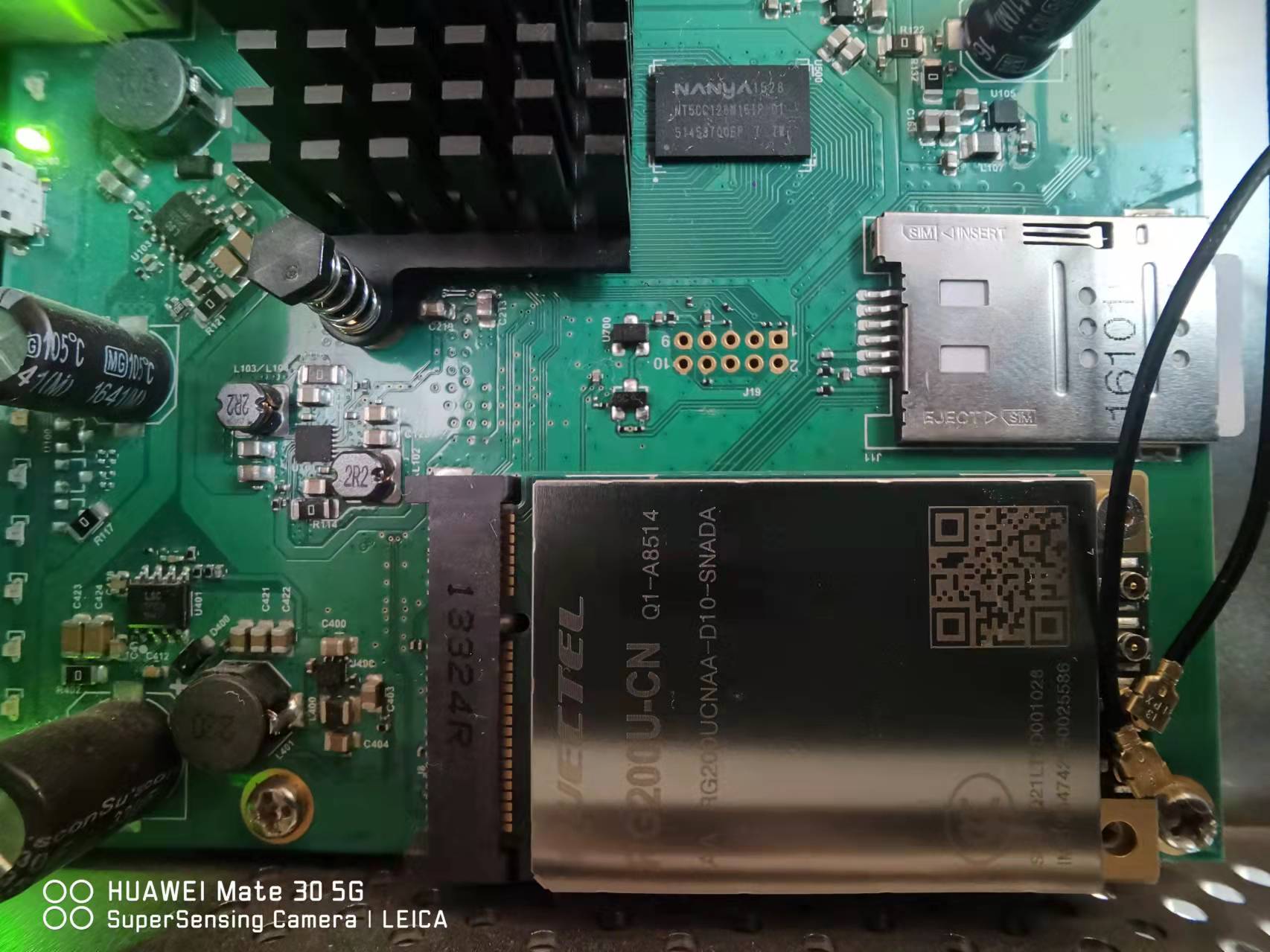
 This is like we have 3 answers from Quectel and we should re-connect to use differ speed per technology.