KVM problem routing

We are implementing a project of a network of tunnels with OVPN link between different corporate in order to build a network ring between 3 remote sites and route each different network segments.

To develop this project we decided to mount on a existing router from another project and virtualizing a router on each with KVM .

The Virtual routers are connected each other with Open Vpn and on it we have an EOIP Tunnel.

Until that point everything works correctly, we have no visibility problems between the ends from each router can route different virtual network segments between the sites.

But on the LAN in sites we have presented the following problems:

At one point from some network segments, lost visibility against the Virtual Router but this is something that occurs randomly.

At the moment the only solution we found to recover the visibility is to add a route which force the return of network packets where we lost visibility but on the Real Router, since from the Virtual router this routing already exists.

Ej
If from the Red 172.16.95.0/24 want to go to that GW would be the ip 172.27.3.203 which is in the virtual router and do not reach

I have to add a route in the REAL ROUTER read:
GW 172.27.3.253 DST 172.16.95.0/24

And I have the same return as the Virtual Router which reads:
GW 172.27.3.253 DST 172.16.95.0/24

The most curious that from the Virtual Router if I get to these sections without having to add the path in the Virtual Router.

I do not see much logic to this whole issue and that all he shares with the router Router Real Virtual Interface Bridge is one which binds an interface REAL ETHER-8 with a Virtual-Interface Generation in the Virtual Router.

What can be the reason for the network drops my router virtual visibility?
Why they see me and I leave them no?
You must add at the table in the Router Real to keep the network visibility, taking into account that only I have a bridge to link a real interface with Virtual?

Another query:

Can I do an VRRP Interface between Virtual KVM and another Virtual KVM router?

Regards,

Nicolas Fillon.

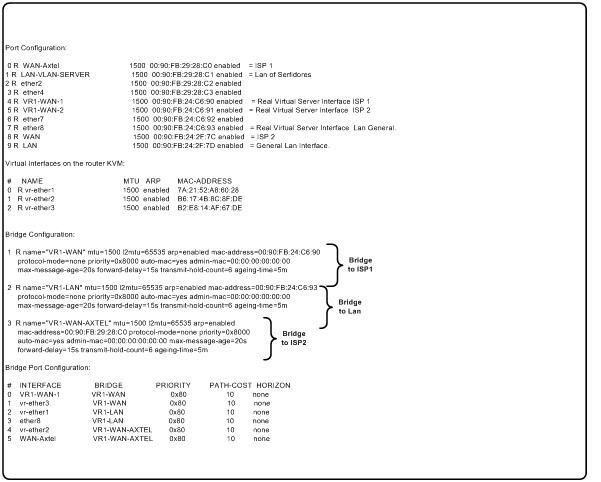
The following is the actual configuration, explained up there.
inter.jpg

Problem detected with KVM virtualization on Mikrotik:

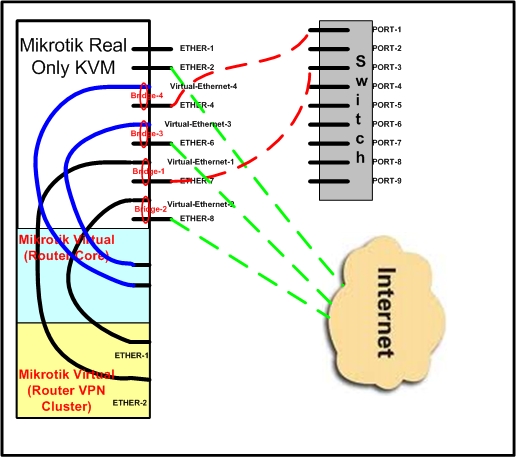
Today we have a structure which is plotted below:

see file esquema-1.jpg

As shown in the diagram we have a main router which is called Mikrotik Real (Router Core) where we have a routing table where we give visibility to the entire network that is behind the switch, since this Mikrotik Real (Core Router) concentrates to more than 190 VPN and routes its traffic to different segments.
This router has a very important firewall with very specific configurations.

We then create a router with kvm called Virtual Router (VPN Router Cluster), this router is used to build a ring with 3 sites and has a routing table which gives me visibility to all networks that are behind the switch, similar scheme to the Real Mikrotik (Router Core).

The problem is that some routes that I have added in the router Mikrotik Virtual (VPN Router Cluster) do not work if I add the same in the Mikrotik Real (Core Router).

The same thing happens with the Mikrotik firewall Real (Core Router) since this firewall filters traffic that comes to or goes to Mikrotik Virtual (VPN Router Cluster), you can only solve by adding exceptions in the firewall applied to the Virtual interface within a Mikrotik bridge on the Real (Core Router).

This might happen because I have this Bridge and that is why the traffic sent and received by Mikrotik Virtual reads the routing table and passes the firewall NAT Mikrotik Real (Core Router).

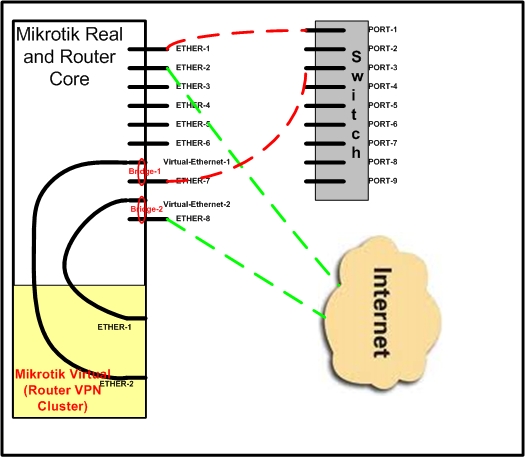
Another alternative that I am analizing is to pass the Core Router to a virtual thus the Real Mikrotik I have no routing table at a firewall or nat.

But I must be sure that with this scheme, the two machines are 100% independent of each other.

see file esquema-2

Here you have the actually conifguration:

On Router Real:
/interface bridge print
1 R name=“VR1-WAN” mtu=1500 l2mtu=65535 arp=enabled mac-address=00:90:FB:24:C6:90
protocol-mode=none priority=0x8000 auto-mac=yes admin-mac=00:00:00:00:00:00
max-message-age=20s forward-delay=15s transmit-hold-count=6 ageing-time=5m

2 R name=“VR1-LAN” mtu=1500 l2mtu=65535 arp=enabled mac-address=00:90:FB:24:C6:93
protocol-mode=none priority=0x8000 auto-mac=yes admin-mac=00:00:00:00:00:00
max-message-age=20s forward-delay=15s transmit-hold-count=6 ageing-time=5m

3 R name=“VR1-WAN-AXTEL” mtu=1500 l2mtu=65535 arp=enabled
mac-address=00:90:FB:29:28:C0 protocol-mode=none priority=0x8000 auto-mac=yes
admin-mac=00:00:00:00:00:00 max-message-age=20s forward-delay=15s
transmit-hold-count=6 ageing-time=5m

Flags: X - disabled, I - inactive, D - dynamic

INTERFACE BRIDGE PRIORITY PATH-COST HORIZON

0 VR1-WAN-1 VR1-WAN 0x80 10 none
1 vr-ether3 VR1-WAN 0x80 10 none
2 vr-ether1 VR1-LAN 0x80 10 none
3 ether8 VR1-LAN 0x80 10 none
4 vr-ether2 VR1-WAN-AXTEL 0x80 10 none
5 WAN-Axtel VR1-WAN-AXTEL 0x80 10 none

On the KVM Virtual Router:
/interface ethernet
0 R ether1 1500 02:20:32:9E:3A:97 enabled
1 R ether2 1500 02:4B:65:8C:11:23 enabled
2 R ether3 1500 02:06:35:04:68:01 enabled
esquema-2.jpg
esquema-1.jpg