Hi mates, honestly I don’t understand why I have to loose so much time to create a VPN for Windows, the videaos in youtube shopw it’s so easy to do, most of them using the same sequence of instructions, create a new pool, then a secret on PPP, a profile, and finally assign it to the L2TP server, why I’m receiving such errors?

I’ve tried to work on IPsec, add there a proposal, nothing to do.
I’ve also tried IEK way, did all it needs as in youtube, and I got this:

Honestly I prefer to fix L2TP as it’s more simple and faster to implement, can you please tell me how? Where are this proposals to be configured?
Is this attempting to connect from WIndows (10 or 11)?
Can you try connecting with another device (running Android, Ios, MacOs or Linux)?
There are quite a few possible causes for that phase 1 error, on both sides, i.e. it could be that you have your Mikrotik configured correctly but you need to change a few settings in Windows, or viceversa, the issue could be on the Mikrotik side.
You wont be able.
Microsoft treats ipsec insecure and patches it.
Use separate software vpn client.
I would suggest setup wireguard.
Thank you for your kind answers,
unfortunately the mikrotik router I’m accessing is an hap lite and doens’t support will version OS7, so I don’t have wireguard. I know it’s powerful and simple, sorry.
I don’t understand why in youtube there are tons of videos where peope can connect easy wint Win10 and L2TP and I have to loose so many hours failing
Ok using another L2TP client, which one? I have android, I’ve searched on google play and can’t find one with L2TP in the descriptions, I’ve google for a windows client but can’t find.. only for Linux.
PLease help me, thank you
I’ve found on Android how to connect to VPN, with L2TP RSA I have the same log, with L2TP PSK I have no log at all
Does your firewall use default rules or is it configured differently?
In the L2tp ipsec configuration, you must first check the ``Input’’ chain to see if the necessary 500,1701,4500 ports are open. Then we look at Vpn-pool, profiles, secrets, proposals and the rest. If you have a wrong firewall configuration, it will also affect the connection performance and the rest.
It might look like this-

I’ve also tried this guide for PPTP and it also doesn’t work, amazing.
https://mikrotiklab.ru/nastrojka/artga-pptp-servera.html
I have connection on log, but it goes in timeout on autentications (Windows side).
Anyway this guide has nothong about username and password, I’ve created a secret and associated to profile but nothing changes.
Amazing
Thank you for your kind help, now I check your photos, tcp or udp ports? Looks they have to be tcp.. but not really sure. Anyway I opened the TCP ones and same result.
Same with UDP
You haven’t answered the question about firewall configuration 
Open Terminal and execute this command? /export hide-sensitive file=myconfig
From the beginning you mentioned L2tp connection, but now you are talking about PPTP connection. What is really needed?
From a security point of view, I would recommend using L2tp connection as it is more secure than PPTP.
My attached image shows part of the l2tp ipsec setup. It’s all working, there shouldn’t be any problems unless the firewall section is a big mess.
UDP ports are opened for 500,4500,1701!
I’ve tried to copy your config but no success, anyway you didn’t specify whay you are using on Windows, L2TP? How you connect L2TP server with IP sec parameters? When you configure L2PT server it automatically create a peer l2tp-in-server under IP sec and it seams to be enough to work, I don’t understand how you mix the things.
Fo any of all tries I gave I haven’t received a different log that I posted, no work for IEK, L2TP and PPTP, crazy
if you understand the Russian language.. This link could also help you - https://www.youtube.com/watch?v=6YQZHitv9hE
Of course, I can explain in more detail with pictures point by point, but it will take a lot of time.
I just need a tunnel, for me it’s enought the easiset way, PPTP, doesn’t matter if it’s not secure.
I’ve created a PPTP client on another mikrotik, the connection is established but after this nothing happens, no autenticatons, no IP addresses gave, I torch the connection and there is nothing. On Client I have inizializing and connecting…
Why it’s so f* complicated? there are a bouch of very easy paramenters to configure and no results at all.
Why complicated? I am not a developer of mikrotik routers
If such an option does not work, then you should try to configure L2tp. The truth is not mega complicated, because we use the settings shown in my picture as a basic example. There is no copied option - how to turn on the L2tp server, but putting a tick and choosing the required vpn section is really not difficult
If you cannot create an L2tp tunnel, you can try an even simpler option - use WireGuard. It is also safe, good speed.
https://help.mikrotik.com/docs/display/ROS/WireGuard
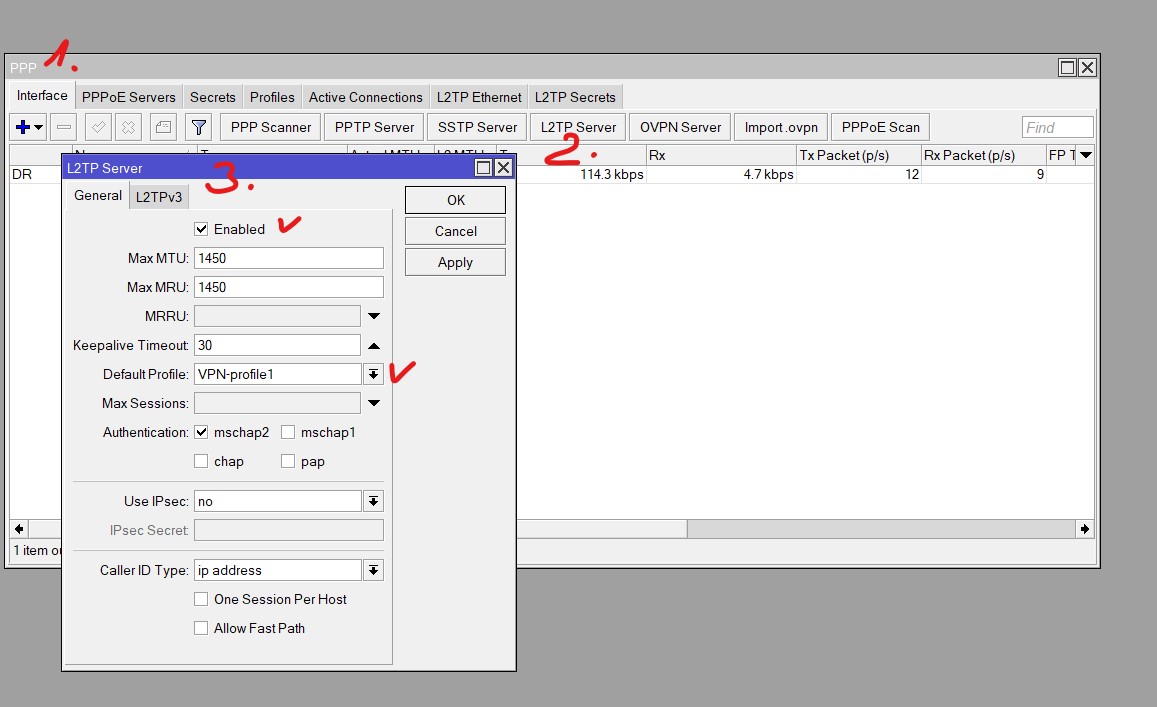
As I told this router is on version OS6, no wireguard. God bless my soul why I can’t deal with a decent OS7 and use wireguard!!
I’ve tried with another OS6, the most simple PPTP with another mikrotik as client, nothing to do, it’s just connecting and there isn’t going the autentication I’ve read the official guide, there is nothing complicated here! But not working.
I’ve also created the filter forward for the tcp 1723 (not only input), but this doesn’t help
sorry i forgot you have Ros6.xx 
If it’s not a big secret, do you use default firewall rules or is there another configuration?
I’ve placed an extra mikrotik OS7 on the LAN, then I desnatted the Wireguard port to that router, I can connect to it, but I have no gateway! An also I can’t ping oth OS7 router, why? What a day I’m having..
IN the client I have to add these lines:
Address =192.168.97.2/24
DNS =8.8.8.8
[Peer]
PublicKey =laEM…
AllowedIPs =0.0.0.0/0
Endpoint = 146.x.x.x:13231
persistentKeepalive = 10
why no way to add here gateway? Why can’t ping 192.168.97.1? the router has this address and is assigned to wireguard interface
How it’s possible that I connect to that router and I can’t ping its IP? this has really no sense. On PC I have correct subnet /24, but 0.0.0.0 as gateway, why?
All blocking filters on firewall on router OS7 are disabled, the wireguard interface is declared LAN, I also created a masquerade with incoming addresses 192.168.97.0/24.. if can be useful.. but here I have no traffic going in any direction! I have wireshark on pc and torch on mikrotik..
that’s really crazy, I’ve tried 4 different VPN types for all day and no one of them works, or half work only
And now you can’t understand why you don’t ping, etc.? It is impossible to answer this question because nor the firewall configuration is visible, which I have already asked several times. It ends up being a strange mess.
Without seeing the firewall config, it is impossible to say anything more precisely. Perhaps you have an incorrect entry in the input or Forward section. To be able to ping your router, you must first have an icmp rule and correctly defined other input and forward rules
Windows side vpn configuration: https://www3.uwsp.edu/infotech/Pages/Tutorials/VPN/Windows-10-VPN-Setup.aspx
the problem was the destNAT on the first router, should be UDP for Wireguard, but nevertheless Wireguard app on windows told me “connected!”, wtf.. why connected if it isn’t at all?
Of course if it was displayed correctly I was guessing myself that..
Anyway I succeded, Wireguard works definitely better, even if the app has some bugs and sometimes you need to reload the service, but its has the big advantage you decide whish subnet you will access, so if you dont use 0.0.0.0/0 you can keep using your gateway for all the rest! cool.
This is a big lesson for me, I’ll never use more PPTP, L2TP and IKE, I won’t more loose a min on this sh**
Thanks to all helped me!