Hi Folk,
Excuse the newbie-ish question please. I have searched the forums and I just can’t seem to find the right example or prior article for what I am trying to configure.
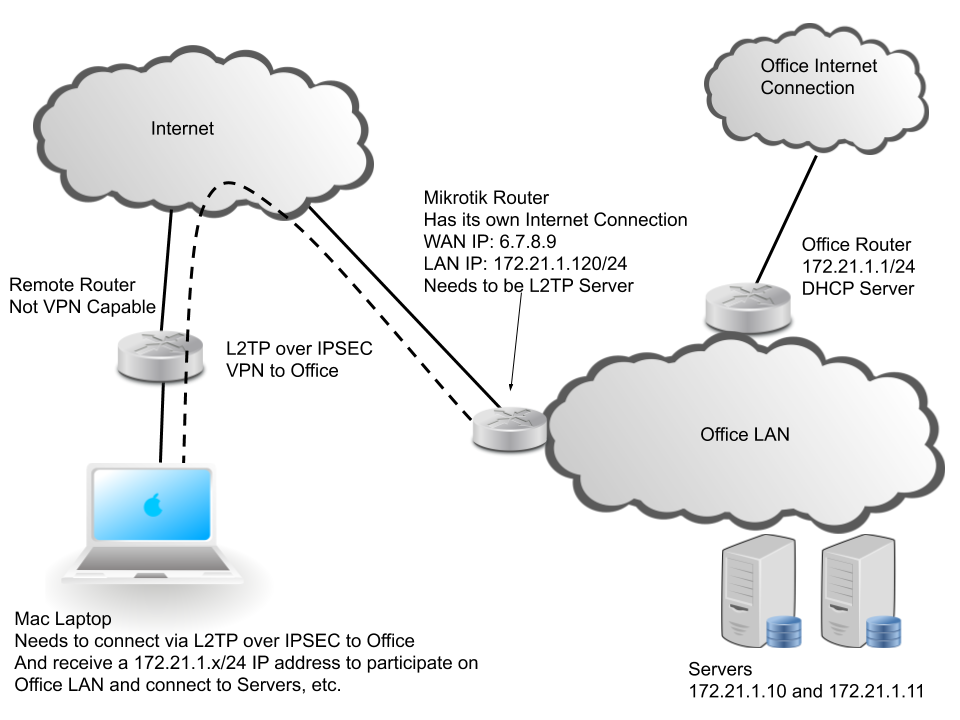
I have installed a Mikrotik router on our office network. It is NOT the main router or DHCP server for office, there is another router that has that. The Mikrotik has its own internet connection which I have been able to setup properly, and it has a connection and IP address from the LAN. I want to setup this Mikrtik to bp a “VPN Server” so that I can connect to the office from anywhere (mostly from home) using my MacBook pro and the built in Apple VPN Client (L2TP over IPSEC). I need to be able to access the other devices at the office from my MacBook so I would like my MacBook’s VPN connection to receive an IP in the same 172.21.1.0/24 subnet as the office. If it can get it from the office DHCP server that would be great, but it is not a requirement, I can use a static IP from the office subnet.
I do not need the MacBook to access the internet via the “office internet connection”. It is fine to access the internet via its own connection. The sole purpose here is for the MacBook to interact with other devices on the LAN as if it was at the office.
I’m not great at diagrams, but I’ve made a crude diagram with what I am trying to accomplish. I need some assistance with the VPN/L2TP (and any other) setup on the Mikrotik.
Thanks in advance.