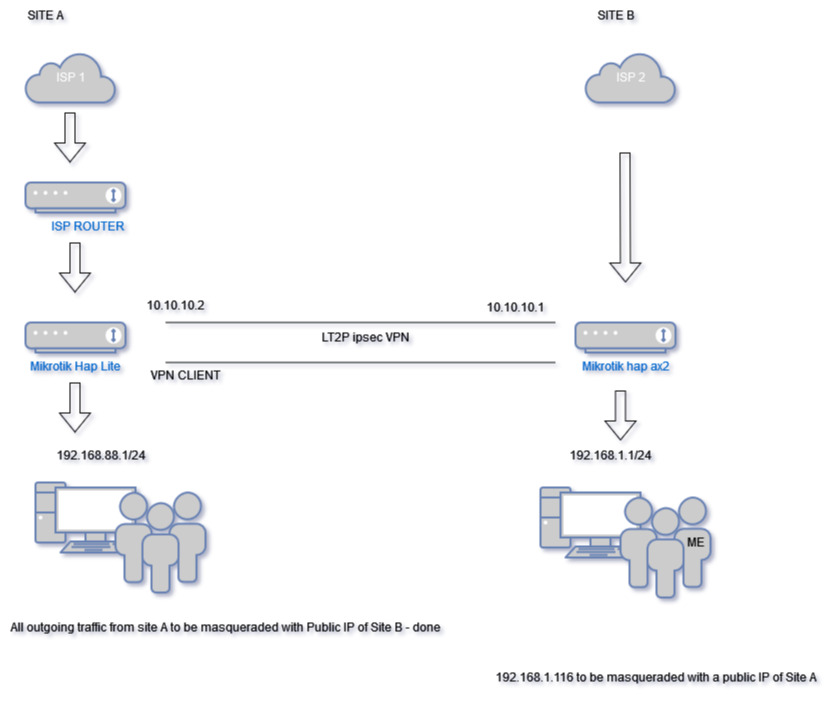
I have a question regarding an L2TP site-to-site VPN.
Site A:
Mikrotik hap lite
Private IP: 192.168.88.1
Site B:
Mikrotik hap ax2
Private IP: 192.168.1.1
These two routers are in different countries. I have set up an L2TP site-to-site VPN, and any device connected to the router at Site A that tries to access the internet is masqueraded with the public IP of Site B. This part is working fine.
However, I am now trying to achieve the following:
I want only one specific IP address at Site B (192.168.1.116) to be masqueraded with the public IP of Site A.
Could someone advise on the best way to achieve this?
you need to remove add default route from the VPN client and create a new routing table where only the traffic coming from the necessary IP is marked on a new routing table
Thank you for your reply. The VPN client is on Site A, and I have all the routing in place so all devices on both sites can ping each other. Now it’s just a matter of redirecting all traffic from 192.168.1.116 on Site B through the VPN. I thought it would be as simple as adding a NAT rule with srcnat source address 192.168.1.116, out interface l2tp, and action masquerade, but it does not seem to be working.
I also tried to create new routing tables and rules on Site B, but that does not seem to be working for me either. I might be doing it wrong. Any instructions on how this should be set up to work would be much appreciated.
I am wondering if that is the problem. Essentially, Site A is supposed to push all traffic through the VPN interface except for the IP 192.168.1.116, as I want this to be masqueraded with Site A’s public IP.
Don’t mix up routes and rules. There are routes that say “packets towards destination x.x.x.x/X shold be sent via gateway a.a.a.a”, there are routing tables which are collections of routes, and there are routing rules and firewall rules. Routes themselves are only chosen according to destination addresses, but they are chosen among those in the same table, and the choice of the table is made using routing rules and/or mangle (part of firewall) rules. The route rules can match also on (in-)interface and src-address; the firewall rules (including mangle ones) can match also on protocols, ports, and other criteria as well.
Unless a particular routing table is assigned using routing rules or firewall rules, the default one called main is used. So if the bulk of your traffic from Site A should go via Site B, the default route in table main (dst-address=0.0.0.0/0) shall have the L2TP interface as a gateway; in order that L2TP worked, you need a route to the /32 address of the router at site B also in table main, with gateway set to the gateway IP provided by your ISP at site A. A route is placed into table main if you do not specify any routing table name when adding it.
For the exceptional source address that should get to internet via the local uplink, you need a separate routing table, with just a single default route via the ISP’s gateway, let’s name it “regional”, so when adding that route, set the routing table name to regional. But to be able to do that, you have to add the routing table with this name first and check the FIB checkmark while adding it 'in RouterOS 7, I hope you use it on both devices). And the last thing is to add a routing rule that says src-address=s.s.s.s/32 interface=(your LAN interface name) acton=lookup-only-in-table table=regional.
A masquerade (or src-nat if the address is static) rule making sure that whatever leaves through your WAN is necessary at both devices of course.
Hi, thank you for the detailed explanation. It really helped. I am located at Site B, while Site A is in another country. Unfortunately, I only have a hap lite router at Site A, and during the upgrade, only RouterOS 6 was available as “stable.” I googled it and it seems to be due to insufficient resources in the hap lite, so I was not sure if upgrading to RouterOS 7 is a good idea. Is there any way to set this up in RouterOS 6?
Don’t worry, there is, it’s just that the way of handling routing tables and the effect of mangle rules assigning routing marks and routing rules have changed a bit on the way between 6.x and current 7.x versions. On 6.x, you need not (and cannot) explicitly define a routing table - instead, whenever you use a new name of a table, it gets created automatically, so unnoticed typos can drive you mad. And if you use both routing rules and mangle rules to choose a routing table (which is not necessary in your case at the moment), configurations from 6.x have to be modified in order to work in 7.6 and above, as the priority of the two methods is now reversed as compared to the previous state.
Now back to the topic, to achieve your goal (which I have initially misunderstood), the routing needs to be augmented at both routers - on router B, you have to add a routing table (with a single default route) and a routing rule to make traffic from 192.168.1.116 go to the L2TP tunnel, and on router B, you need the same triplet to make traffic from 192.168.1.116 use the gateway on the ISP uplink.
Using mangle rules and connection marking, you could make any connection that has been initiated by a client on Site B and arrived to Site A via the tunnel, i. e. not only those coming from 192.168.1.116, use the WAN of router A to get to the internet, but given that you can only access Site A remotely, I’d suggest to keep it really simple there, to minimize the risk of locking yourself out.
Thank you for your response, and apologies if my explanation is not the best. I attached a little diagram of my network as I believe it might help to understand what I am trying to achieve.
I just tried to log into the router at Site A, and for some reason, I can’t do it. I believe I messed up some configuration.
I can ping both routers and everything on the LAN. However, I can’t log into the router at Site A.
Since the L2TP VPN is active, I am trying to access it using the private IP 192.168.88.1 via Winbox, SSH, and Telnet, but nothing works.
In IP/services, SSH, Telnet, and Winbox are definitely enabled. Access via HTTPS or HTTP does not work either.
Trying to access it with a public IP is not an option since I have two routers there, so the Mikrotik is double-NATed.
I think I am missing something in the config, but I am not sure what. It’s a simple setup with L2TP with IPsec VPN. Proxy-ARP is enabled on the bridge on both routers. Routing to both networks is in place. Initially, I could ping only the routers but nothing on the LAN, and I managed to resolve this with RAW rules.
Config of Site B below:
/ip firewall raw (there are the same raw rules at site A)
add action=notrack chain=prerouting comment="SITE-2-SITE VPN" \
dst-address=192.168.88.0/24 src-address=192.168.1.0/24
add action=notrack chain=prerouting comment="SITE-2-SITE VPN" \
dst-address=192.168.1.0/24 src-address=192.168.88.0/24

/routing table
add disabled=no fib name=VPN-TEST-TABLE

/ip route
add comment=VPN disabled=no distance=1 dst-address=192.168.88.0/24 gateway=\
    10.10.10.2 routing-table=main scope=30 suppress-hw-offload=no target-scope=\
    10
add comment=TEST disabled=no distance=1 dst-address=0.0.0.0/0 gateway=\
    <l2tp-name-1> routing-table=VPN-TEST-TABLE scope=30 suppress-hw-offload=\
    no target-scope=10

/routing rule
add action=lookup-only-in-table disabled=no src-address=192.168.1.116/32 \
    table=VPN-TEST-TABLE
As far as I remember my route at Site A is dst-address=0.0.0.0/0 gateway=
action=notrack in raw affects how the packets are handled in further layers of the firewall including filter, so it may have helped one thing but broken another one. After any change of a firewall of a device you are managing remotely, always try to establish a new management connection before closing the existing one (but it may not be sufficient, so safe mode and even scheduled scripts reverting the changes are useful too). But these are useless hints related to future, now you need to gain access to the hAP lite.
What is the own address of the device from which you are trying to connect to 192.168.88.1?
If it is the 192.168.1.116, disable the routing rule for 192.168.1.116 and try again.
Does the L2TP server assign any IP address to the L2TP client?
Also, can we switch to a more interactive channel? If so and you don’t want to publish your contact information in plaintext, use the approach and data from this post.
Why use LT2P when wireguard is so much easier…
Its all about the requirements… they could be clearer.
The requirement seems basic enough but they are not stated directly enough in terms of users…
You wish to have the entire subnet of ISP1 go out the internet of ISP2 for internet via the VPN tunnel correct??
You wish to have a single user behind AX2 router go out the internet of ISP1 via the VPN tunnel. correct??
You do not state what happens to this traffic when the remote site is not available.
a. when AX2 connection to the internet has failed OR the tunnel has failed what happens to 192.168.88.0/24 users?? Are they allowed local WAN access??
b when Lite connection to the internet fails OR the tunnel has failed, what happens to 192.168.1.116? Is the user allowed local WAN access??
So this process takes several steps.
1 - Force all subnet traffic out VPN tunnel ( using routing rules )
2 - Since both entities are MT devices, there is no need to masquerade tunnel traffic, as allowed IPs can ensure traffic flows through the tunnel.
3 - Ensure both MT entities have a basic firewall rule add chain=forward action=accept in-interface-list=LAN out-interface-list=WAN
4 - Ensure both MT entities have a basic sourcenat rule add chain=srcnat action=masquerade out-interface-list=WAN **********
5 - Ensure both wireguard interfaces are part of LAN list
6 - Ensure both MT entities allow DNS in input chain for LAN interface
********* This provides the critical step you desire of having all traffic leaving the local WAN, be given the IP address of the Router itself!!
+++++++++++++++++++++++++++++++++++++++++++++++++++++++++++++
To allow return traffic and cross-check with allowed IPs.
7 - Each router needs a main table route for the non-local subnet with applicable gateway=wireguardinterface ( or in ISP1 case, route for single user )
8 - Each router needs allowed IP to include non-local subnet ( or in ISP1 case limited to single user )
This is not difficult. No mangling required!
Example of routing rules required:
Isp1 /routing table add fib name=to-ISP2
/ip route
add dst-adddress=0.0.0.0/0 gateway=ISP1-gateway-IP routing-table=main
add dst-address=0.0.0.0.0 gateway=wireguard1 routing-table=to-ISP2
add dst-address=192.168.1.116 gateway=wireguard1 routing-table=main { router knows return traffic from WAN should go back into tunnel }
/routing rules
add main-prefix=0 action=lookup-only-in-table table=main
add src-address=192.168.88.0/24 action=lookup table=to-ISP2
note: change action to lookup-only-in-table if ISP1 users are not allowed to use local WAN if tunnel or ISP2 is not available.
Isp2 /routing table add fib name=to-ISP1
/ip route
add dst-adddress=0.0.0.0/0 gateway=ISP2-gateway-IP routing-table=main
add dst-address=0.0.0.0.0 gateway=wireguard2 routing-table=to-ISP1
add dst-address=192.168.88.0/24 gateway=wireguard2 routing-table=main { router knows return traffic from WAN should go back into tunnel }
/routing rules
add main-prefix=0 action=lookup-only-in-table table=main
add src-address=192.168.1.116 action=lookup table=to-ISP1
note: change action to lookup-only-in-table if ISP2 user is not allowed to use local WAN if tunnel or ISP1 is not available.
…except that the actual issue is not how to set up the tunnel but how to make a group of clients at one end access internet through the WAN of the other end and vice versa. So instead of the already working L2TP tunnel you would spend the additional effort to replace it by a Wireguard one and find yourself back where you started. Are you serious?
(leaving aside that the most urgent issue right now is how to log in to the remote router)
The OP can take from the example what he/she they wishes.
If you are stating that the methods shown above DO NOT DEMONSTRATE how a group of clients can use the internet of another router via a VPN tunnel, then I shall remove the post;
If you are stating that the methods shown above are applicable for Wireguard,but not L2TP or whatever abomination is being used, then my post is simply pointing out that there are alternative ways to accomplish what the OP desires.
The basic requirement does not state L2TP only etc, the tunnel is just a vehicle for each router to be connected. The tunnel type could be immaterial or it could be very germane - company requires L2TP, or type of internet connections favour L2TP as the best solution. I don’t predispose what the optimal method is, just stating there are other ways. The requirement is to be able to use the internet of the other is the one that concerns me primarily.
If the LT2P method of achieving the same is EASIER, to config, EASIER, to understand, etc etc… then I am all ears, and waiting for the clear and succinct solution.
As in most threads.
A complete config export for both routers would have provided all the opportunity to guide the OP more smoothly.
Expertise without facts is wasted.
/export file=anynameyouwish (minus router serial number, any public WANIP information, keys etc. )
Thank you for providing an alternative solution. In MikroTik, there are many ways to achieve the same thing. I am trying not only to get this vpn working but also to understand networking a bit more, which is why I’d rather troubleshoot L2TP than give up and go for an alternative method. I appreciate the response with the explanation.
Regarding creating new routing tables and rules, I have the limitation of RouterOS 6 at Site A.